1. መግቢያ እና በላይview
This manual provides detailed instructions for the proper setup, operation, and maintenance of your Techbee TE02 Indoor Digital Electrical Outlet Timer Plug. This device is designed to automate the power supply to your electrical appliances, offering convenience, energy savings, and enhanced home security through its programmable features.
The Techbee TE02 timer plug features a large, easy-to-read display and intuitive controls, allowing for precise scheduling of up to 20 ON/OFF programs per day. It also includes advanced functions such as a countdown timer and a random ON/OFF mode for vacation security. Its built-in battery ensures that your programmed settings are retained even during power outagኢ.
2. የምርት ባህሪዎች
- Extensive Programming: Supports up to 20 weekly ON-OFF timing programs for flexible scheduling.
- የመቁጠር ተግባር Allows for precise delay ON/OFF timing, from 1 second up to 99 hours, 59 minutes, and 59 seconds.
- Anti-theft Random Mode: Activates lights or other appliances at varying times to simulate occupancy, deterring potential intruders.
- ለተጠቃሚ ምቹ ማሳያ፡- Features a large screen for clear visibility of digits and numbers.
- ኃይል ኦtagሠ ጥበቃ፡ Equipped with a built-in NiMH 1.2V battery to retain programmed settings for over 30 days during power interruptions.
- Versatile Time Format: Interchangeable 12-hour (AM/PM) and 24-hour formats.
- የመሬት ላይ መውጫ; Designed with a 3-prong plug and socket for safe use with a wide range of appliances.
- ጸጥ ያለ አሠራር; Operates completely silently, making it suitable for home use.
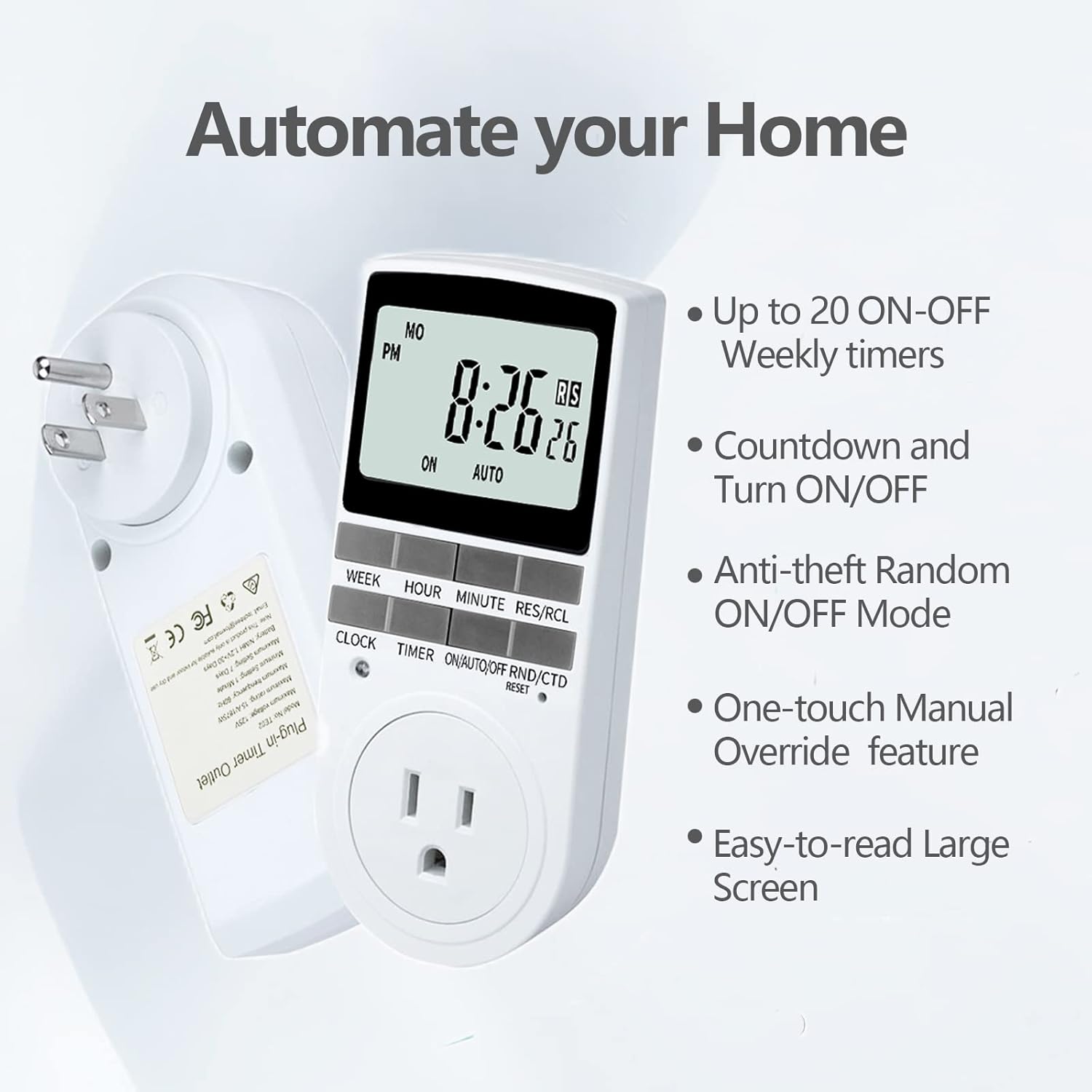
Figure 2.1: Key features of the Techbee TE02 Digital Timer Plug.
3. ዝርዝሮች
| ዝርዝር መግለጫ | ዋጋ |
|---|---|
| የሞዴል ቁጥር | TE02 |
| ከፍተኛው ጥራዝtage | 125 ቪ |
| ከፍተኛ ደረጃ አሰጣጥ | 15 ሀ / 1875 ዋ |
| ከፍተኛ ድግግሞሽ | 60Hz |
| Minimum Setting Interval | 1 Minute (1 second for countdown) |
| Maximum Setting Duration | 7 ቀናት |
| የባትሪ ዓይነት | NiMH 1.2V (retains settings >30 days) |
| የቅንብሮች ብዛት | 20 ON-OFF programs |

Figure 3.1: Technical data and features as displayed on the product packaging.
4. ማዋቀር
Before initial use, it is recommended to plug the timer into a live outlet for at least 30 minutes to charge the internal battery. This ensures that the timer retains its settings even if unplugged or during a power outage.
- Unpack the timer plug and included instruction manual.
- Locate a standard 125V grounded electrical outlet.
- Plug the Techbee TE02 timer directly into the wall outlet. The display should illuminate.
- የሚለውን ይጫኑ ዳግም አስጀምር button (usually a small recessed button) using a non-metallic pointed object (like a pen tip) to clear all previous settings and ensure proper function.
- Proceed to set the current time and day as described in the 'Operating Instructions' section.

Figure 4.1: The Techbee TE02 Digital Timer Plug ready for setup.
ቪዲዮ 4.1: አልቋልview of the Techbee TE02 timer plug, including unboxing and initial setup steps.
5. የአሠራር መመሪያዎች
5.1. የአሁኑን ሰዓት እና ቀን ማቀናበር
- የሚለውን ይጫኑ ሰዓት button. The display will show the current time.
- በመያዝ ላይ ሳለ ሰዓት አዝራር, ይጫኑ ሳምንት to set the current day (MO, TU, WE, TH, FR, SA, SU).
- በመያዝ ላይ ሳለ ሰዓት አዝራር, ይጫኑ ሰአት to set the current hour (12-hour or 24-hour format).
- በመያዝ ላይ ሳለ ሰዓት አዝራር, ይጫኑ ደቂቃ የአሁኑን ደቂቃ ለማዘጋጀት.
- ይልቀቁት ሰዓት ቅንብሮችን ለማስቀመጥ አዝራር።
5.2. Programming ON/OFF Times (Up to 20 Programs)
- የሚለውን ይጫኑ TIMER button to enter programming mode. The display will show "1 ON".
- ተጫን ሳምንት to select the day(s) for this program (e.g., MO, TU, WE, TH, FR, SA, SU, or various combinations).
- ተጫን ሰአት የሚፈለገውን ሰዓት ላይ ለማዘጋጀት።
- ተጫን ደቂቃ የተፈለገውን ON ደቂቃ ለማዘጋጀት.
- ተጫን TIMER እንደገና። ማሳያው "1 ጠፍቷል" ያሳያል.
- Repeat steps 2-4 to set the desired OFF time for this program.
- መጫኑን ይቀጥሉ TIMER to cycle through programs "2 ON", "2 OFF" up to "20 ON", "20 OFF", setting each as needed.
- ሁሉንም የሚፈለጉትን ፕሮግራሞች ካዘጋጁ በኋላ, ይጫኑ ሰዓት ከፕሮግራሚንግ ሁነታ ለመውጣት እና ወደ የአሁኑ የጊዜ ማሳያ ለመመለስ አዝራሩን ይጫኑ።

Figure 5.1: Programming the timer for daily routines.
5.3. የመቁጠር ተግባር
The countdown function allows the timer to turn ON or OFF after a specified duration.
- የሚለውን ይጫኑ ON/AUTO/OFF RND/CTD button repeatedly until "CTD" appears on the display.
- ተጫን ሰአት, ደቂቃ, እና RES/RCL (for seconds) to set the desired countdown duration.
- ተጫን TIMER ቆጠራውን ለመጀመር። ማሳያው የቀረውን ጊዜ ያሳያል።
- Once the countdown reaches zero, the connected appliance will either turn ON or OFF, depending on its initial state.

Figure 5.2: Setting a countdown timer to turn an appliance ON or OFF.
5.4. Random Function (Anti-theft Mode)
The random function helps deter intruders by turning connected lights or appliances ON and OFF at irregular intervals.
- የሚለውን ይጫኑ ON/AUTO/OFF RND/CTD button repeatedly until "RND" appears on the display.
- The timer will now randomly turn the connected appliance ON and OFF within a set time window (typically 6 PM to 6 AM, but the Techbee TE02 offers random from any time).
- ለማሰናከል፣ ይጫኑ ON/AUTO/OFF RND/CTD button again until "AUTO" or "ON"/"OFF" is displayed.

Figure 5.3: Utilizing the random function for home security.
5.5. በእጅ መሻር
You can manually switch the timer's output state without affecting the programmed settings.
- የሚለውን ይጫኑ ON/AUTO/OFF RND/CTD ሁነታዎችን ለማሽከርከር አዝራር፡- ON (always on), አውቶማቲክ (follows programs), ጠፍቷል (always off), አርኤንዲ (random), ሲቲዲ (countdown).
- ይምረጡ ON or ጠፍቷል for immediate control. The timer will remain in this state until manually changed or switched back to አውቶማቲክ.
6. ጥገና
- ማጽዳት፡ ከማጽዳቱ በፊት የሰዓት ቆጣሪውን ከኃይል ማሰራጫው ያላቅቁት. ውጫዊውን ለስላሳ እና ደረቅ ጨርቅ ይጥረጉ. ፈሳሽ ማጽጃዎችን ወይም ቆሻሻ ቁሳቁሶችን አይጠቀሙ.
- ማከማቻ፡ If storing the timer for an extended period, ensure the internal battery is charged by plugging it in for a few hours every few months. Store in a cool, dry place away from direct sunlight and extreme temperatures.
- ባትሪ፡ The internal NiMH battery is designed for long-term use and retains settings for over 30 days. It is not user-replaceable.
7. መላ መፈለግ
- Timer Display is Blank:
- Ensure the timer is securely plugged into a live electrical outlet.
- The internal battery might be fully discharged. Plug the timer in for at least 30 minutes to charge it.
- Programs Not Activating:
- የአሁኑ ሰዓት እና ቀን በትክክል መዋቀሩን ያረጋግጡ።
- Check that the timer is in አውቶማቲክ ሁነታ.
- Ensure the ON/OFF programs are set correctly and do not overlap in an unintended way.
- Confirm the connected appliance is functioning correctly and its power switch is in the ON position.
- Timer Not Responding to Buttons:
- አዝራሩን በመጫን ሙሉ ዳግም ማስጀመር ያከናውኑ ዳግም አስጀምር button with a pointed object. You will need to re-enter all settings after a reset.
- Appliance Does Not Turn ON/OFF with Countdown:
- ሰዓት ቆጣሪው መብራቱን ያረጋግጡ ሲቲዲ mode and the countdown duration is set.
- Verify the connected appliance is working and its power switch is ON.
8. ዋስትና እና ድጋፍ
For warranty information, technical support, or any inquiries regarding your Techbee TE02 Digital Timer Plug, please refer to the official documentation provided with your product or visit the official Techbee store.
ተጨማሪ የድጋፍ እና የምርት መረጃ በመጎብኘት ማግኘት ይችላሉ Techbee Store on Amazon.
A detailed PDF instruction manual is also available for download: የአጠቃቀም መመሪያዎች (ፒዲኤፍ).


