1. መግቢያ እና በላይview
This manual provides essential instructions for setting up, operating, and maintaining your Brinno TLC300 Time Lapse Camera. The TLC300 is designed for capturing time-lapse videos in various environments, including construction sites, outdoor projects, and general-purpose applications. It features Full HD 1080P resolution with HDR, a 118° field of view, and an intuitive user interface.

ምስል 1: የፊት እና ጎን view of the Brinno TLC300 Time Lapse Camera.
ቪዲዮ 1: አልቋልview of the Brinno TLC300 Time Lapse Camera's features and capabilities.
2. በሳጥኑ ውስጥ ያለው
Upon unboxing your Brinno TLC300, please ensure all the following items are present:
- Brinno Time Lapse Camera TLC300
- AA ባትሪዎች x 4
- የሌንስ ሽፋን
- ኤስዲ ካርድ
- ፈጣን መመሪያ መመሪያ
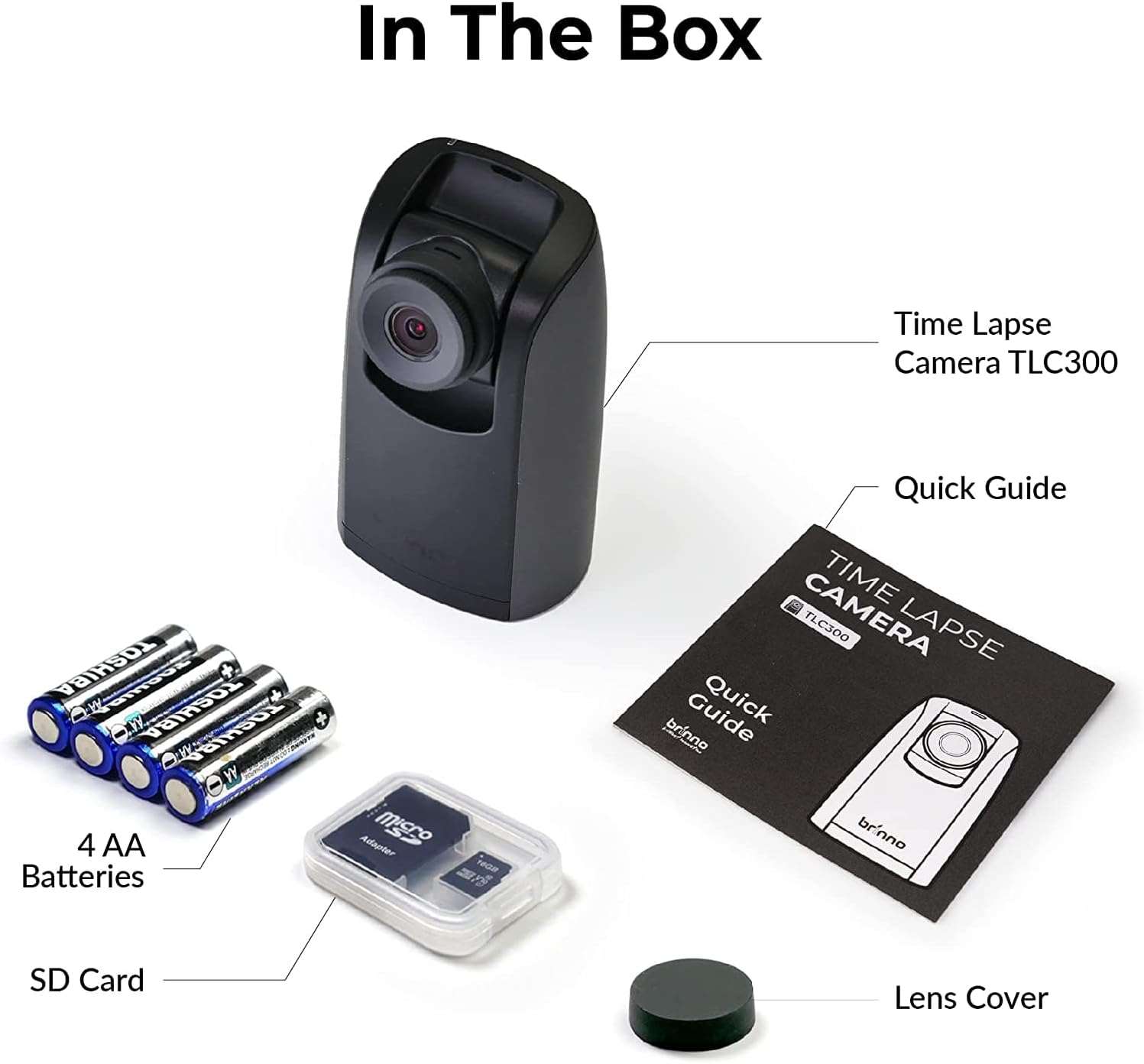
Figure 2: All items included in the Brinno TLC300 package.
3. ማዋቀር
3.1 የባትሪ እና የኤስዲ ካርድ ጭነት
- በካሜራው ስር የሚገኘውን የባትሪውን ክፍል ይክፈቱ።
- ትክክለኛውን ዋልታ (+/-) በማረጋገጥ 4 AA ባትሪዎችን ያስገቡ።
- Insert the provided Micro SD card into the SD card slot until it clicks into place. The camera supports up to 128GB.
- የባትሪውን ክፍል ደህንነቱ በተጠበቀ ሁኔታ ይዝጉ።

Figure 3: Proper installation of AA batteries into the camera.
3.2 የመጀመሪያ የኃይል-ማብሪያ እና መሰረታዊ ቅንብሮች
- ካሜራውን ለማብራት የኃይል ቁልፉን ተጭነው ይያዙ።
- The 1.44" IPS LCD screen will display the live view.
- Navigate the menu using the directional buttons and the OK button.
- Set the current date and time for accurate time-lapse recording.
- Select your preferred language from the multilingual user interface.

Figure 4: The camera's menu for adjusting settings.
4. ካሜራውን መስራት
4.1 የምዝገባ መለኪያዎችን ማዘጋጀት
The TLC300 offers straightforward operation. You primarily need to set the 'interval' and 'schedule' before starting a recording.
- ክፍተት፡ This defines how often the camera captures an image. Adjust this setting based on the duration of your project and the desired speed of the final time-lapse video.
- መርሐግብር፡ Use the schedule function to specify filming days and times. This ensures the camera only records during active periods, conserving battery life and storage.
- ጥራት፡ The camera records in Full HD 1080P. Ensure HDR is enabled for optimal image quality, especially for day-to-night transitions.

Figure 5: Visual comparison of HDR and Night Mode performance.
4.2 ቀረጻን መጀመር እና ማቆም
After configuring your settings, press the OK button to begin recording. The camera will automatically start capturing images according to your set interval and schedule. To stop recording, press the Power button again.
5. ጥገና
- ማጽዳት፡ የካሜራውን አካልና ሌንስ ለማጽዳት ለስላሳና ደረቅ ጨርቅ ይጠቀሙ። ሻካራ ቁሳቁሶችን ወይም ጠጣር ኬሚካሎችን ያስወግዱ።
- የባትሪ ህይወት፡ The TLC300 offers up to 100 days of battery life with a 5-minute capture interval using 4 AA batteries. Monitor battery levels regularly, especially for long-term projects.
- ማከማቻ፡ Periodically transfer your time-lapse videos from the SD card to a computer or external storage device to free up space and prevent data loss. The camera supports Micro SD cards up to 128GB.
- የሌንስ ሽፋን; Always use the provided lens cover when the camera is not in use to protect the lens from dust and scratches.
6. መላ መፈለግ
- ካሜራ አይበራም Ensure batteries are correctly inserted and fully charged. Try replacing with new batteries.
- ደካማ የምስል ጥራት; Check lens for smudges or dirt. Ensure HDR is enabled for challenging lighting conditions. Verify the lens cover is removed.
- Recording not starting: Confirm that the interval and schedule settings are correctly configured. Ensure the SD card has sufficient free space.
- የኤስዲ ካርድ ስህተት፡ Reformat the SD card using the camera's menu (this will erase all data). If the issue persists, try a different SD card.
7. ዝርዝሮች
| ባህሪ | ዝርዝር መግለጫ |
|---|---|
| የሞዴል ቁጥር | TLC300 እ.ኤ.አ. |
| መጠኖች | 2.05 x 2.52 x 4.21 ኢንች |
| የእቃው ክብደት | 4.9 አውንስ |
| የኃይል ምንጭ | 4 AA ባትሪዎች |
| የቪዲዮ ቀረጻ ጥራት | 1080p ሙሉ ጥራት |
| የፎቶ ዳሳሽ ቴክኖሎጂ | CMOS |
| ከፍተኛ የትኩረት ርዝመት | 15 ሚሊሜትር |
| ከፍተኛው Aperture | 2 ረ |
| የፍላሽ ማህደረ ትውስታ አይነት | ማይክሮ ኤስዲ (እስከ 128GB) |
| የቪዲዮ ቀረጻ ቅርጸት | MP4, MOV, AVI |
| የሚደገፍ የድምጽ ቅርጸት | MP3፣ AAC |
| የስክሪን መጠን | 1.44 ኢንች |
| የግንኙነት ቴክኖሎጂ | ብሉቱዝ |
8. ዋስትና እና ድጋፍ
Brinno products are designed for durability and performance. For any technical assistance, warranty claims, or product inquiries, please refer to the contact information provided in your Quick Guide Manual or visit the official Brinno support webጣቢያ. የግዢ ደረሰኝዎን ለዋስትና አገልግሎቶች የግዢ ማረጋገጫ አድርገው ያስቀምጡ።


