1. መግቢያ
Thank you for choosing the DELTACO Gaming PM80 Wireless Optical Gaming Mouse. This manual provides essential information for setting up, operating, and maintaining your new gaming mouse. Please read these instructions carefully before use to ensure optimal performance and longevity of your device.
2. የጥቅል ይዘቶች
- DELTACO Gaming PM80 Wireless Optical Gaming Mouse
- የዩኤስቢ ገመድ አልባ ተቀባይ
- የዩኤስቢ ባትሪ መሙያ ገመድ
- የተጠቃሚ መመሪያ
3. ምርት አብቅቷልview
The DELTACO Gaming PM80 is a high-performance wireless optical gaming mouse designed for precision and comfort. It features 7 programmable buttons, adjustable DPI up to 4800, and customizable illumination. The mouse is rechargeable, ensuring uninterrupted gaming sessions.
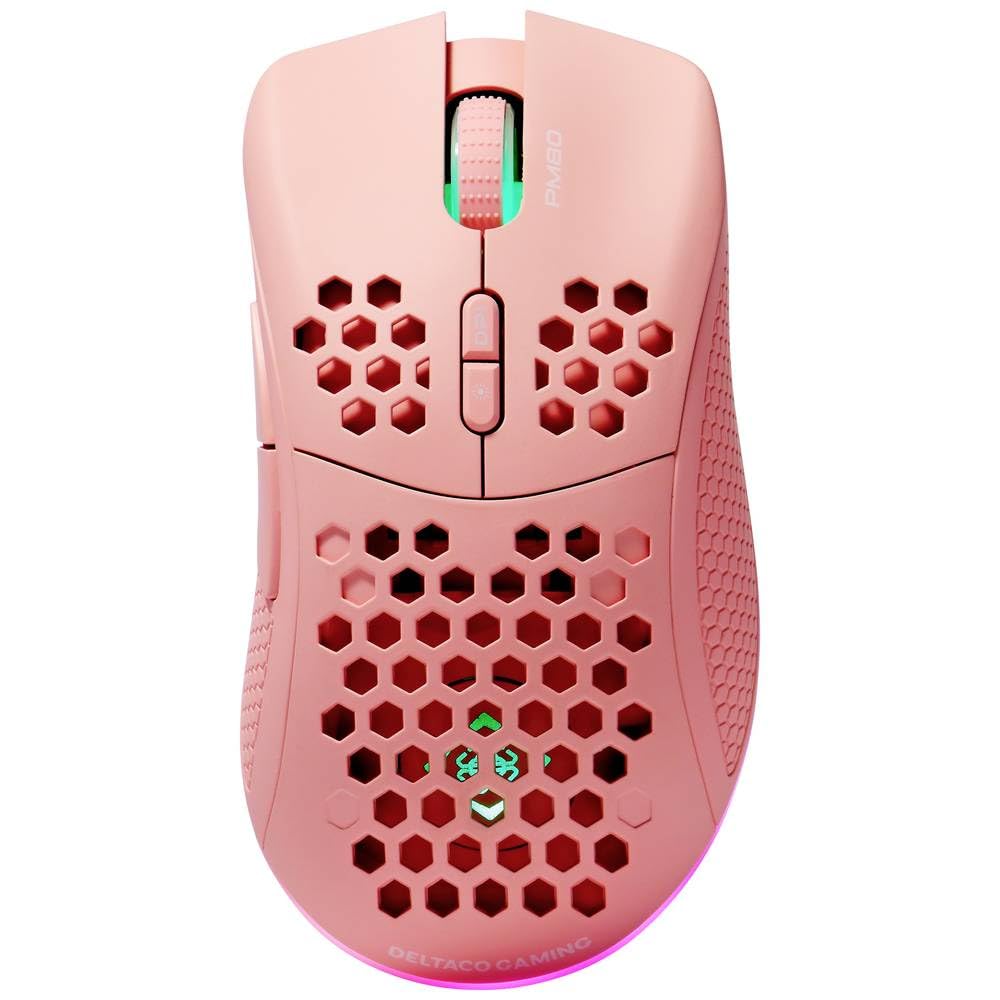
Image: DELTACO Gaming PM80 Wireless Optical Gaming Mouse. This image displays the mouse from a top-down perspective, highlighting its ergonomic design, the central scroll wheel, and the arrangement of its seven buttons.
የአዝራር ተግባራት፡-
- የግራ ጠቅታ አዝራር፡- መደበኛ የመጀመሪያ ደረጃ ጠቅታ ተግባር።
- በቀኝ ጠቅ ያድርጉ አዝራር; መደበኛ ሁለተኛ ደረጃ ጠቅታ ተግባር።
- የማሽከርከር ጎማ፡ Scrolls up/down, and acts as a middle click button.
- የዲፒአይ ዑደት አዝራር፡ Changes the mouse's sensitivity (DPI).
- አስተላልፍ አዝራር፡- ወደ ውስጥ ወደፊት ይሄዳል web አሳሾች ወይም file አሳሾች.
- የኋላ አዝራር፡- ወደ ውስጥ ወደ ኋላ ይመራል። web አሳሾች ወይም file አሳሾች.
- Illumination Mode Button: Cycles through different lighting effects or turns illumination on/off.
4. ማዋቀር
4.1. አይጤውን በመሙላት ላይ
- Connect the small end of the USB charging cable to the charging port on the front of the mouse.
- Connect the larger end of the USB charging cable to an available USB port on your computer or a USB wall adapter.
- The mouse's illumination will indicate charging status (e.g., breathing effect, specific color). A full charge typically takes 2-3 hours.
- Once fully charged, the illumination may change or turn off. Disconnect the charging cable.
4.2. የዩኤስቢ ገመድ አልባ መቀበያ ማገናኘት
- Locate the USB wireless receiver, usually stored in a compartment on the underside of the mouse.
- መቀበያውን ከማጠራቀሚያው ማስገቢያ ያስወግዱት።
- የዩኤስቢ ገመድ አልባ መቀበያ በኮምፒተርዎ ላይ ወዳለው የዩኤስቢ ወደብ ይሰኩት።
- ኮምፒዩተራችን አስፈላጊ የሆኑትን ሾፌሮች በራስ ሰር አግኝቶ መጫን አለበት። ይህ ጥቂት ጊዜ ሊወስድ ይችላል።
4.3. ማብራት / ማጥፋት
- የኃይል ማብሪያ / ማጥፊያውን በመዳፊት ታችኛው ክፍል ላይ ያግኙት።
- Slide the switch to the 'ON' position to power on the mouse. The illumination will light up.
- To conserve battery life, slide the switch to the 'OFF' position when the mouse is not in use for extended periods.
5. የአሠራር መመሪያዎች
5.1. መሰረታዊ አጠቃቀም
Once connected and powered on, the mouse is ready for use. Move the mouse on a flat surface to control the cursor on your screen. Use the left and right click buttons for primary and secondary actions, and the scroll wheel for navigation.
5.2. የዲፒአይ ማስተካከያ
The DPI (Dots Per Inch) setting determines the sensitivity of your mouse. The DELTACO Gaming PM80 offers multiple DPI levels up to 4800 DPI. To adjust the DPI:
- የሚለውን ይጫኑ የዲፒአይ ዑደት ዑደት (typically located behind the scroll wheel).
- Each press will cycle through the available DPI settings. The mouse's illumination may change color or flash to indicate the current DPI level.
- Select the DPI setting that best suits your preference for gaming or general use.
5.3. የመብራት ቁጥጥር
The DELTACO Gaming PM80 features customizable illumination. To change the lighting effects:
- የሚለውን ይጫኑ Illumination Mode Button (refer to Product Overview ለቦታ)።
- Each press will cycle through different lighting modes, such as static colors, breathing effects, or off.
6. ጥገና
6.1. ማጽዳት
- ከማጽዳትዎ በፊት አይጡ መብራቱን ያረጋግጡ።
- የመዳፊትን ገጽ ለማፅዳት ለስላሳ፣ ደረቅ፣ ከቆሸሸ ነፃ የሆነ ጨርቅ ይጠቀሙ።
- ለግትር ቆሻሻ፣ በትንሹ መampጨርቁን በውሃ ወይም መለስተኛ፣ የማይበላሽ ማጽጃ ያድርጉ። ከመጠን በላይ እርጥበትን ያስወግዱ።
- እነዚህ ኬሚካሎች የመዳፊትን ጫፍ ሊጎዱ ስለሚችሉ ኃይለኛ ኬሚካሎችን፣ መሟሟቶችን ወይም ጠለፋ ቁሳቁሶችን አይጠቀሙ።
- በጥቅልል ጎማ እና በአዝራር ክፍተቶች ዙሪያ ለማጽዳት የጥጥ ሱፍ ወይም የተጨመቀ አየር ይጠቀሙ።
6.2. ማከማቻ
When not in use for extended periods, store the mouse in a cool, dry place away from direct sunlight and extreme temperatures. Ensure the power switch is in the 'OFF' position to preserve battery life.
7. መላ መፈለግ
- አይጥ ምላሽ እየሰጠ አይደለም፡-
- አይጤው መብራቱን ያረጋግጡ።
- የዩኤስቢ ገመድ አልባ መቀበያው ደህንነቱ በተጠበቀ ሁኔታ ከሚሰራ የዩኤስቢ ወደብ ጋር መሰካቱን ያረጋግጡ።
- Verify the mouse battery is charged. Connect the charging cable and try again.
- መቀበያውን ወደ ሌላ የዩኤስቢ ወደብ ለመሰካት ይሞክሩ።
- ኮምፒተርዎን እንደገና ያስጀምሩ.
- የዘገየ ወይም የሚቆራረጥ ግንኙነት;
- Ensure the mouse is within close proximity to the USB receiver (ideally within 10 meters).
- ተቀባዩን ከሌሎች ገመድ አልባ መሳሪያዎች ወይም የጣልቃ ገብነት ምንጮች (ለምሳሌ የዋይፋይ ራውተሮች፣ ገመድ አልባ ስልኮች) አጠገብ ከማስቀመጥ ይቆጠቡ።
- አይጤው ሙሉ በሙሉ መሙላቱን ያረጋግጡ።
- የጠቋሚ እንቅስቃሴ የተሳሳተ ወይም የተሳሳተ ነው፡-
- በመዳፊት ስር ያለውን የኦፕቲካል ዳሳሽ ለስላሳ እና ደረቅ ጨርቅ ያጽዱ።
- አይጤውን ተስማሚ በሆነ ገጽ ላይ እየተጠቀሙ መሆንዎን ያረጋግጡ (ለምሳሌ የመዳፊት ፓድ)። በጣም አንጸባራቂ ወይም ግልጽ ንጣፎችን ያስወግዱ።
- ጠቋሚው በጣም ፈጣን ከሆነ የዲፒአይ ቅንብርን ወደ ዝቅተኛ ስሜታዊነት ያስተካክሉት።
- Illumination not working:
- አይጤው መብራቱን ያረጋግጡ።
- Press the Illumination Mode Button to cycle through modes, ensuring it's not set to 'off'.
- Check battery level; low battery might disable illumination.
8. ዝርዝሮች
| ባህሪ | ዝርዝር |
|---|---|
| የምርት ስም | ዴልታኮ ጨዋታ |
| የሞዴል ቁጥር | GAM-120-P |
| ግንኙነት | ገመድ አልባ (USB ተቀባይ) |
| ዳሳሽ ዓይነት | ኦፕቲካል |
| ዲፒአይ | እስከ 4800 ዲፒአይ (ሊስተካከል የሚችል) |
| የአዝራሮች ብዛት | 7 |
| የእጅ አቀማመጥ | ቀኝ |
| ማብራት | አዎ |
| እንደገና ሊሞላ የሚችል | አዎ |
| ባትሪዎች ያስፈልጋሉ። | No (Internal Rechargeable) |
9. ዋስትና እና ድጋፍ
For warranty information and technical support, please refer to the warranty card included with your product or visit the official DELTACO Gaming webጣቢያ. ለማንኛውም የዋስትና ጥያቄዎች የግዢ ማረጋገጫዎን ያስቀምጡ።