1. መግቢያ
This manual provides detailed instructions for the proper use and maintenance of your New Bee BH58 Wireless Headset. Please read this manual thoroughly before using the product to ensure optimal performance and longevity. The BH58 headset features Bluetooth V5.0 connectivity, a noise-canceling microphone, and multiple connection options for various devices.

Figure 1: New Bee BH58 Wireless Headset with included USB dongle.
2. የጥቅል ይዘቶች
ሁሉም እቃዎች በጥቅሉ ውስጥ መኖራቸውን ያረጋግጡ፡-
- New Bee BH58 Wireless Headset
- የዩኤስቢ ዶንግል
- የዩኤስቢ-ሲ ኃይል መሙያ ገመድ
- 3.5 ሚሜ የድምጽ ገመድ
- የተጠቃሚ መመሪያ (ይህ ሰነድ)
3. ምርት አብቅቷልview
ከጆሮ ማዳመጫው ክፍሎች እና መቆጣጠሪያዎች ጋር እራስዎን ይወቁ።

Figure 2: Headset controls layout.
- ማይክ ድምጸ-ከል አዝራር፡- በጥሪዎች ጊዜ ማይክሮፎኑን ድምጸ-ከል ያድርጉ/ድምጸ-ከል ያድርጉ።
- ድምጽ +/-: የድምጽ መጠን ያስተካክሉ።
- Power On/Off / Multifunctional Button: ሙዚቃን ያብሩ/ያቁሙ፣ ያጫውቱ/ያቁሙ፣ ጥሪዎችን ይመልሱ/ያቋርጡ።
- 3.5ሚሜ የድምጽ በይነገጽ፡ ለገመድ ግንኙነት።
- የኃይል መሙያ ወደብ (USB-C)፦ የጆሮ ማዳመጫውን ለመሙላት.
- ማይክሮፎን Rotatable for optimal positioning.

Figure 3: The microphone can rotate 270 degrees for use on either ear.
4. ማዋቀር
4.1 የጆሮ ማዳመጫውን መሙላት
Before first use, fully charge the headset. Connect the USB-C charging cable to the headset's charging port and the other end to a USB power source. The LED indicator will show charging status. A full charge takes approximately 1.5 hours.
4.2 ማብራት / ማጥፋት
- አብራ፡ Push the power button to the middle position and hold for 3 seconds until the LED indicator flashes red and green alternately (for computer pairing mode) or red and blue alternately (for cellphone pairing mode).
- ኃይል ዝጋ: Push the power button to the bottom position to turn off the headset.
4.3 ከመሳሪያዎች ጋር ማጣመር
The BH58 headset supports three connection methods: Bluetooth, USB Dongle, and Wired.
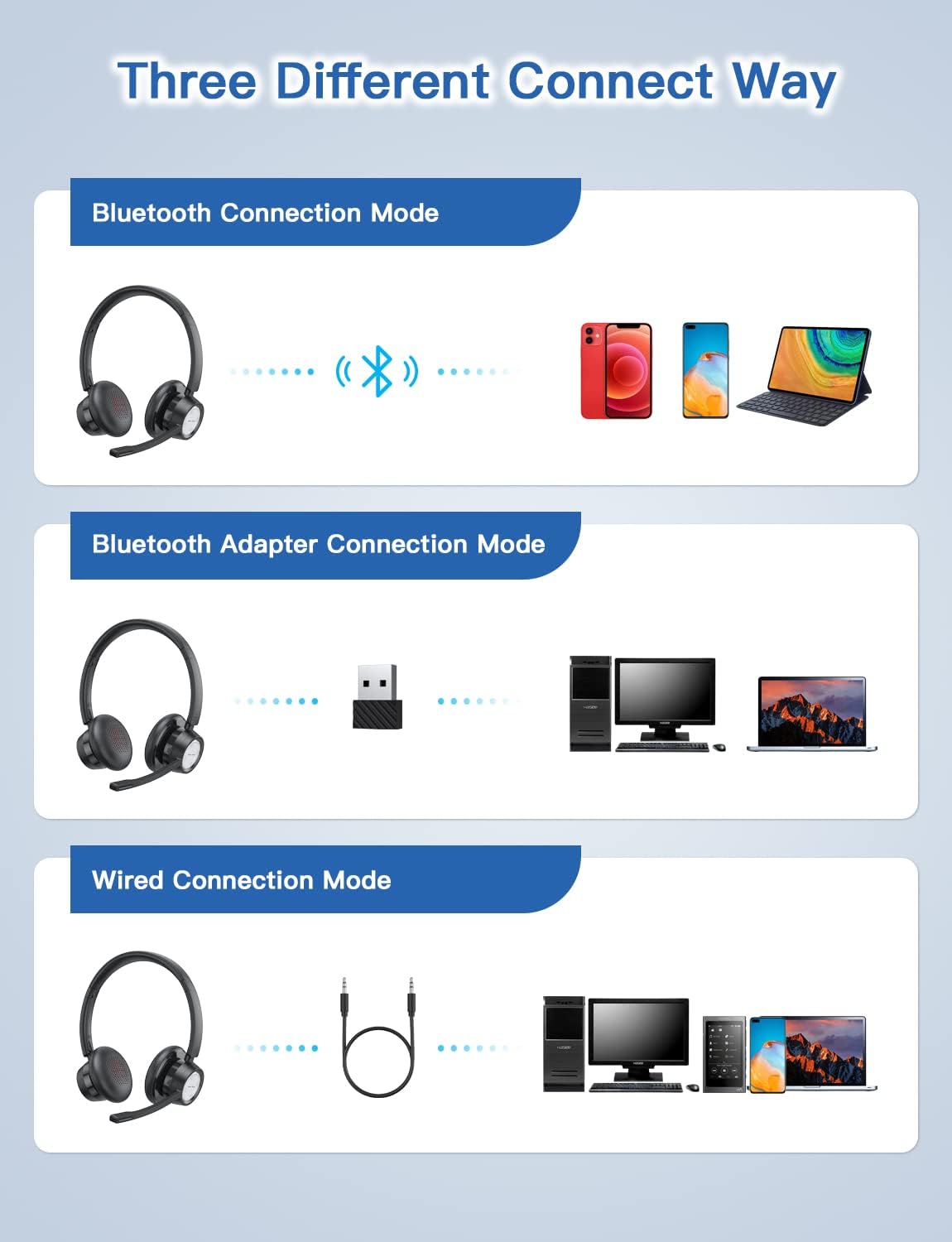
Figure 4: Multiple connection options for the BH58 headset.
4.3.1 Bluetooth Connection (for Cellphones/Tablets)
- Push the power button to the top and hold for 10 seconds until the headset LED indicator keeps flashing red and blue alternately. This indicates cellphone pairing mode.
- On your cellphone or tablet, go to 'Settings' > 'Bluetooth' and turn on Bluetooth.
- ፈልግ new devices and select 'BH58' from the list to connect.
- Once connected, you will hear a 'connected' voice prompt, and the LED indicator will flash blue every 30 seconds.
Video 1: Demonstrates the process of connecting the BH58 headset to a cellphone via Bluetooth.
4.3.2 USB Dongle Connection (for Computers without Bluetooth)
- Push the power button to the middle position to turn on the headset. The headset LED indicator keeps flashing red and green alternately, indicating computer pairing mode.
- Plug the Bluetooth transmitter (USB dongle) into your computer's USB port. It will automatically enter pairing mode. The Bluetooth transmitter LED indicator keeps flashing blue for about 3 seconds, then turns into red and blue flashing alternately.
- When hearing the 'connected' voice prompt, the connection is successful. The headset LED indicator flashes blue every 30 seconds, and the Bluetooth transmitter LED indicator is solid blue.
- On your computer, navigate to Sound Settings. Choose 'BH58' (or 'BTD-Q2' if listed) as the audio input and output device. Adjust sound settings as preferred.
Video 2: Illustrates how to connect the BH58 headset to a computer using the USB dongle and configure sound settings.
4.3.3 ባለገመድ ግንኙነት
Connect the 3.5mm audio cable to the headset's 3.5mm audio interface and the other end to your device's audio jack. In wired mode, only the speaker has sound; the buttons and microphone on the headset do not function.
5. ኦፕሬሽን
5.1 የጥሪ አስተዳደር
- መልስ/ጥሪ ጨርስ፡ Press the Multifunctional Button once.
- ጥሪን ውድቅ አድርግ፡ ባለብዙ ተግባር አዝራሩን ለ 2 ሰከንዶች ተጭነው ይያዙት።
- የማይክሮፎን ድምጸ-ከል አድርግ/ አንሳ፡ Press the Mic Mute Button during an active call.
5.2 የድምጽ መቆጣጠሪያ
- ድምጽ ጨምር የድምጽ መጠን + ቁልፍን ይጫኑ።
- ጥራዝ ታች የድምጽ መጠን - አዝራርን ይጫኑ.
- ሙዚቃን አጫውት/ ለአፍታ አቁም፡ Press the Multifunctional Button once.
5.3 የጆሮ ማዳመጫውን መልበስ
Adjust the headband for a comfortable fit. The microphone boom can be rotated 270 degrees to be worn on either the left or right ear. Position the microphone approximately 1-2 inches from your mouth for optimal voice clarity.

Figure 5: The headset can be adjusted for left or right ear wearing.
6. የባትሪ ህይወት
The BH58 wireless headset offers extended battery performance:
- የንግግር ጊዜ፡- እስከ 20 ሰዓታት ድረስ
- የሙዚቃ ጨዋታ ጊዜ፡- እስከ 28 ሰዓታት ድረስ
- የመጠባበቂያ ጊዜ፡- ከ 400 ሰዓታት በላይ
- የኃይል መሙያ ጊዜ: በግምት 1.5 ሰዓታት
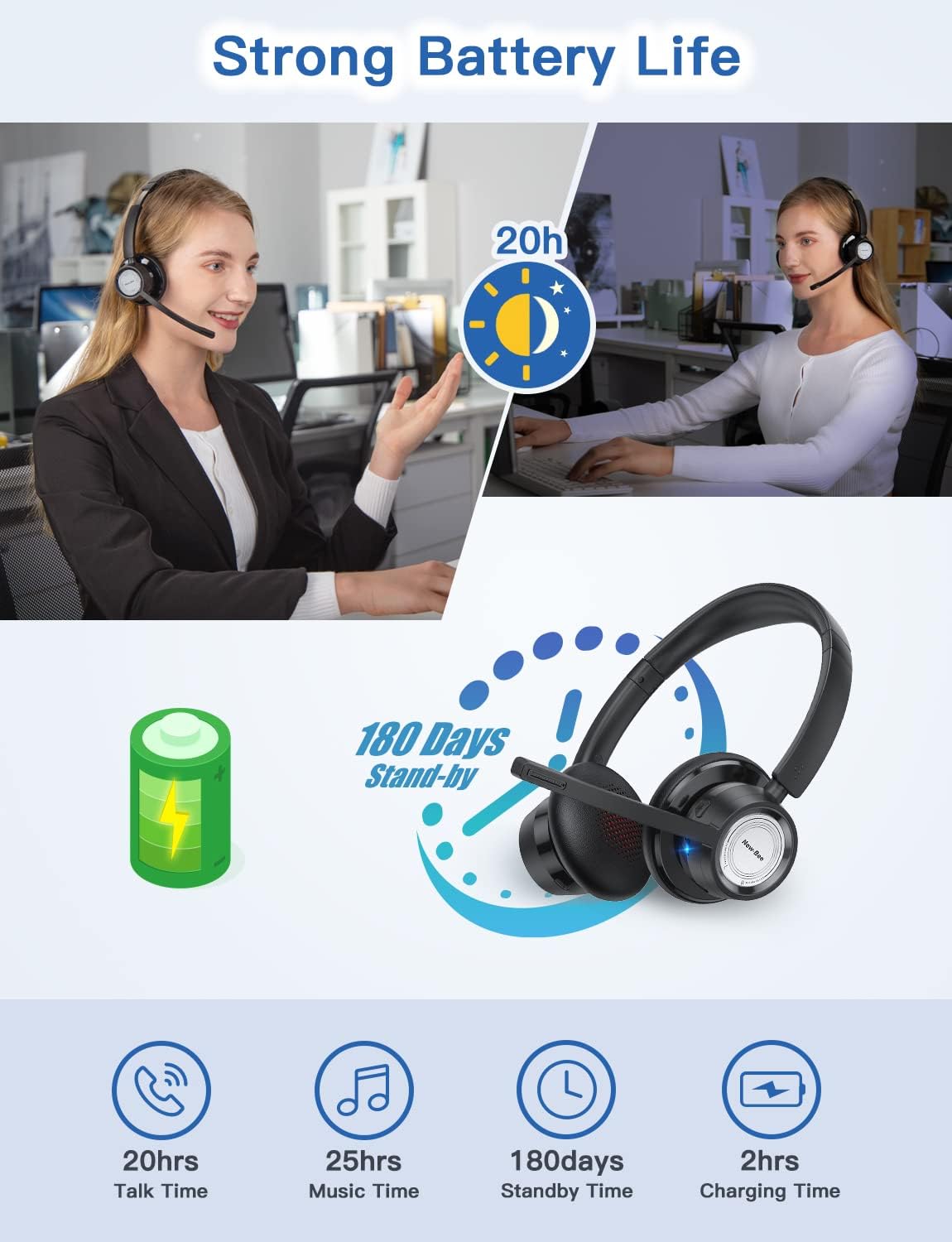
ምስል 6 - ተጠናቀቀview of BH58 headset battery performance.
7. ጥገና
- የጆሮ ማዳመጫውን በየጊዜው ለስላሳ እና ደረቅ ጨርቅ ያጽዱ.
- የጆሮ ማዳመጫውን ለከፍተኛ ሙቀት፣ እርጥበት ወይም ለቆሻሻ ንጥረ ነገሮች ከማጋለጥ ይቆጠቡ።
- ጥቅም ላይ በማይውልበት ጊዜ የጆሮ ማዳመጫውን በቀዝቃዛና ደረቅ ቦታ ያከማቹ።
- የጆሮ ማዳመጫውን እራስዎ ለመበተን ወይም ለመጠገን አይሞክሩ, ይህ ዋስትናውን ይሽራል.
8. መላ መፈለግ
| ችግር | መፍትሄ |
|---|---|
| የጆሮ ማዳመጫ አይበራም። | የጆሮ ማዳመጫው ሙሉ በሙሉ መሙላቱን ያረጋግጡ። |
| በብሉቱዝ በኩል ማጣመር አይቻልም። | Ensure the headset is in pairing mode (LED flashing red/blue or red/green). Turn off and on Bluetooth on your device. Clear previous Bluetooth connections. |
| ምንም ድምፅ ወይም ደካማ የድምጽ ጥራት. | Check volume levels on both the headset and your device. Ensure 'BH58' is selected as the audio output device in your system settings. For wired mode, ensure the cable is fully inserted. |
| ማይክሮፎን አይሰራም። | Ensure the microphone is not muted. Check that 'BH58' is selected as the audio input device in your system settings. Microphone does not work in wired mode. |
| የጆሮ ማዳመጫ በተደጋጋሚ ይቋረጣል. | Ensure the headset is within the effective Bluetooth range (10-45 meters depending on mode and environment). Avoid obstacles that may interfere with the signal. |
9. ዝርዝሮች
| ባህሪ | ዝርዝር |
|---|---|
| የሞዴል ስም | BH58 |
| የግንኙነት ቴክኖሎጂ | ገመድ አልባ (ብሉቱዝ)፣ ባለገመድ (3.5ሚሜ) |
| ገመድ አልባ የመገናኛ ቴክኖሎጂ | ብሉቱዝ V5.0 |
| የድምጽ መቆጣጠሪያ | አዳፕቲቭ ኖዝ ሰርዝ (ENC) |
| ማይክሮፎን | Omnidirectional, 270° Rotatable |
| የንግግር ጊዜ | እስከ 20 ሰዓታት ድረስ |
| የሙዚቃ ማጫዎቻ ጊዜ | እስከ 28 ሰዓታት ድረስ |
| የመጠባበቂያ ጊዜ | ከ 400 ሰዓታት በላይ |
| የኃይል መሙያ ጊዜ | 1.5 ሰዓታት |
| የኃይል መሙያ ወደብ | ዩኤስቢ-ሲ |
| የብሉቱዝ ክልል | 10-45 meters (depending on mode/environment) |
| ቁሳቁስ | Fabric, Memory Foam |
| የእቃው ክብደት | 230 ግራም (8.1 አውንስ) |
| ተስማሚ መሣሪያዎች | Computers, Laptops, Smartphones, Tablets, VoIP systems, Webinar systems, Skype, Zoom, Avaya, Call Centers, Online meeting systems, Home devices, Office devices |
10. ዋስትና እና ድጋፍ
New Bee provides excellent after-sales service, including a 12-month warranty from the date of purchase. A professional technical team and customer service center are available to assist you with any inquiries or issues.
For support, please refer to the contact information provided on the product packaging or the official New Bee webጣቢያ.


