1. መግቢያ
Thank you for choosing the ZGCINE S200 V-Mount Battery. This high-capacity 199Wh/14.8V battery is designed to provide reliable power for professional video cameras, camcorders, and other compatible devices. It features multiple output ports, including Dual DC, USB-C PD, Dual D-TAP, and a BP Interface, allowing simultaneous power delivery to various equipment. This manual provides essential information for safe and efficient operation, setup, maintenance, and troubleshooting.
2. የደህንነት መረጃ
- የባትሪውን ጥቅል አይበታተኑ፣ አይክፈቱ ወይም አይቧጩ።
- ባትሪውን ለሙቀት ወይም ለእሳት አያጋልጡት። በቀጥታ የፀሐይ ብርሃን ውስጥ ማከማቻን ያስወግዱ.
- ባትሪውን አጭር ዙር አያድርጉ።
- ባትሪውን ለሜካኒካዊ ድንጋጤ አያጋልጡት።
- In case of a battery leak, do not allow the liquid to come into contact with skin or eyes. If contact has been made, wash the affected area with copious amounts of water and seek medical advice.
- ባትሪውን ንጹህ እና ደረቅ ያድርጉት።
- ከመሳሪያው ጋር ጥቅም ላይ እንዲውል ከተጠቀሰው ሌላ ማንኛውንም ቻርጀር አይጠቀሙ።
- በአካባቢው ደንቦች መሰረት ባትሪውን በትክክል ያጥፉት.

Image: The ZGCINE S200 V-Mount Battery highlighting its built-in protection features including overcurrent, overpower, overvoltage, overcharge, short circuit, temperature, reset, and circuit protection.
3. ምርት አብቅቷልview
The ZGCINE S200 V-Mount Battery is designed with a compact form factor and robust construction, featuring an aluminum alloy V-lock mount and an ABS cover for durability. It includes various input and output ports to meet diverse power requirements.
3.1 Port Layout and Indicators

ምስል: ከላይ እና ጎን views of the ZGCINE S200 V-Mount Battery, clearly labeling all input and output ports including D-Tap, DC (8.4V/12V), USB-C PD, and the V-mount interface. Input/Output specifications are also shown.
- D-Tap Ports: Two D-Tap ports for input and output (Input: 16.8V/3A Max, Output: 14.8V/13A Max).
- የዲሲ ውፅዓት ወደቦች፡- Two DC output ports (8.4V/3A and 12V/3A).
- የዩኤስቢ-ሲ ፒዲ ወደብ፡- Bi-directional USB-C Power Delivery port for both input and output (Input: 5V/3A, 9V/3A, 12V/3A, 15V/3A, 20V/5A Max; Output: 5V/3A, 9V/3A, 12V/3A, 15V/3A, 20V/3.25A Max).
- ቢፒ በይነገጽ፡ For additional power output.
- የኃይል ቁልፍ፡- Activates the battery and checks charge status.
- የ LED አመልካቾች Five LED lights indicate the remaining battery capacity (20%, 40%, 60%, 80%, 100%).

ምስል፡ መቀራረብ view of the ZGCINE S200 V-Mount Battery's top panel, showing the LED power indicators and the various output ports with their respective voltagሠ እና amperage ደረጃዎች.
4. ማዋቀር
4.1 የመጀመሪያ ደረጃ መሙላት
Before first use, fully charge the ZGCINE S200 battery. Charging can be done via the USB-C PD port or a D-Tap charger. A 100W USB-C PD charger can fully charge the battery in approximately 3.5 hours.

Image: The ZGCINE S200 V-Mount Battery connected to a wall charger via its USB-C PD port, illustrating the fast-charging capability.
4.2 ባትሪውን መጫን
To mount the battery, align the V-mount plate on your camera rig or accessory with the V-lock mechanism on the battery. Slide the battery onto the plate until it clicks securely into place. To release, press the release button on the V-mount plate and slide the battery off.
5. የአሠራር መመሪያዎች
5.1 የባትሪ ሁኔታን መፈተሽ
Press the power button on the side of the battery. The five LED indicators will illuminate to show the current charge level:
- 1 LEDs: 0-20%
- 2 LEDs: 20-40%
- 3 LEDs: 40-60%
- 4 LEDs: 60-80%
- 5 LEDs: 80-100%
5.2 የኃይል ማመንጫ መሳሪያዎች
Connect your camera, camcorder, LED light, monitor, or other compatible devices to the appropriate output port on the ZGCINE S200 battery. The battery supports simultaneous power delivery to multiple devices.
- ዩኤስቢ-ሲ ፒዲ፡ Use a USB-C to USB-C cable to power devices like the Sony FX3, BMPCC 4K/6K Pro, or charge smartphones/tablets.
- D-Tap: Connect D-Tap compatible accessories such as LED lights or monitors.
- የዲሲ ውጤቶች Use the 8.4V or 12V DC outputs for devices requiring these specific voltagኢ.

Image: A user holding a camera rig with the ZGCINE S200 V-Mount Battery attached, demonstrating its use in a portable setup.
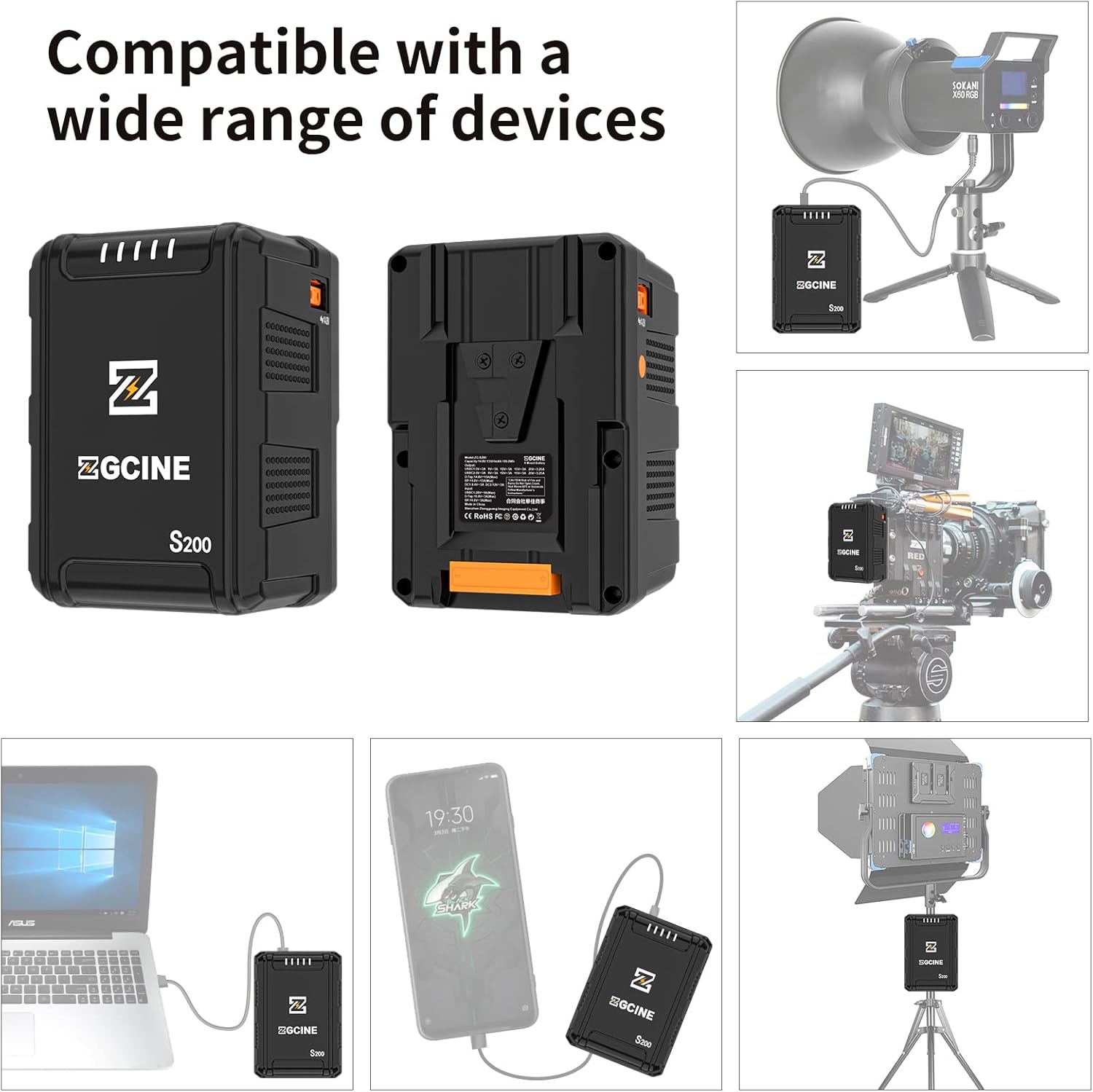
Image: Illustrations showing the ZGCINE S200 V-Mount Battery connected to a studio LED light, a camera rig, a laptop, and a smartphone, demonstrating its wide compatibility.
6. ጥገና
6.1 ማከማቻ
When storing the battery for extended periods, ensure it is charged to approximately 50-70% capacity. Store in a cool, dry place away from direct sunlight and extreme temperatures. Avoid storing fully charged or completely depleted batteries for long durations.
6.2 ጽዳት
Clean the battery's exterior and contact points with a soft, dry cloth. Do not use liquid cleaners or solvents. Ensure all ports are free from dust and debris.
6.3 የባትሪ እንክብካቤ ምክሮች
- ጥልቅ የሆኑ ፈሳሾችን ያስወግዱ፤ ባትሪው ሙሉ በሙሉ ከመሟሟቱ በፊት እንደገና ይሙሉት።
- Do not expose the battery to extreme hot or cold environments.
- Regularly check the battery for any signs of damage or swelling. Discontinue use if any abnormalities are observed.
7. መላ መፈለግ
- ባትሪ እየሞላ አይደለም
- Ensure the charging cable and adapter are securely connected and functional.
- የኃይል ምንጭ ንቁ መሆኑን ያረጋግጡ።
- Try a different charging port (USB-C PD or D-Tap) or charger.
- Battery not powering devices:
- ባትሪው በቂ ክፍያ እንዳለው ያረጋግጡ።
- መሳሪያው ከውጽአት ጥራዝ ጋር ተኳሃኝ መሆኑን ያረጋግጡtage and current of the selected port.
- Verify that the connection cables are secure and undamaged.
- Press the power button to activate the battery's output.
- የ LED አመልካቾች አይሰሩም:
- Press the power button firmly. If indicators still do not light up, the battery may be completely depleted or require service.
If you encounter issues not covered here, please contact ZGCINE customer support.
8. ዝርዝሮች
| ባህሪ | ዝርዝር መግለጫ |
|---|---|
| የሞዴል ቁጥር | S200 |
| የባትሪ አቅም | 199 ዋ / 14.8 ቪ |
| የባትሪ ሕዋስ ቅንብር | ሊቲየም አዮን |
| የምርት ልኬቶች | 3.5 x 3.1 x 5.1 ኢንች (8.9 x 7.9 x 13 ሴሜ) |
| የእቃው ክብደት | 2.4 ፓውንድ (1.09 ኪ.ግ) |
| የዩኤስቢ-ሲ ፒዲ ግብዓት/ውጤት | Input: 5V/3A, 9V/3A, 12V/3A, 15V/3A, 20V/5A (Max 100W) Output: 5V/3A, 9V/3A, 12V/3A, 15V/3A, 20V/3.25A (Max 65W) |
| D-Tap Input/Output | Input: 16.8V/3A (Max) ውፅዓት፡ 14.8V/13A (ከፍተኛ) |
| የዲሲ ውፅዓት | 8.4V/3A፣ 12V/3A |
| የሚመከር አጠቃቀሞች | Camcorder, Camera, LED Light, Monitor, Smartphone, Tablet |
| አምራች | ZGCINE |
9. ዋስትና እና ድጋፍ
ZGCINE products are covered by a limited warranty. For specific warranty terms and conditions, please refer to the warranty card included with your product or visit the official ZGCINE website. For technical support, troubleshooting assistance, or warranty claims, please contact ZGCINE customer service through their official channels.
የእውቂያ መረጃ፡- Please refer to the ZGCINE official website or product packaging for the most up-to-date customer support contact details.


