1. መግቢያ
Thank you for choosing the HDWR wagPRO-P500 Platform Scale. This manual provides essential information for the safe and efficient operation, setup, and maintenance of your new scale. Please read this manual thoroughly before use and keep it for future reference.
The HDWR wagPRO-P500 is a robust platform scale designed for precise weighing of larger items in industrial, warehouse, agricultural, and logistics environments. It features a high capacity, accurate measurements, and a user-friendly interface.
2. የምርት ባህሪዎች
- መድረክ፡ The scale features a spacious 60 x 45 cm platform for easy placement of goods, equipped with special tabs to prevent accidental slipping.
- ትክክለኛ መለኪያ፡ Offers precise measurement for items weighing from 200 grams up to a maximum capacity of 500 kg, with an accuracy of 0.2 kg.
- ለተጠቃሚ ምቹ በይነገጽ፡ Features three easy-to-read, green backlit LCD digital displays showing product weight and unit price.
- ተጨማሪ ተግባራት፡- Includes useful functions such as Tare, unit price input, and totalization.
- የኃይል አሠራር; An integrated 4 Ah battery provides wireless operation for approximately 150 hours.

Image: Key features of the HDWR wagPRO-P500 scale, including display, hold function, unit conversion, accuracy, tare, and battery power.

Image: Details on measurement accuracy, charging process, the robust platform, and the clear display of the scale.
3. የማዋቀር መመሪያዎች
- ማሸግ፡ Carefully remove all components from the packaging. Verify that all parts are present: platform, display unit, support column, power adapter, and user manual.
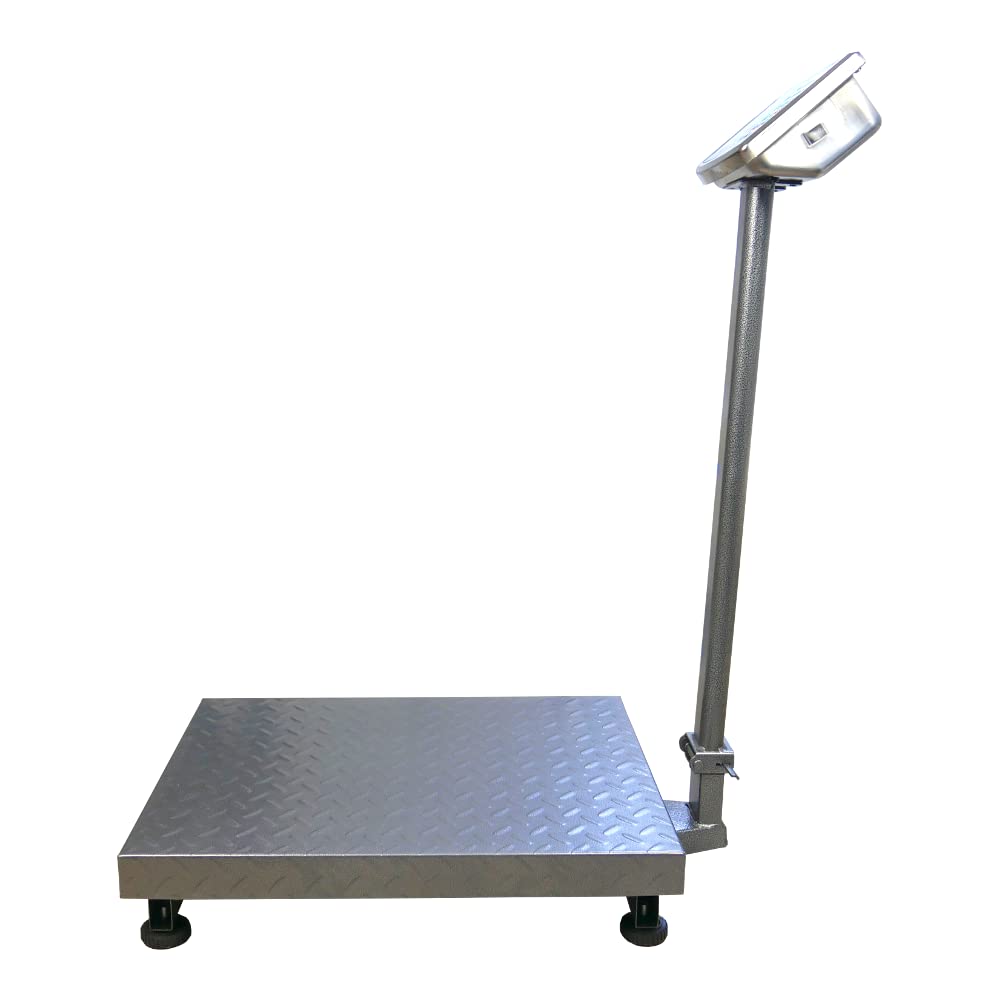
- Assemble the Support Column: Attach the display support column to the platform base. Ensure it is securely fastened using the provided hardware.
- Attach the Display Unit: Mount the display unit onto the top of the support column. Connect the cable from the platform to the display unit.
- አቀማመጥ፡- Place the scale on a firm, level, and stable surface to ensure accurate readings. Avoid areas with excessive vibration, drafts, or extreme temperature changes.
- የመጀመሪያ ክፍያ Connect the scale to a power outlet using the supplied mains adapter. Allow the internal battery to fully charge before the first wireless use. The charging indicator on the display will show the charging status.

Image: An assembled HDWR wagPRO-P500 platform scale, ready for use.
4. የአሠራር መመሪያዎች
4.1 ማብራት / ማጥፋት
- በመለኪያው ላይ ኃይል ለማግኘት፣ የሚለውን ይጫኑ [በርቷል/ጠፍቷል] አዝራር።
- ስኬሉን ለማጥፋት፣ ተጭነው ይያዙት እና ይያዙት [በርቷል/ጠፍቷል] ማሳያው እስኪጠፋ ድረስ አዝራር.
4.2 መሠረታዊ ክብደት
- Ensure the scale is powered on and the display shows '0.00'.
- Carefully place the item to be weighed onto the center of the platform.
- በማያ ገጹ ላይ የሚታየውን ክብደት ያንብቡ.
4.3 Tare ተግባር
The Tare function allows you to subtract the weight of a container or packaging, so only the net weight of the contents is measured.
- Place the empty container onto the platform. The display will show its weight.
- የሚለውን ይጫኑ [ታሬ] አዝራር። ማሳያው ወደ '0.00' ዳግም ይጀመራል።
- Place the items to be weighed into the container. The display will now show only the weight of the items.
- To clear the tare, remove the container and items, then press [ታሬ] እንደገና።
4.4 ክፍል ልወጣ
The scale supports measurement in kilograms (kg) and pounds (lb).
- በአሃዶች መካከል ለመቀያየር፣ የሚለውን ይጫኑ [ዩኒትስ] button (or similar button as indicated on your display). The active unit will be shown on the display.
4.5 Price Calculation (if applicable)
If your model supports price calculation, follow these steps:
- እቃውን በመድረኩ ላይ ያስቀምጡት.
- Using the numeric keypad, enter the unit price.
- The total price will be displayed automatically.
ምስል: ዝርዝር view of the scale's green backlit LCD display and control keypad, showing weight, unit price, and total price fields.
5. ጥገና
5.1 ጽዳት
- Always disconnect the scale from the power supply before cleaning.
- Wipe the platform and display unit with a soft, damp ጨርቅ። አስፈላጊ ከሆነ ለስላሳ ሳሙና ይጠቀሙ።
- Do not use abrasive cleaners, solvents, or immerse any part of the scale in water.
- Ensure no liquid enters the display unit or internal components.
5.2 የባትሪ እንክብካቤ
- ዝቅተኛ የባትሪ አመልካች በማሳያው ላይ ሲታይ ባትሪውን እንደገና ይሙሉት።
- ለተሻለ የባትሪ ዕድሜ፣ ባትሪውን ብዙ ጊዜ ሙሉ በሙሉ ከማጥፋት ይቆጠቡ።
- If the scale is not used for an extended period, charge the battery every 3 months to prevent deep discharge.
5.3 ማከማቻ
- Store the scale in a dry, clean environment, away from direct sunlight and extreme temperatures.
- Avoid placing heavy objects on the platform during storage.

ምስል፡ መቀራረብ view of the durable, textured metal platform, designed for secure placement of items.
6. መላ መፈለግ
| ችግር | ሊሆን የሚችል ምክንያት | መፍትሄ |
|---|---|---|
| ልኬት አይበራም። | Battery is discharged or power adapter is not connected. | Connect the power adapter and charge the battery. Ensure the power outlet is functional. |
| ትክክል ያልሆኑ ንባቦች። | Scale not on a level surface, external vibrations, or overload. | Place the scale on a stable, level surface. Remove any sources of vibration. Do not exceed the maximum weight capacity. |
| Display shows 'Err' or similar error. | Overload, internal error, or unstable reading. | Remove the load from the platform. Power off and restart the scale. If the error persists, contact customer support. |
| ማሳያው ደብዛዛ ወይም ብልጭ ድርግም የሚል ነው። | ዝቅተኛ ባትሪ. | Recharge the battery using the provided power adapter. |
7. ዝርዝሮች
- ሞዴል፡ wagPRO-P500
- የምርት ስም፡ HDWR
- ልኬቶች (L x W x H)፦ 75 x 45 x 88 ሴ.ሜ
- የመድረክ መጠኖች፡ 60 x 45 ሴ.ሜ
- ክብደት፡ 11.6 ኪ.ግ
- ከፍተኛው የክብደት አቅም፡- 500 ኪ.ግ
- Reading Precision: 200 ግራም (0.2 ኪ.ግ)
- የመለኪያ ትክክለኛነት; +/- 0.2%
- ቁሳቁስ፡ ብረት
- የማሳያ አይነት፡ LCD ከአረንጓዴ የኋላ ብርሃን ጋር
- ባትሪ፡ Integrated 4 Ah (approx. 150 hours wireless operation)
- ልዩ ባህሪያት፡ Backlit display, high load capacity, tare function, large display, portable.
- የሚመከሩ አጠቃቀሞች፡- Industry, agriculture, logistics, wholesale.

Image: Dimensions of the wagPRO-P500 platform scale, illustrating its robust design and size.
8. ዋስትና እና ድጋፍ
This product is supplied with a user manual. For information regarding warranty coverage, please refer to the documentation provided at the time of purchase or contact your retailer.
For technical support, service, or inquiries about spare parts, please contact HDWR customer service through their official website or the contact information provided with your purchase. Please have your model number (wagPRO-P500) and purchase date ready when contacting support.


