1. መግቢያ
This user manual provides comprehensive instructions for the installation, operation, and maintenance of the Axis Communications AXIS Q6225-LE PTZ Camera. Please read this manual thoroughly before using the product to ensure proper functionality and safety. This camera is designed for robust outdoor surveillance in challenging conditions.
2. የደህንነት መረጃ
Observe the following safety precautions to prevent damage to the product or injury to personnel:
- መጫን፡ Installation must be performed by qualified personnel in accordance with all local and national electrical and building codes.
- የኃይል አቅርቦት; Use only the specified power supply (60 watts) for this device. Ensure the power source is stable and meets the camera's requirements.
- አካባቢ፡ The camera is designed for outdoor use. However, avoid exposing it to extreme conditions beyond its specified operating range.
- ማጽዳት፡ ከማጽዳትዎ በፊት ኃይልን ያላቅቁ. ለስላሳ እና ደረቅ ጨርቅ ይጠቀሙ. ፈሳሽ ወይም ኤሮሶል ማጽጃዎችን አይጠቀሙ.
- ማሻሻያዎች፡- Do not attempt to modify or disassemble the camera. This may void the warranty and pose safety risks.
3. የጥቅል ይዘቶች
ሁሉም እቃዎች በጥቅሉ ውስጥ መኖራቸውን ያረጋግጡ፡-
- AXIS Q6225-LE PTZ ካሜራ
- የመጫኛ መመሪያ
- የመስቀያ ቅንፍ እና ሃርድዌር
- Network Cable Connector
- Documentation and Software CD (if applicable)
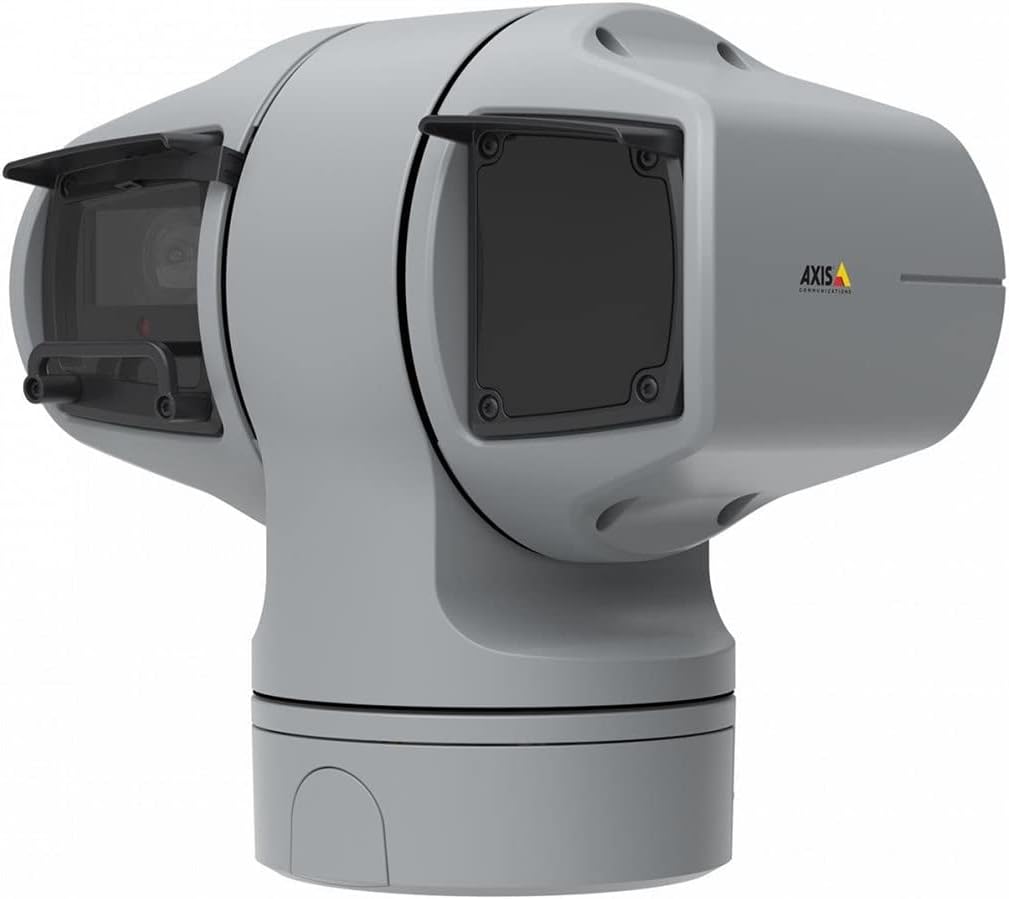
ምስል 1፡ AXIS Q6225-LE PTZ Camera. This image displays the grey-colored PTZ camera unit, highlighting its robust housing and integrated lens system, designed for outdoor surveillance.
4. ማዋቀር እና መጫን
4.1 ካሜራውን መጫን
The AXIS Q6225-LE is designed for wall mount installation. Ensure the mounting surface is strong enough to support the camera's weight and withstand environmental conditions.
- የሚፈለገውን መስክ የሚያቀርብ ተስማሚ የመጫኛ ቦታ ይምረጡ view እና በሃይል እና በኔትወርክ ግንኙነቶች ሊደረስበት የሚችል ነው.
- በግድግዳው ላይ ያሉትን የቁፋሮ ቀዳዳዎች ምልክት ለማድረግ የተሰጠውን የመጫኛ አብነት ይጠቀሙ።
- Drill pilot holes and secure the mounting bracket using appropriate screws and anchors.
- Attach the camera to the mounting bracket, ensuring it is firmly locked in place.
4.2 የኃይል እና የአውታረ መረብ ግንኙነት
Connect the camera to power and network as follows:
- ኃይል፡- Connect the power cable to a 60-watt power source. Ensure the connection is secure and weatherproof.
- አውታረ መረብ፡ Connect an Ethernet cable from your network switch or router to the camera's network port. The camera supports Wi-Fi for wireless communication. Refer to the network configuration section for wireless setup.
4.3 የመጀመሪያ ውቅር
አካላዊ ጭነት እና ግንኙነት ከተደረገ በኋላ፣ ካሜራውን ይድረሱበት web interface for initial configuration:
- ክፈት ሀ web browser on a computer connected to the same network as the camera.
- Enter the camera's IP address in the browser's address bar. If the IP address is unknown, use the AXIS IP Utility tool to discover it.
- Follow the on-screen prompts to set up a new password for the administrator account.
- Configure basic network settings, date/time, and video stream settings.
5. ካሜራውን መስራት
5.1 የፓን፣ የዘንበል እና የማጉላት (PTZ) መቆጣጠሪያ
The AXIS Q6225-LE camera features full PTZ capabilities, allowing remote adjustment of its viewing angle and zoom level. Control is typically performed via the camera's web በይነገጽ ወይም ተኳሃኝ የቪዲዮ አስተዳደር ሶፍትዌር (VMS)።
- ፓን Rotate the camera horizontally to cover a wider area.
- ዘንበል Adjust the camera vertically to view objects at different heights.
- ኦፕቲካል ማጉላት፡ Use the optical zoom feature to magnify distant objects without loss of image quality.
5.2 የእንቅስቃሴ ማወቂያ እና ማንቂያዎች
The camera supports motion-only alerts. Configure motion detection zones and sensitivity settings in the web interface to trigger recordings or notifications when movement is detected.
5.3 Infrared (IR) Illumination
Equipped with infrared light sources, the camera provides clear video surveillance in low-light or complete darkness. IR illumination activates automatically or can be manually controlled.
6. ጥገና
6.1 ጽዳት
Regular cleaning of the camera lens and housing is recommended to ensure optimal performance, especially in dusty or harsh environments.
- Gently wipe the lens with a soft, lint-free cloth. For stubborn dirt, use a lens cleaning solution specifically designed for optical surfaces.
- የካሜራውን መያዣ በማስታወቂያ ያጽዱamp ጨርቅ. ገላጭ ማጽጃዎችን ወይም ፈሳሾችን ያስወግዱ።
6.2 የጽኑ ዝማኔዎች
በየጊዜው የአክሲስ ኮሙኒኬሽንን ይፈትሹ website for firmware updates. Keeping the camera's firmware up-to-date ensures access to the latest features, security enhancements, and bug fixes.
7. መላ መፈለግ
ይህ ክፍል ከ AXIS Q6225-LE ካሜራዎ ጋር ሊያጋጥሙዎት የሚችሉ የተለመዱ ችግሮችን ይዳስሳል።
| ችግር | ሊሆን የሚችል ምክንያት | መፍትሄ |
|---|---|---|
| የቪዲዮ ምግብ የለም። | የኃይል ግንኙነት ተቋርጧል፣ የአውታረ መረብ ችግር፣ የተሳሳተ የአይፒ አድራሻ። | Check power connection. Verify network cable or Wi-Fi connection. Confirm camera's IP address. |
| ደካማ የምስል ጥራት | Dirty lens, improper focus, low light conditions. | Clean the lens. Adjust focus via web interface. Ensure adequate lighting or verify IR functionality. |
| የPTZ መቆጣጠሪያዎች ምላሽ የማይሰጡ ናቸው | Network latency, software glitch, motor issue. | የአውታረ መረብ ግንኙነትን ያረጋግጡ። ካሜራውን እንደገና ያስጀምሩ። ችግሩ ከቀጠለ ድጋፍን ያነጋግሩ። |
8. ዝርዝሮች
| ባህሪ | ዝርዝር |
|---|---|
| የሞዴል ቁጥር | 02316-002 |
| የምርት ስም | አክሲስ ኮሙኒኬሽንስ |
| የመጫኛ አይነት | የግድግዳ ተራራ |
| ቀለም | ነጭ |
| ቁሳቁስ | ብረት |
| ዋትtage | 60 ዋት |
| የግንኙነት ቴክኖሎጂ | ገመድ አልባ፣ ዋይ ፋይ |
| የቤት ውስጥ / የውጭ አጠቃቀም | ከቤት ውጭ |
| የመቆጣጠሪያ ዘዴ | የርቀት |
| የፎቶ ዳሳሽ ቴክኖሎጂ | CMOS |
| የቪዲዮ ቀረጻ ቅርጸት | MPEG-4 |
| የብርሃን ምንጭ ዓይነት | ኢንፍራሬድ |
| የማንቂያ ዓይነት | እንቅስቃሴ ብቻ |
| የማጉላት ዓይነት | የጨረር ማጉላት |
| የእቃው ክብደት | 0.01 ኪሎግራም (0.352 አውንስ) |
| የተካተቱ አካላት | ካሜራ/መለዋወጫ |
9. ዋስትና እና ድጋፍ
For warranty information and technical support, please refer to the official Axis Communications webጣቢያ ወይም የተፈቀደለት አከፋፋይ ያነጋግሩ። የግዢ ደረሰኝህን እንደ ግዢ ማረጋገጫ አቆይ።
የመስመር ላይ መርጃዎች፡- www.axis.com


