1. መግቢያ
This manual provides detailed instructions for the ENDORFY Thock Wireless Mechanical Keyboard, model EY5A078. It covers setup, operation, maintenance, and troubleshooting to ensure optimal performance and longevity of your device. Please read this manual thoroughly before using the keyboard.

Image 1.1: The ENDORFY Thock Wireless Mechanical Keyboard EY5A078. This image displays the full QWERTY layout with illuminated keys, showcasing the keyboard's design and RGB capabilities.
2. የጥቅል ይዘቶች
ሁሉም እቃዎች በጥቅሉ ውስጥ መኖራቸውን ያረጋግጡ፡-
- ENDORFY Thock Wireless Mechanical Keyboard EY5A078
- ከዩኤስቢ-ሲ ወደ ዩኤስቢ-ኤ ገመድ (ሊላቀቅ የሚችል)
- 2.4 GHz ዩኤስቢ ተቀባይ
- የቁልፍ ማስገቢያ
- ፑለር ይቀይሩ
- የተጠቃሚ መመሪያ (ይህ ሰነድ)
3. ማዋቀር እና ግንኙነት
The ENDORFY Thock Wireless Mechanical Keyboard offers three connection modes: wired, 2.4 GHz wireless, and Bluetooth.
3.1. ባለገመድ ግንኙነት
- Locate the USB-C port on the keyboard (typically on the back or top edge).
- Connect the provided USB-C to USB-A cable to the keyboard.
- የኬብሉን የዩኤስቢ-ኤ ጫፍ በኮምፒተርዎ ላይ ካለው የዩኤስቢ ወደብ ጋር ያገናኙ።
- የቁልፍ ሰሌዳው በራስ-ሰር የሚታወቅ እና ለአገልግሎት ዝግጁ ይሆናል።
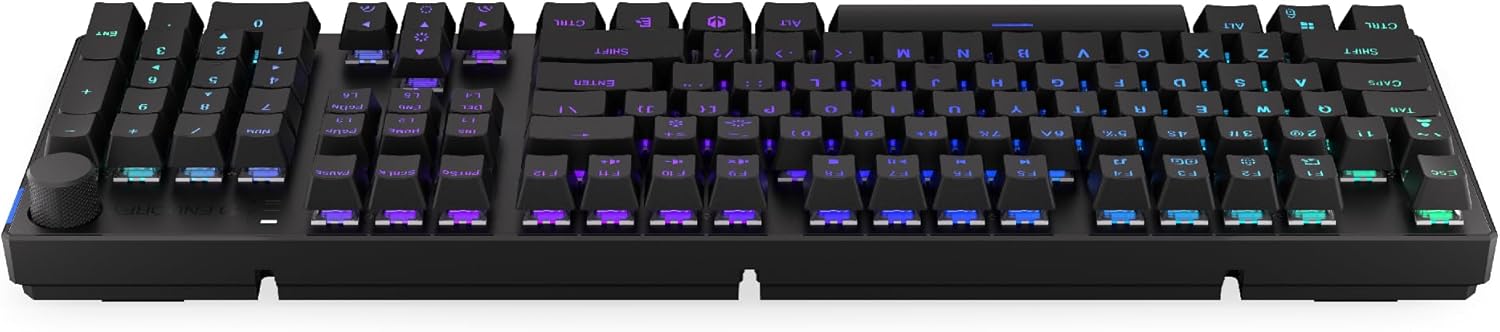
ምስል 3.1፡ ጎን view of the keyboard, highlighting the USB-C port for wired connection and charging.
3.2. 2.4 GHz ገመድ አልባ ግንኙነት
- Locate the 2.4 GHz USB receiver. It may be stored in a compartment on the underside of the keyboard.
- Plug the 2.4 GHz USB receiver into an available USB port on your computer.
- On the keyboard, locate the mode switch (usually on the back or side) and set it to the 2.4 GHz wireless mode (often indicated by a specific icon or "2.4G").
- The keyboard should automatically connect. An indicator light may confirm the connection.

Image 3.2: Underside of the keyboard, showing the compartment for storing the 2.4 GHz USB receiver and adjustable feet.
3.3. የብሉቱዝ ግንኙነት
- On the keyboard, set the mode switch to Bluetooth mode (often indicated by a Bluetooth icon or "BT").
- The keyboard may have multiple Bluetooth profiles (e.g., BT1, BT2, BT3). Select one by pressing Fn + 1, Fn + 2, or Fn + 3. The corresponding indicator light will flash.
- በኮምፒተርዎ ወይም በመሳሪያዎ ላይ የብሉቱዝ ቅንብሮችን ይክፈቱ እና አዳዲስ መሳሪያዎችን ይፈልጉ።
- Select "ENDORFY Thock Wireless" (or similar name) from the list of available devices.
- የማጣመሪያ ሂደቱን ለማጠናቀቅ ማንኛውንም የስክሪን ላይ ጥያቄዎችን ይከተሉ።
- ከተጣመረ በኋላ በቁልፍ ሰሌዳው ላይ ያለው አመላካች መብራት ብልጭ ድርግም ይላል እና ጠንካራ ሆኖ ይቆያል።
4. ኦፕሬሽን
4.1. Key Functions and Shortcuts
The keyboard features various function key combinations (Fn + Key) for multimedia control, lighting adjustments, and other settings.
- Fn + F1-F12፡ Multimedia and system functions (e.g., volume control, media playback, calculator). Refer to the keycap legends for specific functions.
- Fn + የቀስት ቁልፎች፡ Adjust RGB lighting effects (e.g., brightness, speed, direction).
- Fn + 1/2/3፡ በብሉቱዝ ፕሮ መካከል ይቀያይሩfiles.
- Fn + 4፡ Switch to 2.4 GHz wireless mode.
- Fn + 5፡ ወደ ባለገመድ ሁነታ ቀይር።
4.2. የRGB መብራት መቆጣጠሪያ
The ENDORFY Thock keyboard features programmable RGB backlighting. Use the following combinations to customize the lighting:
- Fn + ቀኝ ቀስት፡ Change lighting effect.
- Fn + ግራ ቀስት፡ የመብራት ተፅዕኖ አቅጣጫን ይቀይሩ።
- Fn + ወደ ላይ ቀስት፡ ብሩህነትን ጨምር።
- Fn + የታች ቀስት፡ ብሩህነትን ቀንስ።
- Fn + Ins፡ ቀለም ይቀይሩ.
- Fn + Del፡ Adjust effect speed.
4.3. ጥራዝ አንጓ
The dedicated volume knob located on the top right of the keyboard allows for quick audio adjustments.
- በሰዓት አቅጣጫ አሽከርክር፦ የድምጽ መጠን ጨምር.
- በተቃራኒ ሰዓት አቅጣጫ አሽከርክር፦ ድምጽን ይቀንሱ.
- ወደ ታች ይጫኑ፡- የድምጽ ድምጸ-ከል አንሳ/አጥፋ።

Image 4.1: Detail of the volume knob and status indicator lights, located on the upper right side of the keyboard.
4.4. ትኩስ-ተለዋዋጭ መቀየሪያዎች
The ENDORFY Thock keyboard features hot-swappable switches, allowing you to change mechanical switches without soldering. This enables customization of typing feel.
- ቁልፍን አስወግድ፡ የተፈለገውን ቁልፍ ቆብ በቀስታ ለማስወገድ የቀረበውን የቁልፍ መያዣ ይጠቀሙ።
- መቀየሪያን አስወግድ፡ የተሰጡትን የማብሪያ/ማጥፊያ መጎተቻዎች በመጠቀም የማብሪያ/ማጥፊያውን የላይኛው እና የታችኛውን ክሊፖች በጥንቃቄ ይያዙ እና ቀጥ ብለው ወደ ላይ ይጎትቱት።
- አዲስ መቀየሪያ አስገባ፡ Align the pins of the new switch with the holes on the PCB. Press the switch firmly until it clicks into place. Ensure pins are not bent.
- የቁልፍ መያዣን ይተኩ፡ የቁልፍ ክዳኑን ወደ አዲሱ የማብሪያ / ማጥፊያ ግንድ መልሰው ያስቀምጡ።

ምስል 4.2፡ መቀራረብ view of the Kailh Box Brown mechanical switches, demonstrating the hot-swappable design.
5. ጥገና
5.1. የቁልፍ ሰሌዳውን ማጽዳት
አዘውትሮ ማጽዳት የቁልፍ ሰሌዳውን አፈፃፀም እና ገጽታ ለመጠበቅ ይረዳል።
- ከማጽዳትዎ በፊት የቁልፍ ሰሌዳውን ከኮምፒዩተርዎ ያላቅቁት.
- በደንብ ለማፅዳት የቁልፍ መያዣዎችን ለማስወገድ የቁልፍ መያዣ ይጠቀሙ።
- ከቁልፎቹ መካከል አቧራ እና ፍርስራሾችን ለማስወገድ የታመቀ አየር ይጠቀሙ።
- የቁልፍ ክዳኖቹን እና የቁልፍ ሰሌዳውን ወለል በለስላሳ፣ d ይጥረጉamp ጨርቅ. ኃይለኛ ኬሚካሎችን ያስወግዱ.
- እንደገና ከመገናኘትዎ በፊት የቁልፍ ሰሌዳው ሙሉ በሙሉ ደረቅ መሆኑን ያረጋግጡ።
5.2. የቁልፍ ክዳን እና የመቀየሪያ መተካት
Refer to Section 4.4 for detailed instructions on replacing keycaps and switches. Use only compatible keycaps and switches to avoid damage.
6. መላ መፈለግ
| ችግር | ሊሆን የሚችል ምክንያት | መፍትሄ |
|---|---|---|
| የቁልፍ ሰሌዳ ምላሽ አይሰጥም (ሽቦ) | የተበላሸ የኬብል ግንኙነት፣ የዩኤስቢ ወደብ ችግር አለበት። | የዩኤስቢ-ሲ ገመድ ደህንነቱ በተጠበቀ ሁኔታ መገናኘቱን ያረጋግጡ። የተለየ የዩኤስቢ ወደብ ወይም ገመድ ይሞክሩ። |
| የቁልፍ ሰሌዳ ምላሽ አይሰጥም (ገመድ አልባ) | Low battery, incorrect mode, receiver not plugged in, pairing issue. | Charge the keyboard. Ensure mode switch is set correctly (2.4G or BT). Re-pair Bluetooth or re-insert 2.4 GHz receiver. |
| የ RGB መብራት አይሰራም | Lighting turned off, low battery, software issue. | Check lighting controls (Fn + Arrow keys). Charge the keyboard. Restart computer. |
| ቁልፎችን ድርብ መተየብ ወይም አለመመዝገብ | Dust/debris under switch, faulty switch. | Clean under keycaps with compressed air. If issue persists, replace the switch (refer to Section 4.4). |
7. ዝርዝሮች
- ሞዴል፡ EY5A078
- የምርት ስም፡ ENDORFY
- ግንኙነት፡ Wired (USB-C), 2.4 GHz Wireless, Bluetooth
- የመቀየሪያ አይነት፡ Kailh Box Brown (Hot-swappable)
- ቁልፎች፡- PBT ድርብ Shot
- አቀማመጥ፡- Full-size QWERTY
- የጀርባ ብርሃን በፕሮግራም ሊሰራ የሚችል RGB
- ስርዓተ ክወናዎች; Linux, Mac OS X 10.12 Sierra, Windows 10
- ቀለም፡ ጥቁር
- ቁሳቁስ፡ ፖሊቡቲሊን ቴሬፍታሌት (PBT)
- ልዩ ባህሪያት፡ Detachable cable, Volume knob with mute, Hot-swappable switches
- ባትሪ፡ ሊቲየም-አዮን (የተጨመረ)
8. ዋስትና እና ድጋፍ
ENDORFY products are covered by a manufacturer's warranty. For detailed warranty information, please refer to the warranty card included with your product or visit the official ENDORFY website. For technical support, product inquiries, or service requests, please contact ENDORFY customer support through their official channels.
ኦፊሴላዊ Webጣቢያ፡ www.endorfy.com
9. የደህንነት መረጃ
- የቁልፍ ሰሌዳውን ከፈሳሾች እና ከመጠን በላይ እርጥበት ያስወግዱ.
- የቁልፍ ሰሌዳውን ለከፍተኛ ሙቀት ከማጋለጥ ይቆጠቡ።
- Do not attempt to disassemble or modify the keyboard beyond hot-swapping switches and keycaps, as this may void the warranty and cause damage.
- የቀረበውን ወይም የሚመከረውን የኃይል መሙያ ገመድ ብቻ ይጠቀሙ።
- ባትሪውን እና የኤሌክትሮኒክስ ክፍሎችን በአካባቢያዊ ደንቦች መሰረት በኃላፊነት ያስወግዱ።


