1. መግቢያ
This manual provides essential instructions for the proper installation, operation, and maintenance of your Interphone Cellularline U-Com 6R Motorcycle Bluetooth Intercom. Please read this manual thoroughly before using the device to ensure optimal performance and safety.
The U-Com 6R is designed to enhance your riding experience with reliable Bluetooth 5.2 communication, allowing connection with up to two riders over a distance of 1 kilometer. It offers compatibility with various OEM and GPS systems and features a long-lasting, replaceable battery.
2. የደህንነት መረጃ
Always prioritize safety while riding. Operating the intercom should not distract you from road conditions or traffic. Ensure the device is securely mounted and all cables are properly routed to avoid interference with helmet functionality or rider movement.
- መሣሪያውን ለመበተን ወይም ለማሻሻል አይሞክሩ.
- መሳሪያውን ከከፍተኛ ሙቀት እና ቀጥተኛ የፀሐይ ብርሃን ያርቁ.
- የውሃ መከላከያን ለመጠበቅ ባትሪ በማይሞላበት ጊዜ የኃይል መሙያ ወደብ ሽፋን ደህንነቱ በተጠበቀ ሁኔታ መዘጋቱን ያረጋግጡ።
- Adjust volume to a safe level that allows you to hear ambient traffic sounds.
3. የጥቅል ይዘቶች
ከዚህ በታች የተዘረዘሩት ሁሉም እቃዎች በጥቅልዎ ውስጥ መካተታቸውን ያረጋግጡ፡-
- U-Com 6R Main Unit
- Helmet Mounting Bracket (Clip and Adhesive options)
- አፈጉባኤ አዘጋጅ
- ቡም ማይክሮፎን
- ባለ ገመድ ማይክሮፎን
- የዩኤስቢ-ሲ ኃይል መሙያ ገመድ
- ለድምጽ ማጉያዎች እና ማይክሮፎኖች የቬልክሮ ፓዶች
- የማይክሮፎን ስፖንጅዎች
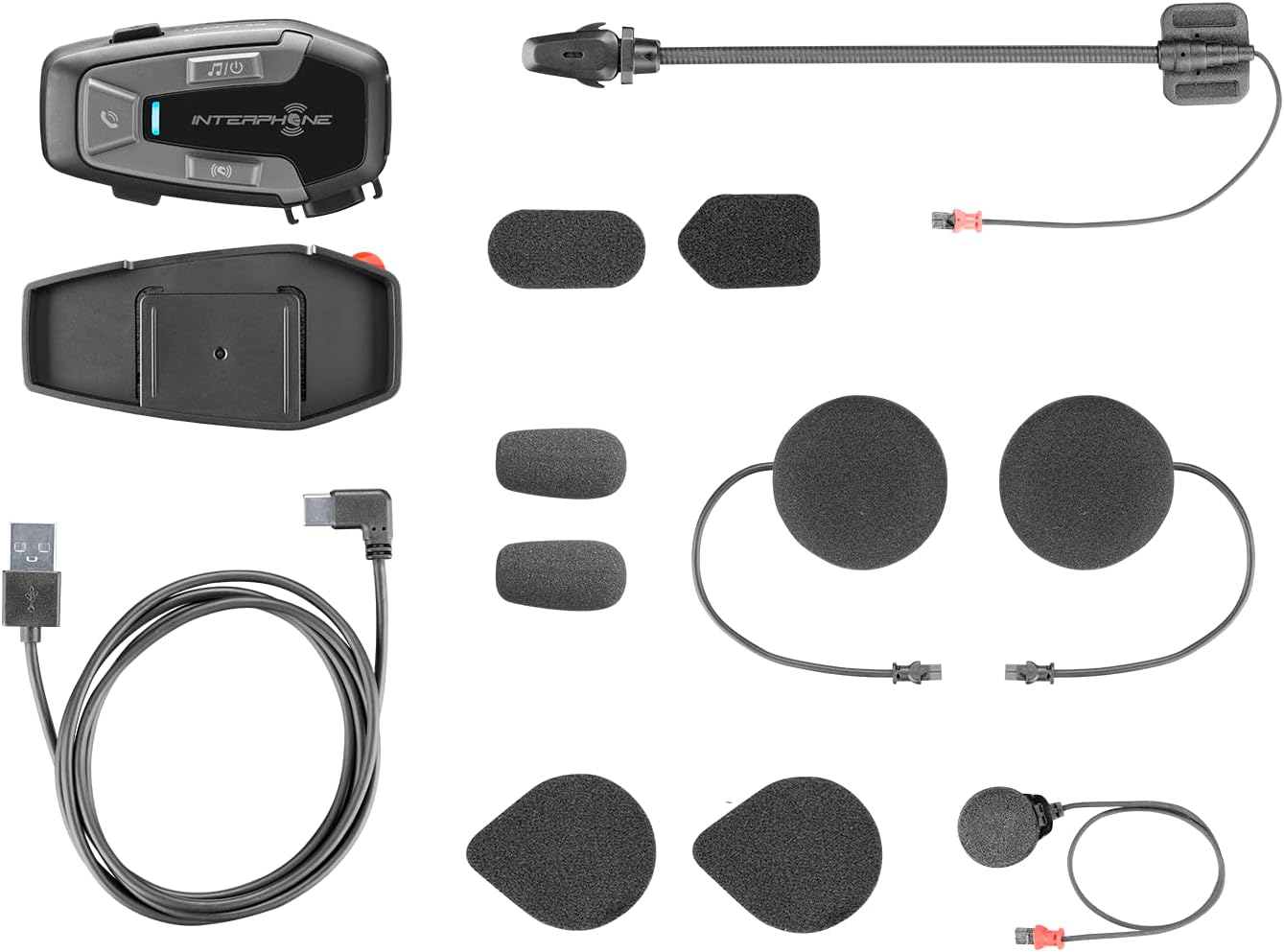
ምስል 3.1፡ All components included in the Interphone U-Com 6R package. This image displays the main intercom unit, mounting accessories, speakers, two types of microphones (boom and wired), and the USB-C charging cable.
4. መሣሪያ አብቅቷልview
4.1. ዋና የክፍል መቆጣጠሪያዎች

ምስል 4.1፡ ፊት ለፊት view of the Interphone U-Com 6R main unit. This image highlights the primary control buttons for music, call management, and intercom functions, along with the LED indicator.
- የሙዚቃ አዝራር፡- Controls music playback (play/pause, skip tracks).
- የጥሪ አዝራር፡- Manages phone calls (answer/end, voice assistant).
- ኢንተርኮም አዝራር፡- Initiates and manages intercom conversations.
- የ LED አመልካች፡- Displays device status (pairing, charging, power).
4.2. ወደቦች እና ማገናኛዎች

ምስል 4.2፡ ጎን view of the Interphone U-Com 6R unit. This image clearly shows the USB-C charging port and the speaker/microphone connector.
- ዩኤስቢ-ሲ ወደብ መሣሪያውን ለመሙላት ጥቅም ላይ ይውላል.
- Speaker/Microphone Connector: Connects the speaker and microphone assembly to the main unit.
5. መጫን
5.1. ዋናውን ክፍል መትከል
The U-Com 6R can be mounted to your helmet using either the clip mount or the adhesive mount.
- ቅንጥብ ተራራ፡ ክሊፕቱን በሄልሜት ቅርፊት እና በግራ በኩል ባለው ውስጣዊ ፓዲንግ መካከል ያንሸራትቱ። ደህንነቱ በተጠበቀ ሁኔታ መያያዙን ያረጋግጡ።
- ተለጣፊ ተራራ; Clean the desired mounting area on the left side of your helmet. Peel off the protective film from the 3M adhesive on the bracket and firmly press it onto the helmet for at least 30 seconds. Allow 24 hours for the adhesive to fully cure before use.
ምስል 5.1፡ Adhesive mounting bracket for the Interphone U-Com 6R. This image shows the bracket with the 3M adhesive backing, ready for attachment to a helmet.
5.2. ድምጽ ማጉያዎችን እና ማይክሮፎን መትከል
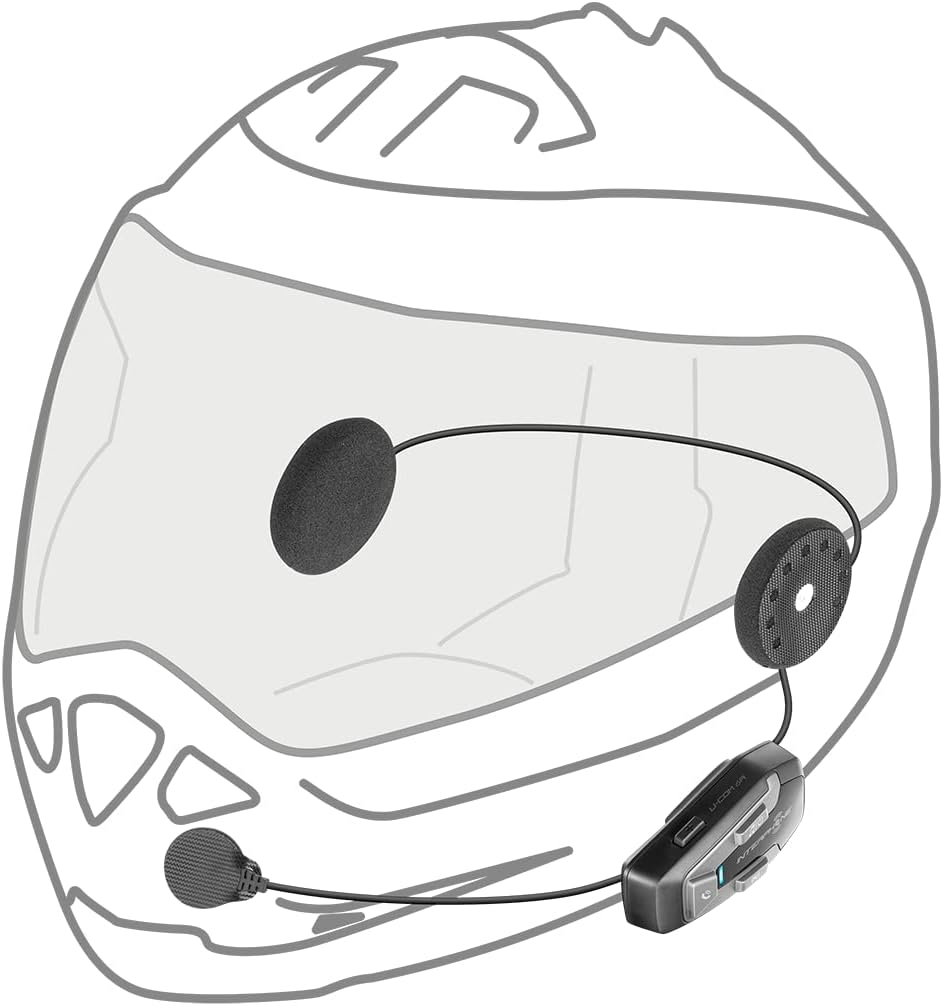
Position the speakers inside the helmet's ear pockets. The microphone should be placed in front of your mouth, ensuring clear voice pickup.
- Attach the speakers to the helmet's interior using the provided Velcro pads. Ensure the speaker with the shorter wire is for the left ear and the longer wire for the right.
- ለራስ ቁርዎ አይነት ተገቢውን ማይክሮፎን ይምረጡ፦
- ቡም ማይክሮፎን፡ Ideal for open-face or modular helmets. Attach it to the inside of the helmet near your mouth.
- ባለገመድ ማይክሮፎን; Suitable for full-face helmets. Attach it to the inside of the chin bar, close to your mouth.
- Connect the speaker and microphone assembly to the main U-Com 6R unit.
- Tuck all wires neatly under the helmet padding to prevent discomfort or entanglement.

ምስል 5.2፡ Installation of speakers and wired microphone inside a full-face helmet. This diagram illustrates the placement of the flat speakers in the ear recesses and the wired microphone near the chin bar.

ምስል 5.3፡ Installation of speakers and boom microphone inside an open-face helmet. This diagram shows the placement of speakers and the flexible boom microphone extending towards the rider's mouth.
6. ማዋቀር እና መሰረታዊ ስራ
6.1. መሣሪያውን በመሙላት ላይ
Before first use, fully charge the U-Com 6R. Connect the supplied USB-C cable to the charging port on the unit and to a USB power source. The LED indicator will show charging status and turn off when fully charged. A full charge provides approximately 15 hours of talk time.
6.2. ማብራት / ማጥፋት
- አብራ፡ Press and hold the Music button for 3 seconds. The LED will flash blue.
- ኃይል ዝጋ: Press and hold the Music button for 5 seconds. The LED will turn red and then off.
6.3. ብሉቱዝ ከሞባይል ስልክ ጋር ማጣመር
- With the U-Com 6R powered off, press and hold the Call button for 5 seconds until the LED flashes red and blue alternately, indicating pairing mode.
- በሞባይል ስልክዎ ላይ ብሉቱዝን ያንቁ እና አዳዲስ መሳሪያዎችን ይፈልጉ።
- Select "Interphone U-Com 6R" from the list of available devices.
- Once paired, the LED on the U-Com 6R will flash blue periodically.
6.4. Intercom Pairing (Up to 2 Riders)
The U-Com 6R supports communication with one other rider. For Mesh 2.0 technology with multiple riders, refer to the advanced features section or the full online manual.
- Ensure both U-Com 6R units are powered on and not connected to other devices.
- On both units, press and hold the Intercom button for 5 seconds until the LED flashes red and blue alternately.
- The units will automatically search and pair with each other. Once connected, the LEDs will flash blue.
- To initiate an intercom conversation, briefly press the Intercom button on either unit.
7. ኦፕሬሽን
7.1. የስልክ ጥሪዎች
- ጥሪ መልስ፡- የጥሪ አዝራሩን በአጭሩ ይጫኑ።
- ጥሪን ጨርስ፡ የጥሪ አዝራሩን በአጭሩ ይጫኑ።
- ጥሪን ውድቅ አድርግ፡ የጥሪ አዝራሩን ተጭነው ለ 2 ሰከንድ ያቆዩት።
- የድምፅ ረዳት Briefly press the Call button twice to activate your phone's voice assistant (Siri, Google Assistant).
7.2. የሙዚቃ መልሶ ማጫወት
- አጫውት/ ለአፍታ አቁም፡ Briefly press the Music button.
- ቀጣይ ትራክ፡ Press the Music button twice.
- ቀዳሚ ትራክ Press the Music button three times.
7.3. የድምጽ ማስተካከያ
The U-Com 6R features dedicated buttons for volume control, typically integrated with the main control panel. Refer to the device overview (Figure 4.1) for button locations.
- የድምፅ መጠን ይጨምሩ; የ'ድምጽ ጨምር' የሚለውን ቁልፍ ይጫኑ።
- የድምፅ መጠን መቀነስ; የ'ድምጽ መጠን ወደ ታች' የሚለውን ቁልፍ ይጫኑ።
7.4. GPS and OEM System Compatibility
The U-Com 6R is designed with Bluetooth 5.2 to ensure broad compatibility with various GPS navigation devices and original equipment manufacturer (OEM) systems found on motorcycles. Pair these devices as you would a mobile phone, following their respective pairing instructions.
8. ጥገና
- ማጽዳት፡ ለስላሳ ይጠቀሙ, መamp cloth to clean the unit. Do not use abrasive cleaners or solvents.
- የውሃ መቋቋም; The U-Com 6R is waterproof. However, ensure the USB-C port cover is fully sealed to maintain its water-resistant properties.
- የባትሪ እንክብካቤ For optimal battery life, avoid fully discharging the battery frequently. Charge the device regularly, especially if it will be stored for extended periods. The integrated battery is replaceable, extending the product's lifespan.
- ማከማቻ፡ ጥቅም ላይ በማይውልበት ጊዜ መሳሪያውን በቀዝቃዛና ደረቅ ቦታ ያከማቹ.
9. መላ መፈለግ
| ችግር | ሊሆን የሚችል ምክንያት | መፍትሄ |
|---|---|---|
| መሣሪያው አይበራም። | ዝቅተኛ ባትሪ. | መሣሪያውን ሙሉ በሙሉ ይሙሉት. |
| ከስልክ/ኢንተርኮም ጋር ማጣመር አይቻልም። | Device not in pairing mode; distance too far; interference. | መሳሪያው በማጣመር ሁነታ ላይ መሆኑን ያረጋግጡ (ቀይ/ሰማያዊ ብልጭ ድርግም ይላል)። ወደ ሌላኛው መሳሪያ ቅርብ ይሁኑ። ሌሎች የብሉቱዝ መሳሪያዎችን ያጥፉ። |
| ምንም የድምጽ ወይም ደካማ የድምጽ ጥራት የለም። | Volume too low; speakers incorrectly positioned; loose connection. | Increase volume. Check speaker placement and connections. Ensure microphone is correctly positioned. |
| የኢንተርኮም ግንኙነት ብዙ ጊዜ ይቋረጣል። | ከክልል ውጪ፤ የአካባቢ ጣልቃገብነት። | Stay within 1 km range. Avoid areas with strong radio interference. |
9.1. የፋብሪካ ዳግም ማስጀመር
If issues persist, a factory reset may resolve them. Consult the full online manual or contact customer support for specific instructions on performing a factory reset for the U-Com 6R.
10. ዝርዝሮች
| ባህሪ | ዝርዝር |
|---|---|
| የሞዴል ቁጥር | INTERPHOUCOM6R |
| የብሉቱዝ ስሪት | 5.2 |
| የኢንተርኮም ክልል | Up to 1 Kilometer (between 2 riders) |
| የንግግር ጊዜ | በግምት 15 ሰዓታት |
| የባትሪ ዓይነት | Lithium Polymer (included, replaceable) |
| ግንኙነት | Bluetooth, Mesh 2.0 (compatible with Sena) |
| የውሃ መቋቋም | አዎ |
| ክብደት | 0.36 ኪሎግራም (12.7 አውንስ) |
| መጠኖች | 9.09 x 5.83 x 2.64 ኢንች (ጥቅል) |
| ተኳኋኝነት | GPS and OEM systems, most other brands on the market |
11. ዋስትና እና ድጋፍ
Interphone products are manufactured to high-quality standards. For warranty information, please refer to the warranty card included with your product or visit the official Interphone website. For technical support or further assistance, please contact Interphone customer service through their official channels.
ተጨማሪ መረጃ እና የድጋፍ ምንጮችን በመጎብኘት ማግኘት ይችላሉ። የኢንተርፎን መደብር በአማዞን ላይ.