መግቢያ
This manual provides detailed instructions for the installation, operation, and maintenance of your Strong SRT 7040 Digital Satellite HD Receiver. Please read this manual carefully before using the device to ensure proper functionality and to prevent damage.

Image: The Strong SRT 7040 DTT Tuner and its retail packaging.
The Strong SRT 7040 is a Full HD digital satellite receiver designed for Free-To-Air (FTA) channels. It features a USB port for multimedia playback and software updates, and supports Dolby Audio for enhanced sound quality.
1. ማዋቀር
1.1 ማሸግ
ሁሉንም ንጥረ ነገሮች ከማሸጊያው ውስጥ በጥንቃቄ ያስወግዱ. የሚከተሉት እቃዎች መኖራቸውን ያረጋግጡ:
- Strong SRT 7040 DTT Tuner
- የርቀት መቆጣጠሪያ (ከ2 AAA ባትሪዎች ጋር)
- የኃይል አስማሚ
- የተጠቃሚ መመሪያ
1.2 መሳሪያውን በማገናኘት ላይ
Follow these steps to connect your SRT 7040 receiver:
- የሳተላይት ግቤት፡- Connect your satellite dish cable to the SAT IN በተቀባዩ ጀርባ ላይ ወደብ።
- Video Output (HDMI): የኤችዲኤምአይ ገመድ ከ HDMI port on the receiver to an HDMI input on your television.
- Video Output (SCART): በአማራጭ፣ ለአሮጌ ቴሌቪዥኖች፣ የSCART ገመድን ከ ቲቪ SCART በተቀባዩ ላይ ወደ SCART ግብዓት በቴሌቪዥንዎ ላይ ወደ ላይኛው ወደብ።
- Audio Output (Digital): For digital audio, connect a coaxial cable from the COAXIAL S/PDIF port to your digital audio ampማብሰያ
- Audio Output (Analog): For analog audio, connect RCA cables from the AUDIO R/L ports to your audio Hi-Fi ampማብሰያ
- የዩኤስቢ መሣሪያ፡- If desired, connect a USB storage device to the ዩኤስቢ port for multimedia playback or software updates.
- ኃይል፡- የኃይል አስማሚውን ከ ጋር ያገናኙ 12 ቮ === 1.5 ኤ input on the receiver, then plug the adapter into a wall outlet.

Image: Rear panel connections of the Strong SRT 7040 DTT Tuner, showing SAT IN, HDMI, TV SCART, COAXIAL S/PDIF, AUDIO R/L, USB, and Power input.
1.3 ለመጀመሪያ ጊዜ የሚጫን እና የቻናል ቅኝት
Upon first power-on, the receiver will guide you through an initial setup wizard. Follow the on-screen prompts to select your language, country, and perform an automatic channel scan. This process will detect and store all available satellite channels.
2. የአሠራር መመሪያዎች
2.1 የርቀት መቆጣጠሪያ በላይview
The included remote control allows you to access all functions of the SRT 7040. Insert the two AAA batteries into the remote control, ensuring correct polarity.

Image: The remote control for the Strong SRT 7040 DTT Tuner, showing buttons for power, numbers, volume, channel, menu, and special functions.
2.2 መሰረታዊ ተግባራት
- ኃይል፡- የሚለውን ይጫኑ ኃይል button to turn the receiver on or off (standby mode).
- የሰርጥ ምርጫ፡- የሚለውን ተጠቀም CH+ / CH- buttons to change channels sequentially, or use the numeric keypad to enter a channel number directly.
- የድምጽ መቆጣጠሪያ፡- የሚለውን ተጠቀም ቮል+ / ድምጽ- የድምጽ መጠኑን ለማስተካከል አዝራሮች።
- ድምጸ-ከል አድርግ፡ የሚለውን ይጫኑ ሙት ኦዲዮውን ለጊዜው ዝም ለማሰኘት አዝራር።
2.3 የምናሌ ዳሰሳ
የሚለውን ይጫኑ MENU ዋናውን ምናሌ ለመድረስ ቁልፉን ይጠቀሙ። የቀስት ቁልፎችን ይጠቀሙ (UP, ታች, ግራ, ቀኝ) to navigate through options and OK ምርጫዎችን ለማረጋገጥ ይጫኑ። ውጣ to return to the previous screen or live TV.
2.4 ልዩ ባህሪያት
- ሰዓት ቆጣሪዎች፡ The receiver supports programming timers for recording or switching to specific channels at scheduled times. Access this feature via the menu.
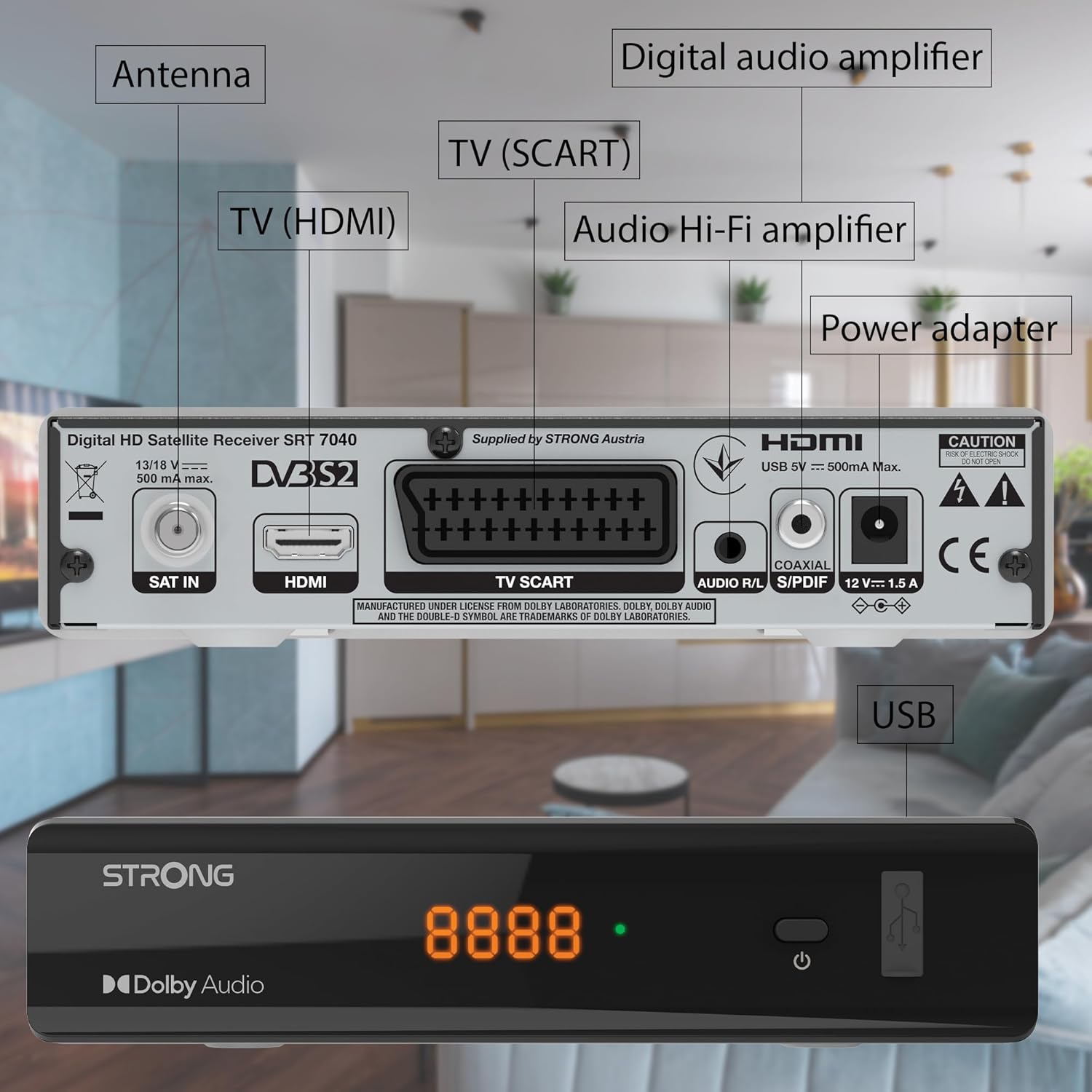
Image: The Strong SRT 7040 DTT Tuner displaying a timer icon, indicating its scheduling capabilities.
- ተወዳጅ ዝርዝሮች፡ Create customized lists of your preferred channels for quick access.
- የትርጉም ጽሑፎች፡- Enable or disable subtitles for compatible broadcasts using the SUB በርቀት መቆጣጠሪያው ላይ ያለው አዝራር.
- የኤሌክትሮኒክ ፕሮግራም መመሪያ (EPG)፡- የሚለውን ይጫኑ ኢ.ፒ.ጂ አዝራር ወደ view program information for upcoming broadcasts.
- ዶልቢ ኦዲዮ፡ The receiver supports Dolby Audio for a high-quality sound experience.

Image: The Strong SRT 7040 DTT Tuner with the Dolby Audio logo, illustrating its sound processing capability.
3. ጥገና
3.1 ጽዳት
To clean the receiver, disconnect it from the power supply. Use a soft, dry cloth to wipe the exterior. Do not use liquid cleaners, aerosols, or abrasive materials, as these can damage the finish or internal components.
3.2 የሶፍትዌር ዝመናዎች
በየጊዜው የአምራቹን ያረጋግጡ website for available software updates. Updates can improve performance, add new features, or resolve issues. Software updates are typically performed via the USB port following specific instructions provided with the update file.
3.3 የደህንነት መረጃ
- መቀበያውን አይክፈቱ casinሰ. በውስጥም ለተጠቃሚ አገልግሎት የሚሰጡ ክፍሎች የሉም። ሁሉንም አገልግሎቶች ብቁ ለሆኑ ባለሙያዎች ያመልክቱ።
- መቀበያውን ከፀሐይ ብርሃን፣ ከሙቀት ምንጮች እና ከእርጥበት ያርቁ።
- ከመጠን በላይ ሙቀትን ለመከላከል በመሳሪያው ዙሪያ በቂ የአየር ዝውውርን ያረጋግጡ።
- የቀረበውን የኃይል አስማሚ ብቻ ይጠቀሙ።
4. መላ መፈለግ
If you encounter problems with your SRT 7040, consult the following table before contacting support.
| ችግር | ሊሆን የሚችል ምክንያት | መፍትሄ |
|---|---|---|
| ኃይል የለም | የኃይል አስማሚ አልተገናኘም፤ የኃይል መውጫው ችግር አለበት | Check power adapter connection; Try a different power outlet |
| ምንም ምልክት የለም / ጥቁር ማያ | Satellite cable loose or disconnected; Incorrect input selected on TV; Satellite dish alignment issue | Check SAT IN cable connection; Ensure TV is on correct HDMI/SCART input; Perform a channel scan; Consult a professional for dish alignment if necessary |
| የርቀት መቆጣጠሪያ አይሰራም | ባትሪዎች ተሟጠዋል ወይም በትክክል አልተገቡም፤ በርቀት መቆጣጠሪያ እና በተቀባዩ መካከል እንቅፋት | Replace batteries; Ensure correct polarity; Remove any obstructions; Point remote directly at receiver |
| ደካማ የምስል ጥራት | Weak satellite signal; Incorrect display settings | Check satellite signal strength in menu; Adjust TV display settings; Ensure Full HD content is being broadcast |
5. ዝርዝሮች
The following are the technical specifications for the Strong SRT 7040 Digital Satellite HD Receiver:
- ሞዴል፡ SRT 7040 (SAT FTA Full HD)
- የምርት ስም፡ ጠንካራ
- መጠኖች፡- 3.39 x 6.46 x 1.38 ኢንች (8.6 x 16.4 x 3.5 ሴሜ)
- የእቃው ክብደት፡ 9.2 አውንስ (260 ግራም)
- ቀለም፡ ጥቁር
- የግንኙነት ቴክኖሎጂ; ዩኤስቢ
- ጥራዝtage: 100 - 240 ቮ
- ድግግሞሽ፡ 50 - 60 ኸርዝ
- የኃይል ፍጆታ; 18 kWh (operational, typical)
- የሚሰራ የሙቀት መጠን; ከ 0º ሴ እስከ 40º ሴ
- አንጻራዊ እርጥበት; 10% - 95%
- ባትሪዎች፡ 2 AAA ባትሪዎች (ለርቀት ተካትቷል)
- ዝርዝር መግለጫ DVB-S2
- ተካትቷል፡ Wally Receiver
6. ዋስትና እና ድጋፍ
For warranty information and technical support, please refer to the warranty card included in your product packaging or visit the official Strong webጣቢያ. ለዋስትና ጥያቄዎች የግዢ ደረሰኝዎን እንደ ግዢ ማረጋገጫ ያቆዩት።
For further assistance, you may contact Strong customer service through the contact details provided on their official webጣቢያ.


