1. በላይview
The Godox XProII-S is a TTL wireless flash trigger specifically designed for Sony cameras. It offers advanced features for controlling lighting in flash photography, including TTL autoflash, 1/8000s High-Speed Sync (HSS), and a robust 2.4G wireless system. This manual provides comprehensive instructions for the setup, operation, and maintenance of your XProII-S trigger, ensuring you can achieve professional lighting results with ease.
ቁልፍ ባህሪዎች
- TTL Autoflash and Manual Flash Modes
- 1/8000s High-Speed Sync (HSS) and Second-Curtain Sync
- TCM (TTL-Convert-Manual) Function for efficient workflow
- Integrated 2.4GHz Godox Wireless System for reliable control
- Bluetooth Connectivity for remote control via Godox Flash App
- New Quick-Release Lock for secure and easy mounting
- SCAN Function for automatic channel selection

Figure 1.1: The Godox XProII-S TTL Wireless Flash Trigger, a versatile tool for Sony camera users.

Figure 1.2: The XProII-S features an upgraded control system for an intuitive, efficient, and professional lighting experience.
2. ማዋቀር
2.1 የባትሪ ጭነት
The XProII-S requires two AA batteries (not included). To install:
- የባትሪውን ክፍል ሽፋን በመሳሪያው ግርጌ ላይ ያግኙ።
- ሽፋኑን ይክፈቱት.
- Insert the two AA batteries, ensuring correct polarity as indicated inside the compartment.
- የባትሪውን ክፍል ደህንነቱ በተጠበቀ ሁኔታ ይዝጉ።
2.2 Mounting to Camera Hotshoe
To attach the XProII-S to your Sony camera:
- Slide the trigger's hotshoe foot into your camera's hotshoe.
- Push the quick-release lock lever forward until it clicks into place, securing the trigger firmly to the camera.
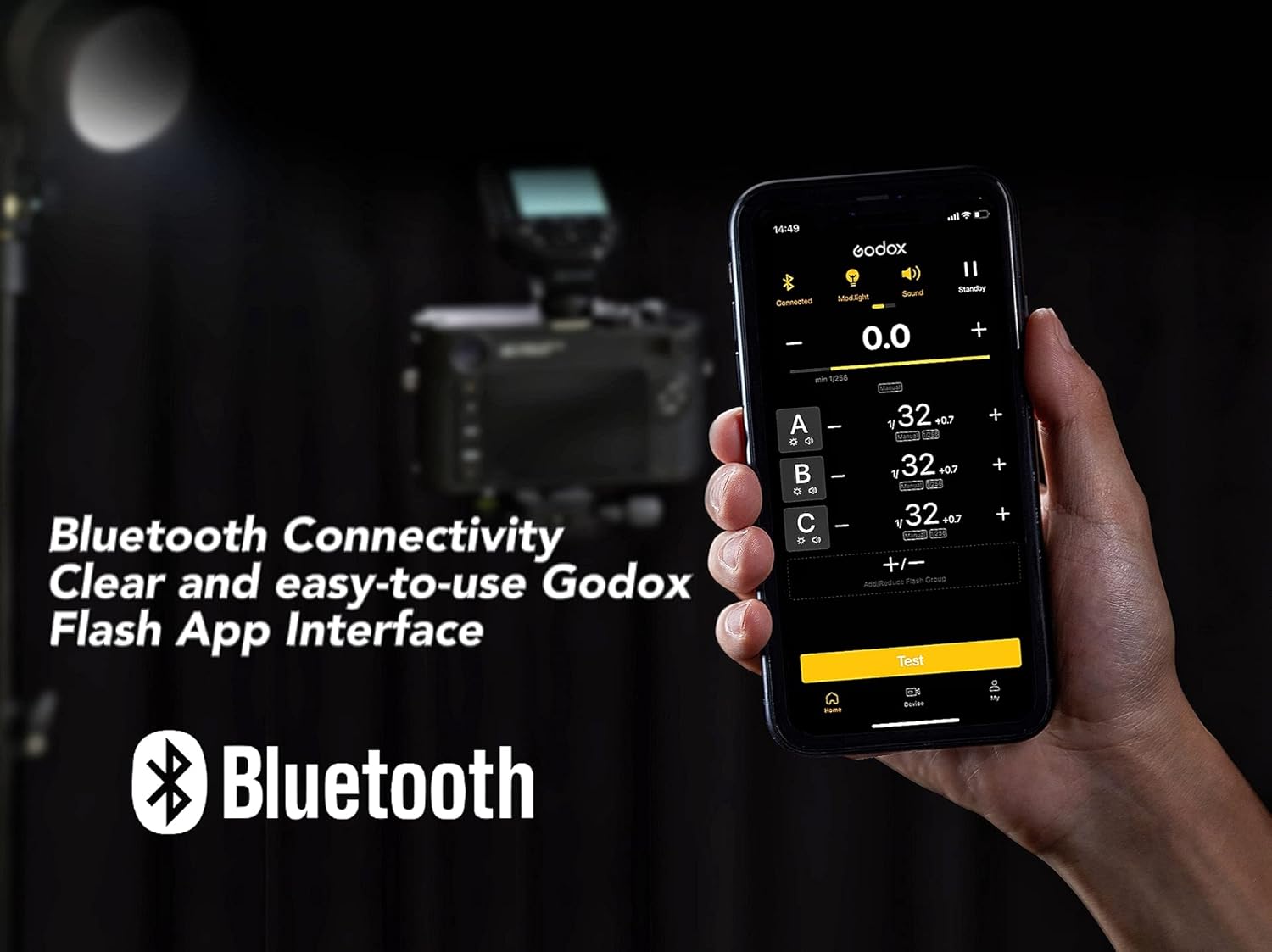
Figure 2.1: The quick-release lock ensures the trigger is securely mounted on the camera's hotshoe.

ምስል 2.2፡ ዝርዝር view of the quick-release lock, designed for efficient and convenient attachment.
2.3 ማብራት / ማጥፋት
Press and hold the power button located on the side of the unit to turn the XProII-S on or off.
2.4 የመጀመሪያ ቅንጅቶች
Upon first use or after a factory reset, you may be prompted to configure basic settings. Follow the on-screen instructions to set parameters such as language and time. Navigate through menus using the control dial and confirm selections with the SET button.
2.5 ገመድ አልባ ማጣመር
The XProII-S utilizes a 2.4GHz Godox Wireless System. To establish communication with compatible flash units:
- Ensure both the XProII-S and the flash unit are powered on.
- Set the same ቻናል (CH)፣ ቡድን (GR), and ገመድ አልባ መታወቂያ (ID) on both the trigger and the flash unit. The XProII-S supports 32 channels and either 5 or 16 groups (selectable in the menu), with 99 wireless ID settings (OFF, 01-99).
- Once settings match, the units will automatically pair.
3. የአሠራር መመሪያዎች
3.1 መሰረታዊ የፍላሽ ሁነታዎች
- ቲቲኤል ራስ ፍላሽ፡ The trigger supports Through-The-Lens (TTL) autoflash, allowing the camera to automatically determine the correct flash output for optimal exposure.
- በእጅ ብልጭታ፡- For precise control, adjust the flash output power manually. This mode is ideal for consistent lighting in controlled environments.
- ባለከፍተኛ ፍጥነት ማመሳሰል (HSS)፦ Achieve shutter speeds up to 1/8000s. This is useful for freezing fast motion or using wide apertures in bright ambient light conditions.
- ሁለተኛ-መጋረጃ ማመሳሰል፡- Synchronize the flash with the closing of the shutter curtain. This creates a natural-looking light trail behind moving subjects.
- ስትሮቦስኮፒክ ፍላሽ፡ Fire multiple flashes during a single exposure to capture sequential motion of a subject.

Figure 3.1: The extra-large LCD screen provides a real-time display of remote flash settings.

Figure 3.2: The XProII-S supports HSS (High-Speed Sync) up to 1/8000s and TTL (Auto Flash) modes.
3.2 የላቀ ተግባራት
- TCM (TTL-Convert-Manual) Function: This two-way function allows instant conversion from TTL mode to Manual mode with retained parameters, and back again. This streamlines your workflow by allowing you to fine-tune manual settings based on an initial TTL reading without repetition.

Figure 3.3: TCM mode allows for quick conversion of TTL settings to manual power for fine adjustments.
- Bluetooth Connectivity & Godox Flash App: The XProII-S features built-in Bluetooth. Download the Godox Flash App on your iPhone, Android smartphone, or tablet to remotely adjust lighting parameters with a clear and user-friendly interface.

Figure 3.4: Control your XProII-S and connected flashes remotely using the Godox Flash App via Bluetooth.
- የSCAN ተግባር፡- In environments with potential signal interference, activate the SCAN function. The XProII-S will automatically search for and suggest spare channels and IDs, helping to avoid interference and improve connection stability.

Figure 3.5: Use the SCAN function to find the most stable wireless channel in busy environments.
- የፍላሽ ተጋላጭነት ማካካሻ (ኤፍኢሲ)፦ Adjust flash output by ±3 EV in 1/3 EV increments to fine-tune exposure.
- አጉላ ቅንብር፡- Control the zoom value of compatible flash units directly from the transmitter, from AUTO or 24mm to 200mm.
- ሞዴሊንግ ኤልamp ቁጥጥር፡- Enable or disable the modeling lamp on compatible flash units directly from the XProII-S.
- Beeper Control: Turn the beeper sound on or off for compatible flash units.
- Wireless Shutter: When used with an optional X1R-S receiver (sold separately) and a 2.5mm sync cord, the XProII-S can remotely trigger your camera's shutter.
- Sekonic Light Meter Integration: The XProII-S can integrate with Sekonic L-858 light meters (equipped with a built-in Godox 2.4G module) to adjust flash parameters directly after metering, enhancing precision and convenience.

Figure 3.6: The XProII-S can be used in conjunction with a Sekonic L-858 light meter for precise flash control.

Figure 3.7: The L-858 mode allows the light meter to prioritize control over connected lights.
4. ጥገና
4.1 ጽዳት
Use a soft, dry cloth to clean the exterior of the XProII-S. Avoid using harsh chemicals, solvents, or abrasive materials, as these can damage the finish or internal components.
4.2 የባትሪ እንክብካቤ
If the trigger will not be used for an extended period, remove the AA batteries to prevent potential leakage and damage to the unit.
4.3 የጽኑ ማላቅ
Godox አፈጻጸሙን ለማሻሻል እና አዲስ ባህሪያትን ለመጨመር የጽኑ ትዕዛዝ ዝመናዎችን በየጊዜው ይለቃል። ኦፊሴላዊውን Godox ያረጋግጡ website for the latest firmware. Upgrades can be performed via the Type-C USB port on the side of the unit.
5. መላ መፈለግ
If you encounter issues with your XProII-S, refer to the following common problems and solutions:
- ብልጭታ የማይተኮስ ቀስቅሴ፡
- Ensure the XProII-S is securely mounted on the camera's hotshoe.
- Check that both the trigger and the flash unit have sufficient battery power.
- Verify that the flash unit is powered on and properly paired (same channel, group, and wireless ID).
- Confirm the camera's flash settings are correctly configured.
- ወጥ ያልሆነ የፍላሽ ውፅዓት፡-
- Check for potential signal interference; use the SCAN function to find a clear wireless channel.
- Ensure the flash unit is within the effective transmission range (approximately 0-100m).
- Verify battery levels in both the trigger and the flash unit.
- የብሉቱዝ ግንኙነት ችግሮች፡-
- Ensure Bluetooth is enabled on both the XProII-S and your smart device.
- Restart the Godox Flash App and the XProII-S.
- Check for updates to the Godox Flash App.
- የኤል ሲ ዲ ማያ ገጽ በትክክል አይታይም፦
- Restart the trigger.
- የባትሪ ደረጃዎችን ይፈትሹ.
- If the issue persists, contact Godox customer support.
6. ዝርዝሮች
| ባህሪ | ዝርዝር መግለጫ |
|---|---|
| ሞዴል | XProII-ኤስ |
| የኃይል አቅርቦት | 2 * AA batteries (Not Included) |
| ልኬቶች (L x W x H) | 95ሚሜ x 62ሚሜ x 49ሚሜ (3.74 x 2.44 x 1.93 ኢንች) |
| የተጣራ ክብደት | 93 ግ (3.28 አውንስ) |
| ተስማሚ ካሜራዎች | For Sony cameras (TTL autoflash), e.g., a77 II, a77, a99, ILCE-6000L, a9, A7R, A7RII, a350, DSC-RX10, A7IV, A7C, A7M4 |
| ተስማሚ የፍላሽ ሞዴሎች | AD300Pro, AD100Pro, AD600B, AD200, AD200Pro, V850II/III series, V1 series, V860II/III series, TT685II series, TT685 series, TT585 series, TT600 series, V350S, TT350S, QTIII series, SK300IIV, SK400IIV, MS300V, MS200V, DPII series, DPIII series |
| TTL Autoflash | አዎ |
| በእጅ ብልጭታ | አዎ |
| ስትሮቦስኮፒክ ብልጭታ | አዎ |
| የፍላሽ ተጋላጭነት ማካካሻ | ±3EV (1/3 EV increment) |
| የፍላሽ ተጋላጭነት መቆለፊያ | አዎ |
| ባለከፍተኛ ፍጥነት ማመሳሰል (HSS) | አዎ (እስከ 1/8000 ድረስ) |
| ሁለተኛ-መጋረጃ አመሳስል | አዎ |
| የትኩረት እገዛ | አዎ |
| ሞዴሊንግ ኤልamp ብልጭታ መቆጣጠሪያ | አዎ |
| ቢፐር መቆጣጠሪያ | አዎ |
| ሽቦ አልባ መከለያ | Yes (via 2.5mm sync cord jack with receiver) |
| አጉላ ቅንብር | AUTO ወይም ከ24 እስከ 200 |
| TCM ተግባር | አዎ |
| የጽኑ ትዕዛዝ አሻሽል። | Via Type-C USB port |
| የማህደረ ትውስታ ተግባር | Settings stored 2 seconds after last operation and recovered after restart |
| ማሳያ | ትልቅ የኤል ሲ ዲ ፓነል፣ የኋላ መብራት በርቷል ወይም ጠፍቷል |
| የማስተላለፊያ ክልል (በግምት) | 0-100ሜ |
| አብሮ የተሰራ ገመድ አልባ | 2.4 ጊኸ |
| የማስተካከያ ሁነታ | MSK |
| ቻናል | 32 |
| ገመድ አልባ መታወቂያ | ጠፍቷል፣ 01-99 |
| ቡድን | 5 groups or 16 groups (selectable in menu) |
7. ዋስትና እና ድጋፍ
For detailed warranty information, product registration, and technical support, please refer to the warranty card included with your product or visit the official Godox webጣቢያ። ለማንኛውም የዋስትና ጥያቄዎች የግዢ ደረሰኝዎን እንደ ማረጋገጫ ማስቀመጥ ይመከራል።


