1. ጠቃሚ የደህንነት መመሪያዎች
እባክዎ ይህንን ምርት ከመጠቀምዎ በፊት ሁሉንም የደህንነት መመሪያዎች ያንብቡ እና ይረዱ። እነዚህን መመሪያዎች አለመከተል የኤሌክትሪክ ንዝረትን፣ እሳትን ወይም ከባድ ጉዳትን ሊያስከትል ይችላል።
- መሳሪያውን ለከፍተኛ ሙቀት፣ ቀጥተኛ የፀሐይ ብርሃን ወይም ከፍተኛ እርጥበት አያጋልጡት።
- Keep the device away from water and other liquids. If it gets wet, turn it off immediately and allow it to dry completely before reuse.
- መሳሪያውን ለመበተን፣ ለመጠገን ወይም ለማሻሻል አይሞክሩ። ሁሉንም አገልግሎት ለሚሰጡ ባለሙያዎች ያማክሩ።
- Use only specified charging methods (USB-C, solar, hand crank).
- ልጆች በማይደርሱበት ቦታ ያስቀምጡ.
- በአካባቢያዊ ደንቦች መሠረት ባትሪዎችን ያስወግዱ።
2. ምርት አብቅቷልview
The FosPower Emergency Weather Radio Model A6 is a versatile device designed for emergency preparedness and outdoor activities. It features multiple power sources, radio reception, lighting, and a power bank function.
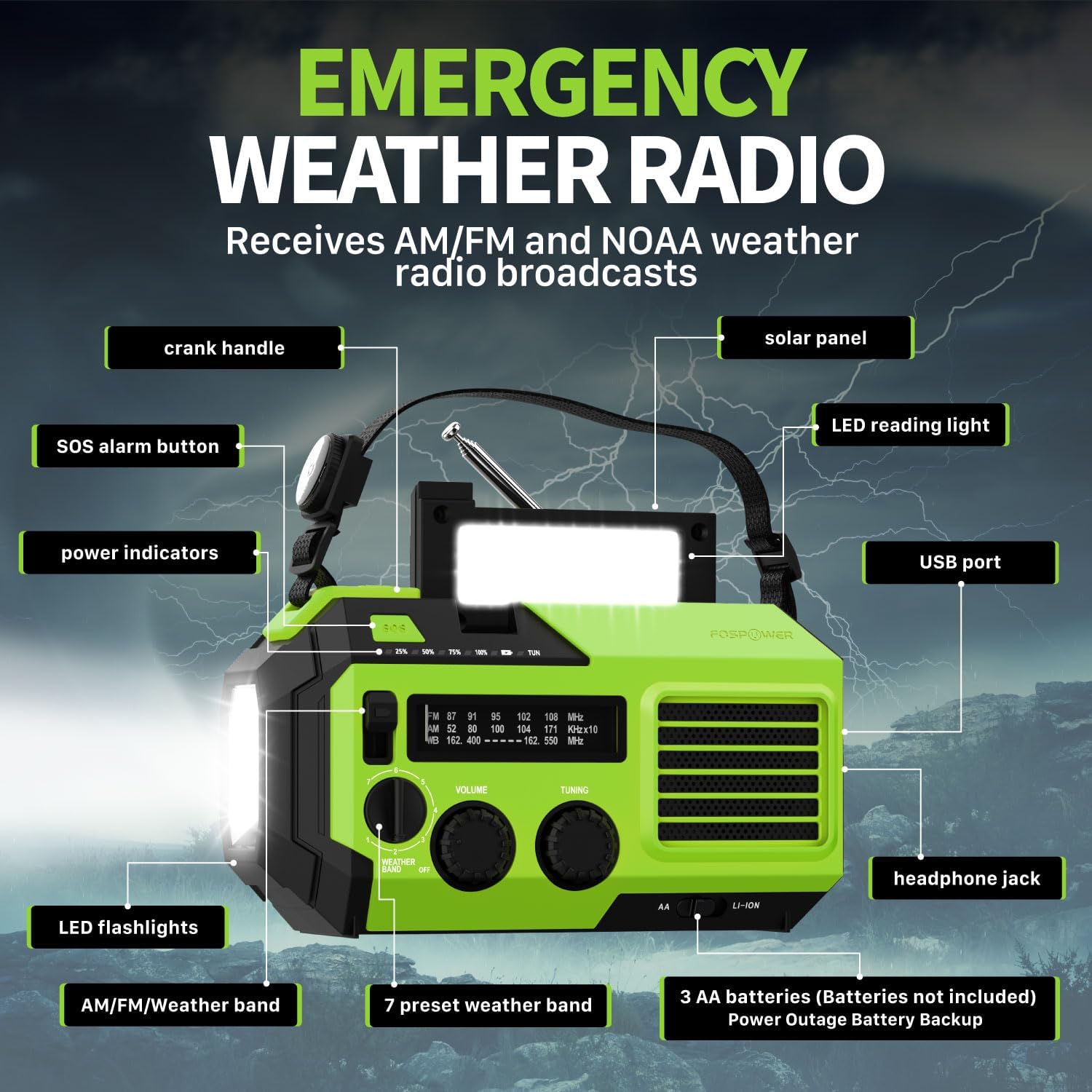
ምስል 2.1፡ ፊት view of the FosPower Emergency Weather Radio with key components labeled, including the crank handle, solar panel, SOS alarm button, power indicators, LED reading light, USB port, LED flashlights, AM/FM/Weather band selector, volume and tuning knobs, and headphone jack.
ቁልፍ ባህሪዎች
- NOAA/AM/FM Radio: Access local weather information and emergency hazard alerts, as well as standard AM/FM broadcasts.
- 19240mWh (5200mAh) የኃይል ባንክ፡ Charge USB devices during power outages or in outdoor settings.
- በርካታ የኃይል ምንጮች; Recharge via USB-C cable, solar panel, or hand crank. Can also be powered by AA batteries (not included).
- SOS ማንቂያ፡- ለአደጋ ጊዜ ምልክት ማድረጊያ ከፍተኛ ድምፅ ያለው ሳይረን እና ብልጭ ድርግም የሚል መብራት ያነቃቃል።
- የተዋሃደ ብርሃን; Features a powerful flashlight and a reading light.
- IPX3 የውሃ መቋቋም; ከውሃ መፍሰስ መከላከያ ይሰጣል።
3. ማዋቀር
3.1 የመጀመሪያ ደረጃ መሙላት
Before first use, fully charge the internal battery using the provided USB-C cable. Connect the USB-C cable to the radio's USB-C port and the other end to a USB power adapter (not included) or a computer USB port. The power indicators will illuminate to show charging progress.
3.2 AA Battery Installation (Optional)
The radio can also operate on 3 AA batteries (not included) as a backup power source. Open the battery compartment cover on the back of the radio and insert 3 AA batteries, ensuring correct polarity. Close the cover securely.

ምስል 3.1፡ የኋላ view of the radio highlighting the solar panel, hand-crank, AA battery compartment, and USB charging port, illustrating the multiple power sources.
4. የአሠራር መመሪያዎች
4.1 የሬዲዮ ኦፕሬሽን
- ማብራት/ማጥፋት፡ Rotate the 'VOLUME' knob clockwise to turn the radio on and adjust the volume. Rotate counter-clockwise until it clicks to turn off.
- የባንዱ ምርጫ Use the 'WEATHER BAND' switch to select between AM, FM, or WB (Weather Band).
- መቃኘት: Rotate the 'TUNING' knob to scan for radio stations. Extend the telescopic antenna for improved reception, especially for FM and WB.
- NOAA የአየር ሁኔታ ባንድ When WB is selected, the radio will receive NOAA weather alerts. The radio supports 7 preset weather bands.
- የጆሮ ማዳመጫ ጃክ For private listening, connect 3.5mm headphones to the headphone jack.
4.2 Flashlight and Reading Light

Image 4.1: The radio demonstrating its high-power flashlight and cool-tone reading lamp ባህሪያት.
- የእጅ ባትሪ፡ Press the flashlight button located on the front of the radio to turn the flashlight on or off.
- የንባብ ብርሃን፡- Lift the solar panel to reveal the LED reading light. Press the reading light button to turn it on or off.
4.3 SOS ማንቂያ
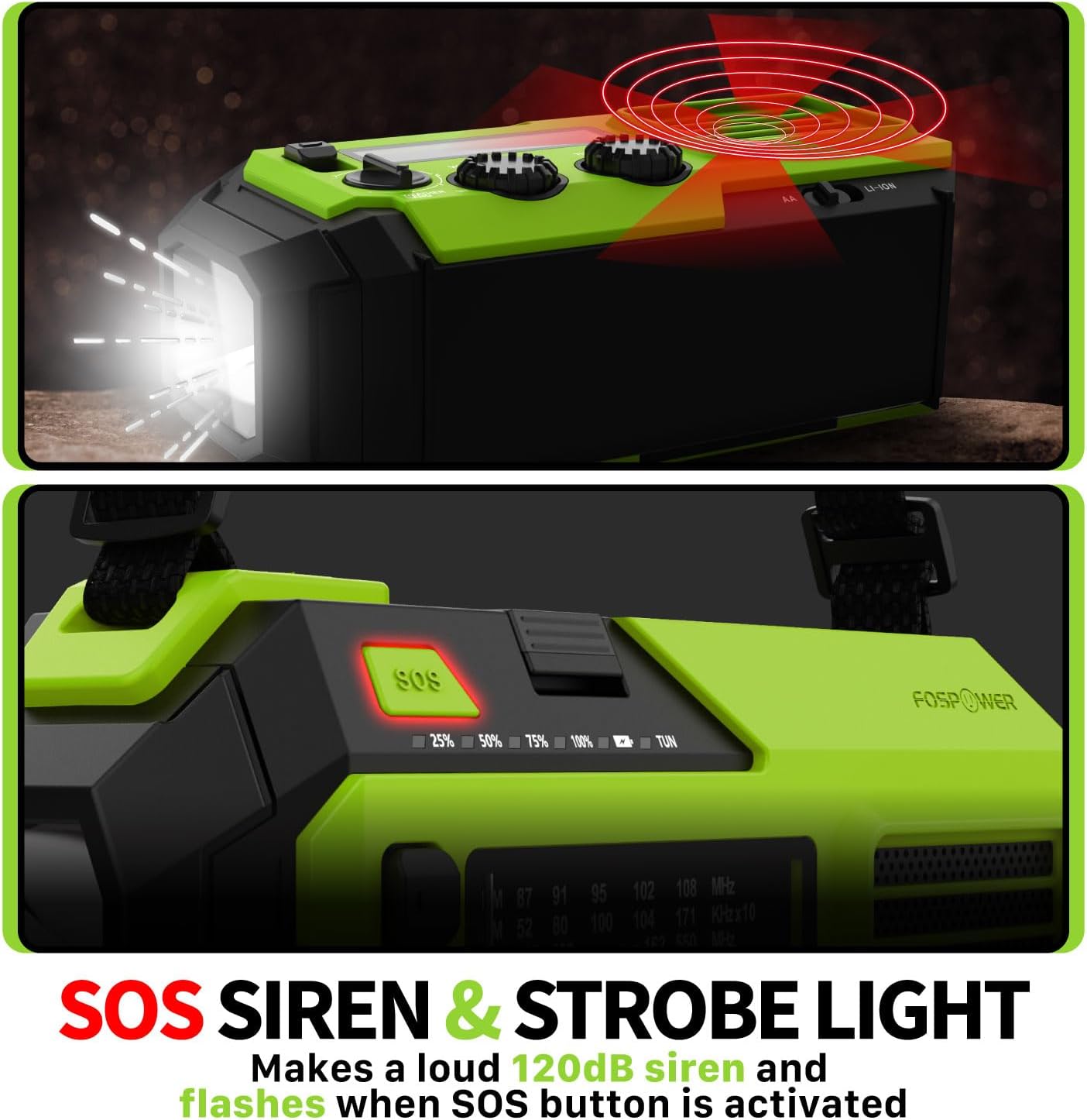
Image 4.2: Close-up of the radio's SOS button and an illustration of the siren and strobe light being activated.
In an emergency, press and hold the 'SOS' button to activate a loud 120dB siren and a flashing strobe light. Press the 'SOS' button again to deactivate.
4.4 ውጫዊ መሳሪያዎችን መሙላት (የኃይል ባንክ)

Image 4.3: The radio connected via USB to a smartphone, demonstrating its power bank capability for charging small electronics.
Connect your USB-powered device (e.g., smartphone, tablet) to the radio's USB-A output port using your device's charging cable. The radio's internal battery will begin charging your device.
4.5 ሬዲዮን መሙላት
- የዩኤስቢ-ሲ ኃይል መሙላት; Connect the provided USB-C cable to the radio's USB-C input port and a USB power source. This is the most efficient charging method.
- የፀሐይ ኃይል መሙላት; Place the radio with the solar panel facing direct sunlight. The solar panel charges the internal battery, primarily for maintaining charge or slow charging in emergencies.
- የእጅ ክራንች መሙላት; Rotate the hand crank clockwise or counter-clockwise at a steady pace (approximately 130-150 RPM) for 3-5 minutes to generate power for short-term use or to initiate charging.
5. ጥገና
- ማጽዳት፡ ሬዲዮውን ለስላሳ እና ደረቅ ጨርቅ ይጥረጉ. ገላጭ ማጽጃዎችን ወይም ፈሳሾችን አይጠቀሙ.
- ማከማቻ፡ Store the radio in a cool, dry place away from direct sunlight when not in use for extended periods. For optimal battery health, fully charge the internal battery every 3-6 months.
- የባትሪ እንክብካቤ If using AA batteries, remove them if the radio will not be used for a long time to prevent leakage.
6. መላ መፈለግ
| ችግር | ሊሆን የሚችል ምክንያት | መፍትሄ |
|---|---|---|
| ሬዲዮ አይበራም። | Internal battery is depleted; AA batteries are depleted or incorrectly installed. | Charge the internal battery via USB-C or hand crank. Check and replace AA batteries if used. |
| ደካማ የሬዲዮ አቀባበል። | አንቴና አልተዘረጋም፤ ደካማ የሲግናል አካባቢ፤ ጣልቃ ገብነት። | Fully extend the telescopic antenna. Adjust radio position. Try tuning to a stronger station. |
| ውጫዊ መሳሪያ እየሞላ አይደለም። | Radio's internal battery is low; incorrect cable; device not compatible. | Ensure the radio's internal battery is sufficiently charged. Use a functional USB charging cable. Verify device compatibility. |
| Hand crank is stiff or not generating power. | Mechanism obstruction; improper cranking speed. | Ensure no obstructions. Crank at a steady, moderate pace (130-150 RPM). |
7. ዝርዝሮች
| ባህሪ | ዝርዝር |
|---|---|
| የሞዴል ቁጥር | FOSPWB-2419 |
| የምርት ልኬቶች | 6.76 x 3.52 x 2.59 ኢንች |
| የእቃው ክብደት | 1.08 ፓውንድ |
| የውስጥ ባትሪ | 19240ሜኸር (5200ሜኸር) |
| External Battery Support | 3 x AA ባትሪዎች (አልተካተተም) |
| የሬዲዮ ባንዶች | AM, FM, NOAA Weather Band (WB) |
| የመሙያ ዘዴዎች | USB-C, Solar, Hand Crank |
| ልዩ ባህሪያት | Built-In Flashlight, Reading Light, SOS Alarm, Power Bank |
| የውሃ መቋቋም | IPX3 |
8. ዋስትና እና ድጋፍ
FosPower provides a limited lifetime warranty for this product. For warranty claims, technical assistance, or customer service inquiries, please contact FosPower's USA-based customer support team. Refer to the official FosPower webለእውቂያ ዝርዝሮች ጣቢያ ወይም የግዢ ሰነድዎ።


