መግቢያ
This manual provides detailed instructions for the setup, operation, maintenance, and troubleshooting of your Makeid L1 Portable Wireless Sticker Label Maker Machine. Please read this manual thoroughly before using the device to ensure proper function and longevity.
በሣጥኑ ውስጥ ያለው
ሁሉም ክፍሎች በጥቅሉ ውስጥ መገኘታቸውን ያረጋግጡ፡-
- Makeid L1 Label Maker Machine
- 4-meter roll of label tape
- የዩኤስቢ ባትሪ መሙያ ገመድ
- የተጠቃሚ መመሪያ (ይህ ሰነድ)
ምርት አልቋልview
Familiarize yourself with the key components of your Makeid L1 Label Maker.

ምስል፡ አልቋልview of the Makeid L1 Label Maker, highlighting the power button, the lid for tape replacement, and the integrated cutter for crisp labels.
- የኃይል ቁልፍ፡- Located on the side, used to turn the device on/off.
- ክዳን፡ Opens to access the tape compartment for loading and replacing label rolls.
- አብሮገነብ መቁረጫ; Ensures clean and precise cuts of printed labels.
- የመለያ ውፅዓት ማስገቢያ፡ የታተሙ መለያዎች የሚወጡበት።
- የኃይል መሙያ ወደብ; USB port for recharging the device.
ማዋቀር
1. መሣሪያውን በመሙላት ላይ
Before first use, ensure the label maker is fully charged. Connect the provided USB charging cable to the device's charging port and a compatible USB power source (e.g., computer USB port, USB wall adapter). The indicator light will show charging status (refer to device specific light indicators for full/charging status).
2. የሌብል ቴፕ በመጫን ላይ
The Makeid L1 supports various label tape widths (9mm, 12mm, 16mm) and types (continuous, die-cut, transparent, white, colored, pattern). Ensure the tape is correctly oriented.
- Open the lid of the label maker.
- Insert the label roll into the compartment, ensuring the tape feeds out from the bottom and through the output slot.
- ሽፋኑን በጥንቃቄ ይዝጉ.
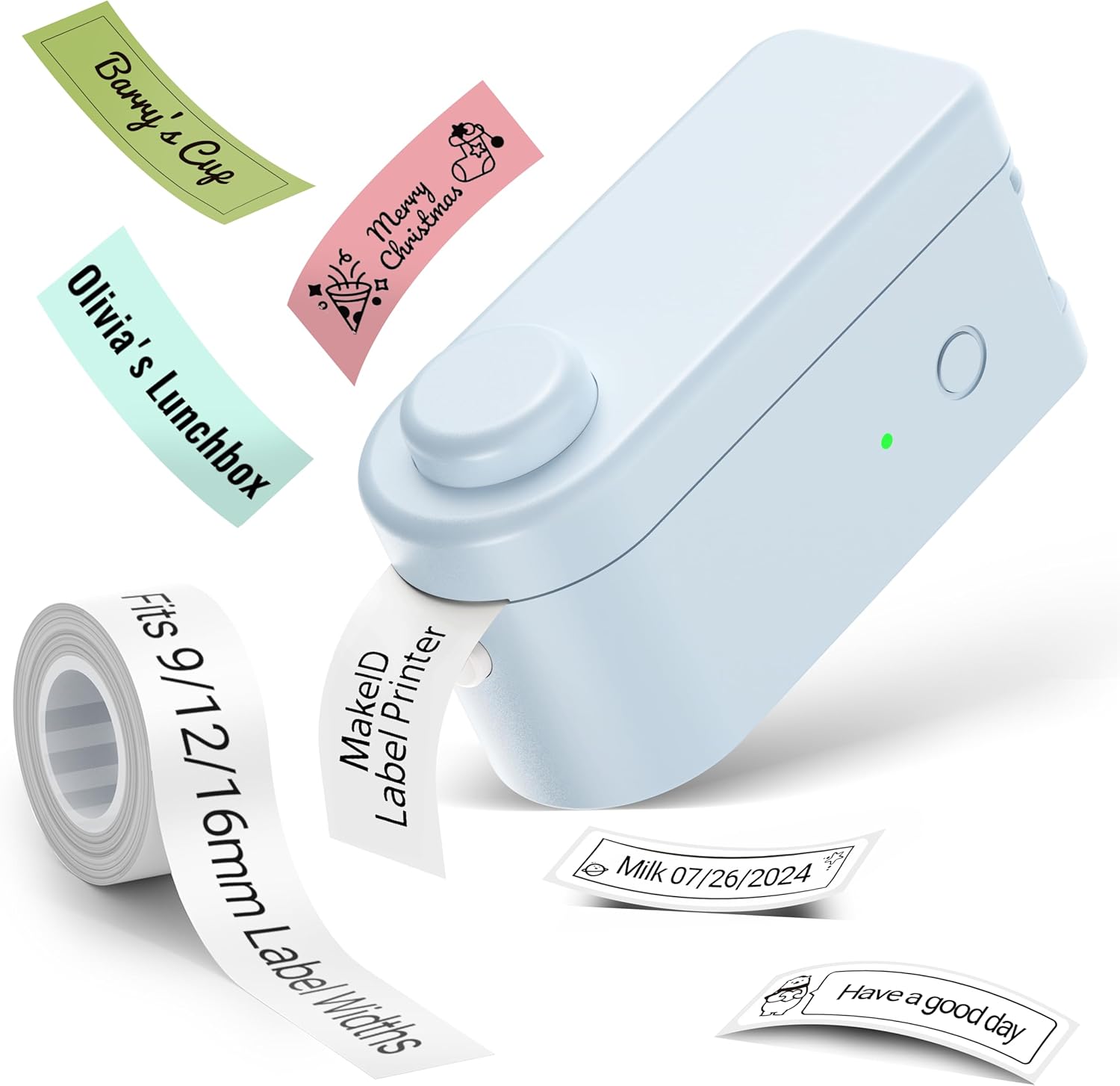
ምስል፡ The Makeid L1 Label Maker demonstrating the label tape roll and examples of printed labels, including continuous and die-cut types.
3. መተግበሪያውን በማውረድ እና በመጫን ላይ
The Makeid L1 operates via a dedicated mobile application. ፈልግ "MakeID-Life" on your device's app store.

ምስል፡ Screenshots showing the "Get it on Google Play" and "Download on the App Store" buttons, indicating where to find the MakeID-Life application.
4. የብሉቱዝ ማጣመር
The label maker connects to your smartphone via Bluetooth.
- በእርስዎ ዘመናዊ ስልክ ላይ ብሉቱዝ መንቃቱን ያረጋግጡ።
- Turn on the Makeid L1 Label Maker by pressing the power button. The indicator light will flash, indicating it's ready for pairing.
- Open the "MakeID-Life" app. The app will automatically search for nearby devices.
- Select "L1" from the list of available devices to connect. Once connected, the indicator light on the label maker will become solid.

ምስል፡ A visual guide demonstrating the three steps for Bluetooth connection: turning on Bluetooth, selecting the L1 model within the app, and confirming the device connection.
የአሠራር መመሪያዎች
1. Designing Your Label
The "MakeID-Life" app offers extensive customization options:
- የጽሑፍ ግቤት፡- Type your desired text.
- ፊደላት፡ Choose from 88 different font styles.
- አዶዎች እና ምልክቶች Access over 600 icons and various symbols.
- አብነቶች፡ Utilize over 400 pre-designed templates for various purposes (e.g., kitchen, office, school).
- Borders & Frames: Add decorative borders.
- ሌሎች ተግባራት፡- Create barcodes, QR codes, tables, dates, and patterns.
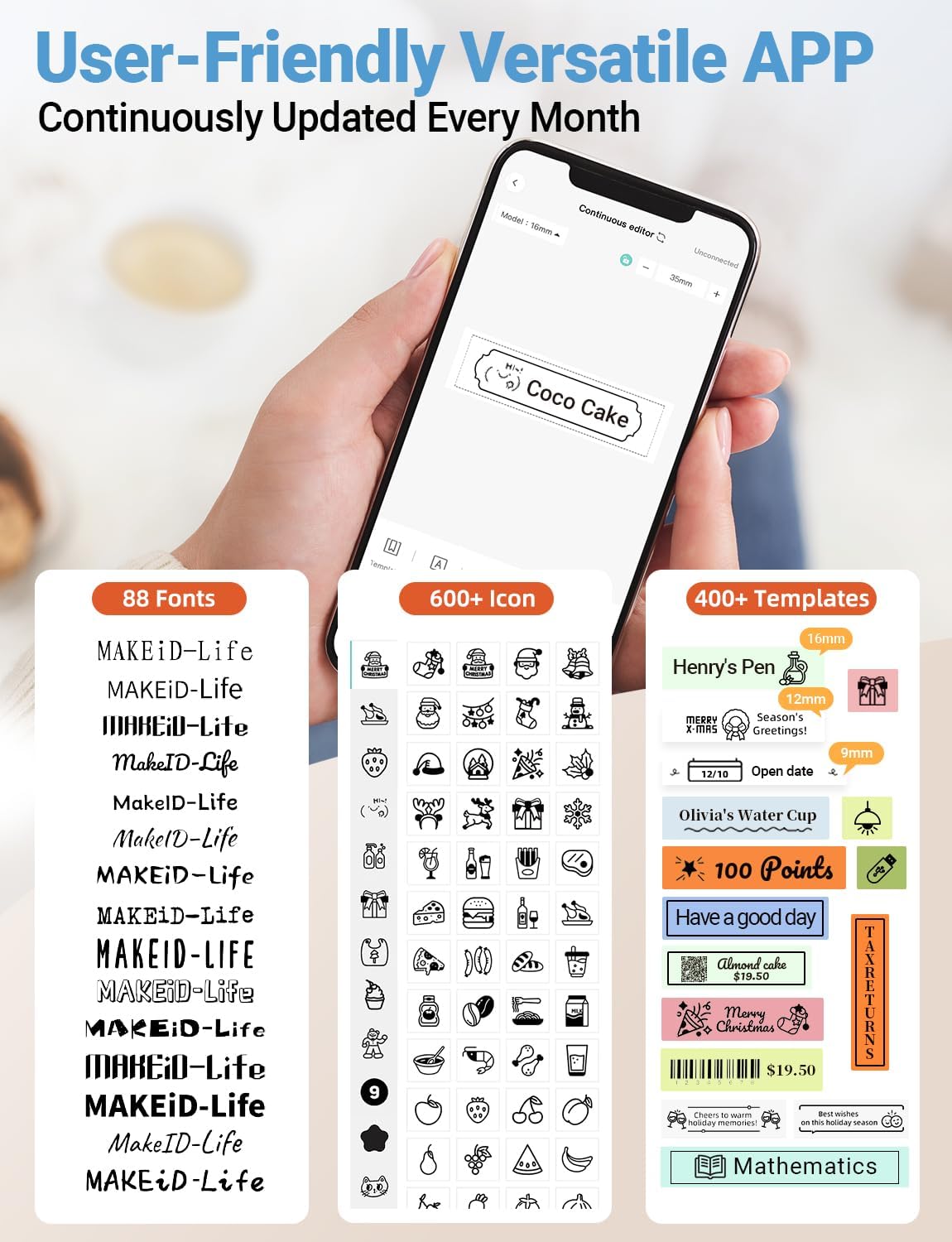
ምስል፡ ዝርዝር view of the MakeID-Life app interface, showcasing the wide selection of 88 fonts, over 600 icons, and more than 400 templates available for label customization.
2. የህትመት መለያዎች
Once your design is complete in the app:
- Review your label design on the app screen.
- Tap the "Print" button within the app.
- The label will be thermally printed and emerge from the output slot.
3. መለያዎችን መቁረጥ
The Makeid L1 features a built-in cutter for clean edges.
- After printing, gently pull the label forward slightly.
- Press the cutting button (refer to the Product Overview image for location) to cleanly cut the label.

ምስል፡ Illustration of the Makeid L1's built-in cutter, demonstrating how it provides professional and safe cutting of labels, eliminating messy torn edges.
4. Types of Label Printing
The L1 supports two primary types of label printing:
- ተከታታይ መለያዎች፡ Ideal for custom lengths, allowing you to print text of any length and cut it precisely.
- Die-Cut Labels: Pre-sized labels with specific shapes, perfect for consistent labeling of items like jars or files.

ምስል፡ Visual representation of continuous labels, which can be cut to any length, and die-cut labels, which are pre-shaped for specific applications.
ጥገና
የህትመት ጭንቅላትን ማጽዳት
To ensure optimal print quality, periodically clean the thermal print head.
- Turn off the label maker and disconnect it from the power source.
- Open the lid and remove the label tape.
- የህትመት ጭንቅላቱን ለስላሳ፣ ያለ ልጣጭ ጨርቅ በቀስታ ይጥረጉ።ampበአይሶፕሮፒል አልኮሆል የተጠቃ። ውሃ ወይም ሻካራ ማጽጃዎችን አይጠቀሙ።
- Allow the print head to dry completely before reinserting the tape and closing the lid.
ማከማቻ
Store the label maker in a cool, dry place away from direct sunlight and extreme temperatures. Remove the label tape if storing for extended periods.
መላ መፈለግ
ለጋራ ጉዳዮች እና መፍትሄዎቻቸው ከዚህ በታች ያለውን ሰንጠረዥ ይመልከቱ።
| ችግር | ሊሆን የሚችል ምክንያት | መፍትሄ |
|---|---|---|
| መሣሪያ አይበራም | ዝቅተኛ ባትሪ. | የቀረበውን የዩኤስቢ ገመድ ተጠቅመው መሳሪያውን ይሙሉት። |
| በብሉቱዝ መገናኘት አልተቻለም። | Bluetooth is off on phone; device not in pairing mode; app issue. | Ensure Bluetooth is enabled on your phone. Turn the label maker off and on again to re-enter pairing mode. Restart the "MakeID-Life" app. |
| ደካማ የህትመት ጥራት / የደበዘዙ ህትመቶች። | Print head dirty; incorrect label tape; low battery. | Clean the print head. Ensure you are using Makeid compatible thermal label tape. Charge the device. |
| Label tape not feeding. | Tape incorrectly loaded; tape jammed. | Open the lid and re-insert the label tape correctly, ensuring it's not jammed. |
| መለያዎች በንጽህና አይቆረጡም። | Cutter blade dull or obstructed. | Ensure no debris is obstructing the cutter. If issues persist, contact customer support. |
ዝርዝሮች
Detailed technical specifications for the Makeid L1 Label Maker Machine:
| ባህሪ | ዝርዝር |
|---|---|
| የምርት ስም | Makeid |
| የሞዴል ስም | L1 |
| የግንኙነት ቴክኖሎጂ | ብሉቱዝ |
| የህትመት ቴክኖሎጂ | ሙቀት |
| የአታሚ ውፅዓት | ሞኖክሮም |
| ጥራት | 203 x 203 DPI (also 300 x 300 DPI for other variants) |
| ከፍተኛው የሚዲያ መጠን | 0.63 ኢንች (16 ሚሜ) |
| ተስማሚ መሣሪያዎች | ስማርት ስልኮች (አንድሮይድ እና አይኦኤስ) |
| የመቆጣጠሪያ ዘዴ | መተግበሪያ |
| የሃርድዌር በይነገጽ | ዩኤስቢ |
| የኃይል ምንጭ | 1 ሊቲየም አዮን ባትሪ (ተጨምሯል) |
| የምርት ልኬቶች | 3.93" ዲ x 1.6" ዋ x 1.96" ሸ (10 x 4.06 x 4.98 ሴሜ) |
| የእቃው ክብደት | 4.4 አውንስ (126 ግራም) |
| ልዩ ባህሪያት | Continuous & Pre-cut Label Tapes, Waterproof, Oil-proof, Friction Resistant, Light Resistant, No Fading, Rich Font Icon Pattern, Portable, Inkless, Wireless, Rechargeable, Creative Print Functions (Barcode, Text, Picture, QR 2D Code, Table, Date, Border, Icon, Shape, Pattern, Template) |
ዋስትና እና ድጋፍ
The Makeid L1 Label Maker comes with a የዕድሜ ልክ ዋስትና. For technical support, warranty claims, or further assistance, please contact Makeid customer service through the official Makeid webበምርት ማሸጊያዎ ውስጥ የቀረበው ጣቢያ ወይም የእውቂያ መረጃ።
ለተጨማሪ ግብዓቶች እና ተደጋጋሚ ጥያቄዎች፣ ይጎብኙ Makeid Store on Amazon.
የደህንነት መረጃ
- አይሰበስቡ ወይም መሳሪያውን እራስዎ ለመጠገን አይሞክሩ.
- መሳሪያውን ከውሃ እና ከፍተኛ እርጥበት ያርቁ.
- Use only original or certified compatible label tapes and charging cables.
- ልጆች በማይደርሱበት ቦታ ያስቀምጡ.
- መሳሪያውን ለከፍተኛ ሙቀት ወይም ቀጥተኛ የፀሐይ ብርሃን ከማጋለጥ ይቆጠቡ።


