1. መግቢያ
This manual provides essential information for the safe and efficient operation of your Fenton RP118B Bluetooth Turntable. Please read it thoroughly before using the device and retain it for future reference.

Image 1.1: The Fenton RP118B Bluetooth Turntable in its open position, showcasing a vinyl record ready for playback.
2. የደህንነት መመሪያዎች
- የኃይል ምንጭ፡- የኃይል አቅርቦቱ ከቮልዩ ጋር መመሳሰሉን ያረጋግጡtagሠ በክፍሉ ላይ ተገልጿል.
- ውሃ እና እርጥበት; ክፍሉን ለዝናብ ወይም ለእርጥበት አያጋልጡት። በፈሳሽ የተሞሉ ዕቃዎችን ለምሳሌ የአበባ ማስቀመጫዎች በክፍሉ ላይ አታስቀምጡ።
- የአየር ማናፈሻ; በቂ የአየር ዝውውር መኖሩን ያረጋግጡ። የአየር ማናፈሻ ክፍተቶችን አይሸፍኑ።
- ሙቀት፡ ክፍሉን እንደ ራዲያተሮች፣ ሙቀት መመዝገቢያዎች፣ ምድጃዎች ወይም ሌሎች መሳሪያዎች (እንደ በራዲያተሮች) ባሉ የሙቀት ምንጮች አጠገብ አታስቀምጥ ampማሞቂያዎች) ሙቀትን ያመነጫሉ.
- ማጽዳት፡ በደረቅ ጨርቅ ብቻ አጽዳ.
- አገልግሎት መስጠት፡ ሁሉንም አገልግሎቶች ብቁ ለሆኑ የአገልግሎት ሰራተኞች ያመልክቱ።
3. የጥቅል ይዘቶች
ሲፈቱ ሁሉም እቃዎች መገኘታቸውን ያረጋግጡ፡-
- Fenton RP118B Bluetooth Turntable
- የኃይል አስማሚ
- USB Cable (for PC encoding)
- መመሪያ መመሪያ
4. ምርት አብቅቷልview
The Fenton RP118B turntable is designed for playing vinyl records. Its black polyurethane leather suitcase design provides a classic aesthetic. This turntable offers three playback speeds (33, 45, and 78 RPM). It features integrated stereo speakers for clear sound reproduction. Bluetooth connectivity allows for connecting external speakers, headphones, and other devices. The PC encoding function via USB enables conversion of vinyl records to MP3 files for digital archiving. The turntable includes a tonearm with manual or automatic stop functionality and a 3.5mm AUX input. Its belt drive system ensures stable record playback. The RP118B combines traditional vinyl playback with modern features in a compact format.

ምስል 4.1፡ አልቋልview of the Fenton RP118B's key features, including USB encoding, headphone output, integrated speakers, Bluetooth, and Line In.
4.1. መቆጣጠሪያዎች እና ግንኙነቶች

ምስል 4.2፡ ዝርዝር view of the turntable's control panel and connection ports.
- ፕላስተር፡ Supports the vinyl record.
- ቶንማርም ስቲለስን ይይዛል እና የመዝገቡን ጉድጓዶች ይከታተላል።
- Stylus/Needle: Reads the audio information from the record.
- ፍጥነት መራጭ፡- በ33፣ 45 እና 78 RPM መካከል ይቀያይሩ።
- ራስ-ሰር የማቆሚያ መቀየሪያ፦ Enables or disables automatic tonearm stop at the end of a record.
- የኃይል/የድምጽ ማዞሪያ፡- መሳሪያውን ያበራል/ያጠፋል እና የድምጽ ማጉያውን ድምጽ ያስተካክላል።
- አመልካች ብርሃን፡- የኃይል እና የብሉቱዝ ሁኔታን ያሳያል።
- የጆሮ ማዳመጫ ጃክ የጆሮ ማዳመጫዎችን ለማገናኘት ፡፡
- Line In (AUX) Jack: ውጫዊ የድምጽ ምንጮችን ለማገናኘት.
- የዩኤስቢ ወደብ፡ For PC connection for MP3 encoding.
- Line Out (RCA) Jacks: ከውጭ ጋር ለመገናኘት ampአሳሾች ወይም የተጎላበተ ድምጽ ማጉያዎች.
- DC 5V ግብዓት፡- የኃይል አስማሚውን ለማገናኘት.
- BT OUT/PHONO/BT IN Switch: Selects Bluetooth transmission, Phono output, or Bluetooth reception mode.
5. ማዋቀር
5.1. ማሸግ እና አቀማመጥ
- ማዞሪያውን ከማሸጊያው ላይ በጥንቃቄ ያስወግዱት.
- Place the unit on a stable, level surface away from direct sunlight, heat sources, and excessive dust or vibration.
- Remove any protective materials from the tonearm and stylus.
5.2. የኃይል ግንኙነት
- Connect the DC 5V power adapter to the DC 5V input port on the turntable.
- አስማሚውን ወደ ተስማሚ የግድግዳ መውጫ ይሰኩት።
5.3. ውጫዊ የድምጽ ግንኙነቶች (አማራጭ)
- To External Speakers/Ampማስታገሻ ፦ Connect RCA cables (not included) from the "Line Out" jacks on the turntable to the audio input of your ampማንሻ ወይም የተጎላበተው ድምጽ ማጉያዎች.
- ለጆሮ ማዳመጫዎች፡- 3.5 ሚሜ የጆሮ ማዳመጫዎችን ወደ የጆሮ ማዳመጫ መሰኪያ ይሰኩት።
- From External Audio Source (AUX In): Connect a 3.5mm audio cable (not included) from your external device (e.g., MP3 player, smartphone) to the "Line In" jack on the turntable.
6. የአሠራር መመሪያዎች
6.1. የቪኒል ሪከርድ መጫወት
- የማዞሪያውን ክዳን ይክፈቱ.
- በፕላስተር ላይ የቪኒየል መዝገብ ያስቀምጡ.
- የፍጥነት መራጭ ማብሪያ / ማጥፊያውን በመጠቀም ተገቢውን ፍጥነት (33፣ 45 ወይም 78 RPM) ይምረጡ። ለ45 RPM መዝገቦች፣ የተካተተውን 45 RPM አስማሚ በስፒንድል ላይ ያስቀምጡ።
- የኃይል/የድምጽ ቁልፉን በሰዓት አቅጣጫ ያዙሩት እና መሳሪያውን ለማብራት።
- Set the BT OUT/PHONO/BT IN switch to "PHONO" mode.
- የቃና ክንዱን በኩን ሊቨር አንስተው በሚፈለገው የመዝገቢያ ትራክ ላይ አስቀምጡት።
- የቲዩም ሊቨርን በመጠቀም የቶኔርሙን ክፍል በሪከርዱ ላይ ቀስ ብለው ዝቅ ያድርጉት። ሪከርዱ መጫወት ይጀምራል።
- የኃይል/የድምጽ ቁልፉን በመጠቀም የድምጽ መጠኑን ያስተካክሉ።
- At the end of the record, if the Auto Stop switch is ON, the platter will stop rotating. If OFF, the platter will continue to rotate, and you must manually lift the tonearm.
- To stop playback, lift the tonearm and return it to its rest.

Image 6.1: The three-speed turntable platter, capable of playing 33 1/3, 45, and 78 RPM records.
6.2. Bluetooth Reception (BT IN)
Use this function to stream audio from your smartphone or tablet to the turntable's built-in speakers.
- የኃይል/የድምጽ ቁልፉን በሰዓት አቅጣጫ ያዙሩት እና መሳሪያውን ለማብራት።
- Set the BT OUT/PHONO/BT IN switch to "BT IN" mode. The indicator light will flash, indicating pairing mode.
- Enable Bluetooth on your smartphone or tablet and search for "Fenton RP118B" (or similar).
- Select the turntable from the list of available devices to pair. Once paired, the indicator light will stop flashing and remain solid.
- Play music from your device. Audio will be streamed through the turntable's speakers.
- Adjust the volume using the Power/Volume knob on the turntable and/or your connected device.

Image 6.2: The turntable utilizing Bluetooth wireless technology to receive audio from a smartphone.
6.3. Bluetooth Transmission (BT OUT)
Use this function to stream audio from your playing vinyl record to external Bluetooth speakers or headphones.
- ውጫዊ የብሉቱዝ ድምጽ ማጉያዎ ወይም የጆሮ ማዳመጫዎችዎ በማጣመር ሁነታ ላይ መሆናቸውን ያረጋግጡ።
- የኃይል/የድምጽ ቁልፉን በሰዓት አቅጣጫ ያዙሩት እና መሳሪያውን ለማብራት።
- Set the BT OUT/PHONO/BT IN switch to "BT OUT" mode. The indicator light will flash.
- The turntable will automatically search for and attempt to pair with nearby Bluetooth audio devices.
- ከተጣመረ በኋላ ጠቋሚው መብራቱን ያቆማል።
- Begin playing a vinyl record as described in section 6.1. The audio will be transmitted to your paired Bluetooth device.
- Adjust the volume on your connected Bluetooth speaker or headphones.
6.4. USB Encoding (Vinyl to MP3)
This feature allows you to convert your vinyl records into digital MP3 fileበኮምፒተርዎ ላይ።
- የቀረበለትን የዩኤስቢ ገመድ በመጠቀም ተርንቴሌቱን ከኮምፒዩተርዎ ጋር ያገናኙ።
- Install the necessary recording software on your computer (software typically provided on a CD or available for download from the manufacturer's webጣቢያ)
- Follow the instructions provided with the recording software to capture the audio from your vinyl record.
- Play the vinyl record on the turntable as you would normally. The audio will be sent to your computer for recording.
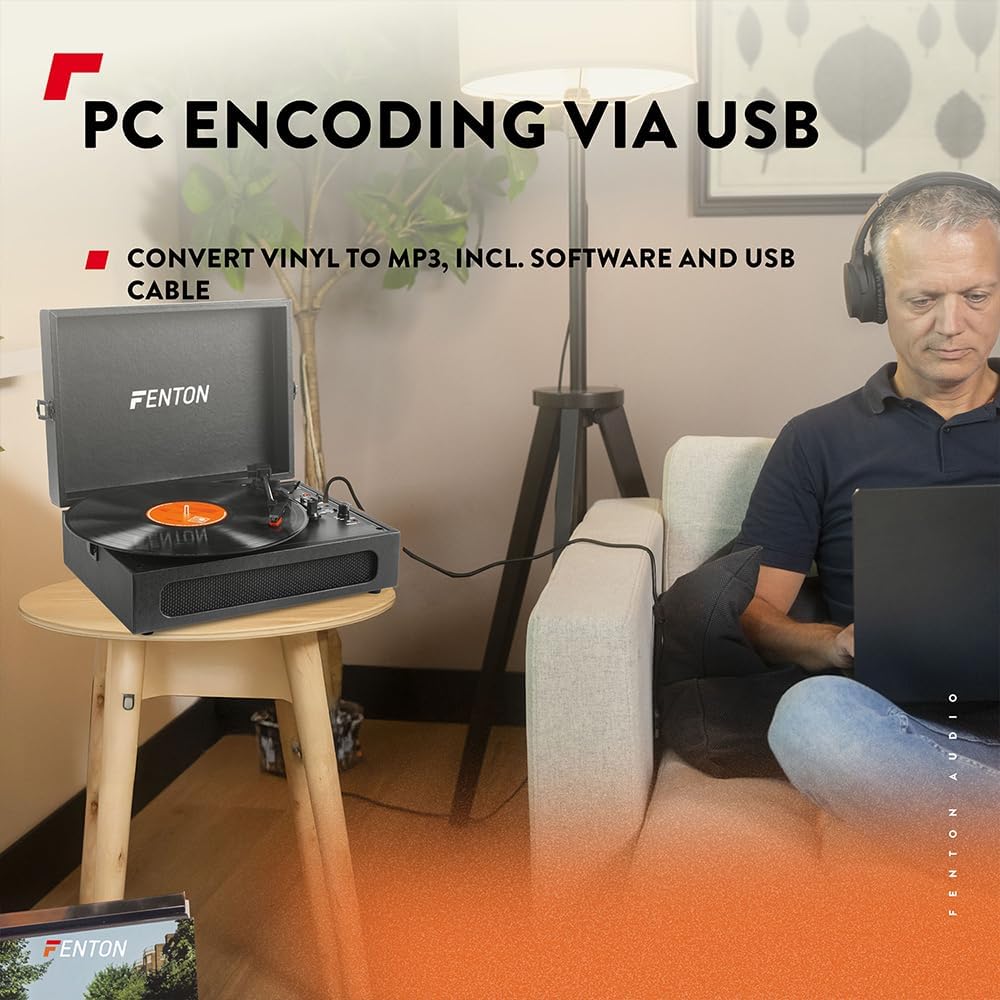
Image 6.3: USB encoding in progress, converting vinyl audio to MP3 fileበኮምፒውተር ላይ s.
6.5. Using the AUX Input (Line In)
Connect an external audio device (e.g., smartphone, MP3 player) to the turntable's built-in speakers.
- Connect a 3.5mm audio cable from your external device's headphone or line-out jack to the "Line In" jack on the turntable.
- የኃይል/የድምጽ ቁልፉን በሰዓት አቅጣጫ ያዙሩት እና መሳሪያውን ለማብራት።
- Ensure the BT OUT/PHONO/BT IN switch is not in "BT IN" mode (it can be in PHONO or BT OUT, as Line In is a separate input).
- ድምጽን ከውጫዊ መሳሪያዎ ያጫውቱ። ድምፁ በተርንቴብል ድምጽ ማጉያዎች በኩል ይተላለፋል።
- Adjust the volume using the Power/Volume knob on the turntable and/or your connected device.
7. ጥገና
7.1. ማዞሪያውን ማጽዳት
- ከማጽዳትዎ በፊት ሁልጊዜ ክፍሉን ከኃይል ማከፋፈያው ያላቅቁት.
- ውጫዊውን ገጽ ለማጽዳት ለስላሳና ደረቅ ጨርቅ ይጠቀሙ። ሻካራ ማጽጃዎችን፣ ሰሞችን ወይም መሟሟቶችን አይጠቀሙ።
- ስታይለስን ለማጽዳት የተነደፈ ለስላሳ ብሩሽ በመጠቀም ከኋላ ወደ ፊት እየተንቀሳቀሰ ቀስ ብለው ይቦርሹት።
- አቧራ እንዳይከማች ለመከላከል ጥቅም ላይ በማይውልበት ጊዜ የአቧራ ሽፋኑን ዝግ ያድርጉት።
7.2. የስታይለስ መተካት
The stylus is a consumable part and will wear out over time. A worn stylus can damage your records and degrade sound quality. Replace the stylus after approximately 300-500 hours of playback, or if you notice a significant drop in sound quality or visible damage.
- Consult the manufacturer's website or your retailer for compatible replacement styli.
- Follow the instructions provided with the replacement stylus for proper installation.
8. መላ መፈለግ
| ችግር | ሊሆን የሚችል ምክንያት | መፍትሄ |
|---|---|---|
| ኃይል የለም | Power adapter not connected; Power outlet not working; Power/Volume knob off. | Ensure power adapter is securely connected. Try a different outlet. Turn Power/Volume knob clockwise to ON. |
| ከድምጽ ማጉያዎች ድምፅ የለም | Volume too low; BT OUT/PHONO/BT IN switch in incorrect position; Headphones connected. | Increase volume. Set switch to "PHONO" for vinyl or "BT IN" for Bluetooth reception. Disconnect headphones. |
| የተዛባ ወይም የተዛባ ድምፅ | Record dirty or damaged; Stylus worn or dirty; Turntable not level. | Clean record. Clean or replace stylus. Place turntable on a level surface. |
| የብሉቱዝ ማጣመር ጉዳዮች | Device too far; Turntable not in pairing mode; Incorrect BT mode selected. | Move device closer. Ensure turntable is in "BT IN" (for reception) or "BT OUT" (for transmission) mode and indicator is flashing. Restart both devices. |
| Record stops prematurely (Auto Stop) | Auto Stop switch is ON. | This is normal operation. If you prefer continuous rotation, set the Auto Stop switch to OFF. |
9. ዝርዝሮች
| የምርት ስም | ፌንቶን |
| የሞዴል ቁጥር | RP118B |
| ቀለም | ጥቁር |
| ቁሳቁስ | ፖሊዩረቴን |
| የሞተር ዓይነት | ቀበቶ የሚነዳ |
| የመልሶ ማጫወት ፍጥነት | 33 1/3፣ 45፣ 78 RPM |
| ተስማሚ መሣሪያዎች | Personal computer, MP3 player, smartphone, headphones, speakers, tablet |
| የብሉቱዝ ስሪት | 5.0 (for reception and transmission) |
| የዩኤስቢ ተግባር | PC encoding (Vinyl to MP3) |
| የድምጽ ውጤቶች | RCA Line Out, 3.5mm Headphone Jack |
| የድምፅ ግብዓቶች | 3.5 ሚሜ AUX ኢን |
| የተዋሃዱ ተናጋሪዎች | Yes, stereo |
| የእቃው ክብደት | 3.25 ኪ |
| የኃይል አቅርቦት | DC 5V (Adapter included) |

Image 9.1: Dimensions of the Fenton RP118B turntable.
10. ዋስትና እና ድጋፍ
For warranty information, please refer to the documentation included with your purchase or visit the official Fenton website. For technical support or service inquiries, please contact your retailer or the manufacturer directly.
Manufacturer: Tronios B.V.


