መግቢያ
This manual provides essential information and instructions for the safe and efficient use of your OPPO A98 5G smartphone. Please read this manual thoroughly before using your device to ensure optimal performance and longevity. Keep this manual for future reference.
የጥቅል ይዘቶች
Upon opening your OPPO A98 5G package, please verify that all the following items are included:
- OPPO A98 5G ስማርትፎን
- የዩኤስቢ ዓይነት- C ገመድ
- የኃይል አስማሚ (67 ዋ ሱፐርቪኦኦሲ)
- ሲም ኢጀክተር መሣሪያ
- ፈጣን ጅምር መመሪያ
- የደህንነት መመሪያ
This image displays the OPPO A98 5G smartphone, highlighting its rear camera module and the vibrant display. A magnetic car mount accessory is also shown.
መሣሪያ አብቅቷልview
Familiarize yourself with the physical components of your OPPO A98 5G.
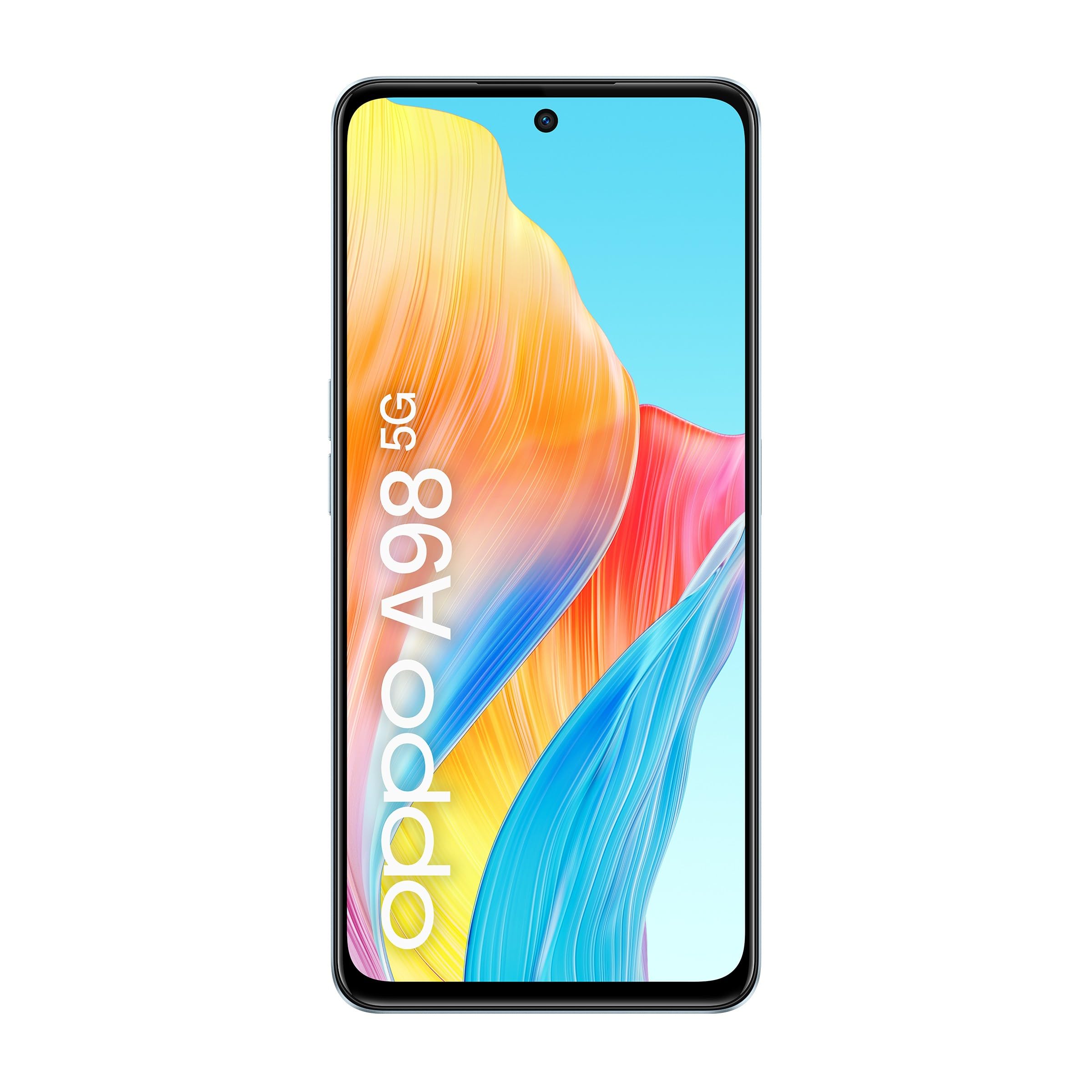
ፊት ለፊት View
- ማሳያ፡- 6.72-inch screen with 2400 x 1080 resolution and 120 Hz refresh rate.
- የፊት ካሜራ፡ ለራስ ፎቶዎች እና የቪዲዮ ጥሪዎች።
- የጆሮ ማዳመጫ በጥሪ ጊዜ ለድምጽ።
የኋላ View
- የኋላ ካሜራ ሞዱል; Main camera and auxiliary lenses.
- ብልጭታ፡- ለዝቅተኛ ብርሃን ፎቶግራፍ.
Sides and Ports
- የኃይል ቁልፍ፡- በጎን በኩል, መሳሪያውን ለማብራት / ለማጥፋት ወይም ማያ ገጹን ለማንቃት / ለመተኛት ያገለግላል.
- የድምጽ አዝራሮች፡- ሚዲያ ያስተካክሉ እና የድምጽ መጠን ይደውሉ.
- የዩኤስቢ ዓይነት-C ወደብ፡- ለክፍያ እና የውሂብ ማስተላለፍ.
- ሲም ካርድ ትሪ፡ ሲም ካርዶችን ለማስገባት።
- ተናጋሪ፡- ለድምጽ ውፅዓት።
ማዋቀር
1. የሲም ካርድ ጭነት
- የሲም ካርዱን ትሪ ከመሳሪያዎ ጎን ያግኙት።
- የሲም ማስወጫ መሳሪያውን ከጣፋዩ ቀጥሎ ባለው ትንሽ ቀዳዳ ውስጥ ያስገቡ እና ትሪው ብቅ እስኪል ድረስ በቀስታ ይጫኑ።
- የናኖ-ሲም ካርድዎን (ዎች) ወደ ትሪው ውስጥ ያስገቡት የወርቅ እውቂያዎች ወደ ታች ይመለከታሉ። ትክክለኛውን አቅጣጫ ያረጋግጡ።
- ትሪውን ወደ ቦታው ጠቅ እስኪያደርጉ ድረስ በጥንቃቄ ወደ መሳሪያው ያስገቡት።
2. የመጀመሪያ ኃይል በርቷል
- Press and hold the Power button until the OPPO logo appears on the screen.
- የቋንቋ ምርጫን፣ የዋይ ፋይ ግንኙነትን እና የጉግል መለያ መግባትን ጨምሮ የመጀመሪያውን ማዋቀር ለማጠናቀቅ የማያ ገጽ ላይ ጥያቄዎችን ይከተሉ።
የአሠራር መመሪያዎች
መሣሪያውን በመሙላት ላይ
Connect the USB Type-C cable to the phone's charging port and the other end to the 67W SuperVOOC power adapter. Plug the adapter into a power outlet. The device supports fast charging, reaching 50% charge in approximately 18 minutes and a full charge in about 44 minutes.
ማሳያ እና አሰሳ
- የንክኪ ምልክቶች፡- ለዳሰሳ እና መስተጋብር ያንሸራትቱ፣ መታ ያድርጉ፣ ለማጉላት ይቆንጥጡ።
- መነሻ ስክሪን፡ በዊጅቶች እና በመተግበሪያ አቋራጮች ያብጁ።
- ማሳወቂያዎች፡- ማሳወቂያዎችን እና ፈጣን ቅንብሮችን ለመድረስ ከማያ ገጹ ላይኛው ክፍል ወደ ታች ያንሸራትቱ።
የካሜራ አጠቃቀም
Open the Camera app to capture photos and videos. Tap the shutter button to take a picture. Swipe left or right to switch between modes like Photo, Video, Portrait, and Night. Adjust settings such as flash, timer, and aspect ratio from the camera interface.
ግንኙነት
- 5G አውታረ መረብ፡ The device supports 5G connectivity for faster mobile data speeds. Ensure your SIM card and plan support 5G.
- ዋይ ፋይ፡ ወደ ሂድ ቅንብሮች > Wi-Fi ከሚገኙ ሽቦ አልባ አውታረ መረቦች ጋር ለመገናኘት.
- ብሉቱዝ፡ ወደ ሂድ ቅንብሮች > ብሉቱዝ እንደ የጆሮ ማዳመጫዎች ወይም ድምጽ ማጉያዎች ካሉ የብሉቱዝ መሳሪያዎች ጋር ለማጣመር።
የማከማቻ አስተዳደር
The OPPO A98 5G comes with 256GB of internal storage. You can manage your storage by going to ቅንብሮች > ማከማቻ. አዘውትሮ ማጽዳት አላስፈላጊ files and cache to maintain optimal performance. The device also supports RAM Expansion, utilizing storage as virtual RAM for smoother multitasking.
ጥገና
የሶፍትዌር ዝማኔዎች
መሣሪያዎ የቅርብ ጊዜዎቹ ባህሪያት፣ የደህንነት መጠገኛዎች እና የአፈጻጸም ማሻሻያዎች እንዳሉት ለማረጋገጥ በየጊዜው የሶፍትዌር ማሻሻያዎችን ይፈልጉ እና ይጫኑ። ወደ ሂድ ቅንብሮች > ስለ መሣሪያ > ወቅታዊ ዝማኔዎችን ለመፈተሽ.
ማጽዳት
የስልክዎን ስክሪን እና አካል ለማፅዳት ለስላሳ፣ ከጥጥ ነጻ የሆነ ጨርቅ ይጠቀሙ። ኃይለኛ ኬሚካሎችን ወይም ሻካራ ቁሳቁሶችን ከመጠቀም ይቆጠቡ. ለግትር ማጭበርበሮች በትንሹ መampጨርቁን በውሃ ወይም ለኤሌክትሮኒክስ የተነደፈ ስክሪን ማጽጃ።
የባትሪ እንክብካቤ
The OPPO A98 5G features a 5000 mAh battery with OPPO's patented Battery Health Engine, designed to double the battery's lifespan to four years or more. To maximize battery life, avoid extreme temperatures, use the original charger, and avoid fully discharging the battery frequently.
መላ መፈለግ
መሳሪያ አይበራም።
- Ensure the battery is charged. Connect the device to the charger for at least 10 minutes before attempting to power it on.
- የግዳጅ ድጋሚ ለመጀመር የኃይል ቁልፉን ለ10-15 ሰከንድ ተጭነው ይቆዩ።
የመሙላት ጉዳዮች
- የኃይል መሙያ ገመዱ እና አስማሚው ደህንነቱ በተጠበቀ ሁኔታ የተገናኙ እና ያልተበላሹ መሆናቸውን ያረጋግጡ።
- የተለየ የኃይል መውጫ ለመጠቀም ይሞክሩ።
- Clean the USB Type-C port on your phone gently with a soft brush to remove any debris.
የአውታረ መረብ ግንኙነት ችግሮች
- ምንም ምልክት/ደካማ ምልክት የለም፦ ሲም ካርድዎ በትክክል መጫኑን ያረጋግጡ። መሳሪያውን እንደገና ለማስጀመር ይሞክሩ። የአውታረ መረብ ሽፋን ባለበት አካባቢ ውስጥ መሆንዎን ያረጋግጡ።
- የWi-Fi ግንኙነት ችግሮች፡- የ Wi-Fi ራውተርዎን እንደገና ያስጀምሩ። በስልክዎ ላይ ያለውን አውታረ መረብ ይረሱ እና እንደገና ያገናኙ።
ዝርዝሮች
| የሞዴል ስም | OPPO A98 5G |
| ስርዓተ ክወና | አንድሮይድ 13.0 |
| የማሳያ መጠን | 17.1 ሴሜ (6.72 ኢንች) |
| የማሳያ ጥራት | 2400 x 1080 |
| የማደስ ደረጃ | 120 Hz |
| ፕሮሰሰር | Qualcomm Snapdragon 5G SoC |
| ራም | 8 GB (expandable up to 16 GB with RAM Expansion) |
| የውስጥ ማከማቻ | 256 ጊባ |
| የባትሪ አቅም | 5000 ሚአሰ |
| በመሙላት ላይ | 67W SuperVOOC ፈጣን ባትሪ መሙላት |
| የኋላ ካሜራ | 16 MP effective resolution (main camera) |
| ግንኙነት | 5G, USB Type-C, Wi-Fi, Bluetooth |
| የሲም ዓይነት | ድርብ ሲም |
ዋስትና እና ድጋፍ
የዋስትና መረጃ
Your OPPO A98 5G smartphone comes with a የ 3 ዓመት ዋስትና against factory defects. Please retain your proof of purchase for warranty claims. This warranty covers manufacturing defects and does not cover damage caused by misuse, accidents, unauthorized modifications, or normal wear and tear.
የደንበኛ ድጋፍ
For further assistance, technical support, or warranty inquiries, please visit the official OPPO website or contact their customer service. Refer to the packaging or the official OPPO webበክልልዎ ውስጥ ለተወሰኑ የእውቂያ ዝርዝሮች ጣቢያ።