Amazon Echo Show 21 የተጠቃሚ መመሪያ
ሞዴል፡ Echo Show 21
1. መግቢያ
Welcome to your new Amazon Echo Show 21. This smart display is designed to be the central hub for your home, offering a large Full HD screen for entertainment, organization, and communication. With built-in Fire TV and Alexa, you can stream content, manage your smart home, make video calls, and keep your family organized with customizable widgets.

Figure 1.1: Amazon Echo Show 21 Overview
The Echo Show 21 integrates seamlessly into your daily life, providing a visual and interactive experience for all your Alexa commands.
2. መጀመር፡ ማዋቀር
2.1 በሳጥኑ ውስጥ ያለው
- Echo Show 21 መሳሪያ
- Alexa Voice Remote with batteries (2 AAA included)
- የኃይል አስማሚ (30 ዋ) እና 5 ጫማ ገመድ (ነጭ)
- Wall mount, anchors, screws, mounting template
- ፈጣን ጅምር መመሪያ
2.2 የመጀመሪያ ማዋቀር
The Echo Show 21 is designed for simple setup. You will need a Wi-Fi connection.
- አብራ፡ የኃይል አስማሚውን ከኢኮ ሾው 21ዎ ጋር ያገናኙትና ከግድግዳ ሶኬት ጋር ይሰኩት። መሣሪያው በራስ-ሰር ይበራል።
- የWi-Fi ግንኙነት፡- Follow the on-screen instructions to connect your device to your Wi-Fi network. Amazon Wi-Fi simple setup can automatically connect your device if you are a Prime member and have previously saved your Wi-Fi credentials.
- Amazon Account Login: በአማዞን መለያዎ ይግቡ።
- ግላዊነት ማላበስ፡ Customize your home screen, set up profiles, and configure your preferred settings.
- የርቀት ማጣመር; The included Alexa Voice Remote should pair automatically. If not, follow the on-screen instructions or refer to the quick start guide for manual pairing.
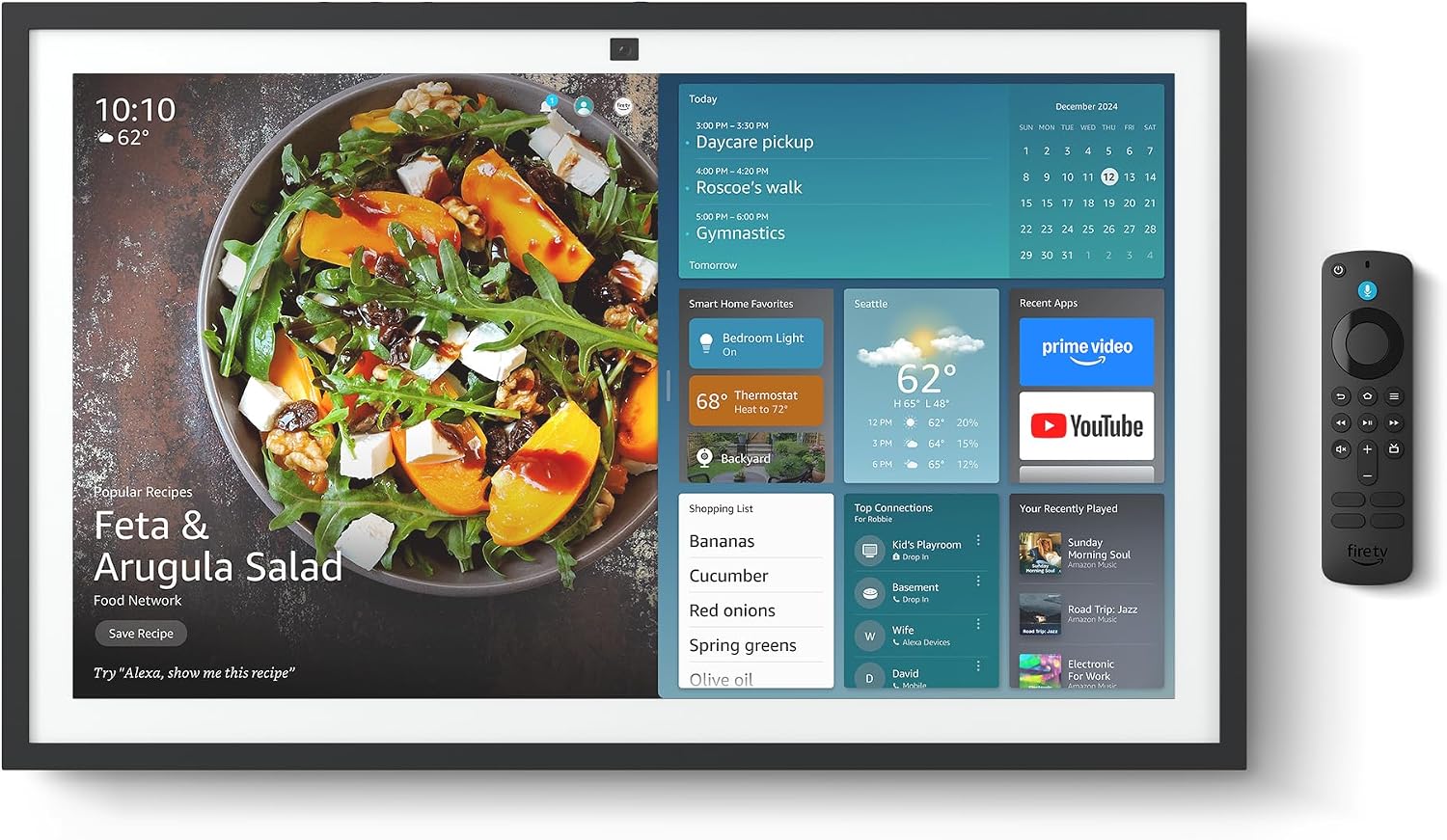
Figure 2.1: Echo Show 21 with Alexa Voice Remote
2.3 የመጫኛ አማራጮች
The Echo Show 21 can be wall-mounted using the included hardware or placed on a stand (sold separately). Wall mounting requires an electric drill.
3. የእርስዎን ኢኮ ሾው መስራት 21
3.1 ከ Alexa ጋር የድምጽ መቆጣጠሪያ
Your Echo Show 21 is primarily controlled by voice using Alexa. Simply say the wake word "Alexa" followed by your command or question.
- አጠቃላይ ትዕዛዞች፡- "አሌክሳ፣ የአየር ሁኔታ ምንድን ነው?"፣ "አሌክሳ፣ ሰዓት ቆጣሪ ለ 10 ደቂቃዎች ያዘጋጁ።"
- ሙዚቃ እና ኦዲዮ፡- "Alexa, play pop music," "Alexa, play my morning playlist."
- Video & Entertainment: "Alexa, open Prime Video," "Alexa, play The Boys on Netflix."
3.2 Fire TV Integration
Enjoy endless entertainment with built-in Fire TV. Use the included Alexa Voice Remote or voice commands to navigate.

Figure 3.1: Fire TV Interface
- Access thousands of apps like Prime Video, Netflix, YouTube, Apple TV.
- Stream movies, TV shows, and live content.
- The Fire TV remote allows for traditional navigation and playback control.
3.3 Home Screen & Widgets
The 21-inch display is ideal for organizing your day with customizable widgets.

Figure 3.2: Customizable Home Screen Widgets
- Keep important information like calendars, shopping lists, and weather in view.
- Personalize your home screen with family photos.
3.4 ዘመናዊ የቤት መቆጣጠሪያ
Control compatible smart devices using your voice or the smart home dashboard.

Figure 3.3: Smart Home Dashboard
- Turn lights on/off, adjust thermostats, or view የቀጥታ የካሜራ ምግቦች.
- Supports Zigbee, Matter, and Thread Border Router for broad compatibility.
3.5 Video Calling
Connect with family and friends using the 13 MP camera with auto-framing, wide field of vision, 3.3x zoom, and noise reduction.

Figure 3.4: Echo Show 21 as a Digital Photo Frame
The camera can also be used to display your favorite memories as a digital photo frame.
4. ጥገና
የእርስዎን Echo Show 21 ረጅም ዕድሜ እና ጥሩ አፈጻጸም ለማረጋገጥ እነዚህን የጥገና መመሪያዎች ይከተሉ፡
- ማያ ገጹን ማጽዳት; ስክሪኑን በቀስታ ለማጽዳት ለስላሳ፣ ከቆሻሻ ነጻ የሆነ ጨርቅ ይጠቀሙ። ለግትር ማጭበርበሮች በትንሹ መampen the cloth with water. Avoid abrasive cleaners or sprays directly on the screen.
- የመሳሪያውን አካል ማጽዳት; Wipe the exterior surfaces with a dry, soft cloth. Do not use harsh chemicals or solvents.
- የአየር ማናፈሻ; Ensure the device's ventilation openings are not blocked to prevent overheating.
- የሶፍትዌር ማሻሻያ Your Echo Show 21 receives automatic software security updates. Ensure your device is connected to Wi-Fi to receive these updates.
5. መላ መፈለግ
If you encounter issues with your Echo Show 21, try the following common solutions:
- መሳሪያ ምላሽ የማይሰጥ፡ Try saying "Alexa" again clearly. If unresponsive, unplug the power adapter for a few seconds and then plug it back in to restart the device.
- ምንም የWi-Fi ግንኙነት የለም፡ Check your router and modem to ensure they are working correctly. Restart your router. On the Echo Show 21, go to Settings > Network to re-select your Wi-Fi network and re-enter the password.
- የድምጽ ጉዳዮች፡- Ensure the volume is not muted or too low. Say "Alexa, turn up the volume." Check audio settings in the device menu.
- ካሜራ አይሰራም; Ensure the physical camera shutter is open and the mic/camera-off button is not activated (red light indicates off).
- የርቀት ምላሽ የማይሰጥ፡ Check the batteries in the Alexa Voice Remote. If necessary, replace them. Re-pair the remote if it becomes disconnected.
6. ቴክኒካዊ ዝርዝሮች
| ባህሪ | ዝርዝር መግለጫ |
|---|---|
| መጠን | 21.4" ዋ x 13.2" ኤች x 1.5" ዲ |
| ክብደት | 10.7 ፓውንድ £ |
| ማሳያ | 21” with 1920 x 1080 resolution (landscape or portrait) |
| ካሜራ | 13 ሜፒ + መሸፈኛ |
| ኦዲዮ | Two 2” woofers + two 0.6” tweeters |
| የ Wi-Fi ግንኙነት | Wi-Fi 6E (802.1ax), Tri-band, dual-antenna (MIMO). Supports 802.11a/b/g/n/ac. |
| ስማርት የቤት ሃብ | ዚግቤ + ጉዳይ + ክር የድንበር ራውተር |
| ፕሮሰሰር | ከአማዞን AZ2 የነርቭ አውታረ መረብ ሞተር ጋር Octa-core SoC |
| ዳሳሾች | ALS RGB + የፍጥነት መለኪያ |
| ቋንቋ | እንግሊዝኛ እና ስፓኒሽ |

Figure 6.1: Echo Show 15 vs. Echo Show 21 Dimensions
7. የግላዊነት ባህሪያት
Echo Show 21 በበርካታ የግላዊነት መቆጣጠሪያዎች የተነደፈ ነው፡-
- የማይክሮፎን/ካሜራ-ማጥፋት አዝራር፡ ማይክሮፎኖችን እና ካሜራዎችን በኤሌክትሮኒክ መንገድ ለማቋረጥ አካላዊ ቁልፍ።
- የካሜራ መከለያ; A built-in physical shutter to cover the camera lens.
- ዋክ ቃል ቴክኖሎጂ፡- Alexa devices only begin recording and sending audio to the cloud after detecting the wake word.
- የዥረት አመላካቾች፡- የእይታ አመልካቾች ኦዲዮ ወይም ቪዲዮ ወደ ደመና በሚተላለፉበት ጊዜ ያሳያሉ።
- Voice Recording Control: ችሎታ view እና የድምጽ ቅጂዎችዎን ይሰርዙ።

Figure 7.1: Mic/Camera-Off Button and Camera Shutter
For more details, visit the Alexa Privacy Hub.
8. የተደራሽነት ባህሪያት
The Echo Show 21 includes various accessibility features to personalize Alexa to your abilities:
- ወደ Alexa ንካ፡ በማያ ገጽ ላይ ሰቆች ወይም በቁልፍ ሰሌዳ በኩል በመንካት አሌክሳን ይድረሱ።
- የሚለምደዉ ማዳመጥ፡ አሌክሳ ከመመለሱ በፊት ለመናገር ለመጨረስ ተጨማሪ ጊዜ ይሰጣል።
- ተመራጭ የንግግር መጠን፡- አሌክሳ ምን ያህል ፈጣን ወይም ቀርፋፋ እንደሚናገር ይቆጣጠሩ።
- መግለጫ ጽሑፍ አሌክሳ መግለጫ ፅሁፍ፣ የጥሪ መግለጫ ፅሁፍ እና ዝግ መግለጫ ፅሁፍ ለሚደገፍ ይዘት ፅሁፍ ያቀርባሉ።
- አሳይ እና ይንገሩ፡- Helps users who are blind or visually impaired identify products.
- ድምጽView ስክሪን አንባቢ፡- Enables access for customers who are blind or visually impaired.
- ስክሪን ማጉያ፡ አሳንስ/አውጣ እና በማያ ገጹ ዙሪያ ይንጠፍቁ።
- Kindle ጮክ ብሎ አንብብ፡- አሌክሳ የእርስዎን Kindle መጽሐፍት ጮክ ብሎ እንዲያነብ ያድርጉ።
- የእውነተኛ ጊዜ ጽሑፍ፡- በቪዲዮ ጥሪ ውስጥ የቀጥታ ጽሑፍ ይተይቡ።
These features can be enabled via Settings > Accessibility on your device.
9. ዋስትና እና ድጋፍ
9.1 የምርት ዋስትና
Your Echo Show 21 comes with a የ 1 ዓመት የተወሰነ ዋስትና እና አገልግሎት. Optional 1-year, 2-year, and 3-year extended warranties are available for U.S. customers, sold separately.
Use of Echo Show 21 and Fire TV on Echo Show 21 is subject to their respective terms of service.
9.2 የደንበኛ ድጋፍ
For further assistance, troubleshooting, or to learn more about your device, please visit the Amazon support webጣቢያ ወይም የአማዞን የደንበኞች አገልግሎትን ያነጋግሩ።


