1. ምርት አብቅቷልview
The Vorago BSP-500-V2 is a portable Bluetooth speaker designed for robust performance and durability. It features IPX5 water resistance, making it suitable for various environments, including outdoor adventures and parties. This manual provides detailed instructions for setting up, operating, and maintaining your speaker.
ቁልፍ ባህሪዎች
- True Wireless Stereo (TWS) Connectivity: Connect two BSP-500-V2 speakers for an immersive stereo sound experience.
- የተራዘመ የባትሪ ህይወት፡ Enjoy up to 7 hours of music playback at 70% volume, thanks to its 2000 mAh battery.
- የዩኤስቢ ዓይነት-ሲ ኃይል መሙላት; Convenient and modern USB-C port for charging.
- ሁለገብ ግንኙነት; Supports Bluetooth for wireless streaming and a 3.5mm auxiliary input for wired connections.
- IPX5 የውሃ መቋቋም; Protected against low-pressure water jets from any direction.
የጥቅል ይዘቶች፡-
- Vorago BSP-500-V2 የብሉቱዝ ድምጽ ማጉያ
- የዩኤስቢ ዓይነት-ሲ ባትሪ መሙያ ገመድ
- 3.5 ሚሜ የድምጽ ገመድ
- የተጠቃሚ መመሪያ (ይህ ሰነድ)
የምርት ሥዕል

ምስል 1.1: የፊት view of the Vorago BSP-500-V2 Bluetooth speaker, showcasing its mesh grille and central Vorago logo.

ምስል 1.2: ማዕዘን view of the speaker, highlighting its robust, rectangular design and integrated carrying strap.

ምስል 1.3: ከፍተኛ view showing the control panel with power, volume down, play/pause, and volume up buttons.
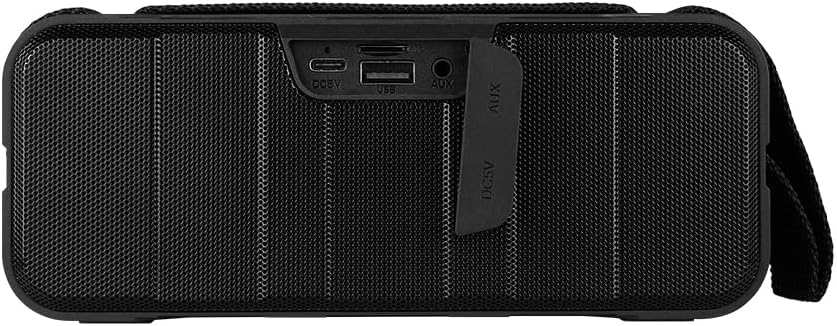
ምስል 1.4: የኋላ view of the speaker, showing the protective flap covering the input ports.

Figure 1.5: Close-up of the input ports, including DC 5V (USB-C), USB-A, and AUX (3.5mm) inputs, protected by a rubber cover.
2. የደህንነት መረጃ
- ድምጽ ማጉያውን ለከፍተኛ ሙቀት (ሙቅ ወይም ቀዝቃዛ) አታጋልጥ.
- ተናጋሪውን ለጠንካራ ተጽእኖዎች ከመጣል ወይም ከማስገዛት ተቆጠብ።
- Keep the speaker away from direct sunlight and heat sources.
- ድምጽ ማጉያውን እራስዎ አይበታተኑ፣ አይጠግኑ ወይም አይቀይሩ። ይህ ዋስትናውን ውድቅ ያደርገዋል።
- Ensure the port cover is securely closed when using the speaker near water to maintain IPX5 water resistance.
- Do not immerse the speaker in water. IPX5 rating protects against splashes and light rain, not submersion.
- ለኃይል መሙያ የቀረበውን የኃይል መሙያ ገመድ ወይም የተረጋገጠ የዩኤስቢ ዓይነት-ሲ ገመድ ብቻ ይጠቀሙ።
- ድምጽ ማጉያውን ለስላሳ እና ደረቅ ጨርቅ ያጽዱ. ገላጭ ማጽጃዎችን ወይም ፈሳሾችን አይጠቀሙ.
3. ማዋቀር
3.1 ድምጽ ማጉያውን መሙላት
- Open the protective rubber cover on the rear of the speaker to access the charging port.
- Connect the USB Type-C end of the charging cable to the speaker's DC 5V port.
- የዩኤስቢ ገመድ ሌላኛውን ጫፍ ከዩኤስቢ ኃይል አስማሚ (ያልተካተተ) ወይም ከኮምፒዩተር ዩኤስቢ ወደብ ጋር ያገናኙ።
- የኃይል መሙያ አመልካች መብራቱ በሚሞላበት ጊዜ ያበራል እና ሙሉ በሙሉ ሲሞላ ይጠፋል።
- Once charging is complete, securely close the protective rubber cover to maintain water resistance.
3.2 ማብራት / ማጥፋት
- ለማብራት፡- ተጭነው ይያዙት። የኃይል አዝራር on the top panel for approximately 3 seconds until you hear an audible prompt.
- ለማጥፋት፡- ተጭነው ይያዙት። የኃይል አዝራር የሚሰማ መልእክት እስኪሰሙ ድረስ ለ3 ሰከንዶች ያህል።
3.3 የብሉቱዝ ማጣመር
- Ensure the speaker is powered on. It will automatically enter Bluetooth pairing mode, indicated by a flashing LED light.
- በመሳሪያዎ ላይ (ስማርትፎን፣ ታብሌት፣ ላፕቶፕ) ብሉቱዝን ያንቁ እና የሚገኙ መሳሪያዎችን ይፈልጉ።
- Select "BSP-500-V2" from the list of found devices.
- Once successfully paired, the speaker will emit an audible confirmation, and the LED light will stop flashing and remain solid.
- መሳሪያው በክልል ውስጥ ከሆነ እና ብሉቱዝ የነቃ ከሆነ ድምጽ ማጉያው ሲበራ በራስ-ሰር ከመጨረሻው የተጣመረ መሳሪያ ጋር እንደገና ይገናኛል።
3.4 እውነተኛ ገመድ አልባ ስቴሪዮ (TWS) ማጣመር
TWS allows you to connect two BSP-500-V2 speakers together for a true stereo sound experience.
- Ensure both BSP-500-V2 speakers are powered on and not connected to any other Bluetooth device.
- On one of the speakers (this will be the primary speaker), double-press the አጫውት/አፍታ አቁም አዝራርተናጋሪው የTWS ማጣመሪያ ሁነታን ይገባል።
- The two speakers will automatically search for and connect to each other. You will hear an audible confirmation once they are successfully paired.
- Once TWS is established, connect your device to the primary speaker via Bluetooth as described in Section 3.3.
- To disconnect TWS, double-press the አጫውት/አፍታ አቁም አዝራር በሁለቱም ተናጋሪ ላይ ፡፡
3.5 ረዳት (AUX) ግንኙነት
For devices without Bluetooth, you can use the 3.5mm audio cable.
- Open the protective rubber cover on the rear of the speaker.
- የ3.5ሚሜ የድምጽ ገመዱን አንድ ጫፍ ከድምጽ ማጉያው AUX ወደብ ጋር ያገናኙ።
- የኬብሉን ሌላኛውን ጫፍ ከመሳሪያዎ የድምጽ ውፅዓት መሰኪያ ጋር ያገናኙ።
- ድምጽ ማጉያው በራስ-ሰር ወደ AUX ሁነታ ይቀየራል።
- Once disconnected, securely close the protective rubber cover.
4. የአሠራር መመሪያዎች
4.1 የአዝራር ተግባራት፡-
| አዝራር | ተግባር (አጭር ፕሬስ) | ተግባር (ረጅም ፕሬስ) |
|---|---|---|
| የኃይል አዝራር | ኤን/ኤ | ኃይል አብራ/ አጥፋ |
| የድምጽ ቅነሳ አዝራር | ድምጽን ቀንስ | የቀድሞ ትራክ |
| አጫውት/አፍታ አቁም አዝራር | ሙዚቃን አጫውት/ ለአፍታ አቁም፣ መልስ/ጥሪውን ጨርስ | Reject Call, Double-press for TWS Pairing |
| የድምጽ መጨመሪያ አዝራር | የድምጽ መጠን ጨምር | ቀጣይ ትራክ |
5. ጥገና
- ማጽዳት፡ Use a soft, dry, lint-free cloth to clean the speaker's surface. For stubborn dirt, slightly dampጨርቁን በውሃ. ኃይለኛ ኬሚካሎችን፣ ማጽጃ ፈሳሾችን ወይም ጠንካራ ሳሙናዎችን አይጠቀሙ።
- የውሃ መቋቋም እንክብካቤ; Always ensure the rubber port cover on the back of the speaker is fully and securely sealed when using the speaker outdoors or near water. This maintains its IPX5 water resistance. After exposure to water, wipe the speaker dry before opening the port cover for charging or auxiliary connections.
- ማከማቻ፡ When not in use for extended periods, store the speaker in a cool, dry place, away from direct sunlight and extreme temperatures. It is recommended to charge the speaker fully before storing and to recharge it every few months to maintain battery health.
- የባትሪ እንክብካቤ To prolong battery life, avoid fully discharging the battery frequently. Charge the speaker when the low battery indicator is active.
6. መላ መፈለግ
| ችግር | ሊሆን የሚችል ምክንያት | መፍትሄ |
|---|---|---|
| ተናጋሪው አይበራም። | ዝቅተኛ ባትሪ. | Charge the speaker fully using the provided USB Type-C cable. |
| በብሉቱዝ በኩል ማጣመር አይቻልም። | Speaker is not in pairing mode; Device's Bluetooth is off; Speaker is already connected to another device; Device is too far from speaker. | Ensure speaker is powered on and flashing (pairing mode). Turn on Bluetooth on your device. Disconnect from other devices. Move device closer to speaker (within 10 meters). |
| ምንም ድምጽ ወይም ዝቅተኛ ድምጽ የለም. | የድምጽ መጠን በድምጽ ማጉያ ወይም መሣሪያ ላይ በጣም ዝቅተኛ ነው; የተሳሳተ የግቤት ሁነታ; ድምጽ ማጉያ አልተገናኘም። | Increase volume on both speaker and connected device. Ensure correct mode (Bluetooth or AUX) is active. Verify successful Bluetooth pairing or AUX cable connection. |
| የድምፅ ማዛባት. | ድምጽ በጣም ከፍተኛ፤ መሳሪያው ከድምጽ ማጉያው በጣም የራቀ፤ ጣልቃ ገብነት። | Reduce volume on speaker and/or device. Move device closer to speaker. Avoid obstacles between speaker and device. |
| TWS ማጣመር አልተሳካም። | Speakers are already paired to a device; Speakers are too far apart. | Ensure both speakers are disconnected from any Bluetooth devices. Place speakers close to each other during TWS pairing. |
7. ዝርዝሮች
| ባህሪ | ዝርዝር |
|---|---|
| የሞዴል ስም | BSP-500-V2 |
| የድምጽ ማጉያ አይነት | መልቲሚዲያ |
| ልዩ ባህሪ | ብሉቱዝ |
| የሚመከር አጠቃቀም | ለሙዚቃ ተጫዋቾች |
| ተስማሚ መሣሪያዎች | ላፕቶፕ፣ MP3 ማጫወቻ፣ ስማርትፎን፣ ታብሌት |
| የመቆጣጠሪያ አይነት | አዝራር |
| የዙሪያ ድምጽ ቻናል ውቅር | 5.0 |
| የባትሪ ህይወት | 7 ሰዓታት |
| አካላት ተካትተዋል። | ተናጋሪ |
| የምርት ልኬቶች | 5D x 15W x 18H ሴንቲሜትር |
| የምርት ክብደት | 1 ኪሎ ግራም |
| የውሃ መከላከያ | አዎ (IPX5) |
| የባትሪ አቅም | 2000 ሚአሰ |
| Ampየሚያነቃቃ ዓይነት | ንቁ |
| የኃይል ምንጭ | ባትሪ |
| የድግግሞሽ ምላሽ | 180 Hz |
| የግንኙነት ቴክኖሎጂ | ብሉቱዝ |
| የድምጽ ውፅዓት ሁኔታ | ስቴሪዮ |
| የመጫኛ አይነት | የጠረጴዛ ተራራ |
8. ዋስትና እና ድጋፍ
The Vorago BSP-500-V2 Bluetooth Speaker comes with a limited warranty. Please refer to the warranty card included with your product for specific terms and conditions, or visit the official Vorago webለተጨማሪ ዝርዝሮች ጣቢያ.
For technical support, troubleshooting assistance, or warranty claims, please contact Vorago customer service through their official channels. You can find more information and contact details on the Vorago Brand Store on Amazon ወይም ባለሥልጣናቸው webጣቢያ.
እባክዎ ለዋስትና ዓላማዎች የግዢ ማረጋገጫዎን ያቆዩ።


