መግቢያ
Welcome to the iTouch Sport 4 Smartwatch user manual. This guide provides detailed instructions on how to set up, operate, maintain, and troubleshoot your new smartwatch. The iTouch Sport 4 is designed to enhance your fitness journey and keep you connected with its advanced health tracking features, extensive sports modes, and smart notifications.

The iTouch Sport 4 Smartwatch, featuring a vibrant display showing activity metrics.
የማዋቀር መመሪያ
1. Unboxing እና የመጀመሪያ ክፍያ
Your iTouch Sport 4 Smartwatch package includes:
- iTouch Sport 4 Smartwatch
- የዩኤስቢ ባትሪ መሙያ ገመድ
Before first use, fully charge your smartwatch. Connect the USB charging cable to the charging pins on the back of the watch and plug the USB end into a power adapter (not included) or a computer USB port. A full charge typically takes 1-2 hours.
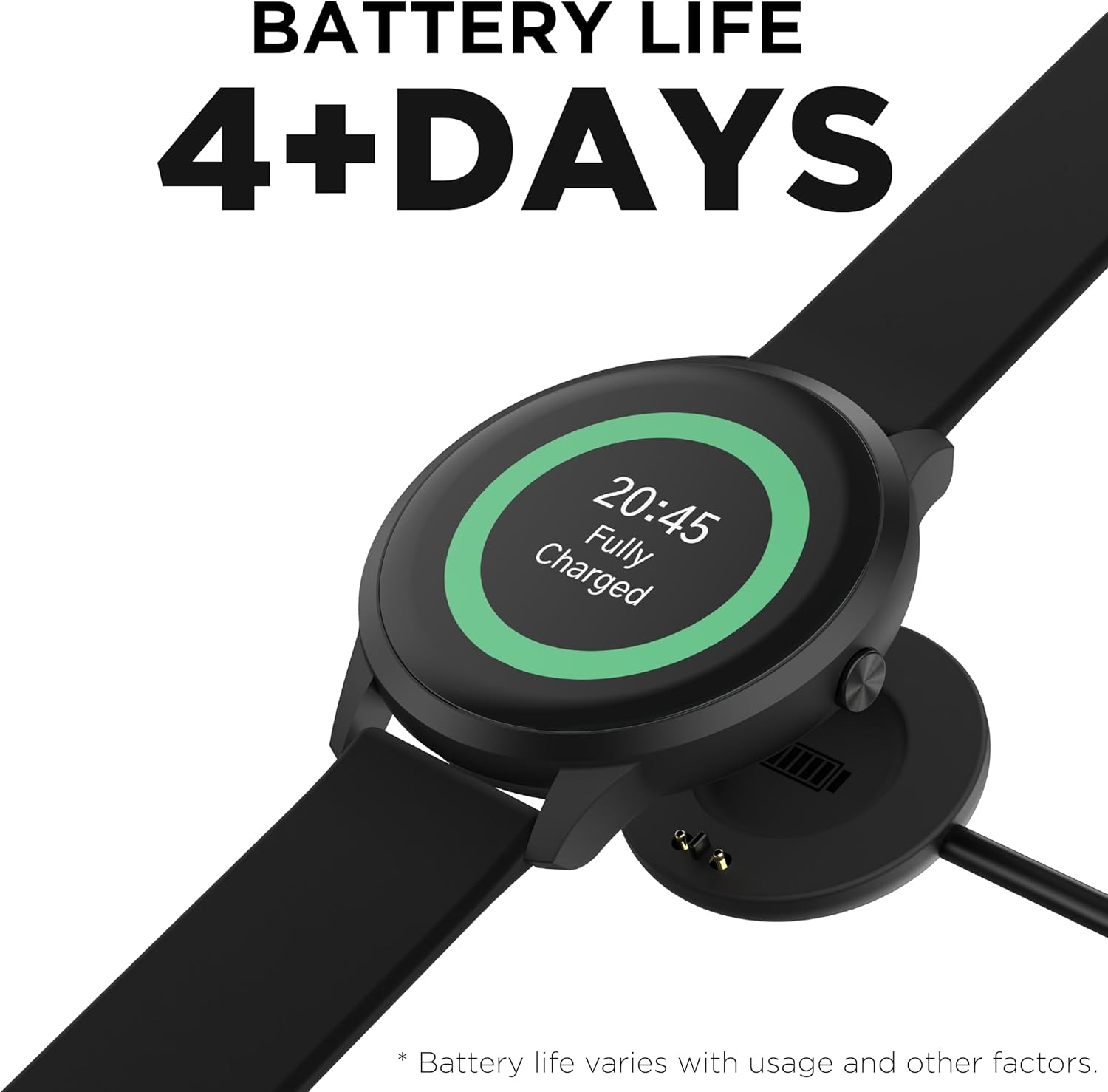
The smartwatch connected to its magnetic USB charging cable.
2. የመተግበሪያ ጭነት እና ማጣመር
To unlock the full potential of your iTouch Sport 4, download the ITOUCH ተለባሾች app from the Apple App Store (for iOS 13 or higher) or Google Play Store (for Android 10 or higher).
- በእርስዎ ዘመናዊ ስልክ ላይ ብሉቱዝ መንቃቱን ያረጋግጡ።
- Open the iTOUCH Wearables app and follow the on-screen instructions to create an account or log in.
- በመተግበሪያው ውስጥ 'መሣሪያ አክል' ወይም 'አዲስ መሣሪያ አጣምር' የሚለውን ይምረጡ።
- Choose 'iTouch Sport 4' from the list of available devices.
- በሁለቱም በስልክዎ እና በስማርት ሰዓቱ ላይ የማጣመሪያ ጥያቄውን ያረጋግጡ።

The iTOUCH Wearables app on a smartphone, demonstrating its interface for tracking steps, miles, calories, and sleep, alongside the smartwatch.
የእርስዎን ስማርት ሰዓት በመስራት ላይ
መሰረታዊ ዳሰሳ
The iTouch Sport 4 features a responsive touchscreen and a navigational button on the side. Swipe left/right or up/down to navigate through menus and features. Press the side button to return to the home screen or wake the device.
የሰዓት መልኮችን ማበጀት።
Personalize your smartwatch by choosing from a wide variety of watch faces. You can select built-in faces directly on the watch or explore the extensive library within the iTOUCH Wearables app.

A collection of iTouch Sport 4 Smartwatches in different colors, highlighting the variety of available watch faces.

A selection of watch faces, demonstrating the customization options for the iTouch Sport 4.

Examples of custom watch faces, including one with a photo background, available on the iTouch Sport 4.
ማሳወቂያዎች
Receive call, text, and app notifications directly on your wrist. Configure which notifications you want to receive through the iTOUCH Wearables app settings.

The iTOUCH Wearables app showing notification settings, allowing users to enable or disable alerts from various applications on their smartwatch.

Smartwatches displaying message notifications, showing how alerts appear on the device screen.
የጤና መከታተያ ባህሪያት
The iTouch Sport 4 is equipped with comprehensive health monitoring capabilities:
- የልብ ምት መቆጣጠሪያ; የልብ ምት ክትትልን በ24/7 ያቀርባል።
- የደም ኦክሲጅን መቆጣጠሪያ; የደም ኦክስጅንን መጠን ይለካል.
- የእንቅልፍ መቆጣጠሪያ; Tracks sleep patterns, including deep, light, and awake times.
- Pedometer: Automatically tracks steps and distance.
- የካሎሪ መከታተያ; ቀኑን ሙሉ የተቃጠሉ ካሎሪዎችን ይገምታል።
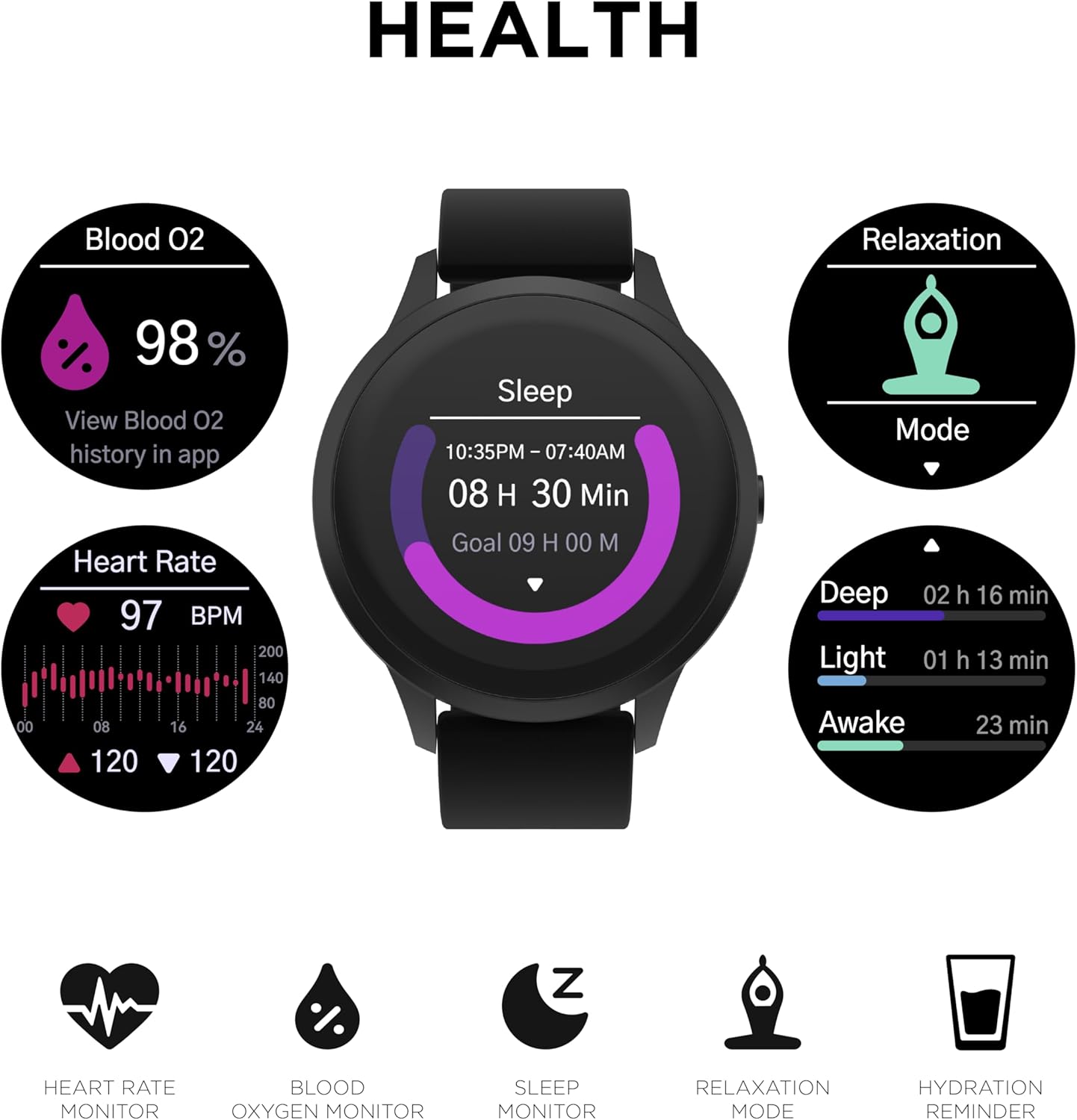
The smartwatch displaying various health metrics: Blood Oxygen (98%), Heart Rate (97 BPM with a graph), and Sleep tracking (8 hours 30 minutes, broken down into Deep, Light, and Awake stagእስ)

The iTouch Sport 4 Smartwatch tracking sleep, showing the duration and different sleep stagኢ.

The smartwatch showing real-time heart rate data with a graphical representation.
የአካል ብቃት እንቅስቃሴ ሁነታዎች
Activate Sports Mode to choose from over 100 different sports and workout options. The watch collects data tailored to your exercise, providing real-time stats and 13 workout metrics points. Your workout history is accessible on the watch and in the iTOUCH Wearables app.
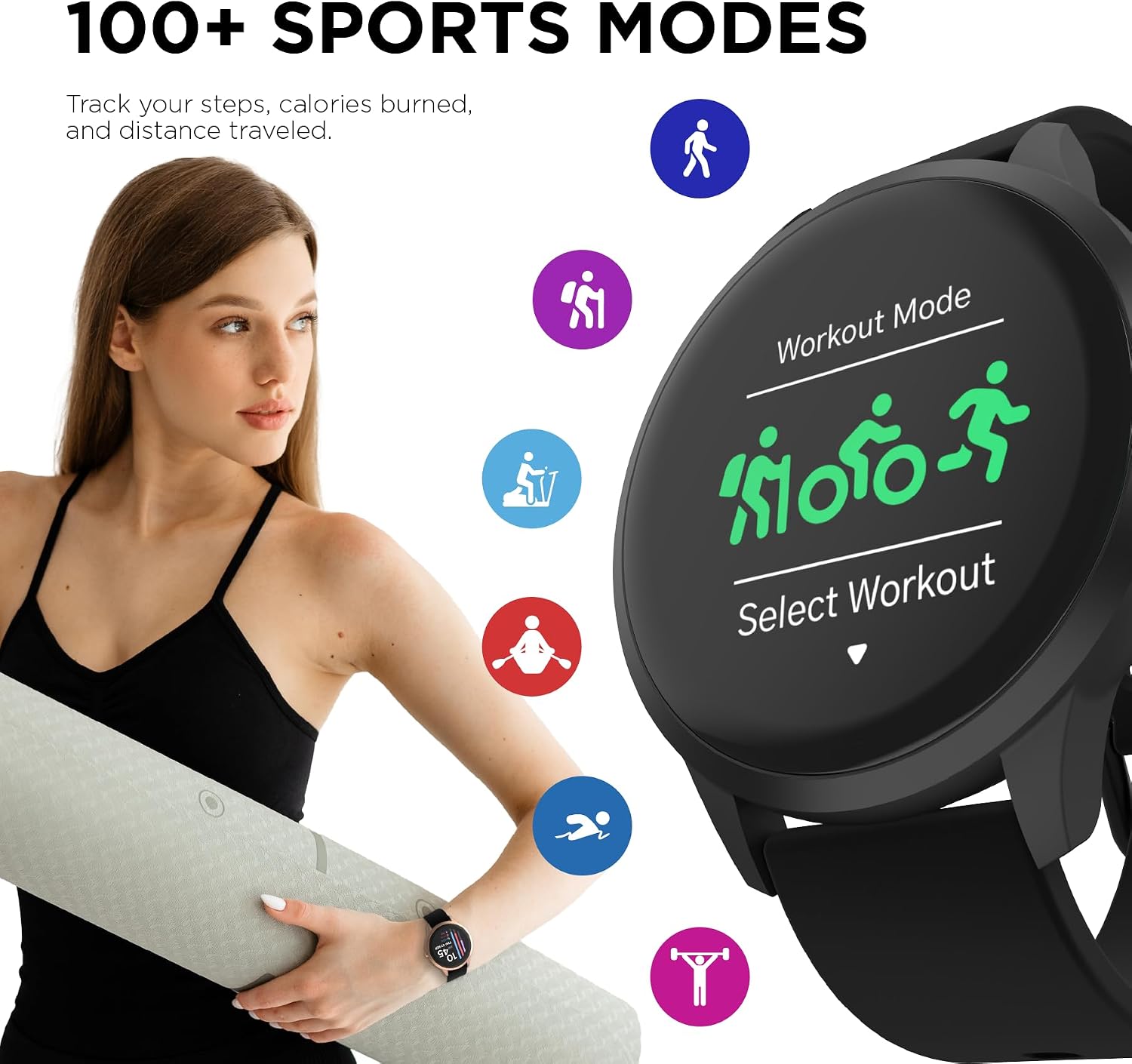
The iTouch Sport 4 Smartwatch displaying its 'Workout Mode' selection screen, with icons for various activities like running, cycling, and hiking.

The iTouch Sport 4 Smartwatch being worn during an outdoor activity, with icons representing different sports modes.
ተጨማሪ ባህሪያት
The iTouch Sport 4 includes several useful features:
- የእረፍት ሁነታ; በአተነፋፈስ ልምምዶች ይመራዎታል።
- የካሜራ ርቀት: የስልክዎን ካሜራ በርቀት ይቆጣጠሩ።
- ሙዚቃ የርቀት መቆጣጠሪያ፡ በስልክዎ ላይ የሙዚቃ መልሶ ማጫወትን ይቆጣጠሩ።
- የአየር ሁኔታ መረጃ; የእውነተኛ ጊዜ የአየር ሁኔታ ዝመናዎችን ያግኙ።
- የሩጫ ሰዓት እና ማንቂያ፡ አስፈላጊ የጊዜ አያያዝ መሳሪያዎች።
- Hydration & Sedentary Reminders: Prompts to drink water and move throughout the day.

The iTouch Sport 4 Smartwatch displaying hydration and stretch reminders, encouraging users to stay active and hydrated.
የምርት ቪዲዮ
ይፋዊ የምርት ቪዲዮ ማሳያasing the features and design of the iTouch Sport 4 Smartwatch.
ጥገና
የእርስዎን ስማርት ሰዓት በማጽዳት ላይ
To keep your iTouch Sport 4 in optimal condition, regularly clean the watch and band with a soft, damp ጨርቅ. ኃይለኛ ኬሚካሎችን ወይም ሻካራ ቁሳቁሶችን ከመጠቀም ይቆጠቡ.
የውሃ መቋቋም
The iTouch Sport 4 is IP68-rated water resistant, meaning it can withstand submersion in water up to 1.5 meters for up to 30 minutes. It is suitable for everyday use, including hand washing and light rain. However, it is not recommended for swimming, showering, or prolonged submersion.

The iTouch Sport 4 Smartwatch demonstrating its water resistance with droplets on the screen.
የባትሪ ህይወት
The iTouch Sport 4 offers up to 7 days of battery life on a single charge, depending on usage. To maximize battery life, reduce screen brightness, limit notifications, and disable features you don't frequently use.
መላ መፈለግ
| ችግር | ሊሆን የሚችል መፍትሄ |
|---|---|
| ሰዓት እየበራ/እየሞላ አይደለም | Ensure the charging pins are clean and properly aligned with the watch. Try a different USB port or power adapter. Allow the watch to charge for at least 30 minutes before attempting to turn it on. |
| ከስማርትፎን ጋር ማጣመር አይቻልም | Ensure Bluetooth is on and the iTOUCH Wearables app is open. Restart both your phone and the smartwatch. Forget the device in your phone's Bluetooth settings and try pairing again. Ensure your phone's OS meets the compatibility requirements (iOS 13+ or Android 10+). |
| ትክክለኛ ያልሆነ የጤና ንባብ | Ensure the watch is worn snugly on your wrist, not too tight or too loose. Clean the sensor on the back of the watch. Readings can be affected by movement, skin tone, and environmental factors. Consult a medical professional for accurate health measurements. |
| ማሳወቂያዎች አይታዩም። | Check notification settings in the iTOUCH Wearables app and your phone's system settings. Ensure the app has necessary permissions. Keep the app running in the background. |
ዝርዝሮች
- የሞዴል ስም፡- iTOUCH Sport 4 Smartwatch
- የሞዴል ቁጥር፡- TP4R01-G02
- የምርት ስም፡ oouchuch
- የስክሪን መጠን፡ 48 ሚሊሜትር (1.28 ኢንች)
- ማሳያ፡- ደማቅ ቀለም ማሳያ
- ክብደት፡ 100 ግራም (3.53 አውንስ)
- የውሃ መቋቋም; IP68 Rated (up to 1.5 meters for 30 minutes)
- ግንኙነት፡ ብሉቱዝ
- ስርዓተ ክወና፡ Wear OS
- ባትሪ፡ 1 መደበኛ ያልሆነ ባትሪ (ሊቲየም አዮን)
- የባትሪ ህይወት፡ Up to 7 days (varies with usage)
- ተኳኋኝነት iOS 13+ እና አንድሮይድ 10+
- ልዩ ባህሪያት፡ Heart Rate Monitor, Blood Oxygen Monitor, Sleep Monitor, Pedometer, Calorie Tracker, 100+ Sports Modes, Customizable Watch Faces, Notifications, Camera/Music Remote, Weather, Stopwatch, Alarm, Hydration/Sedentary Reminders.
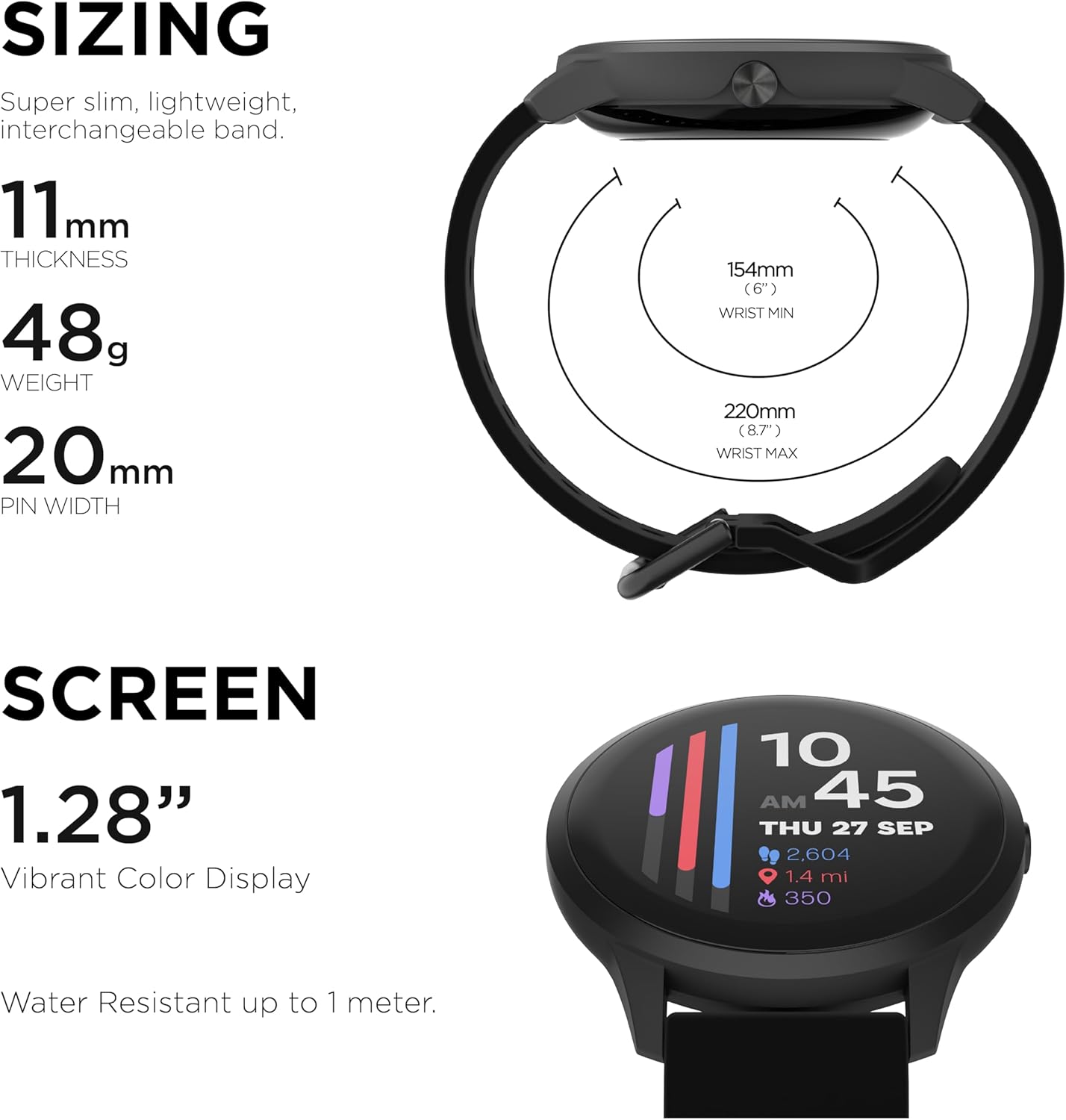
Detailed sizing information for the iTouch Sport 4 Smartwatch, including thickness, weight, and band dimensions.

አበቃview of all the features supported by the iTouch Sport 4 Smartwatch, compatible with Android and iOS.
ዋስትና እና ድጋፍ
For warranty information and customer support, please refer to the official iTouch Wearables webጣቢያ ወይም በቀጥታ የደንበኛ አገልግሎታቸውን ያግኙ። ለማንኛውም የዋስትና ጥያቄዎች የግዢ ማረጋገጫዎን ያስቀምጡ።
የመስመር ላይ ድጋፍ ን ይጎብኙ iTouch Store on Amazon ለተጨማሪ መገልገያዎች እና የምርት መረጃ.


