መግቢያ
ስለገዙ እናመሰግናለንasing the Kogan MX10 Pro Cordless Stick Vacuum Cleaner. This manual provides important information regarding the safe operation, maintenance, and troubleshooting of your new appliance. Please read this manual thoroughly before use and retain it for future reference.
The Kogan MX10 Pro is designed for efficient cleaning of various surfaces, featuring powerful suction, a brushless motor, and a HEPA filtration system for a cleaner home environment.
የደህንነት መመሪያዎች
To reduce the risk of fire, electric shock, or injury, always observe basic safety precautions when using an electrical appliance.
- መሳሪያውን ከመጠቀምዎ በፊት ሁሉንም መመሪያዎች ያንብቡ.
- ከቤት ውጭ ወይም እርጥብ በሆኑ ቦታዎች ላይ አይጠቀሙ.
- እንደ አሻንጉሊት መጠቀም አትፍቀድ. በልጆች ወይም በአቅራቢያው በሚጠቀሙበት ጊዜ የቅርብ ትኩረት አስፈላጊ ነው.
- በዚህ ማኑዋል ውስጥ እንደተገለፀው ብቻ ይጠቀሙ። የአምራቹን የሚመከሩ አባሪዎችን ብቻ ይጠቀሙ።
- በተበላሸ ገመድ ወይም መሰኪያ አይጠቀሙ. መገልገያው በሚፈለገው መልኩ የማይሰራ ከሆነ፣ ከተጣለ፣ ከተበላሸ፣ ከቤት ውጭ ከወጣ ወይም ወደ ውሃ ከተጣለ ወደ አገልግሎት ማዕከል ይመልሱት።
- በገመድ አይጎትቱ ወይም አይያዙ ፣ ገመዱን እንደ እጀታ አይጠቀሙ ፣ በገመድ ላይ በር አይዝጉ ፣ ወይም ገመድ በሹል ጠርዞች ወይም ማዕዘኖች አይጎትቱ ። መሣሪያውን በገመድ ላይ አያሂዱ። ገመዱን ከተሞቁ ቦታዎች ያርቁ.
- ገመዱን በማንሳት አይንቀሉት። ሶኬቱን ለመንቀል ገመዱን ሳይሆን መሰኪያውን ይያዙ።
- ሶኬቱን ወይም ዕቃውን በእርጥብ እጆች አይያዙ።
- ማንኛውንም ዕቃ ወደ ክፍት ቦታዎች አታስቀምጡ. በማንኛውም ክፍት የታገደ አይጠቀሙ; ከአቧራ፣ ከጥጥ፣ ከፀጉር እና የአየር ፍሰት ሊቀንስ ከሚችል ከማንኛውም ነገር ይርቁ።
- ፀጉርን፣ ልቅ ልብሶችን፣ ጣቶችን እና ሁሉንም የሰውነት ክፍሎችን ከመክፈትና ከሚንቀሳቀሱ ክፍሎች ያርቁ።
- የሚቃጠል ወይም የሚያጨስ ማንኛውንም ነገር እንደ ሲጋራ፣ ክብሪት ወይም ትኩስ አመድ አይውሰዱ።
- እንደ ነዳጅ ያሉ ተቀጣጣይ ወይም ተቀጣጣይ ፈሳሾችን ለማንሳት አይጠቀሙ ወይም በሚገኙባቸው ቦታዎች አይጠቀሙ።
- በደረጃዎች ላይ ሲያጸዱ ተጨማሪ ጥንቃቄ ይጠቀሙ.
- ያለ አቧራ ስኒ እና/ወይም ማጣሪያዎች በቦታ አይጠቀሙ።
- ሳይታሰብ መጀመርን ይከላከሉ. ከባትሪ ጥቅል ጋር ከመገናኘትዎ፣ መሳሪያውን ከማንሳትዎ ወይም ከመያዙ በፊት ማብሪያው ከቦታው ውጪ መሆኑን ያረጋግጡ።
- በአምራቹ በተጠቀሰው ባትሪ መሙያ ብቻ ይሙሉ. ለአንድ የባትሪ ጥቅል ተስማሚ የሆነ ቻርጀር ከሌላ የባትሪ ጥቅል ጋር ሲጠቀሙ የእሳት አደጋ ሊፈጥር ይችላል።
- በአሰቃቂ ሁኔታዎች ውስጥ ፈሳሽ ከባትሪው ሊወጣ ይችላል; ግንኙነትን ያስወግዱ. ግንኙነቱ በድንገት ከተከሰተ በውሃ ያጠቡ። ፈሳሽ ዓይኖችን የሚነካ ከሆነ, በተጨማሪ የሕክምና እርዳታ ይፈልጉ. ከባትሪው የሚወጣ ፈሳሽ ብስጭት ወይም ማቃጠል ሊያስከትል ይችላል።
ምርት አልቋልview & አካላት
Familiarize yourself with the parts of your Kogan MX10 Pro Cordless Stick Vacuum Cleaner.

Figure 1: Fully assembled Kogan MX10 Pro Cordless Stick Vacuum Cleaner, showing the main unit, extension wand, and motorized brush head.

Figure 2: Kogan MX10 Pro with icons indicating 25000Pa suction power, up to 45 minutes battery life, dust detection & adaptive suction, motorized roller brush, and touchscreen display.
የጥቅል ይዘቶች፡-
- Main Vacuum Unit (with dust bin and motor)
- የኤክስቴንሽን ዋንዴ
- የሞተር ብሩሽ ራስ
- Detachable Li-ion Battery (2000mAh)
- የኃይል አስማሚ / ባትሪ መሙያ
- ግድግዳ ላይ የተገጠመ መትከያ
- የክሪቪስ መሣሪያ
- 2-በ-1 ብሩሽ መሣሪያ
- የተጠቃሚ መመሪያ
ማዋቀር
ስብሰባ፡-
- ደህንነቱ በተጠበቀ ሁኔታ ወደ ቦታው ጠቅ እስኪያደርግ ድረስ የኤክስቴንሽን ዘንግ ወደ ዋናው የቫኩም አሃድ ያስገቡ።
- Attach the motorized brush head to the other end of the extension wand, ensuring it clicks securely.
- Insert the detachable Li-ion battery into the battery slot on the main unit until it locks.
ባትሪ መሙላት;
- Connect the power adapter to the charging port on the battery or the wall-mounted dock.
- Plug the adapter into a power outlet. The LCD touchscreen will display the charging status.
- For first use, fully charge the battery (approximately 4-5 hours).
Wall-Mounted Dock Installation:
- Choose a suitable location near a power outlet for convenient storage and charging.
- Mark the drilling points for the dock on the wall.
- ቀዳዳዎችን ቆፍሩ እና የግድግዳ መሰኪያዎችን (አስፈላጊ ከሆነ) ያስገቡ።
- Secure the wall-mounted dock using screws.
- የቫክዩም ማጽጃውን ለማከማቸት እና ለመሙላት ወደ መትከያው ላይ ያስቀምጡት።
የአሠራር መመሪያዎች
ማብራት/ማጥፋት፡
- Press the power button on the handle to turn the vacuum cleaner on.
- ለማጥፋት የኃይል ቁልፉን እንደገና ይጫኑ።
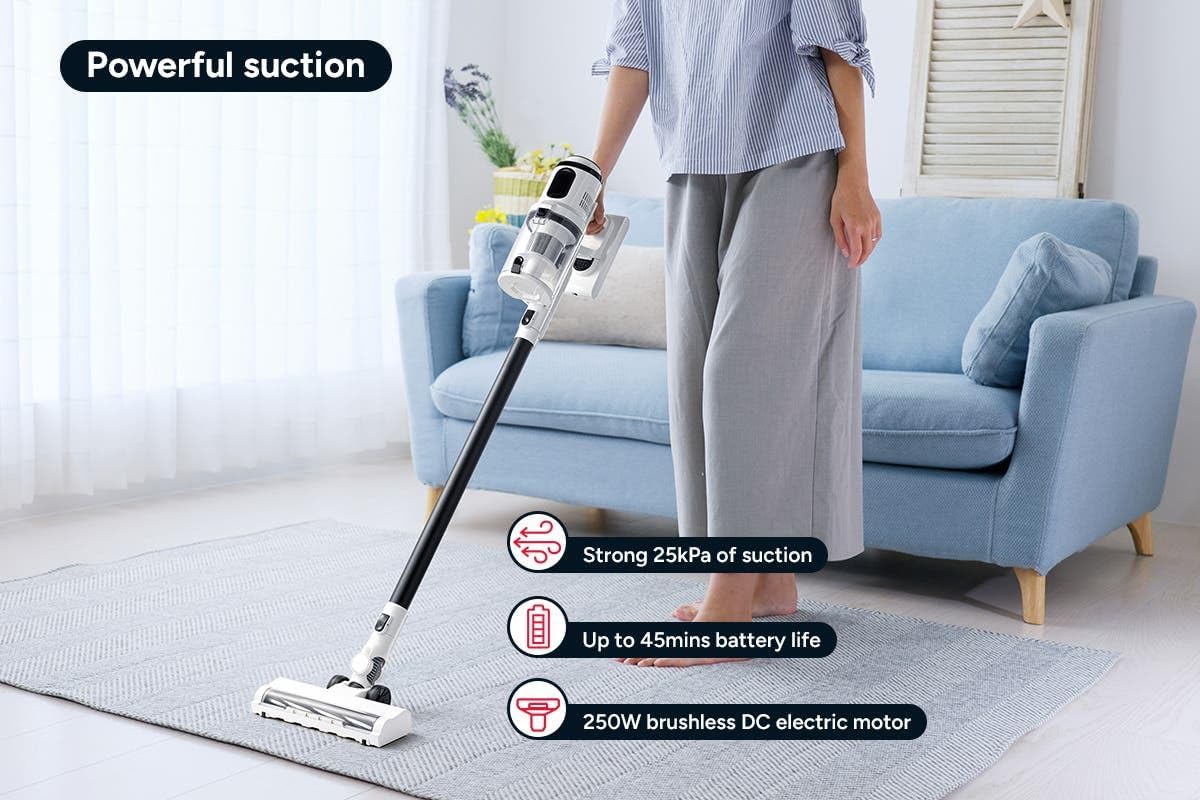
Figure 3: The Kogan MX10 Pro in use, highlighting its powerful 25kPa suction, long battery life, and efficient 250W brushless motor.
Suction Modes & LCD Touchscreen:

Figure 4: The LCD touchscreen provides real-time information on battery level, suction mode, and other operational indicators.
- The LCD touchscreen displays battery status, current suction level, and other relevant information.
- Tap the mode button on the touchscreen to switch between different suction modes (e.g., Eco, Standard, Max).
- The vacuum features dust detection, which automatically adjusts suction power based on the amount of dirt detected.

Figure 5: The brush head detecting dust on a hard floor, demonstrating the automatic suction adjustment feature.
አባሪዎችን በመጠቀም፡-
- የሞተር ብሩሽ ጭንቅላት; Ideal for carpets and hard floors, providing powerful agitation to lift dirt.
- የክሪቪስ መሣሪያ Perfect for narrow gaps, corners, and hard-to-reach areas.
- ባለ 2-በ-1 ብሩሽ መሳሪያ፡ Use the brush for dusting delicate surfaces or slide the brush back for upholstery and larger debris.
- To change attachments, press the release button on the current attachment and pull it off. Then, push the desired attachment onto the main unit or extension wand until it clicks.
ጥገና
መደበኛ ጥገና ጥሩ አፈጻጸምን ያረጋግጣል እና የቫኩም ማጽጃውን ዕድሜ ያራዝመዋል።
የአቧራ ማጠራቀሚያውን ባዶ ማድረግ;
- It is recommended to empty the dust bin after each use or when the MAX fill line is reached.
- Hold the main unit over a rubbish bin.
- Press the dust bin release button to open the bottom flap and allow debris to fall out.
- The ejection mechanism ensures dirt and dust are removed in a singular motion.

Figure 6: Demonstrating the easy bin emptying process by pressing the release button to open the dust bin flap.
የጽዳት ማጣሪያዎች;
The Kogan MX10 Pro features a cyclone filter system and a washable HEPA filter to ensure maximum performance and trap fine dust and allergens.

Figure 7: The HEPA filter captures up to 99.97% of fine dust and allergens.
- Twist and pull to remove the filter assembly from the dust bin.
- የHEPA ማጣሪያውን እና የብረት ጥልፍልፍ ማጣሪያውን ይለያዩ።
- Rinse the HEPA filter and metal mesh filter under cold running water.
- Allow all filter components to air dry completely for at least 24 hours before reassembling and placing back into the vacuum. Important: Ensure all parts are completely dry before reinstallation to prevent damage.
የብሩሽ ጭንቅላትን ማጽዳት;
- Periodically check the brush head for tangled hair or debris.
- To remove the brush roll, locate the release tab on the side of the brush head and open it.
- Carefully pull out the brush roll.
- ማንኛውንም የተዘበራረቀ ጸጉር ወይም ፋይበር ለመቁረጥ እና ለማስወገድ መቀስ ወይም ማጽጃ መሳሪያ ይጠቀሙ።
- Slide the brush roll back into place and secure the release tab.
መላ መፈለግ
| ችግር | ሊሆን የሚችል ምክንያት | መፍትሄ |
|---|---|---|
| ቫክዩም አይበራም። | Battery not charged; Battery not properly installed; Power button not pressed correctly. | Charge the battery fully; Ensure battery is securely clicked into place; Press the power button firmly. |
| ዝቅተኛ የመሳብ ኃይል | Dust bin full; Filters clogged; Blockage in nozzle, wand, or hose; Brush roll tangled. | Empty the dust bin; Clean or replace filters; Check for and remove any blockages; Clean the brush roll. |
| ብሩሽ ጥቅል አይሽከረከርም | Brush roll tangled with hair/debris; Brush roll not properly installed; Obstruction in brush head. | Clean the brush roll; Reinstall brush roll correctly; Remove any obstructions. |
| ባትሪ እየሞላ አይደለም። | Charger not properly connected; Power outlet not working; Damaged charger or battery. | Ensure charger is securely plugged into battery/dock and outlet; Test outlet with another device; Contact Kogan support if charger or battery is damaged. |
ዝርዝሮች
| ባህሪ | ዝርዝር |
|---|---|
| የምርት ስም | ኮጋን |
| ሞዴል | MX10 Pro (KAVACSTM10P) |
| የመሳብ ኃይል | 25 ኪፓ |
| ሞተር | 250 ዋ ብሩሽ አልባ ሞተር |
| ባትሪ | 2000mAh Detachable Li-ion |
| የድምጽ ደረጃ | 80 ዲቢቢ |
| የማጣሪያ ዓይነት | ሄፓ (ሊታጠብ የሚችል) |
| ልዩ ባህሪያት | Lightweight, Cordless, LCD Touchscreen, Dust Detection, Cyclone Filter System |
| የእቃው ክብደት | 3.47 ኪ.ግ |
| የሚመከር ወለል | ጠንካራ ወለል ፣ ምንጣፍ |
ዋስትና እና ድጋፍ
For warranty information, technical support, or any inquiries regarding your Kogan MX10 Pro Cordless Stick Vacuum Cleaner, please visit the official Kogan website or contact Kogan customer support directly.
You can find more information and contact details on the Kogan store page: የኮጋን ኦፊሴላዊ መደብር


