መግቢያ
Welcome to the user manual for your Infinity Smartwatch, Model NX 10. This device is designed to enhance your daily life with advanced fitness tracking, communication features, and smart notifications. Featuring a vibrant 1.43" AMOLED screen and robust IP68 water resistance, your smartwatch is built for both everyday use and active lifestyles. Please read this manual carefully to ensure proper operation and maintenance of your device.

Figure 1: Infinity Smartwatch NX 10. This image shows the smartwatch from an angled perspective, highlighting its round AMOLED display, black silicone strap, and two side buttons.
ማዋቀር
1. Unboxing እና የመጀመሪያ ክፍያ
Upon unboxing, ensure all components are present: the Infinity Smartwatch NX 10 and the charging cable.
- የማግኔቲክ ኃይል መሙያ ገመዱን ከስማርት ሰዓቱ ጀርባ ላይ ካሉት የኃይል መሙያ ነጥቦች ጋር ያገናኙ።
- የኬብሉን የዩኤስቢ ጫፍ ወደ መደበኛ የዩኤስቢ ሃይል አስማሚ (ያልተካተተ) ወይም የኮምፒዩተር ዩኤስቢ ወደብ ይሰኩት።
- The watch display will show a charging indicator. Fully charge the device before first use, which typically takes approximately 2 hours.

Figure 2: Smartwatch charging. The image illustrates the smartwatch being charged magnetically, with a green lightning bolt icon on the screen indicating charging status and a "400mAh Battery Capacity" label.
2. የመተግበሪያ ጭነት እና ማጣመር
To unlock the full potential of your Infinity Smartwatch, download and install the companion application, የአካል ብቃት ክላውድ ፕሮ, በስማርትፎንዎ ላይ።
- Scan the QR code provided in the quick start guide (if available) or search for "Fit Cloud Pro" in your smartphone's app store (Google Play Store for Android, Apple App Store for iOS).
- መተግበሪያውን ይጫኑ.
- Open the Fit Cloud Pro app and follow the on-screen instructions to create an account or log in.
- በእርስዎ ዘመናዊ ስልክ ላይ ብሉቱዝ መንቃቱን ያረጋግጡ።
- In the app, navigate to the device pairing section and search for your smartwatch (e.g., "NX 10" or similar Bluetooth name).
- Select your smartwatch from the list to initiate pairing. Confirm the pairing request on both your phone and the smartwatch if prompted.
- Once paired, the app will synchronize data with your smartwatch, and you can customize settings.
የአሠራር መመሪያዎች
1. መሰረታዊ ዳሰሳ
- የንክኪ ማያ ገጽ፡ Swipe left/right to navigate between main screens (e.g., activity, heart rate, weather). Swipe up/down to access quick settings or notifications. Tap to select an option.
- የጎን ቁልፎች; The top button typically acts as a power button (long press) or a back/home button (short press). The bottom button may be customizable or provide quick access to sports modes.

Figure 3: 1.43" AMOLED Screen. This image highlights the vibrant display of the smartwatch, showing a detailed watch face with various data points like time, date, steps, and heart rate.
2. ጥሪዎችን ማድረግ እና መመለስ
Your Infinity Smartwatch supports Bluetooth calling, allowing you to make and receive calls directly from your wrist when connected to your smartphone.
- ጥሪ ለማድረግ፡- Access the dialer or contacts list on your smartwatch. You can dial a number directly or select a contact to call.
- ጥሪን ለመመለስ፡- When a call comes in, the smartwatch will display the caller ID. Tap the green answer icon to accept the call or the red icon to decline.

Figure 4: Stay Connected On The Go. This image shows a user interacting with the smartwatch to make a call, illustrating the microphone, dialing, call records, and contacts features.
3. የአካል ብቃት እና የጤና ክትትል
The smartwatch is equipped with multiple sensors to monitor your health and fitness activities.
- Pedometer: እርምጃዎችዎን፣ ርቀትዎን እና ቀኑን ሙሉ የተቃጠሉ ካሎሪዎችዎን በራስ-ሰር ይከታተላል።
- የልብ ምት ክትትል; Provides real-time heart rate data. Access this feature from the main menu or set up continuous monitoring in the app.
- የደም ግፊት ክትትል; Offers blood pressure readings. For accurate results, ensure the watch is worn correctly and remain still during measurement. ማሳሰቢያ፡ ይህ ባህሪ ለማጣቀሻ ብቻ የተዘጋጀ ሲሆን ለህክምና ምርመራ ጥቅም ላይ መዋል የለበትም።
- የእንቅልፍ ክትትል; ጥልቅ እንቅልፍ፣ ቀላል እንቅልፍ እና የንቃት ጊዜን ጨምሮ የእንቅልፍ ሁኔታዎን ይከታተላል። View detailed analysis in the Fit Cloud Pro app.
- የስፖርት ሁነታዎች፡- Supports over 100 sports modes, including running, cycling, swimming, and more. Select your desired activity to track specific metrics.

Figure 5: Track Every Move. This image displays the smartwatch tracking a swimming activity, with additional visuals of rock climbing and cycling, indicating its multi-sport tracking capabilities.

Figure 6: More than 110 sports modes. This image shows a variety of colorful icons representing different sports activities supported by the smartwatch, overlaid on a background of a person cycling.
4. ማበጀት
Personalize your smartwatch experience through the Fit Cloud Pro app.
- የእይታ ገጽታዎች Choose from a wide range of pre-installed watch faces or download new ones via the app. You can also create custom watch faces using your own photos.
- ማሳወቂያዎች፡- Configure which app notifications you wish to receive on your smartwatch (e.g., calls, SMS, social media alerts).
- ማንቂያዎች እና አስታዋሾች፡- Set alarms, sedentary reminders, and hydration reminders through the app.
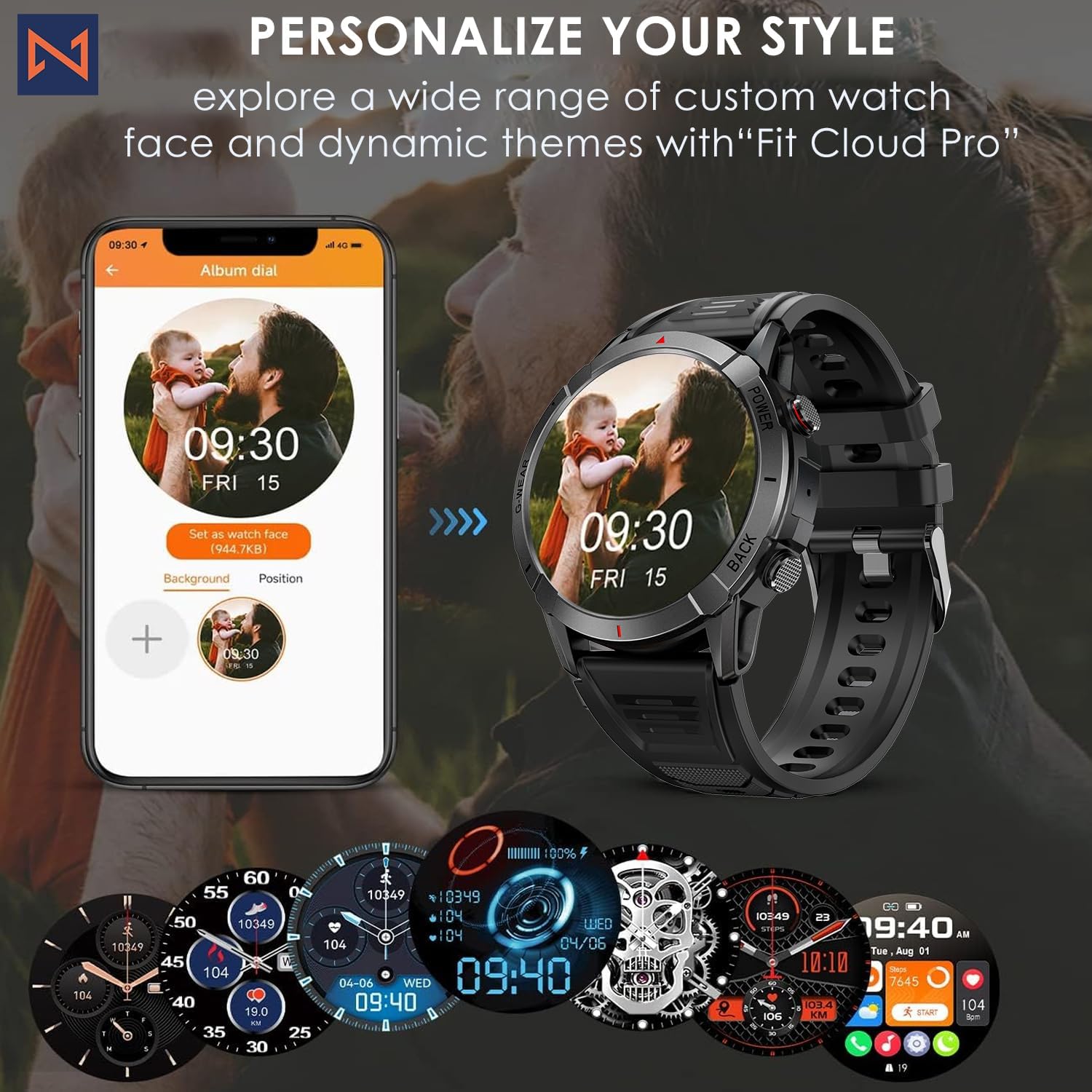
Figure 7: Personalize Your Style. This image demonstrates how to customize watch faces using the "Fit Cloud Pro" app, showing various digital and analog watch face options.
ጥገና
1. ስማርት ሰዓትዎን ማጽዳት
አዘውትሮ ማጽዳት የመሳሪያዎን ገጽታ እና ተግባር ለመጠበቅ ይረዳል።
- ስክሪኑን እና ገላውን ለስላሳ፣ ከተሸፈነ ጨርቅ ይጥረጉ።
- ለጠንካራ ቆሻሻዎች፣ ዲampጨርቁን በትንሹ በውሃ። ኃይለኛ ኬሚካሎችን ወይም ሻካራ ቁሳቁሶችን ከመጠቀም ይቆጠቡ.
- ትክክለኛውን ግንኙነት ለማረጋገጥ የኃይል መሙያ እውቂያዎችን በየጊዜው ያጽዱ።
2. የውሃ መቋቋም (IP68)
Your Infinity Smartwatch is rated IP68, meaning it is resistant to dust and can withstand immersion in water up to 1.5 meters for up to 30 minutes.
- ለዕለታዊ አጠቃቀም፣ ለእጅ መታጠብ እና ለቀላል ዝናብ ተስማሚ ነው።
- Avoid prolonged immersion, hot water, steam, or high-pressure water jets (e.g., showering, sauna, diving).
- If the watch gets wet, dry it thoroughly before charging or operating buttons.

Figure 8: Engineered for Adventure. This image highlights the smartwatch's durability features, including waterproof, dustproof, anti-magnetic, and shockproof capabilities, with corresponding icons.
3. የባትሪ እንክብካቤ
- የባትሪ ዕድሜን ለማራዘም ከፍተኛ ሙቀትን ያስወግዱ።
- ሰዓቱን በመደበኛነት ይሙሉት፤ ባትሪው ለረጅም ጊዜ ሙሉ በሙሉ እንዲፈስ አይፍቀዱ።
- የቀረበውን የኃይል መሙያ ገመድ ብቻ ይጠቀሙ።
መላ መፈለግ
| ችግር | ሊሆን የሚችል መፍትሄ |
|---|---|
| ሰዓት አይበራም። | ሰዓቱ ሙሉ በሙሉ መሙላቱን ያረጋግጡ። ከቻርጀሩ ጋር ያገናኙትና ለማብራት ከመሞከርዎ በፊት ለጥቂት ደቂቃዎች ይጠብቁ። |
| ከስማርትፎን ጋር ማጣመር አይቻልም |
|
| ትክክለኛ ያልሆነ የጤና መረጃ |
|
| ማሳወቂያዎች አልተቀበሉም። |
|
| አጭር የባትሪ ህይወት |
|
ዝርዝሮች
| ባህሪ | ዝርዝር |
|---|---|
| የሞዴል ቁጥር | NX 10 |
| ማሳያ | 1.43" AMOLED Screen |
| የማሳያ ጥራት | 466x466 ኤችዲ |
| የባትሪ አቅም | 400 ሚአሰ ሊቲየም ፖሊመር |
| የውሃ መቋቋም | IP68 |
| ግንኙነት | ብሉቱዝ |
| ስርዓተ ክወና | አንድሮይድ (ከ iOS ጋር ተኳሃኝ) |
| ማሰሪያ ቁሳቁስ | 22mm Silicon Belt |
| የማሳያ ቁሳቁስ | ዚንክ ቅይጥ |
| የእቃው ክብደት | 1.76 አውንስ |
| የማህደረ ትውስታ ማከማቻ አቅም | 128 ሜባ |
ዋስትና እና ድጋፍ
For warranty information and technical support, please refer to the documentation included with your purchase or visit the official Infinity webጣቢያ.
Manufacturer: Infiniity
For further assistance, you may contact Infiniity customer service through the contact information provided on their official website or within the Fit Cloud Pro application.


