1. መግቢያ
Thank you for choosing the Defender Enjoy S200 Portable Bluetooth Speaker. This manual provides essential information for setting up, operating, and maintaining your speaker to ensure optimal performance and longevity. Please read this manual thoroughly before use.
The Defender Enjoy S200 is a versatile portable speaker featuring Bluetooth 5.3 connectivity, True Wireless Stereo (TWS) pairing, an integrated FM radio, and MP3 playback capabilities via USB flash drive or microSD card. It also includes an LED light and supports hands-free calling. Designed for portability, it offers up to 9 hours of playback on a single charge and convenient USB Type-C charging.
2. ምርት አብቅቷልview
2.1 ቁልፍ ባህሪያት
- ብሉቱዝ 5.3: ለተረጋጋ እና ቀልጣፋ ገመድ አልባ የድምጽ ዥረት።
- እውነተኛ ገመድ አልባ ስቴሪዮ (TWS) Connect two Enjoy S200 speakers for a stereo sound experience.
- በርካታ የመልሶ ማጫወት ሁነታዎች፡- Bluetooth, FM Radio, USB Flash Drive, MicroSD Card (up to 32GB).
- የተዋሃደ የ LED መብራት; Provides visual ambiance.
- ከእጅ ነጻ ጥሪ፡ ለስልክ ጥሪዎች አብሮ የተሰራ ማይክሮፎን ፡፡
- ረጅም የባትሪ ህይወት; እስከ 9 ሰዓታት የሚዘልቅ ቀጣይነት ያለው የሙዚቃ መልሶ ማጫወት።
- የዩኤስቢ ዓይነት-ሲ ኃይል መሙላት; ዘመናዊ እና ምቹ የኃይል መሙያ ወደብ.
- ተንቀሳቃሽ ንድፍ; Compact and lightweight with a carrying strap.
2.2 የጥቅል ይዘቶች
- Defender Enjoy S200 Portable Bluetooth Speaker
- ዓይነት-ሲ ባትሪ መሙያ ገመድ
- ፈጣን ጅምር መመሪያ
- የተሸከመ ማሰሪያ

Image: The Defender Enjoy S200 Portable Bluetooth Speaker, showcasing its compact design and front grille with an illuminated LED ring.

Image: An infographic highlighting key features such as multi-colored LED lighting, True Wireless Stereo (TWS) pairing, Bluetooth 5.3, MP3 player, FM receiver, and hands-free calling.
3. ማዋቀር
3.1 ድምጽ ማጉያውን መሙላት
- Locate the Type-C charging port on the back of the speaker.
- Connect the provided Type-C charging cable to the speaker and the other end to a USB power adapter (not included) or a computer's USB port.
- የኤልኢዲ አመልካች የኃይል መሙያ ሁኔታን ያሳያል። ሙሉ ኃይል መሙላት አብዛኛውን ጊዜ ከ3-4 ሰዓታት ይወስዳል።
- አንዴ ሙሉ ኃይል ከሞላ በኋላ ገመዱን ያላቅቁት።
3.2 ማብራት / ማጥፋት
- To power on, slide the ON/OFF switch located on the back of the speaker to the 'ON' position.
- ኃይልን ለማጥፋት የማብራት / ማጥፊያ ማብሪያ / ማጥፊያውን ወደ 'OFF' ቦታ ያንሸራትቱ።
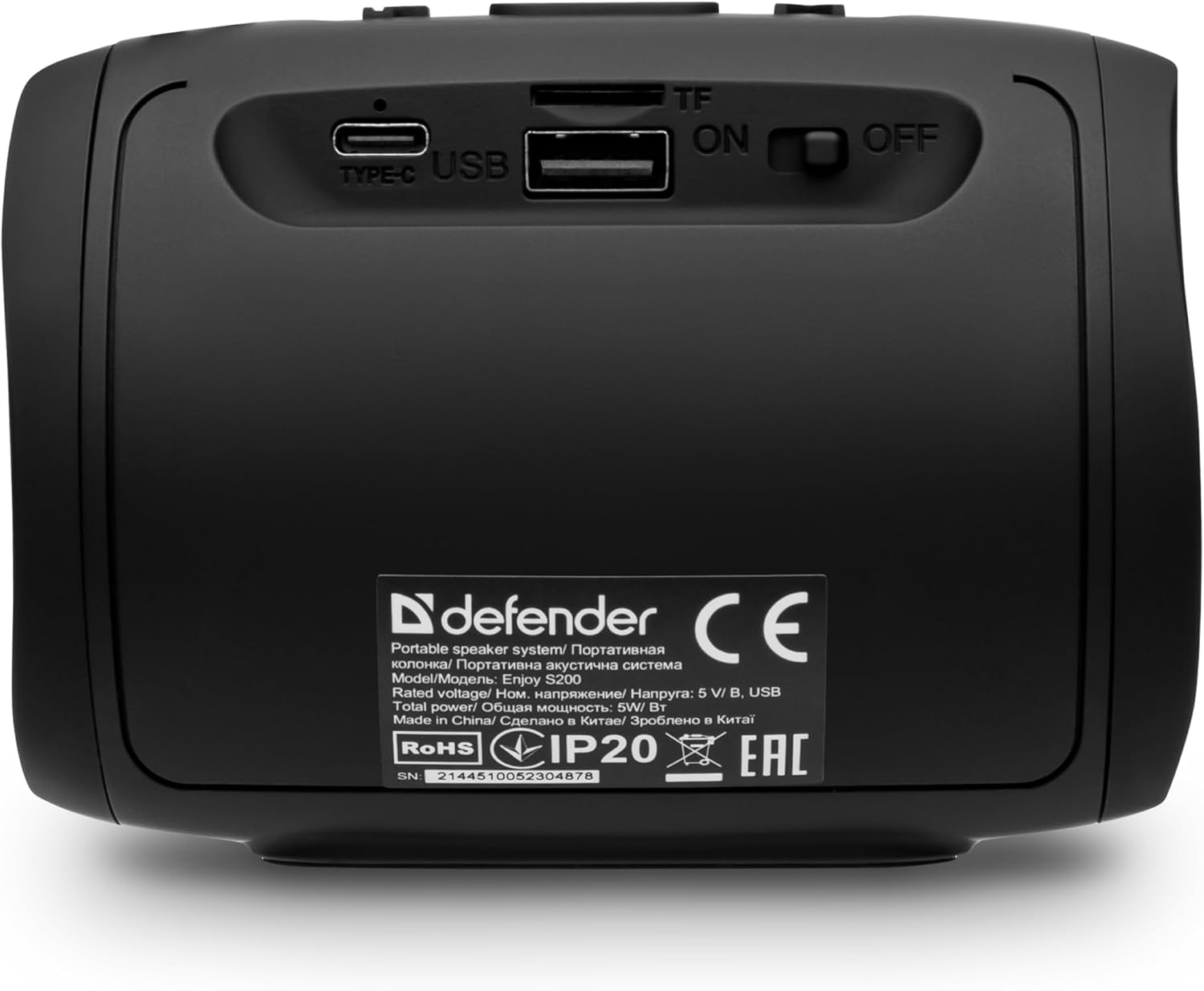
ምስል: የኋላ view of the Defender Enjoy S200 speaker, showing the Type-C charging port, USB port, TF (microSD) card slot, and the ON/OFF power switch.
3.3 የብሉቱዝ ማጣመር
- ድምጽ ማጉያው መብራቱን እና በብሉቱዝ ማጣመሪያ ሁነታ ላይ መሆኑን ያረጋግጡ (በብልጭ ድርግም የሚሉ LED)።
- በመሳሪያዎ (ስማርትፎን፣ ታብሌት፣ ወዘተ) ላይ ብሉቱዝን አንቃ እና የሚገኙ መሳሪያዎችን ፈልግ።
- Select "Defender Enjoy S200" from the list of devices.
- Once paired, the speaker will emit a confirmation sound, and the LED will stop flashing.
3.4 እውነተኛ ገመድ አልባ ስቴሪዮ (TWS) ማጣመር
To pair two Defender Enjoy S200 speakers for stereo sound:
- ሁለቱም ድምጽ ማጉያዎች መብራታቸውን እና ከማንኛውም የብሉቱዝ መሳሪያ ጋር አለመገናኘታቸውን ያረጋግጡ።
- On one speaker (this will be the primary speaker), press and hold the TWS button (often indicated by a double-arrow icon) until you hear a pairing tone.
- The two speakers will automatically search and connect to each other. A confirmation tone will sound once connected.
- አሁን በክፍል 3.3 እንደተገለጸው መሳሪያዎን ከዋናው ድምጽ ማጉያ ጋር በብሉቱዝ ያገናኙት። ኦዲዮ በሁለቱም ድምጽ ማጉያዎች በኩል በስቲሪዮ ውስጥ ይጫወታል።

Image: A visual representation of two Defender Enjoy S200 speakers pairing wirelessly to create a True Wireless Stereo system, alongside icons for Bluetooth 5.3, MP3 player, FM receiver, and hands-free calling.
4. የአሠራር መመሪያዎች
4.1 Button Functions (Refer to top panel controls)
- የኃይል ቁልፍ፡- Long press to power on/off. Short press to play/pause in music mode, or answer/end calls.
- የድምጽ መጠን መጨመር (+): ድምጽን ለመጨመር አጭር ተጫን። ለቀጣይ ትራክ/ጣቢያ በረጅሙ ተጫን።
- ድምጽ መቀነስ (-): ድምጽን ለመቀነስ አጭር ተጫን። ለቀደመው ትራክ/ጣቢያ በረጅሙ ተጫን።
- ሁነታ (ኤም) አዝራር፡- Short press to switch between Bluetooth, FM Radio, USB, and MicroSD modes.
- የ LED መብራት ቁልፍ; Short press to cycle through LED light modes or turn off the LED.
4.2 የብሉቱዝ መልሶ ማጫወት
After successful Bluetooth pairing (Section 3.3), open your music application on your device and begin playback. Use the speaker's volume buttons or your device's volume controls to adjust the audio level.
4.3 ኤፍኤም ሬዲዮ ሁነታ
- Press the 'M' (Mode) button until you hear the FM radio prompt.
- የሚገኙ የኤፍ ኤም ጣቢያዎችን በራስ ሰር ለመቃኘት እና ለማስቀመጥ ተጫወት/አፍታ አቁም የሚለውን በረጅሙ ተጫን።
- Use the Volume Up (+) and Volume Down (-) buttons (long press) to navigate between saved stations.
4.4 የዩኤስቢ/ማይክሮ ኤስዲ መልሶ ማጫወት
- Insert a USB flash drive or a microSD card (up to 32GB) containing MP3 audio fileበተናጋሪው ጀርባ ላይ ወደሚገኘው ወደብ።
- Press the 'M' (Mode) button until the speaker automatically switches to USB or MicroSD mode and begins playback.
- Use the speaker's control buttons for play/pause, next track, and previous track.
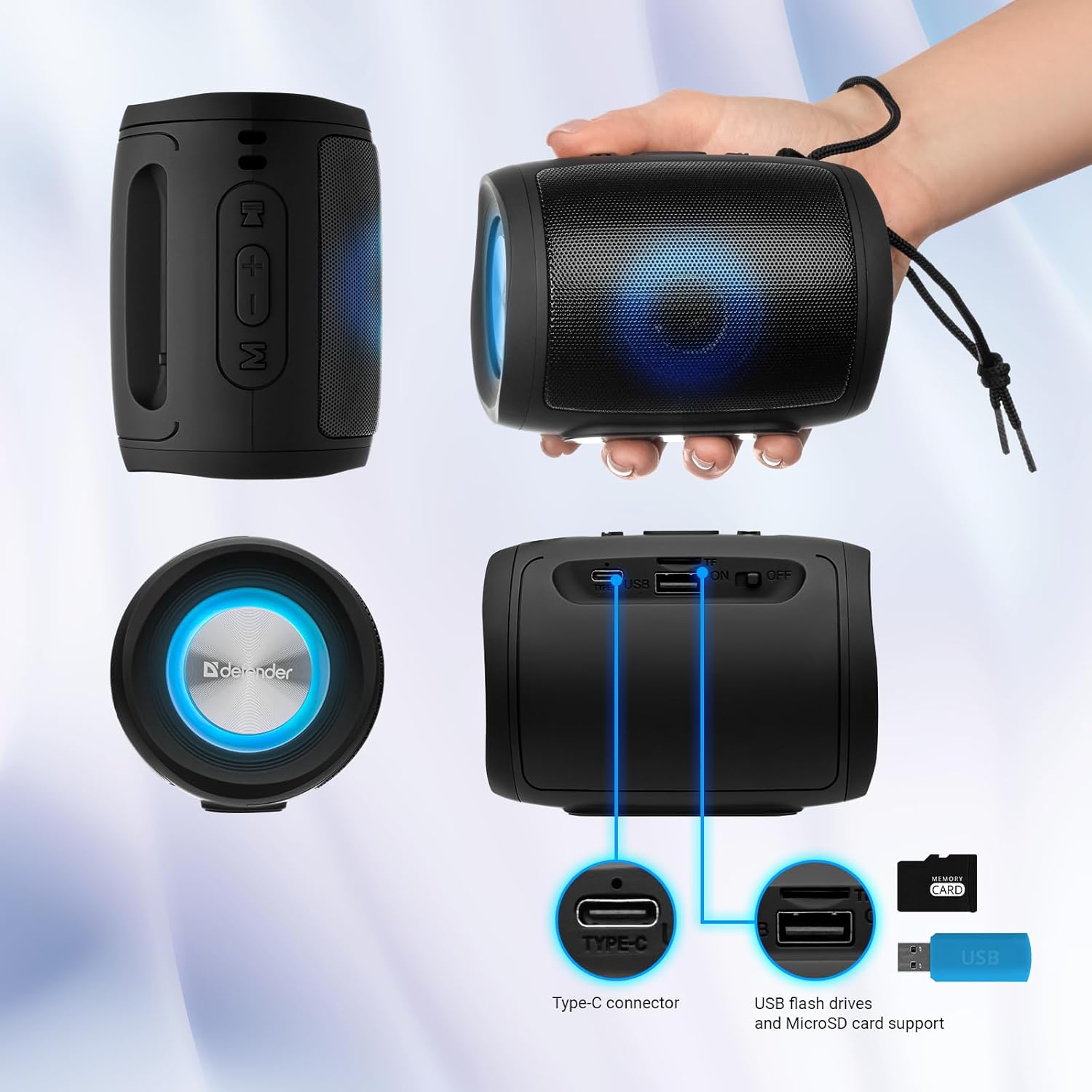
Image: A detailed diagram illustrating the Type-C connector, USB flash drive port, and MicroSD card slot on the Defender Enjoy S200 speaker.
4.5 ከእጅ-ነጻ ጥሪ
When connected to your smartphone via Bluetooth, the speaker's built-in microphone allows for hands-free calls.
- ጥሪ መልስ፡- አጫውት/አፍታ አቁም የሚለውን ቁልፍ ተጫን።
- ጥሪን ጨርስ፡ አጫውት/አፍታ አቁም የሚለውን ቁልፍ ተጫን።
- ጥሪን ውድቅ አድርግ፡ አጫውት/አፍታ አቁም የሚለውን በረጅሙ ተጫን።
5. ጥገና
- ማጽዳት፡ የተናጋሪውን ገጽ ለማጽዳት ለስላሳና ደረቅ ጨርቅ ይጠቀሙ። የማጽጃ ማጽጃዎችን ወይም ማሟሟቶችን አይጠቀሙ።
- ማከማቻ፡ ድምጽ ማጉያውን በቀጥታ ከፀሀይ ብርሀን እና ከከፍተኛ ሙቀት ርቆ በቀዝቃዛና ደረቅ ቦታ ያከማቹ።
- የውሃ መቋቋም; The speaker has an IP20 rating, meaning it is protected against solid objects larger than 12.5mm but has no protection against water. Avoid exposure to rain, splashes, or immersion in water.
- የባትሪ እንክብካቤ የባትሪውን ዕድሜ ለማራዘም፣ ድምጽ ማጉያውን ለመጀመሪያ ጊዜ ከመጠቀምዎ በፊት ሙሉ በሙሉ ይሙሉት እና በመደበኛነት ጥቅም ላይ ካልዋለ ቢያንስ በየሶስት ወሩ አንድ ጊዜ እንደገና ይሙሉት።
6. መላ መፈለግ
- ኃይል የለም፡ Ensure the speaker is charged. Connect the Type-C cable and allow it to charge for a few minutes before attempting to power on again.
- ድምጽ የለም፡ Check the volume levels on both the speaker and your connected device. Ensure the speaker is in the correct mode (Bluetooth, FM, USB, MicroSD).
- የብሉቱዝ ማጣመሪያ ጉዳዮች፡- Ensure the speaker is in pairing mode. Turn off Bluetooth on your device and turn it back on. Try unpairing and re-pairing the speaker. Move closer to the speaker to ensure you are within the 10-meter range.
- የኤፍኤም ሬዲዮ አቀባበል ደካማ ነው፡ Ensure you are in an area with good signal. The charging cable can sometimes act as an antenna; try connecting it for improved reception.
- USB/MicroSD Not Playing: ኦዲዮውን ያረጋግጡ files are in a compatible format (e.g., MP3). Check that the USB drive or microSD card is inserted correctly and is not corrupted.
7. ዝርዝሮች
| የሞዴል ስም | በS200 ይደሰቱ |
| የንጥል ሞዴል ቁጥር | 65200 |
| የምርት ስም | ተከላካይ |
| የግንኙነት ቴክኖሎጂ | ብሉቱዝ 5.3, ዩኤስቢ |
| ገመድ አልባ የመገናኛ ቴክኖሎጂ | ብሉቱዝ፣ የሬዲዮ ፍሪኩዌንሲ |
| የድምጽ ማጉያ አይነት | መልቲሚዲያ |
| የድምጽ ማጉያ መጠን | 2 ኢንች |
| የኃይል ውፅዓት | 5 ዋት |
| የድምጽ ውፅዓት ሁኔታ | ስቴሪዮ |
| የኃይል ምንጭ | ባትሪ የተጎላበተ (1 ሊቲየም-አዮን ባትሪ ተካትቷል) |
| ልዩ ባህሪያት | Integrated Microphone, USB Port, Portable Bluetooth, LED Light, FM Radio, MicroSD Card Support, TWS |
| የምርት ልኬቶች (L x W x H) | 8 x 11 x 8 ሴ.ሜ |
| ክብደት | 330 ግራም |
| ከፍተኛው ክልል | 10 ሜትር |
| የአይፒ ደረጃ አሰጣጥ | IP20 |
8. ዋስትና እና ድጋፍ
8.1 የዋስትና መረጃ
የተወሰኑ የዋስትና ዝርዝሮች በተለምዶ በግዢ ሰነድዎ ወይም በአምራቹ ኦፊሴላዊ ላይ ይሰጣሉ website. Please refer to these resources for information regarding warranty coverage and duration.
8.2 የደንበኛ ድጋፍ
For technical assistance, troubleshooting beyond this manual, or inquiries about your Defender Enjoy S200 speaker, please contact Defender Global customer support. Contact information can usually be found on the product packaging, the manufacturer's webጣቢያ፣ ወይም የግዢ ደረሰኝዎ።


