1. መግቢያ
Thank you for choosing the Baseus AeQur G10 TWS Earphones. This manual provides detailed instructions on how to set up, operate, maintain, and troubleshoot your new earphones. Please read this manual thoroughly before using the product to ensure optimal performance and longevity.
2. የጥቅል ይዘቶች
ሳጥኑን በጥንቃቄ ይክፈቱ እና ከዚህ በታች የተዘረዘሩት እቃዎች በሙሉ መኖራቸውን እና በጥሩ ሁኔታ ላይ መሆናቸውን ያረጋግጡ። ማንኛውም እቃ ከጎደለ ወይም ከተበላሸ፣ እባክዎን ቸርቻሪዎን ያነጋግሩ።
- Baseus AeQur G10 TWS Earphones (Left and Right)
- የመሙያ መያዣ
- USB-A/USB-C Wireless Dongle
- የዩኤስቢ-ሲ ኃይል መሙያ ገመድ
- በርካታ የጆሮ ምክሮች መጠኖች
- የተጠቃሚ መመሪያ (ይህ ሰነድ)

Image 2.1: Complete package contents of the Baseus AeQur G10 TWS Earphones.
3. ምርት አብቅቷልview
Familiarize yourself with the components of your Baseus AeQur G10 TWS Earphones.
3.1 የጆሮ ማዳመጫዎች
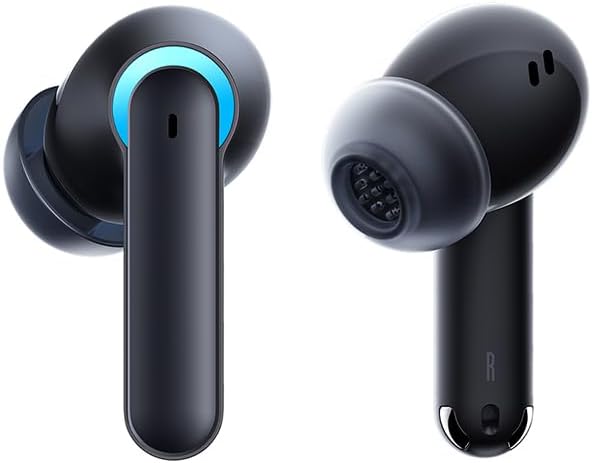
Image 3.1: Left and Right Baseus AeQur G10 Earphones. Each earphone features a touch control area, microphone, and charging contacts.
3.2 የኃይል መሙያ ጉዳይ

Image 3.2: Baseus AeQur G10 Earphones in their charging case with the lid open. The case has charging slots for each earphone and an LED indicator for battery status.
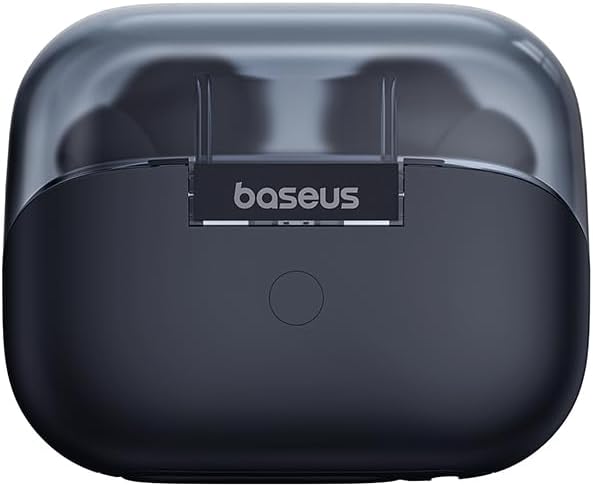
ምስል 3.3፡ የኋላ view of the Baseus AeQur G10 charging case, displaying the Baseus brand logo and a USB-C charging port (not explicitly visible but implied by common design).
3.3 USB-A/USB-C Wireless Dongle
The included wireless dongle allows for low-latency connection to various devices, including PCs, laptops, gaming consoles, and mobile devices.

Image 3.4: Compatibility diagram for the Baseus AeQur G10, illustrating connections to Type-C Androids & Tablets, Type-C/USB-A PCs & Laptops, PS5/PS4/Switch, Steam Deck, and VR devices.
4. ማዋቀር
4.1 የመጀመሪያ ደረጃ መሙላት
- ሁለቱንም የጆሮ ማዳመጫዎች ወደ ቻርጅ መሙያው ያስገቡ።
- Connect the USB-C charging cable to the charging port on the case and the other end to a USB power source (e.g., computer USB port, wall adapter).
- The LED indicator on the case will show charging status. A full charge typically takes approximately 1.5 hours for the earphones and 2 hours for the case.
4.2 ከብሉቱዝ መሳሪያዎች ጋር ማጣመር
- የጆሮ ማዳመጫዎቹ በቻርጅ መሙያ መያዣ ውስጥ መሆናቸውን እና መያዣው በቂ ኃይል እንዳለው ያረጋግጡ።
- Open the charging case lid. The earphones will automatically enter pairing mode (indicated by a flashing LED on the earphones or case).
- በመሳሪያዎ (ስማርትፎን፣ ታብሌት፣ ላፕቶፕ) ላይ ብሉቱዝን ያንቁ እና አዳዲስ መሳሪያዎችን ይፈልጉ።
- Select "Baseus AeQur G10" from the list of available devices.
- አንዴ ከተገናኘ በኋላ የ LED አመልካች ብልጭ ድርግም ይላል፣ እና የማረጋገጫ ድምጽ ይሰማሉ።
4.3 Connecting via USB Wireless Dongle
- Insert the USB-A or USB-C end of the wireless dongle into the corresponding port on your device (PC, laptop, gaming console).
- Ensure the earphones are in the charging case and the lid is open.
- The earphones will automatically attempt to connect to the dongle. The dongle's LED indicator will show connection status.
- Once connected, the LED on the dongle will become solid, and you will hear a confirmation tone from the earphones.
5. የአሠራር መመሪያዎች
5.1 ማብራት / ማጥፋት
- አብራ፡ Open the charging case lid, or take the earphones out of the case. They will power on automatically.
- ኃይል ዝጋ: የጆሮ ማዳመጫዎቹን ወደ ቻርጅ መሙያ መያዣው መልሰው ያስቀምጡና ክዳኑን ይዝጉ። በራስ-ሰር ይጠፋሉ እና ባትሪ መሙላት ይጀምራሉ።
5.2 የጆሮ ማዳመጫዎችን መልበስ
- Identify the 'L' (left) and 'R' (right) markings on each earphone.
- Gently insert the earphones into your ear canals.
- Rotate them slightly to find a comfortable and secure fit. Choose the appropriate ear tip size for optimal sound quality and comfort.
5.3 የንክኪ መቆጣጠሪያዎች
The Baseus AeQur G10 earphones feature touch-sensitive controls on each earbud. The specific functions may vary slightly depending on the device and application.
| ድርጊት | ተግባር |
|---|---|
| ነጠላ መታ ማድረግ (ኤል/አር) | ሙዚቃን አጫውት/ለአፍታ አቁም ፣ መልስ/ጥሪ ጨርስ |
| ሁለቴ መታ ያድርጉ (ኤል) | የቀድሞ ትራክ |
| ሁለቴ መታ ያድርጉ (አር) | ቀጣይ ትራክ |
| ሶስቴ መታ ማድረግ (ኤል/አር) | የድምጽ ረዳትን አግብር |
| ረጅም ፕሬስ (L/R፣ 2s) | ጥሪን ውድቅ አድርግ |
| ረጅም ፕሬስ (L/R፣ 3s) | Toggle Gaming/Music Mode (if applicable) |
6. ጥገና
6.1 ጽዳት
- የጆሮ ማዳመጫዎቹን እና የኃይል መሙያ መያዣውን ለማጽዳት ለስላሳ፣ ደረቅ፣ ከንጣፍ ነፃ የሆነ ጨርቅ ይጠቀሙ።
- For earwax or debris in the ear tips, gently remove the ear tips and clean them with a cotton swab lightly dampened with rubbing alcohol. Ensure they are completely dry before reattaching.
- ሻካራ ማጽጃዎችን፣ ፈሳሾችን ወይም ኤሮሶልን የሚረጩ አይጠቀሙ።
6.2 ማከማቻ
- የጆሮ ማዳመጫዎቹን ጥቅም ላይ በማይውሉበት ጊዜ ሁሉ በቻርጅ መያዣቸው ውስጥ ያስቀምጡት፤ ይህም እነሱን ለመጠበቅ እና ቻርጅ ለማድረግ ይረዳል።
- ከከፍተኛ ሙቀት እና ቀጥተኛ የፀሐይ ብርሃን ርቀው በቀዝቃዛና ደረቅ ቦታ ያከማቹ።
6.3 የባትሪ እንክብካቤ
- Charge the earphones and case regularly, even if not used frequently, to maintain battery health.
- ባትሪዎቹን ለረጅም ጊዜ ሙሉ በሙሉ ከመሙላት ይቆጠቡ።
7. መላ መፈለግ
If you encounter issues with your Baseus AeQur G10 earphones, refer to the following common solutions:
7.1 ምንም ድምፅ ወይም የሚቆራረጥ ግንኙነት የለም
- Ensure earphones are charged and properly connected to your device (Bluetooth or dongle).
- በጆሮ ማዳመጫዎች እና በተገናኘው መሣሪያዎ ላይ የድምጽ መጠኑን ያረጋግጡ።
- ጣልቃ ገብነትን ለማስወገድ ወይም ችግሮችን ለማስወገድ ወደ መሳሪያዎ ይቅረቡ።
- Try disconnecting and re-connecting the earphones.
- For Bluetooth, forget the device on your phone and re-pair.
- For dongle, unplug and re-plug the dongle.
7.2 የጆሮ ማዳመጫዎች ባትሪ እየሞሉ አይደሉም
- የኃይል መሙያ ገመዱ ከኬዝ እና ከኃይል ምንጭ ጋር ደህንነቱ በተጠበቀ ሁኔታ መገናኘቱን ያረጋግጡ።
- የኃይል ምንጩ ንቁ መሆኑን ያረጋግጡ።
- Clean the charging contacts on both the earphones and inside the case with a dry cotton swab.
- ሌላ የኃይል መሙያ ገመድ ወይም የኃይል አስማሚ ይሞክሩ።
7.3 Only One Earphone Working
- ሁለቱንም የጆሮ ማዳመጫዎች ወደ መሙያ መያዣው መልሰው ያስቀምጡ፣ ክዳኑን ይዝጉ፣ ለጥቂት ሰከንዶች ይጠብቁ፣ ከዚያም ክዳኑን ይክፈቱ እና እንደገና ያውጧቸው።
- ሁለቱም የጆሮ ማዳመጫዎች መሞላታቸውን ያረጋግጡ።
- የጆሮ ማዳመጫዎቹን እንደገና ለማስጀመር ይሞክሩ (የአምራቹን ይመልከቱ) webአስፈላጊ ከሆነ ለተወሰኑ የዳግም ማስጀመሪያ መመሪያዎች ጣቢያ).
8. ዝርዝሮች
Key technical specifications for the Baseus AeQur G10 TWS Earphones:
| ባህሪ | ዝርዝር መግለጫ |
|---|---|
| የሞዴል ስም | A00055400111-00 |
| የምርት ስም | ቤዝየስ |
| ቀለም | ጥቁር |
| የጆሮ አቀማመጥ | በጆሮ ውስጥ |
| የቅጽ ምክንያት | በጆሮ ውስጥ |
| የግንኙነት ቴክኖሎጂ | ገመድ አልባ (ብሉቱዝ) |
| ገመድ አልባ የመገናኛ ቴክኖሎጂ | ብሉቱዝ |
| ባትሪዎች | 1 ሊቲየም ion ባትሪዎች ያስፈልጋሉ (ተጨምሯል) |
| የምርት ልኬቶች | 10 x 5 x 1.27 ሴ.ሜ |
| የእቃው ክብደት | 220 ግ |
| አምራች | ቤዝየስ |
| ልዩ አጠቃቀሞች | ጉዞ |
9. ዋስትና እና ድጋፍ
Baseus products are designed and manufactured to the highest quality standards. For information regarding warranty coverage, technical support, or service, please refer to the warranty card included with your product or visit the official Baseus webጣቢያ. ለዋስትና ጥያቄዎች የግዢ ማረጋገጫዎን ያስቀምጡ።
ለተጨማሪ እርዳታ፣ የቤዝየስ የደንበኛ ድጋፍን በይፋዊ ቻናሎቻቸው በኩል ማግኘት ይችላሉ።