1. መግቢያ
This manual provides detailed instructions for the installation, operation, and maintenance of your Jennov JS7015 5MP Dual-Band Wi-Fi Outdoor Security Camera. Please read this manual thoroughly before using the product to ensure correct usage and optimal performance.

Figure 1: Jennov JS7015 Outdoor Security Camera
The Jennov JS7015 is a 5-megapixel outdoor security camera featuring dual-band Wi-Fi connectivity (2.4GHz and 5GHz). It offers 360-degree viewing capabilities, PIR human detection, auto-tracking, 24/7 recording, and two-way audio for comprehensive outdoor surveillance.
2. የጥቅል ይዘቶች
እባኮትን በደረሰኝ ጊዜ የጥቅል ይዘቱን ያረጋግጡ። ማንኛቸውም ነገሮች ከጠፉ ወይም ከተበላሹ የደንበኛ ድጋፍን ያነጋግሩ።
- Jennov JS7015 5MP Dual-Band Wi-Fi Outdoor Security Camera
- የኃይል አስማሚ
- መስቀያ ብሎኖች እና መልህቆች
- የተጠቃሚ መመሪያ (ይህ ሰነድ)
3. ምርት አብቅቷልview
ከካሜራው ክፍሎች ጋር እራስዎን ይወቁ።

Figure 2: Camera Pan and Tilt Mechanism
The camera features a motorized pan and tilt mechanism, allowing for a 355° horizontal rotation (pan) and a 60° vertical rotation (tilt). This enables comprehensive coverage of the surveillance area. The camera body houses the lens, infrared LEDs, white light LEDs, microphone, and speaker. Two external antennas provide enhanced Wi-Fi signal reception.
- የካሜራ ሌንስ; የቪዲዮ foo ይይዛልtage.
- የኢንፍራሬድ LEDs; Provide illumination for black and white night vision.
- ነጭ ብርሃን LEDዎች፡ Provide illumination for color night vision and act as a spotlight.
- ማይክሮፎን ለሁለት መንገድ ግንኙነት እና ቀረጻ ኦዲዮን ይቀርጻል።
- ተናጋሪ፡- Outputs audio for two-way communication and alarms.
- አንቴናዎች ለ Wi-Fi ግንኙነት።
- የኃይል ወደብ ከኃይል አስማሚ ጋር ይገናኛል.
- ዳግም አስጀምር አዝራር፡- Used to reset the camera to factory settings (usually located near the SD card slot or under a cover).
- የኤስዲ ካርድ ማስገቢያ፡ For local video storage (supports up to 128GB, not included).
4. የማዋቀር መመሪያ
4.1 አካላዊ ጭነት
The camera is designed for outdoor use and is IP66 waterproof. Choose a suitable location for mounting, ensuring a clear view of the area you wish to monitor and proximity to a power source.
- የቁፋሮ ቦታዎች ምልክት ያድርጉበት፡ በግድግዳው ላይ ያሉትን የዊንች ቀዳዳዎች ምልክት ለማድረግ የመጫኛውን አብነት (ከተሰጠ) ወይም የካሜራውን መሠረት ይጠቀሙ።
- ጉድጓዶች ቁፋሮ; Drill holes at the marked positions. Insert wall anchors if mounting on masonry.
- ደህንነቱ የተጠበቀ ካሜራ፡ Attach the camera base to the wall using the provided screws.
- አስተካክል አንግል፡ Loosen the adjustment screws (if any) to position the camera for optimal coverage before tightening.

ምስል 3፡ IP66 የውሃ መከላከያ ዲዛይን
The camera is built with waterproof materials and has an IP66 rating, making it suitable for outdoor installation and resistant to dust and water jets.
4.2 የኃይል ግንኙነት
የቀረበውን የኃይል አስማሚ ከካሜራው የኃይል ወደብ ጋር ያገናኙ እና ከዚያ በኃይል ሶኬት ውስጥ ይሰኩት። ካሜራው ይበራል እና የጅማሬውን ቅደም ተከተል ይጀምራል።
4.3 የመተግበሪያ ማውረድ እና የመለያ ምዝገባ
The Jennov JS7015 camera uses the EseeCloud application for remote access and control.
- መተግበሪያ ያውርዱ ፈልግ "EseeCloud" in your smartphone's app store (Google Play Store for Android or Apple App Store for iOS) and download the application.
- መለያ ይመዝገቡ፡ Open the EseeCloud app and follow the on-screen instructions to register a new account using your email address or phone number.
4.4 ካሜራውን ወደ አፕሊኬሽኑ ማከል
ስማርት ስልክዎ ካሜራውን ለማገናኘት ካሰቡት ተመሳሳይ የWi-Fi አውታረ መረብ (2.4GHz ወይም 5GHz) ጋር መገናኘቱን ያረጋግጡ።
- መተግበሪያን ክፈት፡ Launch the EseeCloud app and log in.
- መሣሪያ አክል፡ Tap the "+" icon or "Add Device" option.
- የመሣሪያ ዓይነት ይምረጡ፡- Choose "Wi-Fi Camera" or similar option.
- የ QR ኮድ ይቃኙ The app may prompt you to scan a QR code located on the camera or its packaging.
- የWi-Fi ውቅረት፡- Follow the app's instructions to enter your Wi-Fi network name (SSID) and password. The camera supports both 2.4GHz and 5GHz Wi-Fi bands.
- አገናኝ፡ The camera will attempt to connect to your Wi-Fi network. Once connected, it will appear in your device list within the app.
- የይለፍ ቃል አዘጋጅ፡ ለደህንነት ሲባል ለካሜራዎ ጠንካራ የይለፍ ቃል ይፍጠሩ።
5. የአሠራር መመሪያዎች
5.1 ቀጥታ ስርጭት View እና የፓን / ዘንበል መቆጣጠሪያ
ከኢሴክላውድ መተግበሪያ፣ በቀጥታ ስርጭት ላይ ለመድረስ ካሜራዎን ይምረጡ view.
- የቀጥታ ምግብ፡ View real-time video from your camera.
- ማንጠልጠል/ማጋደል፡ Use the directional controls within the app to remotely adjust the camera's horizontal (pan) and vertical (tilt) angles.
5.2 ራስ-መከታተያ
ካሜራው በእሱ መስክ ውስጥ የሚንቀሳቀሱ ነገሮችን በራስ-ሰር መከታተል ይችላል። view.

ምስል 4፡ በተግባር አውቶማቲክ ክትትል
Enable the auto-tracking feature in the app settings. The camera will then detect and follow moving targets until they leave the camera's view.
5.3 የእንቅስቃሴ ማወቂያ እና ማንቂያዎች
The camera features advanced PIR (Passive Infrared) human detection to minimize false alarms.

Figure 5: PIR Human Detection and Alarm Options
When a human thermal profile is detected, the camera can trigger various alarms.
- የ PIR ማወቂያ Activates recording and sends notifications when a human is detected.
- የድምጽ ማንቂያ፡- Configure the camera to emit a siren sound upon detection.
- Spotlight Alarm: The integrated spotlight can be activated to deter intruders.
- ማሳወቂያዎች፡- Receive instant alerts on your smartphone via the EseeCloud app.
5.4 ባለ ሁለት መንገድ ኦዲዮ
አብሮ የተሰራውን ማይክሮፎን እና ድምጽ ማጉያ በመጠቀም ከካሜራው አቅራቢያ ካሉ ሰዎች ጋር በቀጥታ ይገናኙ።

ምስል 6፡ ባለ ሁለት መንገድ የድምጽ ግንኙነት
Tap the microphone icon in the app to speak, and listen through the camera's speaker. This feature is useful for interacting with visitors or deterring unwanted guests.
5.5 መቅዳት እና ማከማቻ
ካሜራው ቀጣይነት ያለው 24/7 ቀረጻን ይደግፋል እና ተለዋዋጭ የማከማቻ አማራጮችን ይሰጣል።
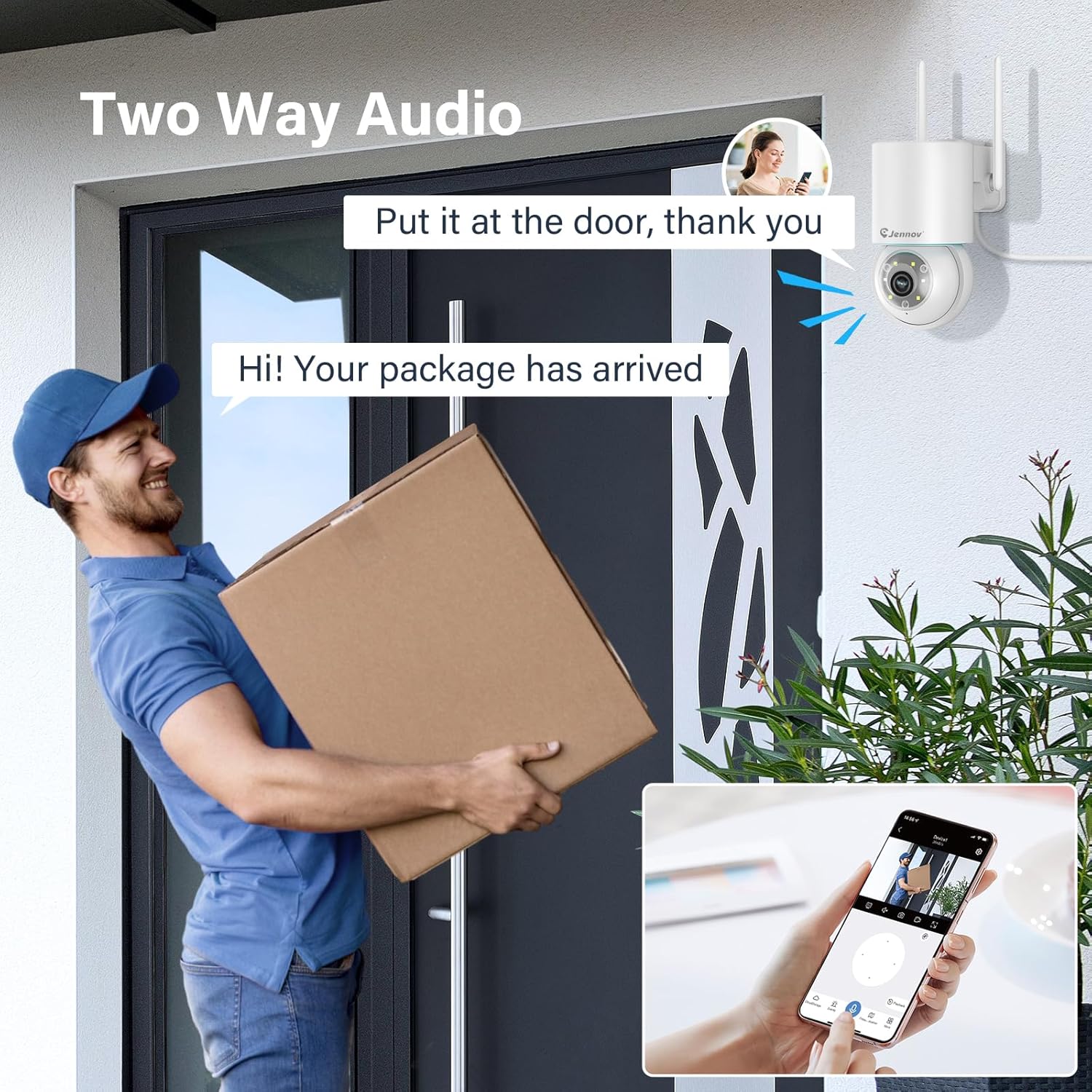
Figure 7: 24/7 Recording and Storage Options
መዳረሻ ተመዝግቧል footage via the app's playback function.
- 24/7 ቀረጻ፡ The camera can continuously record footage, ensuring no vital moments are missed.
- የአካባቢ ማከማቻ፡ Insert a microSD card (up to 128GB, not included) into the camera's SD card slot for local storage.
- የደመና ማከማቻ፡ Optional cloud storage service is available, often with a free trial period (e.g., 7 days). This provides off-site backup of your recordings.
5.6 የምሽት እይታ ሁነታዎች
The camera offers three night vision modes for clear visibility in low-light conditions.

Figure 8: 5MP Color Night Vision
The camera provides clear night vision up to 65 feet (20 meters) with 5MP resolution.
- ሙሉ የቀለም ሁኔታ Utilizes white LEDs to provide full-color video at night.
- ጥቁር እና ነጭ ሁነታ፡ Uses infrared LEDs for traditional black and white night vision.
- ብልጥ ሁነታ: Automatically switches between black and white and full color based on detected motion or light conditions.
You can switch between these modes within the EseeCloud mobile application.
5.7 Customized Detection Area
በካሜራው ውስጥ የተወሰኑ ቦታዎችን ይግለጹ view እንቅስቃሴን ማወቂያ ንቁ መሆን ያለበት.

Figure 9: Customized Detection Area Settings
This feature helps reduce unwanted alerts by focusing detection on critical zones. The app typically offers "Area mode" and "Cordon mode" for defining these zones.
6. ጥገና
- ማጽዳት፡ የካሜራ ሌንስን ለስላሳና ደረቅ ጨርቅ አዘውትረው ያጽዱ፤ ይህም የምስል ጥራት ግልጽ እንዲሆን ያደርጋል። ጠጣር ኬሚካሎችን አይጠቀሙ።
- የጽኑዌር ዝማኔዎች ፦ የሚገኙ የጽኑዌር ዝማኔዎችን ለማግኘት በየጊዜው የEseeCloud መተግበሪያን ይፈትሹ። የካሜራዎን ፈርምዌር ማዘመን ጥሩ አፈጻጸም እና ደህንነት ያረጋግጣል።
- ኤስዲ ካርድ አስተዳደር If using local storage, periodically check the SD card's status in the app. Format the card as needed to maintain recording efficiency.
- የኃይል አቅርቦት; Ensure the power adapter and cable are free from damage and properly connected.
7. መላ መፈለግ
- ካሜራ ከመስመር ውጭ;
- የWi-Fi ምልክት ጥንካሬን ያረጋግጡ።
- ካሜራው መብራቱን ያረጋግጡ።
- ካሜራውን እና የ Wi-Fi ራውተርዎን እንደገና ያስጀምሩ።
- If using 5GHz Wi-Fi, ensure your router supports it and the camera is connected to the correct band.
- Try re-adding the camera to the EseeCloud app.
- ደካማ የምስል ጥራት፡
- የካሜራውን ሌንስ ያጽዱ.
- በተለይም በሌሊት በቂ ብርሃን መኖሩን ያረጋግጡ።
- የበይነመረብ ግንኙነትዎን ፍጥነት ያረጋግጡ።
- የእንቅስቃሴ ማወቂያ አይሰራም፡
- Verify motion detection settings in the app are enabled.
- የመለየት ስሜትን ያስተካክሉ።
- ካሜራውን የሚያግዱ ምንም እንቅፋቶች አለመኖራቸውን ያረጋግጡ view.
- Check if detection areas are correctly configured.
- ባለሁለት መንገድ የድምጽ ጉዳዮች፡-
- Ensure microphone and speaker permissions are granted to the EseeCloud app on your smartphone.
- Check volume settings on both the app and your phone.
- የካሜራውን ማይክሮፎን ወይም ድምጽ ማጉያ የሚያግዱ ምንም አይነት አካላዊ እንቅፋቶች አለመኖራቸውን ያረጋግጡ።
- Cannot Access SD Card Recordings:
- የኤስዲ ካርዱ በትክክል መጫኑን ያረጋግጡ።
- Check if the SD card is formatted correctly (usually FAT32).
- Verify that continuous recording or event recording to SD card is enabled in the app.
- The SD card might be full; consider formatting it or replacing it.
8. ዝርዝሮች
| ባህሪ | ዝርዝር መግለጫ |
|---|---|
| የሞዴል ቁጥር | JS7015 |
| የምርት ስም | ጄንኖቭ |
| ጥራት | 5 Megapixel (1920p video recording) |
| የፓን / ዘንበል አንግል | ፓን 355°፣ 60° ዘንበል |
| የምሽት ራዕይ | Color Night Vision, Black & White Night Vision, Smart Mode (up to 65ft/20m) |
| የ Wi-Fi ግንኙነት | ባለሁለት ባንድ (2.4GHz / 5GHz) |
| ኦዲዮ | ባለሁለት መንገድ ኦዲዮ (አብሮ የተሰራ ማይክሮፎን እና ድምጽ ማጉያ) |
| እንቅስቃሴ ማወቂያ | PIR Human Detection, Auto Tracking |
| የማከማቻ አማራጮች | የማይክሮ ኤስዲ ካርድ (እስከ 128 ጊባ)፣ የደመና ማከማቻ |
| የውሃ መከላከያ ደረጃ | IP66 |
| የኃይል ግቤት | 5 ቮልት |
| የኃይል ፍጆታ | 24 ዋት |
| ልኬቶች (L x W x H) | 12 x 8 x 16 ሴ.ሜ |
| ቁሳቁስ | ፕላስቲክ |
| የመጫኛ አይነት | የግድግዳ ተራራ |
| ተስማሚ መሣሪያዎች | ስማርትፎን፣ ታብሌት፣ ኮምፒውተር |
| የመቆጣጠሪያ መተግበሪያ | EseeCloud |
9. ዋስትና እና ድጋፍ
For warranty information and technical support, please refer to the warranty card included with your product or visit the official Jennov webጣቢያ.
- የደንበኛ አገልግሎት፡ Contact Jennov customer support for assistance with product issues, technical questions, or warranty claims.
- የመስመር ላይ መርጃዎች፡- Check the Jennov webለተደጋጋሚ ጥያቄዎች፣ የተዘመኑ መመሪያዎች እና የሶፍትዌር ማውረዶች ጣቢያ።


