1. መግቢያ
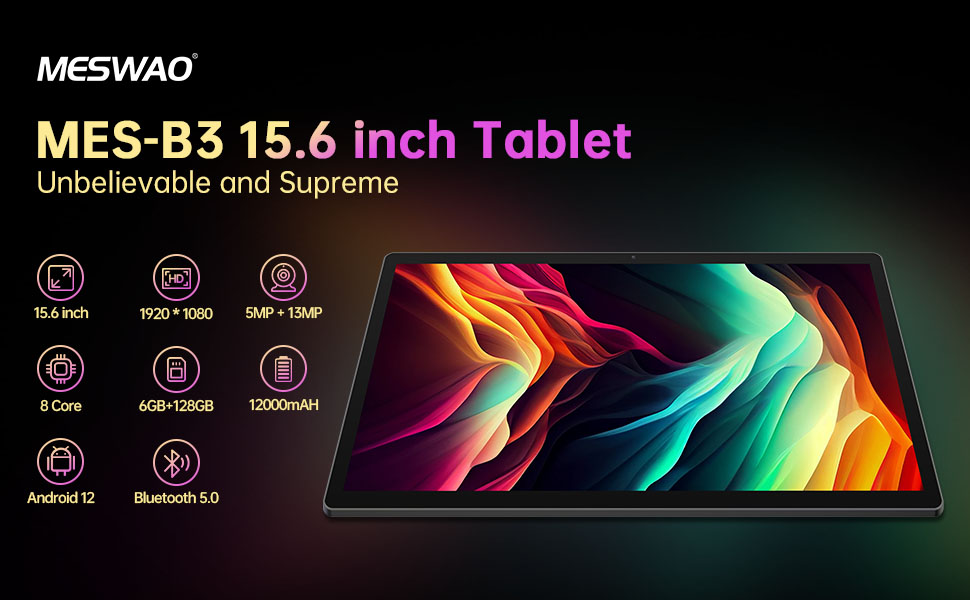
Welcome to the user manual for your MESWAO MES-B3 15.6-inch Android 13 Tablet. This document provides essential information for setting up, operating, maintaining, and troubleshooting your device. The MES-B3 tablet features a large 15.6-inch IPS HD display, an Octa-Core processor, 6GB RAM, 128GB internal storage (expandable), and a 12000mAh battery, designed for a versatile user experience.

Figure 1: MESWAO MES-B3 Tablet Overview
2. የደህንነት መረጃ
Please read all safety instructions carefully before using your tablet to prevent injury or damage to the device. Keep this manual for future reference.
- የባትሪ ደህንነት፡ Do not attempt to replace the battery yourself. Do not expose the tablet to extreme temperatures, direct sunlight, or fire. Do not puncture, drop, or disassemble the battery.
- ውሃ እና እርጥበት; This tablet is not waterproof. Avoid exposing it to water, rain, or high humidity.
- ማጽዳት፡ Use a soft, dry cloth to clean the tablet. Do not use liquid cleaners or aerosols.
- አያያዝ፡ ጡባዊውን ከመጣል ወይም ለጠንካራ ተጽእኖ ከማጋለጥ ይቆጠቡ።
- የመስማት ችሎታ; When using headphones, set the volume to a moderate level to avoid hearing damage.
3. የጥቅል ይዘቶች
ሁሉም እቃዎች በጥቅሉ ውስጥ መኖራቸውን ያረጋግጡ፡-
- MESWAO MES-B3 15.6-inch Android 13 Tablet
- የኃይል አስማሚ
- የ USB-C ገመድ
- የተጠቃሚ መመሪያ (ይህ ሰነድ)
4. መሣሪያ አብቅቷልview
Familiarize yourself with the physical components of your MESWAO MES-B3 tablet.

Figure 2: Buttons and Connectors
- የኃይል ቁልፍ፡- Press and hold to turn the tablet on or off. Press briefly to turn the screen on or off.
- የድምጽ አዝራሮች፡- የድምጽ መጠኑን ያስተካክሉ።
- የፊት ካሜራ፡ ለቪዲዮ ጥሪዎች እና ለራስ ፎቶዎች (5 ሜፒ)።
- Rear Camera with Flashlight: For taking photos and videos (13MP).
- ዓይነት-ሲ ወደብ: ታብሌቱን ለመሙላት እና ከኮምፒዩተር ጋር ለመገናኘት።
- የ TF ካርድ ማስገቢያ Insert a MicroSD card to expand storage.
- ስቴሪዮ ድምጽ ማጉያዎች፡- የድምጽ ውፅዓት ያቅርቡ።
5. ማዋቀር
5.1 ጡባዊውን መሙላት
Before first use, fully charge your tablet. Connect the USB-C cable to the tablet's Type-C port and the other end to the power adapter. Plug the adapter into a wall outlet. The battery indicator on the screen will show charging status.
5.2 ማብራት / ማጥፋት
- ለማብራት፡- Press and hold the Power Button until the MESWAO logo appears.
- ለማጥፋት፡- Press and hold the Power Button until the power options appear, then select 'Power off'.
- ዳግም ለመጀመር፡- Press and hold the Power Button until the power options appear, then select 'Restart'.
5.3 የመነሻ ማዋቀር አዋቂ
Upon first power-on, the tablet will guide you through an initial setup process:
- የሚመርጡትን ቋንቋ ይምረጡ።
- ከWi-Fi አውታረ መረብ ጋር ይገናኙ።
- በጉግል መለያዎ ይግቡ ወይም አዲስ ይፍጠሩ።
- Review እና ውሎችን እና ሁኔታዎችን ይቀበሉ።
- የማያ ገጽ መቆለፊያ (ፒን ፣ ስርዓተ-ጥለት ፣ የይለፍ ቃል) ያዋቅሩ።
5.4 የማይክሮ ኤስዲ ካርድ ማስገባት
To expand the tablet's storage, you can insert a MicroSD card (up to 256GB, as per some product information, though 1TB is also mentioned in images, please verify with product packaging for exact maximum). Locate the TF card slot on the side of the tablet. Gently insert the MicroSD card with the gold contacts facing down until it clicks into place.

Figure 3: Storage Expansion with MicroSD Card
6. የጡባዊዎን ስራ መስራት
6.1 መሰረታዊ ዳሰሳ
The MESWAO MES-B3 runs on Android 13, offering an intuitive touch interface.
- መታ ያድርጉ፡ አንድ ንጥል ይምረጡ ወይም መተግበሪያ ይክፈቱ።
- ያንሸራትቱ በማያ ገጾች ውስጥ ያስሱ፣ ዝርዝሮችን ያሸብልሉ ወይም ማሳወቂያዎችን ያስወግዱ።
- መቆንጠጥ-ለማጉላት፡ በማያ ገጹ ላይ ያለውን ይዘት ያሳድጉ ወይም ይቀንሱ።
- መነሻ ስክሪን፡ Access your apps and widgets. Swipe down from the top for notifications and quick settings.
ምስል 4፡ አንድሮይድ 13 በይነገጽ
6.2 የ Wi-Fi ግንኙነት
- ወደ ሂድ ቅንብሮች > አውታረ መረብ እና በይነመረብ > ኢንተርኔት.
- Wi-Fiን ያብሩ።
- ከዝርዝሩ ውስጥ የሚፈልጉትን አውታረ መረብ ይምረጡ እና ከተጠየቁ የይለፍ ቃሉን ያስገቡ።
6.3 የብሉቱዝ ማጣመር
ጡባዊው ገመድ አልባ መለዋወጫዎችን ለማገናኘት ብሉቱዝ 5.0ን ይደግፋል።
- ወደ ሂድ ቅንብሮች > የተገናኙ መሣሪያዎች > የግንኙነት ምርጫዎች > ብሉቱዝ.
- ብሉቱዝን ያብሩ።
- የብሉቱዝ መሣሪያዎ በማጣመር ሁነታ ላይ መሆኑን ያረጋግጡ።
- Select your device from the 'Available devices' list and follow on-screen prompts to pair.
6.4 የመተግበሪያ አስተዳደር
- መተግበሪያዎችን ጫን የGoogle Play መደብር መተግበሪያን ይክፈቱ፣ የሚፈልጉትን መተግበሪያ ይፈልጉ እና 'ጫን' የሚለውን ይጫኑ።
- መተግበሪያዎችን አራግፍ፡ Press and hold an app icon on the home screen or app drawer, then drag it to 'Uninstall' or select 'App info' and choose 'Uninstall'.
- መተግበሪያዎችን ያቀናብሩ፦ ወደ ሂድ ቅንብሮች > መተግበሪያዎች ወደ view, force stop, or clear data for installed applications.
6.5 የማሳያ ቅንብሮች
የእርስዎን ያብጁ viewልምድ;
- ወደ ሂድ ቅንብሮች > ማሳያ.
- አስተካክል። የብሩህነት ደረጃ.
- አዘጋጅ የማያ ገጽ ጊዜ አለቀ (sleep duration).
- ለውጥ የቅርጸ ቁምፊ መጠን እና የማሳያ መጠን.
- አንቃ ጨለማ ጭብጥ for reduced eye strain.
6.6 የባትሪ አስተዳደር
The MES-B3 features a 12000mAh battery for extended use.

ምስል 5፡ የተራዘመ የባትሪ ህይወት
- ወደ ሂድ ቅንብሮች > ባትሪ ወደ view usage and optimize settings.
- አንቃ ባትሪ ቆጣቢ mode to extend battery life when needed.
- ከበስተጀርባ የሚሰሩ ጥቅም ላይ ያልዋሉ መተግበሪያዎችን ዝጋ።
- የስክሪን ብሩህነት ቀንስ።
7. ጥገና
7.1 ጽዳት
- ስክሪኑን እና አካሉን በቀስታ ለማጽዳት ለስላሳ፣ ከላጣ ነፃ የሆነ ጨርቅ ይጠቀሙ።
- ለግትር ማጭበርበሮች በትንሹ መampጨርቁን በውሃ ወይም ስክሪን ማጽጃ በተለይ ለኤሌክትሮኒክስ የተነደፈ።
- Avoid using abrasive materials, alcohol, or chemical solvents.
7.2 ማከማቻ
- ጡባዊውን በቀጥታ ከፀሀይ ብርሀን እና ከከፍተኛ ሙቀት ርቆ በቀዝቃዛና ደረቅ ቦታ ያከማቹ።
- If storing for an extended period, ensure the battery is charged to about 50% to prolong its lifespan.
7.3 የሶፍትዌር ዝመናዎች
ጥሩ አፈጻጸም እና ደህንነትን ለማረጋገጥ የሶፍትዌር ማሻሻያዎችን በመደበኛነት ያረጋግጡ።
- ወደ ሂድ ቅንብሮች > ስርዓት > የስርዓት ዝመና.
- ታብሌቱ ያሉትን ዝመናዎች ይፈትሻል። ማንኛውንም ዝመና ለማውረድ እና ለመጫን የማያ ገጽ ላይ መመሪያዎችን ይከተሉ።
8. መላ መፈለግ
ሊያጋጥሙህ ለሚችሉ የተለመዱ ጉዳዮች መፍትሄዎች እነኚሁና፡
| ችግር | መፍትሄ |
|---|---|
| ጡባዊው አይበራም | ታብሌቱ መሙላቱን ያረጋግጡ። ቢያንስ ለ30 ደቂቃዎች ከቻርጀሩ ጋር ያገናኙት፣ ከዚያም እንደገና ለማብራት ይሞክሩ። |
| የWi-Fi ግንኙነት ችግሮች | Restart your Wi-Fi router and the tablet. Go to Settings > Network & internet > Internet, forget the network, and reconnect. |
| ዘገምተኛ አፈጻጸም | Close unused apps. Clear cache for frequently used apps (Settings > Apps > [App Name] > Storage & cache > Clear cache). Restart the tablet. |
| ባትሪ በፍጥነት ይጠፋል | Reduce screen brightness. Disable Wi-Fi/Bluetooth when not in use. Close background apps. Check battery usage in Settings > Battery to identify power-hungry apps. |
| መተግበሪያዎች እየተበላሹ ወይም እየቀዘቀዙ | Force stop the app (Settings > Apps > [App Name] > Force stop). Clear the app's cache. If the problem persists, uninstall and reinstall the app. |
9. ዝርዝሮች
Detailed technical specifications for the MESWAO MES-B3 tablet:

ምስል 6፡ ቁልፍ ባህሪያት እና ዝርዝር መግለጫዎች
| ባህሪ | ዝርዝር መግለጫ |
|---|---|
| የምርት ስም | MESWAO |
| የሞዴል ቁጥር | MES-B3 |
| ስርዓተ ክወና | አንድሮይድ 13 |
| ፕሮሰሰር | MediaTek Octa-Core (MTK6789) |
| ራም | 6 ጊባ |
| የውስጥ ማከማቻ | 128 ጊባ |
| ሊሰፋ የሚችል ማከማቻ | Up to 256 GB (via TF/MicroSD card) |
| የስክሪን መጠን | 15.6 ኢንች |
| የማያ ጥራት | 1920 x 1080 ፒክስል (አይፒኤስ ኤችዲ) |
| የፊት ካሜራ | 5 ሜፒ |
| የኋላ ካሜራ | 13 ሜፒ |
| የባትሪ አቅም | 12000 ሚአሰ |
| የባትሪ ህይወት | በግምት 10 ሰዓታት (በአጠቃቀም ላይ የተመሰረተ) |
| ግንኙነት | Bluetooth 5.0, Wi-Fi (802.11ac, 2.4G/5G) |
| ወደቦች | USB Type-C, TF Card Slot |
| ቀለም | ግራጫ |
| ልኬቶች (L x W x H) | 36.85 x 22.25 x 0.93 ሴ.ሜ |
| ክብደት | 1.1 ኪ |
10. ዋስትና እና ድጋፍ
Your MESWAO MES-B3 tablet is covered by a standard manufacturer's warranty. Please refer to the warranty card included in your package for specific terms and conditions, including warranty duration and coverage details.
For technical support, troubleshooting assistance beyond this manual, or warranty claims, please contact MESWAO customer service through the retailer where you purchased the product or visit the official MESWAO webየእውቂያ መረጃ ለማግኘት ጣቢያ.


