1. መግቢያ
This manual provides comprehensive instructions for the installation, operation, and maintenance of your SPORTARC Tuya ZigBee Smart Water Leak Detector, Model 1401400107. This device is designed to detect water leaks and provide real-time alerts through the Smart Life mobile application, helping to prevent potential water damage in your home or office.

ምስል 1.1፡ ፊት view of the SPORTARC Tuya ZigBee Smart Water Leak Detector, showing its compact, circular design with a water drop icon in the center.
2. የምርት ባህሪዎች
- Remote Monitoring via Smart Life App: Monitor and detect water leaks remotely using the Smart Life mobile application. Receive timely notifications to prevent potential water damage.
- Accurate Leak Detection: Designed for quick and precise detection of water leaks, offering reliable protection against water-related damage.
- ቀላል መጫኛ; User-friendly design allows for simple installation in various areas prone to water leaks, such as basements, kitchens, bathrooms, and utility rooms.
- አስተማማኝ አፈጻጸም፡ Equipped with advanced technology to ensure consistent and effective operation, providing continuous protection.
- ዘመናዊ ማሳወቂያዎች Receive real-time alarms and notifications on your smartphone when a water leak is detected, enabling immediate action.

Image 2.1: The water leak detector with text indicating 24-hour water leakage monitoring capabilities.
3. የጥቅል ይዘቶች
ሁሉም እቃዎች በጥቅሉ ውስጥ መኖራቸውን ያረጋግጡ፡-
- 1 x SPORTARC Tuya ZigBee Smart Water Leak Detector
4. ማዋቀር እና መጫን
Follow these steps to set up and install your water leak detector:
- የባትሪ ጭነት; The device requires a battery (CR2032, not included). Locate the battery compartment on the bottom of the sensor. Unscrew the cover, insert the battery with the correct polarity, and then secure the cover.
- Pairing with ZigBee Gateway: This detector operates using ZigBee protocol and requires a compatible ZigBee gateway (not included) to connect to the Smart Life application. Refer to your ZigBee gateway's instructions for pairing new devices. Typically, you will put the gateway into pairing mode, then press and hold the button on the water leak detector for 3 seconds until the blue LED flashes, indicating it is in pairing mode.
- የስማርት ላይፍ መተግበሪያን ያውርዱ፦ If you haven't already, download the Smart Life application from your smartphone's app store (available for iOS and Android).
- መሣሪያን በመተግበሪያ ውስጥ አክል፡ Once paired with the ZigBee gateway, open the Smart Life app. The detector should appear as a discoverable device. Follow the in-app instructions to add and configure the water leak detector.
- አቀማመጥ፡- Place the water leak detector in areas prone to water leaks, such as under sinks, near water heaters, washing machines, dishwashers, in basements, or bathrooms. Ensure the sensor is placed on a flat surface where water would accumulate first. The device is designed for various indoor environments.

ምስል 4.1: ታች view of the water leak detector, illustrating the battery compartment cover and screw points.

Image 4.2: The water sensor depicted in a home environment, indicating its function with a wireless gateway for smart home integration.
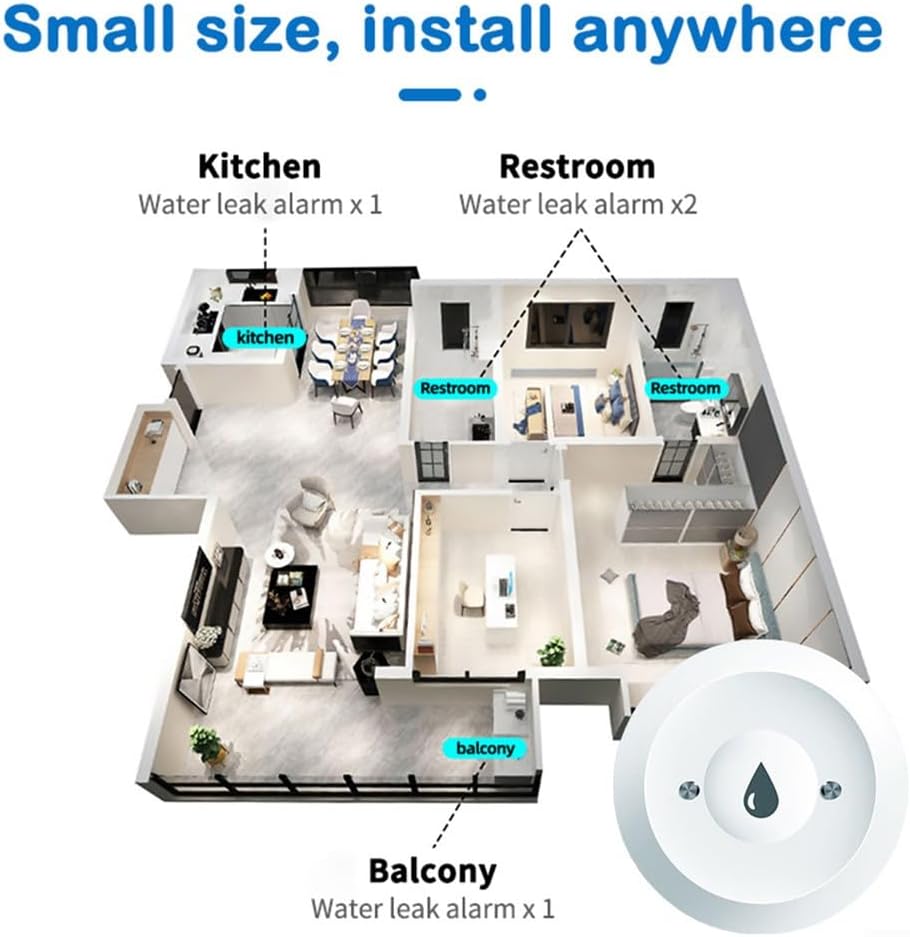
Image 4.3: An illustrative floor plan suggesting optimal locations for water leak alarms in a typical home, including kitchen, restrooms, and balcony.

ምስል 4.4፡ ዘጸamples of diverse environments suitable for the water leak detector, such as lockers, radiators, warehouses, and computer rooms.
5. የአሠራር መመሪያዎች
Once installed and configured, the water leak detector operates automatically:
- ራስ-ሰር ማወቂያ፡ The sensor continuously monitors for the presence of water. When water is detected, it triggers an alert.
- የእውነተኛ ጊዜ ማንቂያዎች፡- Upon detection, the device sends a wireless alarm signal via your ZigBee gateway to the Smart Life mobile application. You will receive an immediate push notification on your smartphone.
- Action upon Alert: When an alert is received, promptly investigate the source of the leak and take necessary corrective actions to prevent further damage.

Image 5.1: A graphic illustrating an immediate alert notification on a mobile app when flooding occurs, triggered by the sensor.
6. ጥገና
Regular maintenance ensures optimal performance of your water leak detector:
- የባትሪ መተካት፡ The device is battery-powered. When the battery level is low, you may receive a notification via the Smart Life app. Replace the CR2032 battery as needed to ensure continuous operation.
- ማጽዳት፡ Periodically clean the exterior of the sensor with a soft, dry cloth. Do not use abrasive cleaners or immerse the device in water.
- በመሞከር ላይ፡ It is recommended to periodically test the sensor by placing a small amount of water on its detection probes to ensure it triggers an alert.
7. መላ መፈለግ
If you encounter issues with your water leak detector, refer to the following:
- መሳሪያው እየተገናኘ/እየተጣመረ አይደለም፡
- ባትሪው በትክክል መጫኑን እና በቂ ክፍያ እንዳለው ያረጋግጡ።
- Verify that your ZigBee gateway is powered on and in pairing mode.
- Make sure the detector is within range of your ZigBee gateway.
- Reset the detector by removing and reinserting the battery, then attempt pairing again.
- No Notifications from App:
- Check your smartphone's notification settings for the Smart Life app to ensure push notifications are enabled.
- Verify that your smartphone has an active internet connection.
- Confirm the detector is properly connected to the ZigBee gateway and the Smart Life app.
- የውሸት ማንቂያዎች፡-
- Ensure the sensor is placed on a dry, stable surface and not in an area prone to condensation or accidental splashes.
- Clean the sensor probes to remove any dust or debris that might interfere with detection.
8. ዝርዝሮች
| ዝርዝር መግለጫ | ዝርዝር |
|---|---|
| የምርት ስም | የውሃ ፍሳሽ ማወቂያ |
| የምርት ስም | SPORTARC |
| የሞዴል ቁጥር | 1401400107 |
| የመቆጣጠሪያ ዘዴ | አፕሊኬሽን (ስማርት ላይፍ) |
| አነፍናፊ ቴክኖሎጂ | ዳሳሽ ያግኙ |
| የኃይል ምንጭ | በባትሪ የተጎላበተ |
| የባትሪ ዓይነት | CR2032 (አልተካተተም) |
| ተስማሚ መሣሪያዎች | Smart Life Application (via ZigBee Gateway) |
| የምርት ልኬቶች (L x W x H) | 8 x 8 x 4 ሴ.ሜ |
| የምርት ክብደት | 30 ግራም |
| ቀለም | ነጭ |
9. ዋስትና እና ድጋፍ
Information regarding specific warranty terms and availability of spare parts for the SPORTARC Tuya ZigBee Smart Water Leak Detector is not provided in the product details. For support or warranty inquiries, please contact the retailer or manufacturer directly.
