1. መግቢያ እና በላይview
This manual provides essential instructions for the safe and efficient use of your Maxcom MM135L Basic Mobile Phone. The MM135L is designed for straightforward communication, featuring a user-friendly interface, large keys, and a 1.77-inch screen. It supports 2G networks and includes dual SIM capability, an SOS button for emergencies, and convenient USB-C charging. Please read this manual thoroughly before operating the device.
2. የጥቅል ይዘቶች
ሁሉም እቃዎች በጥቅሉ ውስጥ መኖራቸውን ያረጋግጡ፡-
- Maxcom MM135L Mobile Phone
- Battery (Lithium-Ion, 600 mAh)
- የዩኤስቢ ገመድ
- የሲም ትሪ ኤጀክተር
- የተጠቃሚ መመሪያ (ይህ ሰነድ)
3. የመሣሪያ አቀማመጥ
Familiarize yourself with the physical components of your Maxcom MM135L phone.
ምስል 3.1: የኋላ view of the Maxcom MM135L phone, showing the blue textured back cover, Maxcom logo, and speaker grille at the top.

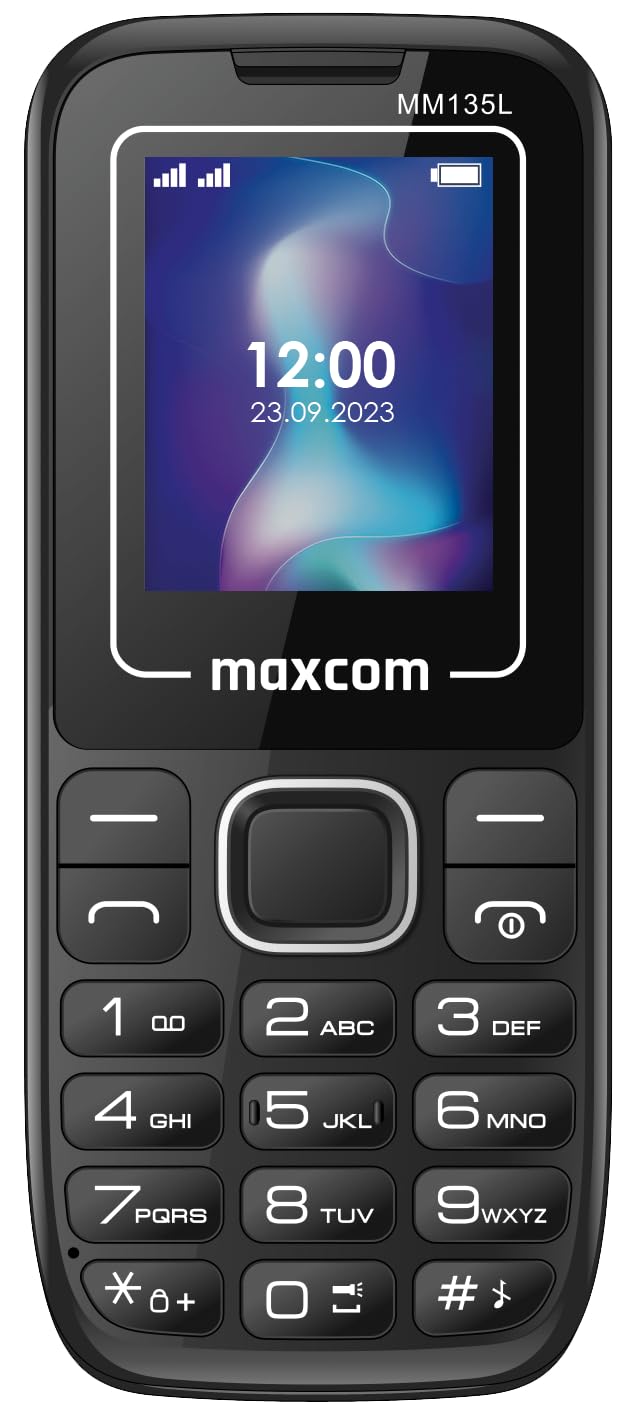
ምስል 3.2: የፊት view of the Maxcom MM135L phone, displaying the screen, large numeric keypad, and call/end buttons.

Figure 3.3: Bottom edge of the phone, featuring the USB-C charging port and a 3.5mm headphone jack.

Figure 3.4: Top edge of the phone, highlighting the integrated flashlight.
ቁልፍ አካላት፡-
- ማሳያ ማያ: 1.77-inch LCD for clear text and call information.
- የቁጥር ቁልፍ ሰሌዳ፡ Large, tactile buttons for easy dialing and texting.
- Call/End Buttons: Dedicated buttons for managing calls.
- የማውጫ ቁልፎች: ለምናሌ አሰሳ።
- የኤስኦኤስ ቁልፍ፡- Located on the rear for emergency calls (refer to Figure 3.1).
- የእጅ ባትሪ፡ Integrated at the top of the device (refer to Figure 3.4).
- ዩኤስቢ-ሲ ወደብ For charging the device (refer to Figure 3.3).
- የጆሮ ማዳመጫ ጃክ 3.5mm port for audio accessories (refer to Figure 3.3).
4. ማዋቀር
4.1 የባትሪ ጭነት
- የስልኩን የኋላ ሽፋን በጥንቃቄ ያስወግዱት።
- የባትሪውን መገናኛዎች በባትሪው ክፍል ውስጥ ካሉት ተርሚናሎች ጋር ያስተካክሉ።
- ባትሪውን ወደ ቦታው ቀስ ብለው ይጫኑት.
- ደህንነቱ በተጠበቀ ሁኔታ ጠቅ ማድረግን በማረጋገጥ የጀርባውን ሽፋን ይተኩ።
4.2 የሲም ካርድ ጭነት
The Maxcom MM135L supports dual SIM cards.
- With the phone powered off and the back cover removed, locate the SIM card slots.
- ሲም ካርድዎን(ዎች) በስልኩ ላይ በተጠቀሰው አቅጣጫ መሰረት ወርቃማ ንክኪዎች ወደታች እያዩ ወደተመደበው ቦታ(ዎች) ያስገቡ።
- ሲም ካርዱ(ዎች) ሙሉ በሙሉ መቀመጡን ያረጋግጡ።
- Replace the back cover and battery.
4.3 ስልኩን መሙላት
The phone uses a USB-C port for charging.
- Connect the USB-C cable to the charging port at the bottom of the phone (refer to Figure 3.3).
- የዩኤስቢ ገመዱን ሌላኛውን ጫፍ ከተኳሃኝ የዩኤስቢ የኃይል አስማሚ ወይም ከኮምፒዩተር የዩኤስቢ ወደብ ጋር ያገናኙ።
- በስክሪኑ ላይ ያለው የባትሪ አመልካች የኃይል መሙያ ሁኔታን ያሳያል።
- ባትሪው ሙሉ በሙሉ ከሞላ በኋላ ቻርጅ መሙያውን ያላቅቁት።
ማስታወሻ፡- For optimal battery life, fully charge the phone before first use.
5. የአሠራር መመሪያዎች
5.1 ማብራት / ማጥፋት
- ለማብራት፡- ተጭነው ይያዙት። Call/Power ማያ ገጹ እስኪበራ ድረስ አዝራር።
- ለማጥፋት፡- ተጭነው ይያዙት። መጨረሻ/ኃይል button until the power off options appear, then confirm.
5.2 ጥሪዎችን ማድረግ እና መቀበል
- ጥሪ ለማድረግ፡- በቁልፍ ሰሌዳው ላይ የስልክ ቁጥሩን ያስገቡ እና ይጫኑ ይደውሉ አዝራር።
- ጥሪን ለመመለስ፡- የሚለውን ይጫኑ ይደውሉ ስልኩ ሲደወል አዝራር.
- ጥሪን ለማቆም፡- የሚለውን ይጫኑ መጨረሻ አዝራር።
5.3 መልዕክቶችን መላክ እና መቀበል
- የማውጫ ቁልፎችን በመጠቀም ወደ "መልእክቶች" ምናሌ ይሂዱ.
- Select "Create New Message" to compose an SMS.
- የተቀባዩን ቁጥር እና መልእክትዎን ያስገቡ፣ ከዚያም ይላኩ።
- የተቀበሉት መልዕክቶች በ "Inbox" ውስጥ ይታያሉ.
5.4 Using the SOS Button
The SOS button is located on the rear of the phone. It is designed for emergency situations.
- ለማግበር Press and hold the SOS button for several seconds.
- The phone will automatically sound an alarm and send emergency SMS messages to pre-set contacts.
- It will then automatically call the saved emergency contacts in a loop until a call is answered.
- የአደጋ ጊዜ እውቂያዎች በስልክ ቅንብሮች ውስጥ በትክክል መዋቀራቸውን ያረጋግጡ።
5.5 የባትሪ ብርሃን ተግባር
The built-in flashlight can be activated for convenience.
- Refer to the phone's specific settings or a dedicated side button for flashlight activation. Typically, a long press on a designated key or a side switch controls it.
6. ጥገና
- ማጽዳት፡ የስልኩን ገጽ ለማጽዳት ለስላሳና ደረቅ ጨርቅ ይጠቀሙ። ፈሳሽ ማጽጃዎችን ያስወግዱ።
- የባትሪ እንክብካቤ ባትሪውን ለከፍተኛ የሙቀት መጠን አያጋልጡት። ባትሪውን በተደጋጋሚ ሙሉ በሙሉ ከመሙላት ይቆጠቡ።
- ማከማቻ፡ ስልኩን ለረጅም ጊዜ ጥቅም ላይ በማይውልበት ጊዜ ቀዝቃዛና ደረቅ ቦታ ያስቀምጡት።
- የውሃ መቋቋም; ይህ ስልክ ውሃ አይቋቋምም። ለፈሳሽ መጋለጥን ያስወግዱ።
7. መላ መፈለግ
| ችግር | ሊሆን የሚችል መፍትሄ |
|---|---|
| ስልክ አይበራም። | ባትሪው በትክክል መጫኑን እና መሙላቱን ያረጋግጡ። ቻርጀሩን ያገናኙና እንደገና ይሞክሩ። |
| ጥሪዎችን ማድረግ ወይም መቀበል አይቻልም። | ሲም ካርዱ በትክክል መገባቱን እና መንቀሳቀሱን ያረጋግጡ። የአውታረ መረብ ሲግናል ጥንካሬን ያረጋግጡ። ችግሩ ከቀጠለ የአገልግሎት አቅራቢዎን ያነጋግሩ። |
| ባትሪ እየሞላ አይደለም። | Ensure the USB-C cable and charger are securely connected and functional. Try a different charging cable or adapter. |
| የኤስኦኤስ ቁልፍ አይሰራም። | Verify that emergency contacts are saved in the phone's settings. Ensure the phone has network coverage. |
| ደካማ የጥሪ ጥራት። | Move to an area with better network reception. Check the speaker and microphone for obstructions. |
8. ዝርዝሮች
| ባህሪ | ዝርዝር |
|---|---|
| የሞዴል ስም | ኤምኤም135ኤል |
| የስክሪን መጠን | 1.77 ኢንች |
| የማሳያ ዓይነት | LCD |
| ጥራት | 128 x 160 |
| ሴሉላር ቴክኖሎጂ | 2G |
| የሲም ድጋፍ | ድርብ ሲም |
| የባትሪ ዓይነት | ሊቲየም-አዮን |
| የባትሪ አቅም | 600 ሚአሰ |
| የኃይል መሙያ ወደብ | ዩኤስቢ-ሲ |
| ልኬቶች (L x W x H) | 7 x 14 x 3.5 ሴ.ሜ |
| ክብደት | 60 ግ |
| ልዩ ባህሪያት | SOS Button, Flashlight, Expandable Memory, Fast Charging Support |
9. ዋስትና እና ድጋፍ
For warranty information, technical support, or service inquiries, please refer to the warranty card included with your product or contact Maxcom customer service directly. Keep your proof of purchase for warranty claims.


