1. ምርት አብቅቷልview
The Baseus 240W Smart USB C Charger is a versatile 5-port desktop charging station designed for efficient power delivery to multiple devices simultaneously. It features PD 3.1 and GAN technology, an LED display, and smart app control, making it suitable for charging laptops, smartphones, tablets, and other USB-C compatible devices.

Figure 1: Baseus 240W Smart USB C Charger and its accompanying cables.
ቁልፍ ባህሪዎች
- Compact 5-Port 240W Desktop Charger: Combines AC adapters with USB-C adapters in a compact design.
- Simultaneous Laptop Fast-Charging: Supports 140W PD3.1 for one laptop and 100W PD3.0 for another simultaneously.
- Unique One-Touch Display and App Control: Features an edge-to-edge display and remote control via the Baseus smart app.
- Intelligent Core with Extensive Safety: Utilizes an upgraded Baseus chip with advanced cooling technology (glue-fill and Graphene) and 9 protective charging protocols.
2. በሳጥኑ ውስጥ ያለው
ከዚህ በታች የተዘረዘሩት ሁሉም እቃዎች በጥቅልዎ ውስጥ መካተታቸውን ያረጋግጡ፡-
- 1 x 240W 5-Port GaN Charger
- 1 x 240W USB-C Charging Cable
- 1 x Square Tip DC Adapter
- 2 x Round Tip DC Adaptors

Figure 2: The 5-port layout of the charger, including DC, USB-C, and USB-A ports.
3. የማዋቀር መመሪያ
- ከኃይል ጋር ይገናኙ፡ Plug the charger's power cable into a standard AC wall outlet. The LED display on the charger should illuminate.
- ወደቦችን መለየት፡- The charger features 3 USB-C ports, 1 USB-A port, and 1 DC port. Identify the appropriate port for your device.
- መሣሪያዎችን ማገናኘት;
- For USB-C devices (laptops, phones, tablets): Use the provided 240W USB-C to USB-C cable or another compatible USB-C cable.
- For DC-powered laptops: Select the appropriate round tip or square tip DC adapter and connect it to the charger's DC port, then to your laptop. Refer to Figure 8 for connector compatibility.
- For USB-A devices: Use a standard USB-A cable.
- Initial Display Check: Upon connecting a device, the LED display will show the real-time wattage output for each active port and a total wattage.
- Smart App Setup (Optional):
- Download the Baseus smart app from your device's app store.
- በእርስዎ ዘመናዊ ስልክ ላይ ብሉቱዝን ያንቁ።
- Open the app and follow the on-screen instructions to pair with your charger. This allows for remote control, temperature monitoring, and custom charging profiles.

Figure 3: Illustrates simultaneous fast charging of two laptops.

Figure 4: The Baseus smart app interface for customizing charging settings.
4. የአሠራር መመሪያዎች
4.1 የ LED ማሳያን መረዳት
The integrated LED display provides real-time information about the charging status:
- Individual Port Wattage: Shows the power output (in Watts) for each connected device.
- ጠቅላላ ዋትtage: Displays the combined power output of all active ports.
- የንክኪ አዝራር፡- A touch-sensitive area on the display allows for interaction, such as cycling through display modes or activating certain functions (refer to app for full control).
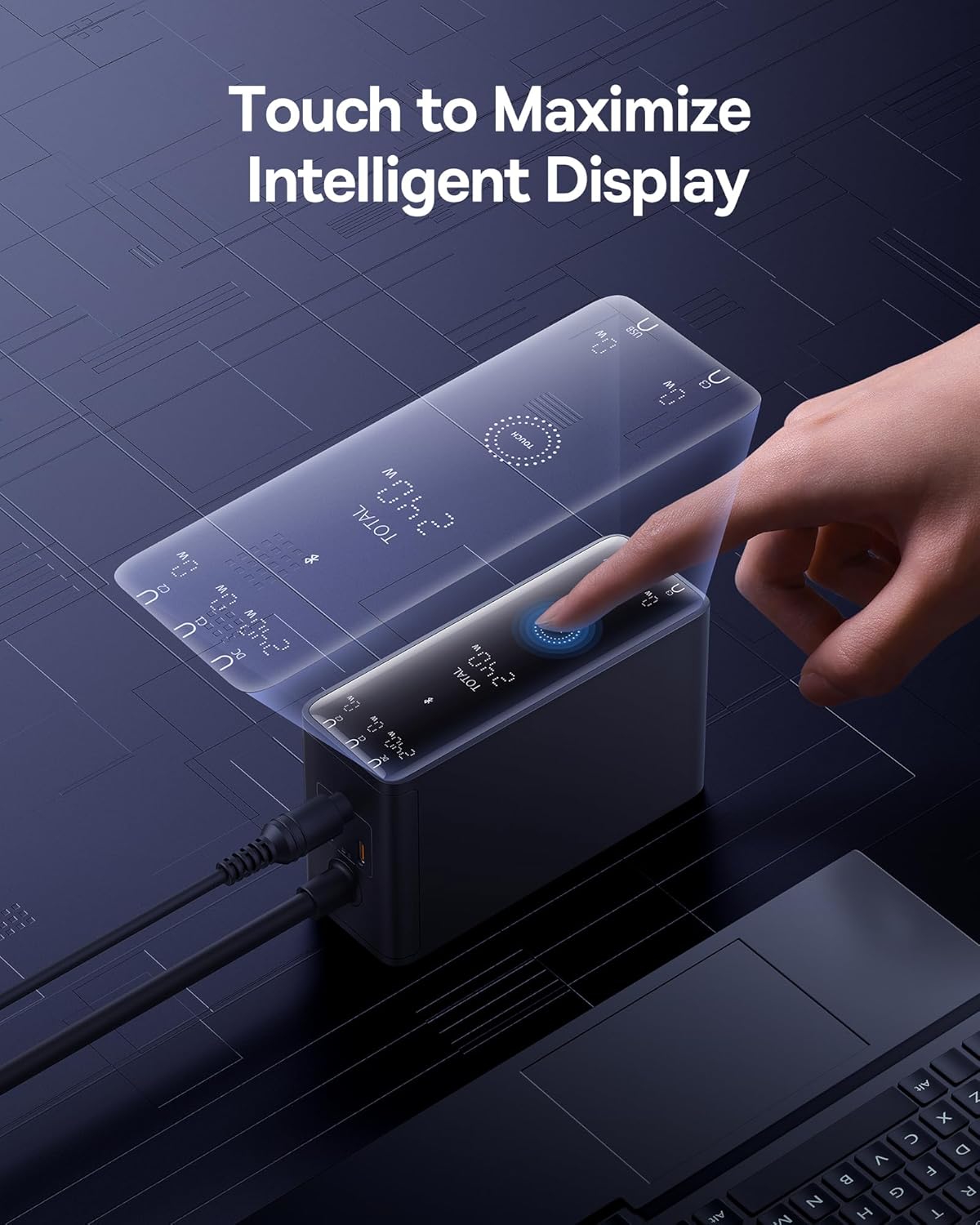
Figure 5: Interacting with the charger's intelligent touch display.
4.2 በርካታ መሳሪያዎችን መሙላት
The charger is designed to intelligently distribute power across its 5 ports. When multiple devices are connected, the power output to each port may adjust based on the device's power requirements and the charger's total available wattagሠ (240 ዋ)
- ላፕቶፕ መሙላት፡ The charger can fast-charge two laptops simultaneously, with one USB-C port supporting up to 140W (PD3.1) and another up to 100W (PD3.0).
- Mixed Device Charging: You can charge a combination of laptops, tablets, smartphones, and other USB-powered devices. The charger's intelligent chip will optimize power delivery.
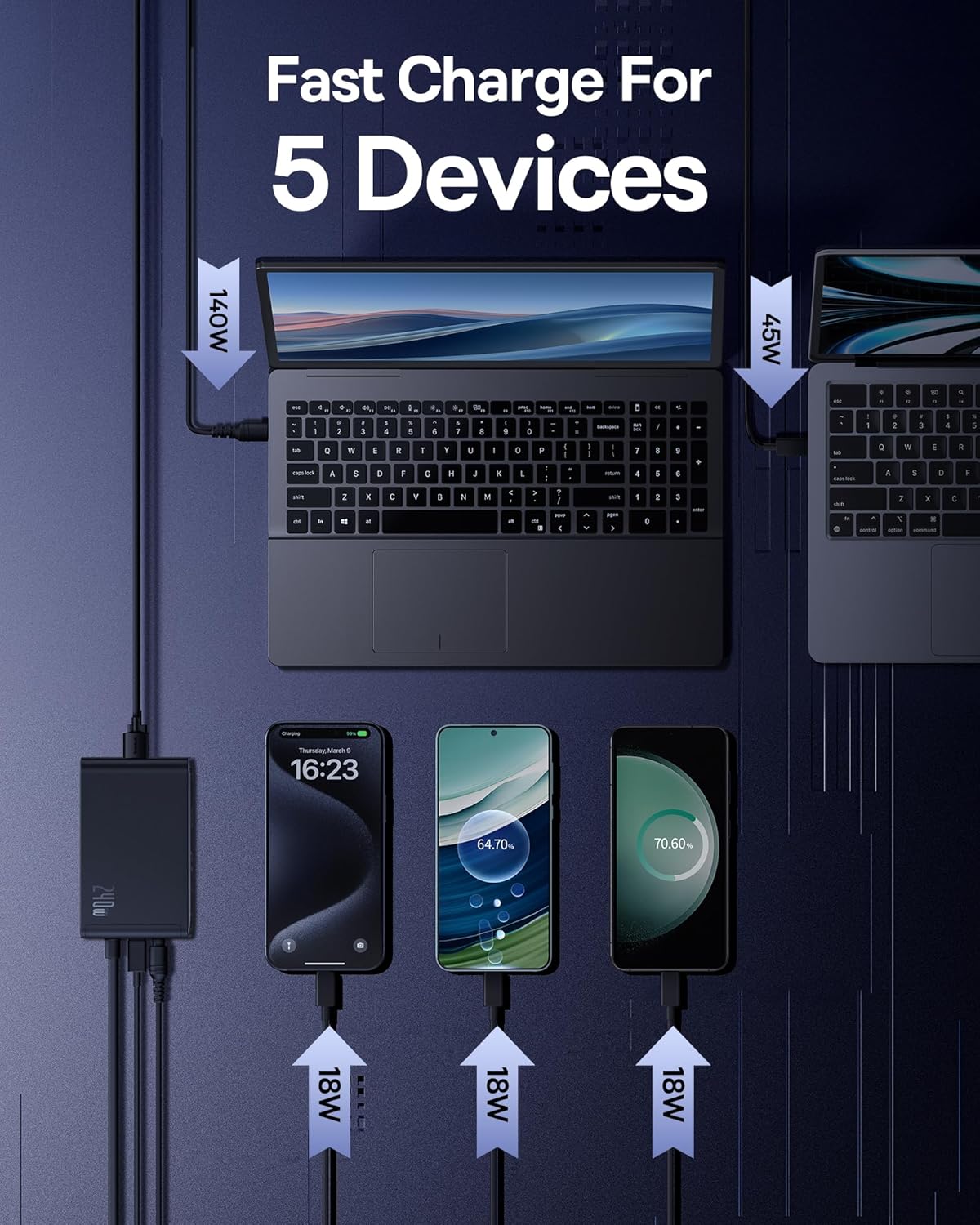
ምስል 6: ዘፀample of charging five devices simultaneously with optimized power distribution.
4.3 Connector Compatibility
The charger includes various DC adapters to ensure compatibility with a wide range of laptops. Always verify the shape and dimensions of your device's charging port before connecting.

Figure 7: Guide to different DC and USB-C connector types for compatibility.
5. ዝርዝሮች
| ባህሪ | ዝርዝር |
|---|---|
| የምርት ልኬቶች | 4.5 x 1.65 x 2.6 ኢንች |
| የእቃው ክብደት | 1.39 ፓውንድ |
| የሞዴል ቁጥር | CCGA240CS |
| የምርት ስም | ቤዝየስ |
| የግንኙነት ቴክኖሎጂ | የኃይል መስመር |
| የማገናኛ አይነት | DC, USB-C, USB-A |
| ግብዓት Voltage | 240 ቮልት (ኤሲ) |
| ልዩ ባህሪያት | 240W Fast Charging, App Control, LED Display |
| ተስማሚ መሣሪያዎች | Smartphones, Tablets, Laptops (MacBook Pro, Dell XPS, Lenovo, HP), Earbuds, Nintendo Switch, Steam Deck, and Other USB-C Devices. |
6. ጥገና
To ensure the longevity and optimal performance of your Baseus 240W Smart USB C Charger, follow these maintenance guidelines:
- ማጽዳት፡ Disconnect the charger from the power outlet and all devices before cleaning. Use a soft, dry cloth to wipe the surface. Do not use liquid cleaners or abrasive materials.
- ማከማቻ፡ ቻርጅ መሙያውን በቀጥታ ከፀሀይ ብርሀን እና ከከፍተኛ ሙቀት ርቆ በቀዝቃዛና ደረቅ ቦታ ያከማቹ።
- የኬብል እንክብካቤ; Avoid bending or crimping cables excessively, especially near the connectors, to prevent damage.
- የአየር ማናፈሻ; Ensure the charger is placed in an area with adequate ventilation to prevent overheating. Do not cover the charger during operation.

Figure 8: Internal cooling technologies designed for efficient heat dissipation.
7. መላ መፈለግ
| ችግር | ሊሆን የሚችል ምክንያት / መፍትሄ |
|---|---|
| Charger display shows 0W or is blank. |
|
| መሣሪያው በዝግታ እየሞላ ወይም እየሞላ አይደለም። |
|
| ቻርጀር በሚሰራበት ጊዜ ሞቅ ያለ ስሜት ይሰማዋል። |
|
| Smart app cannot connect to the charger. |
|
8. ዋስትና እና ድጋፍ
Baseus products are designed and manufactured to the highest quality standards. For information regarding warranty coverage, technical support, or service inquiries, please refer to the warranty card included with your product or visit the official Baseus webጣቢያ.
ለዋስትና ጥያቄዎች እባክዎ የግዢ ማረጋገጫዎን ያቆዩ።


