1. መግቢያ
This manual provides detailed instructions for the safe and efficient operation of your Xprinter XP-P323B Portable Thermal Printer. Please read this manual thoroughly before using the device to ensure proper functionality and to prevent damage. The XP-P323B is designed for printing receipts and labels, offering portability and high-speed capabilities for various business needs.
2. የደህንነት መረጃ
- ማተሚያውን ለውሃ ወይም ከመጠን በላይ እርጥበት አያጋልጡት።
- አታሚውን ከመጣል ወይም ለጠንካራ ተጽእኖዎች ከማስገዛት ተቆጠብ።
- የተገለጸውን የኃይል አስማሚ እና መለዋወጫዎችን ብቻ ይጠቀሙ።
- አታሚውን ከሙቀት ምንጮች እና ከቀጥታ የፀሐይ ብርሃን ያርቁ።
- አታሚውን እራስዎ ለመበተን ወይም ለመጠገን አይሞክሩ። ብቃት ያላቸውን የአገልግሎት ባለሙያዎችን ያነጋግሩ።
- በሚሠራበት ጊዜ ትክክለኛ የአየር ዝውውርን ያረጋግጡ.
3. የጥቅል ይዘቶች
ሁሉም እቃዎች በጥቅሉ ውስጥ መኖራቸውን ያረጋግጡ፡-
- Xprinter XP-P323B Portable Thermal Printer
- Power Adapter (not explicitly listed but standard)
- USB Cable (not explicitly listed but standard)
- Sample Thermal Paper Roll (not explicitly listed but standard)
- የተጠቃሚ መመሪያ (ይህ ሰነድ)
4. ምርት አብቅቷልview
The Xprinter XP-P323B is a compact and efficient thermal printer designed for various printing tasks. It supports NV logo download and picture printing (BMP format), along with concentration adjustment for print quality.
4.1. የአታሚ ክፍሎች

ምስል 1፡ ፊት ለፊት view of the Xprinter XP-P323B Portable Thermal Printer, showing the power button, display, and a sample label being printed.
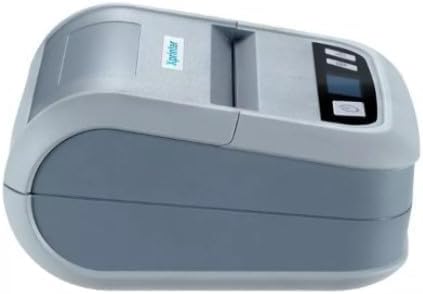
ምስል 2፡ ጎን view of the Xprinter XP-P323B, highlighting its compact design and the Xprinter logo.
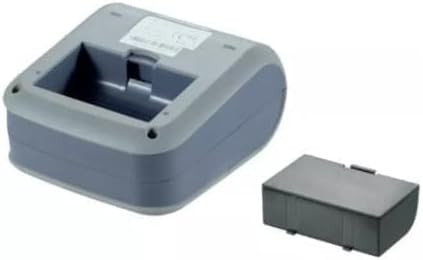
ምስል 3፡ ከስር view of the Xprinter XP-P323B, showing the base and the removable battery compartment.
5. ማዋቀር
5.1. ባትሪውን በመሙላት ላይ
- Connect the power adapter to the printer's charging port.
- የኃይል አስማሚውን ወደ ግድግዳ መውጫ ይሰኩት.
- The charging indicator light will illuminate. Allow the printer to charge fully before first use.
5.2. Loading Thermal Paper/Labels
- Open the paper compartment cover by gently pushing the release latch.
- Insert the thermal paper roll with the printing surface facing the print head. Ensure the roll is seated correctly.
- Pull a small amount of paper out past the print head.
- የወረቀት ክፍሉን ክዳን ወደ ቦታው እስኪገባ ድረስ በጥብቅ ይዝጉት።
5.3. ከመሳሪያ ጋር መገናኘት
The XP-P323B supports USB and Bluetooth connectivity.
5.3.1. የዩኤስቢ ግንኙነት
- የቀረበውን የዩኤስቢ ገመድ በመጠቀም አታሚውን ከኮምፒዩተርዎ ጋር ያገናኙት።
- Install the necessary printer drivers (available from the Xprinter website or included software).
5.3.2. Bluetooth Connection (for Smartphones/iOS)
- አታሚው መብራቱን ያረጋግጡ።
- On your smartphone or iOS device, go to Bluetooth settings and enable Bluetooth.
- ፈልግ available devices and select 'XP-P323B' (or similar name).
- Enter the pairing PIN if prompted (refer to printer documentation for default PIN, often '0000' or '1234').
- Once paired, you can use a compatible printing application to send print jobs.
6. ማተሚያውን መስራት
6.1. መሰረታዊ ማተሚያ
- አታሚው ከመሳሪያዎ ጋር መገናኘቱን እና ወረቀት መጫኑን ያረጋግጡ።
- Open the document or image you wish to print on your connected device.
- በመተግበሪያዎ ውስጥ ያለውን የህትመት አማራጭ ይምረጡ።
- Choose 'XP-P323B' as the printer.
- Adjust print settings as needed (e.g., paper size, print quality).
- የህትመት ስራውን ይጀምሩ.
6.2. NV Logo and Picture Printing
The printer supports downloading and printing NV (Non-Volatile) logos and BMP format pictures. This functionality typically requires specific software or commands. Refer to the advanced programming guide or software documentation for detailed instructions on how to upload and print custom logos or images.
6.3. Adjusting Print Concentration
Print concentration can be adjusted to optimize print quality. This setting is usually accessible through the printer driver software on a computer or within the settings of a compatible mobile printing application. Consult your software's help section for specific steps.
7. ጥገና
7.1. ማተሚያውን ማጽዳት
- ውጫዊ፡ የአታሚውን ውጫዊ ገጽታ ለስላሳ, መamp ጨርቅ. ኃይለኛ ኬሚካሎችን ወይም ሻካራ ማጽጃዎችን አይጠቀሙ.
- የህትመት ራስ፡ The thermal print head should be cleaned periodically to ensure optimal print quality. Use a cotton swab lightly dampened with isopropyl alcohol. Gently wipe the print head surface. Allow it to dry completely before closing the cover and resuming operation.
- የወረቀት መንገድ፡ Remove any paper dust or debris from the paper path using a soft brush or compressed air.
7.2. ማከማቻ
When not in use for extended periods, store the printer in a cool, dry place, away from direct sunlight and extreme temperatures. Remove the paper roll if storing for a very long time to prevent dust accumulation.
8. መላ መፈለግ
| ችግር | ሊሆን የሚችል ምክንያት | መፍትሄ |
|---|---|---|
| አታሚ አይበራም። | Low battery; Power adapter not connected; Faulty power adapter | Charge the battery; Ensure power adapter is securely connected; Try a different power outlet or adapter |
| ምንም የህትመት ውጤት የለም። | No paper; Paper loaded incorrectly; Printer not connected; Driver issue | Load paper correctly; Re-establish connection; Reinstall printer drivers |
| ደካማ የህትመት ጥራት | Dirty print head; Low print concentration; Low battery | Clean the print head; Adjust print concentration in software; Charge the battery |
| የብሉቱዝ ግንኙነት አልተሳካም። | Bluetooth off on device; Incorrect pairing PIN; Printer out of range | Enable Bluetooth; Re-enter correct PIN; Move device closer to printer |
9. ዝርዝሮች
| የምርት ስም | Xprinter |
| የሞዴል ቁጥር | XP-P323B |
| የንጥል መጠኖች (D x W x H) | 15D x 7W x 10H ሴንቲሜትር |
| የግንኙነት ቴክኖሎጂ | ዩኤስቢ |
| የአታሚ ቴክኖሎጂ | ሙቀት |
| ልዩ ባህሪያት | ተንቀሳቃሽ |
| ቀለም | ግራጫ |
| ተስማሚ መሣሪያዎች | ስማርትፎኖች |
| የመቆጣጠሪያ አይነት | iOS |
| ከፍተኛው የሚዲያ መጠን | 4 x 6 ኢንች |
| የህትመት ሚዲያ | መለያዎች |
| የወረቀት መጠን | 4 x 6 ኢንች |
| የአታሚ ውፅዓት | ሞኖክሮም |
| ከፍተኛው የህትመት ፍጥነት (ጥቁር እና ነጭ) | 40 mm/s (estimated from context) |
| የእቃው ክብደት | 300 ግራም |
10. ዋስትና እና ድጋፍ
For warranty information and technical support, please refer to the warranty card included with your product or visit the official Xprinter webጣቢያ. ለዋስትና ጥያቄዎች የግዢ ደረሰኝዎን እንደ ግዢ ማረጋገጫ ያቆዩት።


