1. መግቢያ
This manual provides essential information for the safe and effective operation of your Betopper 260W Moving Head DJ Light, model CLB260-O. Please read this manual thoroughly before installation, operation, or maintenance to ensure proper usage and to prevent damage or injury.

Image 1.1: Betopper 260W Moving Head DJ Light CLB260-O. This image displays the main unit of the moving head light, showcasing በውስጡ የታመቀ ንድፍ እና የቁጥጥር ፓነል.
2. የደህንነት መረጃ
Adherence to the following safety guidelines is crucial for preventing electrical shock, fire, or personal injury.
2.1 አጠቃላይ ደህንነት
- Always read and understand all instructions before installing, operating, or servicing this product.
- This device is for professional use only. Keep out of reach of children.
- Do not operate the fixture if it has visible damage.
- Ensure adequate ventilation around the fixture to prevent overheating. Maintain a minimum distance of 0.5 meters from any flammable materials.
- ለብርሃን ምንጭ ቀጥተኛ የዓይን መጋለጥን ያስወግዱ.
2.2 የኤሌክትሪክ ደህንነት
- Connect the fixture only to a grounded power outlet with the correct voltagኢ (ኤሲ 100-240V፣ 50/60Hz)።
- Always disconnect the power cable before cleaning, servicing, or moving the fixture.
- የኃይል ገመዱን በእርጥብ እጆች አይያዙ.
- If the power cable is damaged, it must be replaced by a qualified technician.
2.3 የመጫኛ ደህንነት
- የመጫኛው ወለል ወይም መዋቅር የመሳሪያውን ክብደት መደገፍ እንደሚችል ያረጋግጡ።
- Always use a safety cable when mounting the fixture overhead to prevent accidental falling.
- መጫኑ ብቃት ባለው ሠራተኛ መከናወን አለበት።
3. ምርት አብቅቷልview
3.1 ቁልፍ ባህሪያት
- እጅግ በጣም ብሩህ ውፅዓት፡- Equipped with a potent 260W bulb, delivering 180,000 Lux at 10 meters.
- Enhanced Light Engine: Features an optimized light path and lens, providing 1.5X brighter output than typical 230W 7R engines.
- የታመቀ ንድፍ Measures 10.83"L x 7.84"W x 16.85"H and weighs 13.22 lbs, allowing for versatile placement.
- Advanced Thermal Management: Includes an innovative die-cast air nozzle, smart half-power mode, system-wide thermal resistor monitoring, professional overheat protector, and fan status monitoring for extended lifespan.
- አጠቃላይ ተፅዕኖዎች፡ Features an 8-facet prism, 13-color wheel with rainbow effect, 14-Gobo wheel, frost wheel, 0-100% dimming, gobo shaking, strobe, and clockwise/counter-clockwise rotation.

Image 3.1: Key features of the Betopper 260W Moving Head DJ Light, highlighting the 11 fixed dichroic colors + white, 13 static gobos + open, and 8-facet prism.

Image 3.2: Internal components and thermal management features, including the innovative die-cast air nozzle, smart half-power mode, triple-layer bulb safety system, and high-performance cooling fans.
3.2 ክፍሎች እና ግንኙነቶች
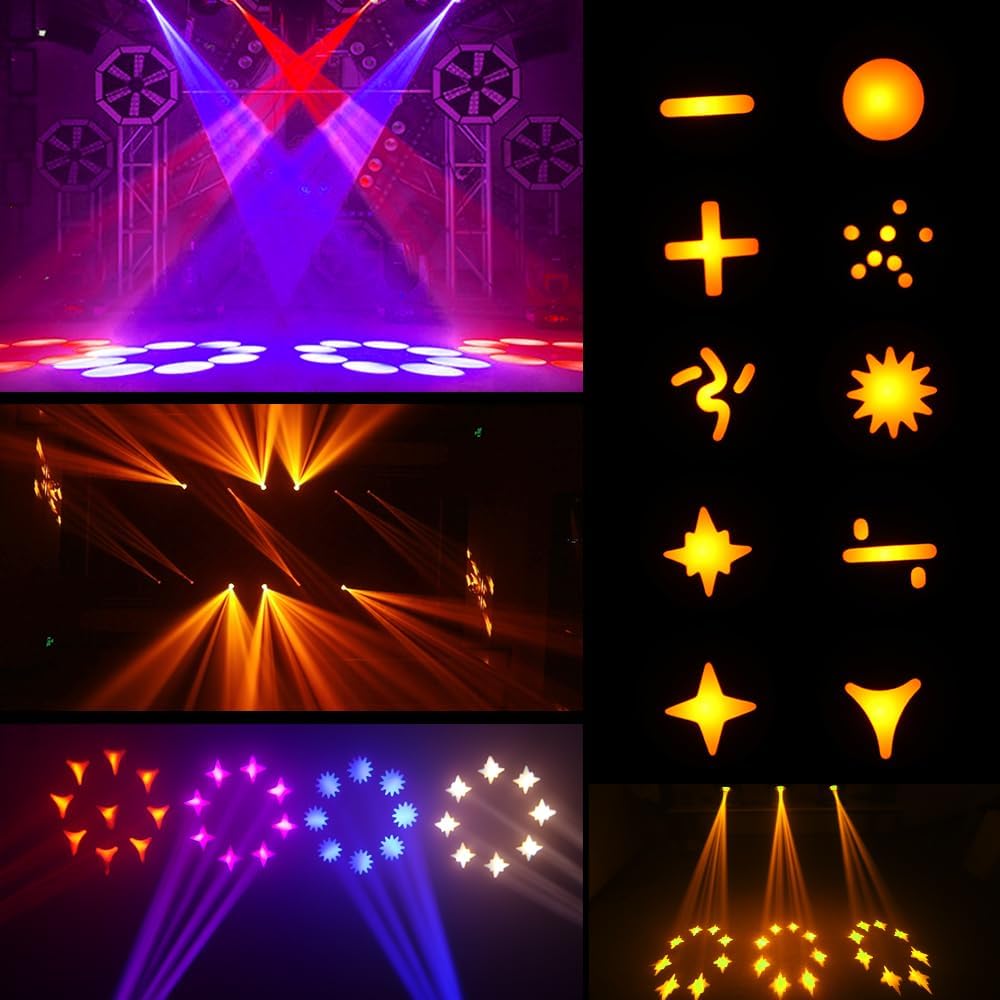
Image 3.3: Front and back panel overview of the CLB260-O. The front panel includes the display screen and control buttons (Display, Down, Enter, OK, Up, DMX ERR indicator). The back panel features DMX IN/OUT, Power IN/OUT, and a fuse holder.
3.3 በሳጥኑ ውስጥ ያለው
ሲከፍቱት ሁሉም ክፍሎች መኖራቸውን ያረጋግጡ፡
- Betopper 260W Moving Head DJ Light (CLB260-O)
- የኃይል ገመድ
- ዲኤምኤክስ ኬብል
- መጫኛ Clamp
- የደህንነት ገመድ
- መመሪያ መመሪያ
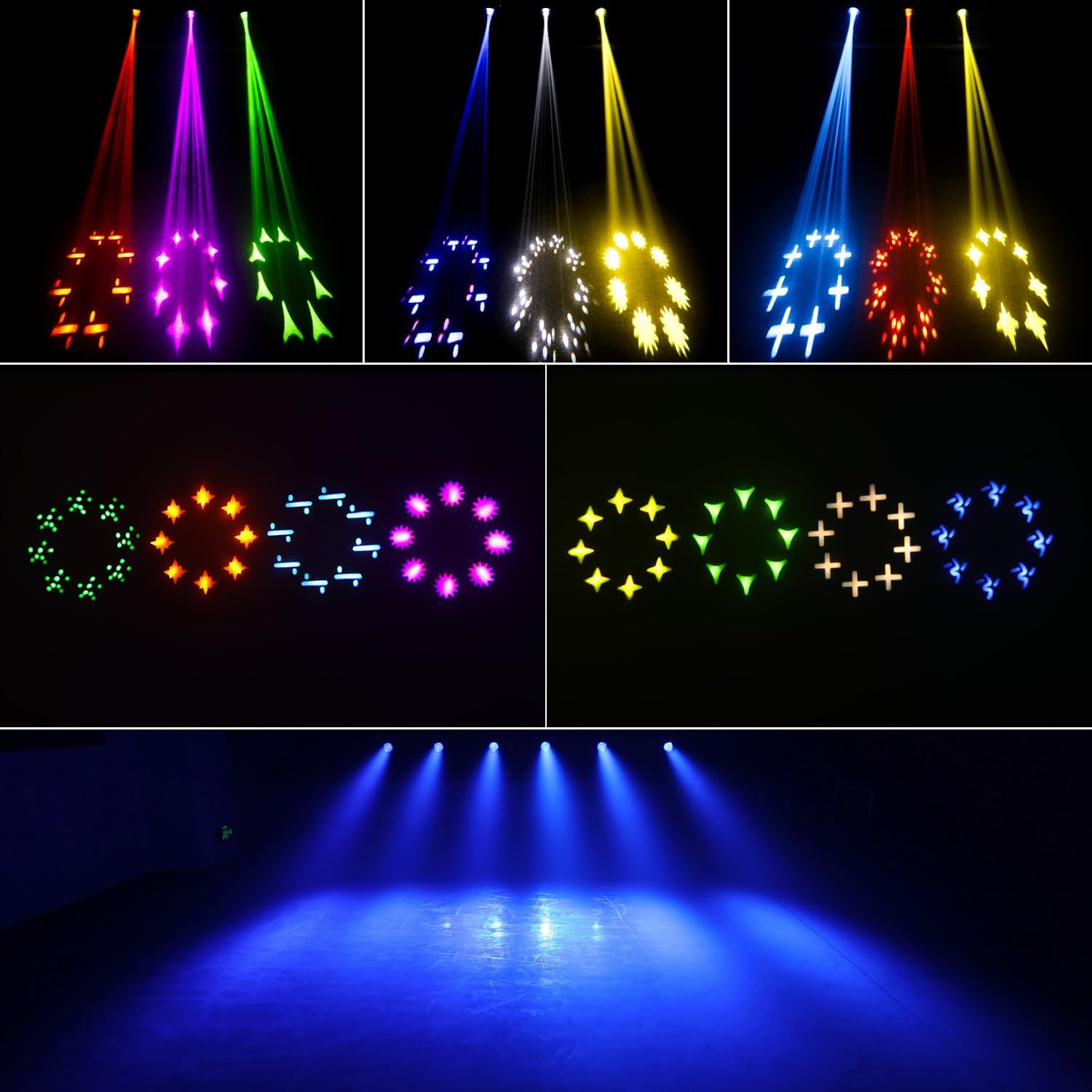
Image 3.4: Included accessories: Power input cable, safety rope, light hook plate, and the instruction manual.
4. ማዋቀር
4.1 መጫን
The CLB260-O can be mounted in various orientations, including ceiling mount and floor mount. Always ensure the fixture is securely fastened using the provided installation clamp and a safety cable.
- Attach the installation clamp to the designated mounting points on the fixture's base.
- Secure the fixture to a truss or mounting surface using the clamp.
- Attach the safety cable to the fixture and wrap it around the mounting structure, ensuring it can hold the fixture's weight independently.
4.2 የኤሌክትሪክ ግንኙነት
- Connect the power cable to the 'POWER IN' socket on the fixture's back panel.
- Plug the other end of the power cable into a grounded power outlet (AC 100-240V, 50/60Hz).
- If linking multiple units, use the 'POWER OUT' socket to connect to the 'POWER IN' of the next fixture.
4.3 የዲኤምኤክስ ግንኙነት (አማራጭ)
For DMX control, connect a DMX cable from your DMX controller to the 'DMX IN' socket of the first fixture. For multiple fixtures, connect 'DMX OUT' of the first fixture to 'DMX IN' of the next, creating a daisy chain.
5. የአሠራር መመሪያዎች
5.1 የቁጥጥር ፓነል
The control panel on the front of the fixture features a display screen and several buttons for navigation and setting adjustments:
- ማሳያ Toggles through menu options.
- ታች እሴቶችን ይቀንሳል ወይም በምናሌዎች ውስጥ ወደ ታች ይዳሰሳል።
- ግባ ምርጫዎችን ያረጋግጣል ወይም ንዑስ ምናሌዎችን ያስገባል።
- እሺ Confirms selections or exits sub-menus.
- የላይ: በምናሌዎች ውስጥ እሴቶችን ይጨምራል ወይም ወደ ላይ ያስሳል።
5.2 የአሠራር ሁነታዎች
The CLB260-O supports several operating modes:
- Automatic Operation (Auto Mode): The fixture runs through pre-programmed light shows.
- የድምጽ መቆጣጠሪያ ሁነታ; The light reacts to ambient sound via a built-in microphone.
- የዲኤምኤክስ ሁነታ፡ Allows external control via a DMX controller for precise manipulation of all features.
- ማስተር-ባሪያ ሁነታ፡- One fixture acts as the master, controlling other linked slave fixtures.
- Half-Power Mode: An energy-saving mode that reduces light output and heat generation.

Image 5.1: Visual representation of available effects (8-facet prism, frost, dimming, strobe, gobo shaking), color wheel options, gobo wheel patterns, and operating modes (Automatic, Half-power, Sound Control, DMX Mode).
5.3 የዲኤምኤክስ ቁጥጥር
The fixture utilizes 12 DMX channels for comprehensive control. Refer to the DMX channel chart (typically found in a separate DMX manual or appendix) for specific channel functions, including:
- Pan/Tilt movement and speed
- ዲመር (0-100%)
- የስትሮብ ፍጥነት
- Color selection (13 colors + open, rainbow effect)
- Gobo selection (14 gobos + open, gobo shaking)
- Prism (8-facet, rotation)
- የበረዶ ተጽእኖ

ምስል 5.2፡ ዘጸamples of various gobo patterns and light effects achievable with the CLB260-O.

Image 5.3: Demonstrates various color and beam effects, including wide washes, sharp beams, and prism effects.
6. ጥገና
መደበኛ ጥገና ከፍተኛ አፈፃፀምን ያረጋግጣል እና የመሳሪያውን ዕድሜ ያራዝማል።
6.1 ጽዳት
- ውጫዊ፡ Use a soft, lint-free cloth to wipe the housing. Do not use abrasive cleaners.
- ኦፕቲክስ Gently clean lenses and mirrors with a soft cloth and a specialized optical cleaning solution. Avoid scratching the surfaces.
- ደጋፊዎች፡- Periodically clean the cooling fans and air vents to prevent dust buildup, which can impede airflow and cause overheating.
6.2 አምፖል መተካት
The CLB260-O uses a Halogen light source, which has a finite lifespan and requires replacement. Always disconnect power and allow the fixture to cool completely before attempting bulb replacement. Consult a qualified technician for bulb replacement if you are unsure.
7. መላ መፈለግ
ችግሮች ካጋጠሙዎት የሚከተሉትን የተለመዱ ችግሮች እና መፍትሄዎች ይመልከቱ።
| ችግር | ሊሆን የሚችል ምክንያት | መፍትሄ |
|---|---|---|
| ስልኩ አይበራም | No power supply; Damaged power cable; Blown fuse | Check power connection; Replace power cable; Replace fuse (refer to specifications for fuse type) |
| ምንም የብርሃን ውጤት የለም | Bulb failure; Dimmer channel at 0%; DMX signal issue | Replace bulb; Check DMX dimmer channel; Verify DMX connection and address |
| Incorrect movement or effects | Incorrect DMX address; Wrong operating mode; DMX signal interference | Set correct DMX address; Select appropriate operating mode; Check DMX cable and controller |
| ቋሚ ሙቀት | Poor ventilation; Clogged fans | Ensure adequate space around fixture; Clean fans and vents |
8. ዝርዝሮች
| ባህሪ | ዝርዝር መግለጫ |
|---|---|
| የሞዴል ቁጥር | CLB260-O |
| የብርሃን ምንጭ ዓይነት | ሃሎጅን |
| የብርሃን ምንጭ ዋትtage | 260 ዋት |
| ብሩህነት | 180,000 Lux at 10m |
| ጥራዝtage | 100-240 ቮልት (ኤሲ) |
| ድግግሞሽ | 50/60 ኸርዝ |
| የቀለም ሙቀት | 7800 ኬልቪን |
| የዲኤምኤክስ ቻናሎች | 12-CH |
| ጎቦ ጎማ | 14 ጎቦስ + ክፍት |
| የቀለም ጎማ | 13 Colors + Open, Rainbow Effect |
| ፕሪዝም | 8-Facet Prism |
| ተፅዕኖዎች | Frost, Dimming (0-100%), Strobe, Gobo Shaking, Rotation |
| የክወና ሁነታዎች | DMX, Sound Activate, Master-Slave, Automatic, Half-Power |
| የምርት ልኬቶች | 10.83"ኤል x 7.84" ዋ x 16.85" ኤች |
| የእቃው ክብደት | 13.22 ፓውንድ (6 ኪ.ግ) |
| ቁሳቁስ | አሲሪሎኒትሪል ቡታዲየን ስቲሪን (ኤቢኤስ) |
| የመጫኛ አይነት | Ceiling mount, Floor mount |
| የምስክር ወረቀቶች | CE፣ RoHS |
9. ዋስትና እና ድጋፍ
Betopper products are designed for reliability and performance. For warranty information, technical support, or service inquiries, please contact Betopper customer service through the official website or your point of purchase. Keep your purchase receipt as proof of purchase.


