መግቢያ
This user manual provides essential information for setting up, operating, maintaining, and troubleshooting your VIBOX I-45 Gaming PC. Please read this manual thoroughly before using your new computer to ensure optimal performance and longevity.
1. ማዋቀር
1.1 Unboxing እና ጥቅል ይዘቶች
Carefully remove all components from the packaging. Ensure all items listed below are present. Retain the packaging for future transport or service needs.
- VIBOX I-45 Gaming PC (VTX-4 Black Tower)
- የኃይል ገመድ
- Wi-Fi Network Adapter (300 Mbps)
- ሰነድ (ይህ መመሪያ)
1.2 ማገናኛ ፔሪፈራል
ፒሲዎን ከማብራትዎ በፊት ሁሉንም አስፈላጊ ተጓዳኝ መሳሪያዎችን ያገናኙ።
- ተቆጣጠር፥ Connect your monitor to the graphics output port (HDMI or DisplayPort) on the rear of the PC. Ensure the monitor is also connected to a power source.
- የቁልፍ ሰሌዳ እና መዳፊት; የቁልፍ ሰሌዳዎን እና መዳፊትዎን ከሚገኙት የዩኤስቢ ወደቦች ጋር ያገናኙ።
- አውታረ መረብ፡ For wired internet, connect an Ethernet cable to the LAN port. For wireless internet, ensure the included Wi-Fi adapter is installed or connected.
- ኦዲዮ፡ Connect speakers or a headset to the audio output jacks.
- ኃይል፡- Connect the power cable to the PC's power input and then to a wall outlet.

Figure 1.2.1: Rear I/O Ports for connecting peripherals.
1.3 የመጀመሪያ ጅምር እና የዊንዶውስ 11 ማዋቀር
After connecting all peripherals, press the power button on the front of the PC. The system will boot into Windows 11 Home. Follow the on-screen instructions to complete the initial setup, including language selection, network connection, and user account creation.

Figure 1.3.1: Windows 11 Home Operating System.
2. የአሠራር መመሪያዎች
2.1 አብራ/ አጥፋ እና እንደገና አስጀምር
- አብራ፡ በፊት ፓነል ላይ የሚገኘውን የኃይል አዝራሩን ይጫኑ.
- ዝጋ፡ በዊንዶውስ ውስጥ የጀምር አዝራሩን ጠቅ ያድርጉ እና ከዚያ ኃይል > ዝጋን ይምረጡ።
- እንደገና ጀምር፥ በዊንዶውስ ውስጥ የጀምር አዝራሩን ጠቅ ያድርጉ እና ከዚያ ኃይል > ዳግም አስጀምር የሚለውን ይምረጡ።
2.2 Windows 11 Home Features
Your VIBOX I-45 comes pre-installed with Windows 11 Home, offering several features designed to enhance your computing experience:
- ቀጥታ ማከማቻ፡ Enables faster game loading times.
- AutoHDR: Automatically enhances visuals for improved graphics.
- Xbox Game Pass Integration: Seamless access to a library of games.
- Optimized CPU Performance: Enhanced performance for various tasks.
2.3 RGB የመብራት መቆጣጠሪያ
The VTX-4 case features Hex RGB Infinity 120mm fans. You can customize the lighting effects and colors using the dedicated RGB change button on the top panel or through compatible software if available.

Figure 2.3.1: Customizable RGB Fans.
3. ጥገና
3.1 ፒሲዎን ማጽዳት
Regular cleaning helps maintain performance and extends the lifespan of your computer.
- ውጫዊ፡ ለስላሳ ይጠቀሙ, መamp ውጫዊ ገጽታዎችን ለማጥፋት ጨርቅ. ኃይለኛ ኬሚካሎችን ያስወግዱ.
- አቧራ ማስወገድ; Periodically use compressed air to clear dust from fan vents and internal components. Ensure the PC is powered off and unplugged before cleaning.
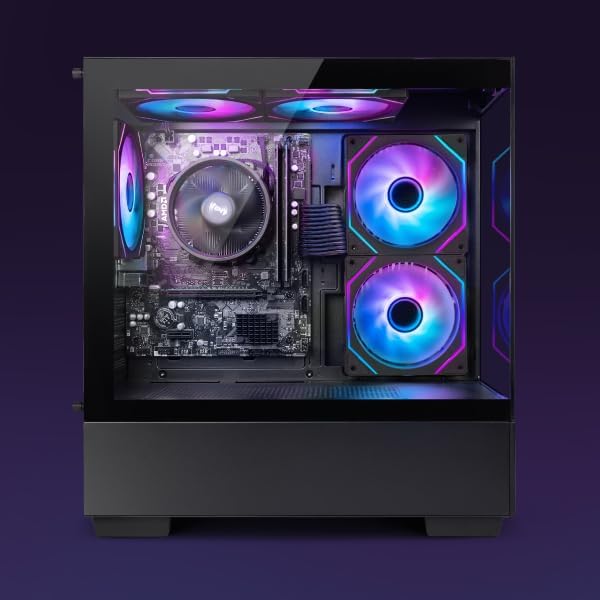
Figure 3.1.1: Internal components of the VIBOX I-45 PC.
3.2 የሶፍትዌር ዝመናዎች
ደህንነትን፣ መረጋጋትን እና ጥሩ አፈጻጸምን ለማረጋገጥ የእርስዎን ስርዓተ ክወና እና ሾፌሮች ማዘመን ያቆዩት።
- የዊንዶውስ ዝመናዎች; Windows 11 automatically checks for updates. You can manually check by going to Settings > Windows Update.
- የአሽከርካሪ ማሻሻያ Regularly check the VIBOX support webየጣቢያ ወይም የክፍሎች አምራቾች websites (AMD for CPU/GPU) for the latest drivers.
3.3 የስርዓት ምትኬ
የውሂብ መጥፋትን ለመከላከል አስፈላጊ ውሂብዎን ወደ ውጫዊ ድራይቭ ወይም የደመና ማከማቻ በመደበኛነት ምትኬ ያስቀምጡ።
4. መላ መፈለግ
This section addresses common issues you might encounter. For more complex problems, please contact VIBOX support.
4.1 ምንም ኃይል የለም
- የኃይል ገመዱ ከፒሲው እና ከግድግዳው መውጫ ጋር ደህንነቱ በተጠበቀ ሁኔታ መገናኘቱን ያረጋግጡ።
- ሌላ መሳሪያ በመጫን የግድግዳው መውጫው የሚሰራ መሆኑን ያረጋግጡ።
- Check the power supply switch on the rear of the PC (if present) is in the 'On' position.
4.2 በሞኒተር ላይ ምንም ማሳያ የለም
- Confirm the monitor is powered on and correctly connected to the PC's graphics output port.
- ትክክለኛው የግቤት ምንጭ በእርስዎ ማሳያ ላይ መመረጡን ያረጋግጡ።
- Try a different display cable if available.
4.3 ቀርፋፋ አፈጻጸም
- ከበስተጀርባ የሚሰሩ አላስፈላጊ መተግበሪያዎችን ዝጋ።
- በመጠባበቅ ላይ ያሉ የዊንዶውስ ወይም የአሽከርካሪ ዝመናዎችን ያረጋግጡ እና ይጫኑ።
- የዲስክ ማጽጃ እና መበታተን ያሂዱ (ለኤችዲዲ፣ በተለምዶ ለኤስኤስዲ አያስፈልግም)።
- ማልዌር ወይም ቫይረሶችን ይቃኙ።
4.4 የአውታረ መረብ ግንኙነት ጉዳዮች
- ዋይ ፋይ፡ Ensure the Wi-Fi adapter is properly installed and drivers are up to date. Check your router and internet connection.
- ኢተርኔት፡ Verify the Ethernet cable is securely connected to both the PC and the router/modem. Check router status.
- Restart your router/modem and PC.
5. ዝርዝሮች
| ባህሪ | ዝርዝር መግለጫ |
|---|---|
| የምርት ስም | VIBOX |
| የሞዴል ቁጥር | አይ-45 |
| ቀለም | VTX-4 Black |
| ስርዓተ ክወና | ዊንዶውስ 11 መነሻ |
| ፕሮሰሰር | AMD Ryzen 3 3200G (4 Cores, 3.6 GHz Base, up to 4.0 GHz Max) |
| ግራፊክስ | Integrated Radeon Vega 8 Graphics (2GB Shared Memory) |
| ራም | 16 GB DDR4 (3200 MHz Dual Channel) |
| ማከማቻ | 480 ጊባ SSD |
| ከፍተኛ የማህደረ ትውስታ ድጋፍ | 128 ጊባ |
| ዋይ ፋይ | 802.11n (300 Mbps adapter included) |
| HDMI ወደቦች | 1 |
| ዩኤስቢ 2.0 ወደቦች | 3 |
| ዩኤስቢ 3.0 ወደቦች | 3 |
| ልኬቶች (L x W x H) | 36 x 20 x 41 ሴ.ሜ |
| ተስማሚ መሣሪያዎች | Headset, Keyboard, Printer, Monitor, Mouse |
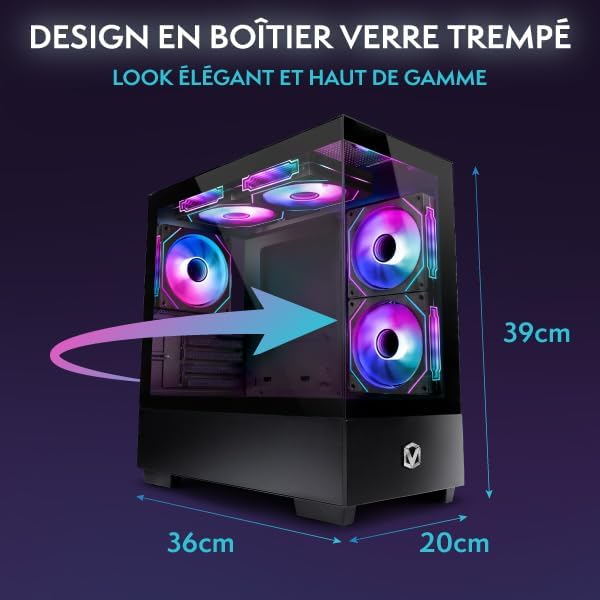
Figure 5.1.1: VIBOX I-45 PC Dimensions.
6. የዋስትና መረጃ
Your VIBOX I-45 Gaming PC comes with a manufacturer's warranty covering:
- ክፍሎች፡ 2 ዓመታት
- የጉልበት ሥራ; የህይወት ዘመን
Please retain your proof of purchase for warranty claims. For detailed terms and conditions, refer to the warranty card included with your product or visit the official VIBOX webጣቢያ.
7. ድጋፍ
For technical assistance, troubleshooting beyond this manual, or warranty inquiries, please contact VIBOX customer support. You can find contact information on the official VIBOX Gaming webጣቢያ ወይም በእርስዎ ቸርቻሪ በኩል.
የመስመር ላይ መርጃዎች፡-
- ን ይጎብኙ VIBOX Gaming Store on Amazon ለምርት መረጃ እና ዝማኔዎች.


