መግቢያ
Welcome to the VTech Genius XL Interactive Video Binoculars. This device is designed for children aged 5 and above to explore the world around them through observation, interactive videos, images, and educational games. This manual provides essential information for setup, operation, and maintenance to ensure optimal use and longevity of your product.

Image: The VTech Genius XL Interactive Video Binoculars, showing the main unit with its flip-up color screen and binocular lenses.
ጠቃሚ የደህንነት መረጃ
ማስጠንቀቂያ፡- ትናንሽ ክፍሎች በመኖራቸው ምክንያት ከ36 ወር በታች ለሆኑ ህጻናት ተስማሚ አይደለም።
- በሚጠቀሙበት ጊዜ ሁል ጊዜ ልጆችን ይቆጣጠሩ።
- Do not look directly at the sun through the binoculars, as this can cause serious eye damage.
- ባትሪዎች በትክክል መግባታቸውን ያረጋግጡ።
- አሮጌ እና አዲስ ባትሪዎችን ወይም የተለያዩ አይነት ባትሪዎችን አያቀላቅሉ.
- የተሟጠጡ ባትሪዎችን ወዲያውኑ ያስወግዱ።
- ባትሪዎችን በኃላፊነት ያስወግዱ ፡፡
በሣጥኑ ውስጥ ያለው
- 1 Pair of VTech Genius XL Interactive Video Binoculars
- Batteries (4 x LR6-AA)
- የአንገት ማንጠልጠያ
ማዋቀር
1. የባትሪ ጭነት
- በመሳሪያው ላይ የባትሪውን ክፍል ያግኙ.
- ዊንዳይቨር በመጠቀም የባትሪውን ክፍል ክዳን ይክፈቱ።
- ሁለት አዳዲስ LR6-AA ባትሪዎችን ያስገቡ፣ ይህም ትክክለኛውን የፖላራይቲ (+/-) ያረጋግጣል።
- መከለያውን ይተኩ እና ጠመዝማዛውን ያጥብቁ።
2. የአንገት ማሰሪያ ማያያዝ
Thread the provided neck strap through the designated loops on the binoculars. Adjust the strap length for comfortable and secure wearing.

Image: A child wearing the VTech Genius XL Interactive Video Binoculars with the neck strap, demonstrating how it can be worn for outdoor exploration.
የአሠራር መመሪያዎች
1. ማብራት / ማጥፋት
Press and hold the power button to turn the device on or off. The device features an automatic shut-off function to preserve battery life.
2. Viewሁነታዎች
The binoculars offer two primary viewing methods:
- Through the Binoculars: Look directly through the eyepieces (binocular lenses) for traditional observation. The interpupillary distance is adjustable for optimal comfort.
- On the LCD Screen: Flip up the 2.4-inch color LCD screen to view observations digitally.

Image: A child looking through the VTech Genius XL Interactive Video Binoculars, demonstrating the traditional viewየመግቢያ ዘዴ።
3. Magnification and Focus
- The binoculars provide up to 10x ማጉላት.
- Use the focus wheel to adjust the image clarity for both binocular and screen viewing
4. የምሽት እይታ ሁነታ
Activate the integrated infrared system for night vision. This mode is exclusively available on the LCD screen, allowing observation in low-light or dark conditions.

Image: The VTech Genius XL Interactive Video Binoculars displaying a night vision image of a hedgehog on its screen, highlighting the night vision feature.
5. የፎቶ እና የቪዲዮ ቀረጻ
The integrated camera allows you to capture images of flora and fauna. The internal memory can store up to 50 photos. A micro-SD card slot (card not included) is available to expand storage capacity and save photos for printing.

Image: The VTech Genius XL Interactive Video Binoculars with multiple captured images of animals and nature displayed around it, illustrating the photo capture function.
6. Interactive Content (BBC Videos & Images)
Explore over 340 official videos and images from the BBC, providing more than 700 educational facts categorized into 9 groups:
- Ampሂቢያን
- አርትሮፖድስ
- Terrestrial Birds
- Flying Birds
- Terrestrial Mammals
- Marine Mammals
- የሚሳቡ እንስሳት
- የአበባ ተክሎች
- Other Plants and Fungi

Image: The VTech Genius XL Interactive Video Binoculars displaying an image of a mushroom on its screen, with a speech bubble indicating educational information, showcasing the BBC content.
7. Games and Quizzes
- Adventure Game: Navigate through 5 natural environments, encountering over 100 animals and exploring 25 levels.
- Educational Quiz: Test scientific knowledge through a 3-stage quiz (Training, Time Challenge, Clue Game).
- Use the joystick and 12 buttons to navigate through games and features.
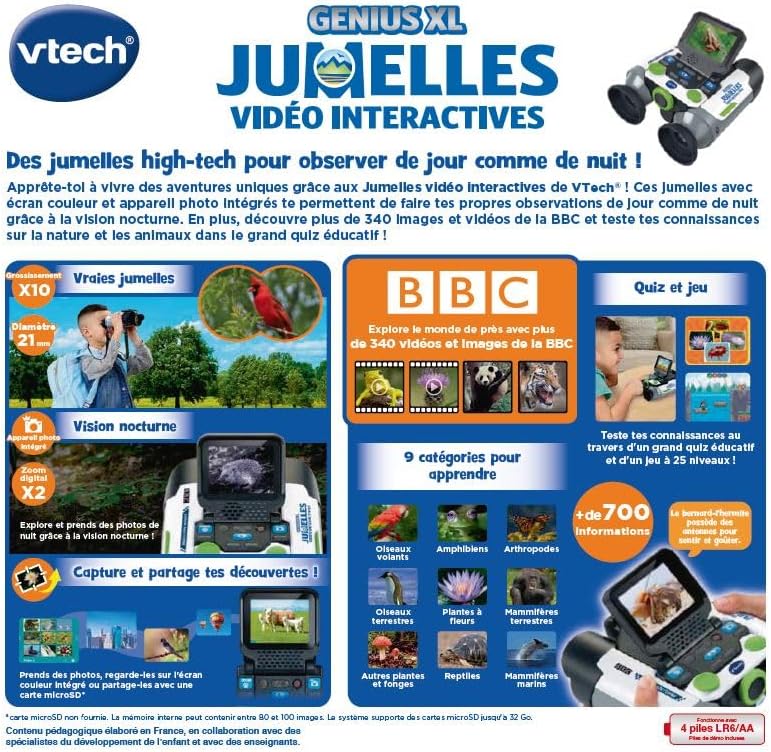
Image: A child holding the VTech Genius XL Interactive Video Binoculars, playing an adventure game on its screen, demonstrating the interactive game feature.
8. የድምጽ መቆጣጠሪያ
Adjust the sound volume using the dedicated controls on the device.
የሚዲያ ውህደት
ይፋዊ የምርት ቪዲዮዎች
The following video demonstrates the key features and interactive capabilities of the VTech Genius XL Interactive Video Binoculars.
ቪዲዮ: አጭር ቅድመview የቪዲዮ ማሳያasing children using the VTech Genius XL Interactive Video Binoculars to observe nature, take photos, play games, and utilize the night vision mode. It highlights the educational BBC content and interactive features.
This video provides a broader overview of the Genius XL range, including the Interactive Video Binoculars and the Interactive Video Globe.
Video: A preview video demonstrating both the VTech Genius XL Interactive Video Binoculars and the Interactive Video Globe. It shows children engaging with both products, highlighting their educational and interactive aspects, including exploring animals and geography.
ጥገና
ማጽዳት
መሳሪያውን በትንሹ መamp ጨርቅ። ጠጣር ኬሚካሎችን ወይም ሻካራ ማጽጃዎችን አይጠቀሙ። ከማከማቸትዎ በፊት መሳሪያው ደረቅ መሆኑን ያረጋግጡ።
ማከማቻ
Store the binoculars in a cool, dry place away from direct sunlight. Remove batteries if the device will not be used for an extended period.
መላ መፈለግ
- መሣሪያው አይበራም፦ የባትሪውን ጭነት ያረጋግጡ እና ባትሪዎቹ እንዳልተሟሉ ያረጋግጡ። አስፈላጊ ከሆነ በአዲስ ባትሪዎች ይተኩ።
- ማያ ገጹ ባዶ ወይም የቀዘቀዘ ነው፡- Try turning the device off and on again. If the issue persists, remove and reinsert the batteries.
- Sound not working: Check the volume settings. If the issue persists after checking volume and restarting, contact customer support.
- Photos lost or unable to access gallery: Ensure a micro-SD card is properly inserted if you are relying on external storage. If using internal storage and experiencing issues, a factory reset might be necessary, but this will erase all stored photos. It is recommended to regularly transfer important photos to an external micro-SD card.
- የምስል ብዥታ፡ ምስሉ ግልጽ እስኪሆን ድረስ የትኩረት መንኮራኩሩን ያስተካክሉ።
ዝርዝሮች
| ባህሪ | ዝርዝር |
|---|---|
| የምርት ልኬቶች | 12.1 x 6.9 x 16.2 ሴ.ሜ |
| ክብደት | 170 ግራም |
| የሚመከር ዕድሜ | 5 ዓመት እና ከዚያ በላይ |
| የትምህርት ዋጋ | Learning, Creativity, Animal Discoveries, Interaction |
| ቋንቋ | French (Note: Product content is in French as per specifications) |
| የአምራች ማጣቀሻ | 618605 |
| የቁሶች ብዛት | 1 |
| ባትሪዎች ያስፈልጋሉ። | አዎ (4 x LR6-AA) |
| ባትሪዎች ተካትተዋል። | አዎ |
| ዋና ቁሳቁስ | ፕላስቲክ |
| ቀለም | ግራጫ |
| ልዩ ባህሪ | የምሽት ራዕይ |
| የዓላማ ሌንስ ዲያሜትር | 21 ሚሊሜትር |
| ከፍተኛው ማጉላት | 10x |
| የመጫኛ አይነት | Collar (Neck Strap) |
| የሞዴል ስም | X 21 |
| Binocular Prism Description | ፖሮ ፕሪዝም |
ዋስትና እና ድጋፍ
ለዋስትና መረጃ እና ለደንበኛ ድጋፍ፣ እባክዎ ከግዢዎ ጋር የተካተቱትን ሰነዶች ይመልከቱ ወይም ኦፊሴላዊውን VTech ይጎብኙ webጣቢያ. ለማንኛውም የዋስትና ጥያቄዎች የግዢ ማረጋገጫዎን ያስቀምጡ።
Product support and spare parts availability may vary by region. The manufacturer states that spare parts are unavailable for this product.


