መግቢያ
Thank you for choosing the Mastech MS8233D Digital Multimeter. This manual provides essential information for the safe and effective operation, maintenance, and troubleshooting of your device. Please read this manual thoroughly before use and keep it for future reference.
የደህንነት መረጃ
WARNING: To avoid electric shock or personal injury, read and understand all safety information before using this product.
- መለኪያ ከማድረግዎ በፊት ሁልጊዜ መልቲሜትር በትክክለኛው ተግባር እና ክልል ውስጥ መሆኑን ያረጋግጡ።
- ከተገመተው ጥራዝ በላይ አይተገበሩtage, as marked on the meter, between terminals or between any terminal and earth ground. The MS8233D has a Safety Rating of CATII 600V.
- ከቮል ጋር ሲሰሩ ጥንቃቄ ያድርጉtagከ30V AC RMS፣ 42V ጫፍ ወይም 60V DC በላይ። እንዲህ ዓይነቱ ቮልትtagአስደንጋጭ አደጋ ይፈጥራል።
- በመለኪያ ጊዜ ጣቶችዎን ከምርመራ መከላከያዎች ጀርባ ያቆዩ።
- Do not use the meter if it is damaged or if the case is open. Inspect the meter and test leads before use.
- የባትሪው ዝቅተኛ አመልካች ሲታይ ባትሪውን ወዲያውኑ ይተኩት፤ ይህም ትክክለኛ ንባብ እንዲኖርዎት ያደርጋል።
- ቆጣሪውን በሚፈነዳ ጋዝ፣ ትነት ወይም አቧራ አካባቢ ውስጥ አይጠቀሙ።
ቁልፍ ባህሪያት
The Mastech MS8233D Digital Multimeter offers a range of functionalities for various electrical measurements:
- ማሳያ፡- ለትክክለኛ ንባቦች 2000 ቆጠራዎች።
- ደረጃ፡ Auto and Manual Ranging capabilities.
- የዲዲዮ ሙከራ: Features a Diode Open Voltagሠ የ 1.5 ቪ.
- ቀጣይነት ያለው ፈተና፡- Audible buzzer for resistance less than 60Ω.
- የውሂብ መያዣ፡ ለምቾት የሚታየውን ንባብ ያቆማል።
- ራስ-ሰር ኃይል ጠፍቷል; የባትሪ ዕድሜን ይቆጥባል።
- እውቂያ ያልሆነ ጥራዝtagሠ ማወቂያ (ኤን.ሲ.ቪ) ቀጥተኛ ግንኙነት ሳይኖር የቀጥታ ሽቦዎችን ለመለየት።
- ከፍተኛው መለኪያ፡ Records the highest value measured.
- የጀርባ ብርሃን አሳይ፡ በዝቅተኛ ብርሃን ሁኔታዎች ውስጥ ለታይነት.
- ዝቅተኛ የባትሪ ማሳያ; የባትሪ መተካት አስፈላጊ በሚሆንበት ጊዜ ይጠቁማል.
- የኃይል አቅርቦት; Operates on 1x 9V 6F22 Battery.
- ማረጋገጫዎች፡- RoHS ታዛዥ
- የደህንነት ደረጃ CATII 600V.
ምስል 1: የፊት view of the Mastech MS8233D Digital Multimeter, highlighting the display, rotary function switch, and input terminals.
ምርት አልቋልview እና አካላት
The MS8233D multimeter is designed for ease of use and durability. Familiarize yourself with its main parts:

ምስል 2 - ተጠናቀቀview of the MS8233D Digital Multimeter, illustrating its physical dimensions, power supply, and typical applications in domestic, industrial, and electronics settings.
- LCD ማሳያ፡- የመለኪያ ንባቦችን፣ አሃዶችን እና የተግባር አመልካቾችን ያሳያል።
- የሮታሪ ማብሪያ/ማጥፊያ ተግባር፡ Used to select the desired measurement function (e.g., ACV, DCV, Resistance, Diode, Continuity, Temperature, NCV).
- የግቤት ጃክሶች፡- የሙከራ መስመሮችን ለማገናኘት ተርሚናሎች።
- COM ጃክ፡ ለሁሉም መለኪያዎች የተለመደ (አሉታዊ) የግቤት ተርሚናል።
- VΩmA ጃክ፡ አዎንታዊ የግቤት ተርሚናል ለ ጥራዝtage, resistance, diode, continuity, and small current measurements.
- 10ኤ ጃክ፡ Positive input terminal for high current (up to 10A) measurements.
- የተግባር አዝራሮች፡ For features like Data Hold, Backlight, and Range selection.
ማዋቀር
የባትሪ ጭነት
The MS8233D requires one 9V 6F22 battery for operation. To install or replace the battery:
- መልቲሜትር መጥፋቱን ያረጋግጡ እና ሁሉንም የሙከራ ገመዶች ከግቤት ተርሚናሎች ያላቅቁ።
- የባትሪውን ክፍል ሽፋን በሜትር መለኪያው ጀርባ ላይ ያግኙት።
- Use a screwdriver to loosen the screw(s) on the battery cover and remove the cover.
- Connect the new 9V battery to the battery clips, observing the correct polarity.
- ባትሪውን ወደ ክፍሉ ውስጥ ያስቀምጡትና ሽፋኑን ይቀይሩት፣ በዊንች(ዎች) ያስጠብቁት።
ማስታወሻ፡- The meter includes a low battery indicator. Replace the battery promptly when this indicator appears to maintain measurement accuracy.
የአሠራር መመሪያዎች
Before making any measurement, ensure the test leads are properly connected and the function switch is set to the desired range.
የዲሲ ጥራዝ መለካትtagሠ (ዲሲቪ)
- ቀዩን የሙከራ እርሳስ በVΩmA መሰኪያ ውስጥ እና ጥቁር የሙከራ እርሳስን በCOM መሰኪያ ውስጥ ያስገቡ።
- Set the rotary switch to the desired DCV range (e.g., 200mV, 2V, 20V, 200V, 600V). If unsure, start with the highest range or use auto-ranging if available.
- Connect the test probes across the component or circuit to be measured, observing polarity.
- ጥራዝ ያንብቡtagበኤልሲዲ ማሳያ ላይ ኢ እሴት።
የ AC ቮልtagሠ (ACV)
- ቀዩን የሙከራ እርሳስ በVΩmA መሰኪያ ውስጥ እና ጥቁር የሙከራ እርሳስን በCOM መሰኪያ ውስጥ ያስገቡ።
- Set the rotary switch to the desired ACV range (e.g., 2V, 20V, 200V, 600V).
- የሙከራ መመርመሪያዎችን በሚለኩት አካል ወይም ወረዳ ላይ ያገናኙ።
- ጥራዝ ያንብቡtagበኤልሲዲ ማሳያ ላይ ኢ እሴት።
Measuring DC/AC Current (DCA/ACA)
ማስጠንቀቂያ፡ ቆጣሪውን ከቮልት ጋር በትይዩ በጭራሽ አያገናኙትtagየአሁኑን ጅረት ሲለኩ ምንጭ። ይህ ቆጣሪውን እና ወረዳውን ሊጎዳ ይችላል።
- For currents up to 200mA, insert the red test lead into the VΩmA jack. For currents up to 10A, insert the red test lead into the 10A jack. Insert the black test lead into the COM jack.
- Set the rotary switch to the desired DC or AC current range (e.g., 200µA, 2000µA, 20mA, 200mA, 10A).
- የአሁኑን መጠን የሚለካበትን ወረዳ ይክፈቱ እና ቆጣሪውን በተከታታይ ከጭነቱ ጋር ያገናኙ።
- አሁን ያለውን ዋጋ በኤልሲዲ ማሳያ ላይ ያንብቡ።
የመለኪያ መቋቋም (Ω)
- ቀዩን የሙከራ እርሳስ በVΩmA መሰኪያ ውስጥ እና ጥቁር የሙከራ እርሳስን በCOM መሰኪያ ውስጥ ያስገቡ።
- Set the rotary switch to the desired Resistance range (e.g., 200Ω, 2kΩ, 20kΩ, 200kΩ, 2MΩ, 20MΩ).
- የመቋቋም አቅምን ከመለካትዎ በፊት ወረዳው ወይም ክፍሉ ከኃይል መሟጠጡን ያረጋግጡ።
- የሙከራ መመርመሪያዎችን በክፍሎቹ ላይ ያገናኙ።
- በ LCD ማሳያ ላይ ያለውን የመቋቋም ዋጋ ያንብቡ.
የዳዮ ሙከራ
- ቀዩን የሙከራ እርሳስ በVΩmA መሰኪያ ውስጥ እና ጥቁር የሙከራ እርሳስን በCOM መሰኪያ ውስጥ ያስገቡ።
- Set the rotary switch to the Diode symbol (usually shared with Continuity).
- ቀዩን መመርመሪያ ከአኖድ ጋር እና ጥቁር መመርመሪያውን ከዲዮድ ካቶድ ጋር ያገናኙ።
- ማሳያው ወደፊት ያለውን ጥራዝ ያሳያልtage drop. Reverse the probes; the display should show 'OL' (Open Loop) for a good diode.
ቀጣይነት ፈተና
- ቀዩን የሙከራ እርሳስ በVΩmA መሰኪያ ውስጥ እና ጥቁር የሙከራ እርሳስን በCOM መሰኪያ ውስጥ ያስገቡ።
- Set the rotary switch to the Continuity symbol (usually shared with Diode).
- በወረዳው ወይም በንጥረ ነገሮች ላይ የሙከራ መመርመሪያዎችን ያገናኙ.
- ተቃውሞው ከ60Ω አካባቢ በታች ከሆነ፣ ብልጭታው ድምፅ ይሰማል፣ ይህም ቀጣይነትን ያሳያል። ማሳያው የመቋቋም እሴቱንም ያሳያል።
እውቂያ ያልሆነ ጥራዝtagሠ (NCV) ማወቂያ
- Set the rotary switch to the NCV function.
- Move the top part of the meter (NCV sensor area) close to the conductor suspected of having AC voltage.
- ቆጣሪው የሚሰማ ድምጽ ያሰማል እና የኤንሲቪ አመልካች የኤሲ መጠን ከጠፋ ይበራልtagሠ ተገኝቷል.
የውሂብ አያያዝ ተግባር
በማሳያው ላይ ያለውን የአሁኑን ንባብ ለማቀዝቀዝ 'ያዝ' የሚለውን ቁልፍ ይጫኑ። መያዣውን ለመልቀቅ እና የቀጥታ መለኪያዎችን ለመቀጠል እንደገና ይጫኑት።
የጀርባ ብርሃን ተግባር
Press the 'LIGHT' button to turn on the display backlight. Press it again to turn it off. The backlight may automatically turn off after a short period to conserve battery.
ጥገና
ማጽዳት
የቆጣሪውን መያዣ በማስታወቂያ ይጥረጉamp ጨርቅ እና መለስተኛ ሳሙና። ማጽጃዎችን ወይም ማሟሟቶችን አይጠቀሙ። ከመጠቀምዎ በፊት ቆጣሪው ሙሉ በሙሉ ደረቅ መሆኑን ያረጋግጡ።
የባትሪ መተካት
Refer to the 'Battery Installation' section under 'Setup' for instructions on replacing the 9V battery. Always replace the battery when the low battery indicator is displayed to ensure accurate readings and proper operation.
ፊውዝ መተካት
The MS8233D is equipped with internal fuses to protect against overcurrent. If the current measurement function stops working, the fuse may need replacement. Fuse replacement should only be performed by qualified personnel. Use only fuses of the specified type and rating (e.g., F200mA/250V for mA range, F10A/250V for 10A range).
መላ መፈለግ
| ችግር | ሊሆን የሚችል ምክንያት | መፍትሄ |
|---|---|---|
| ምንም ማሳያ ወይም ደብዛዛ ማሳያ የለም። | የሞተ ወይም ዝቅተኛ ባትሪ | 9 ቮ ባትሪውን ይተኩ ፡፡ |
| የተሳሳቱ ንባቦች | የተሳሳተ የተግባር/ክልል ተመርጧል፤ ደካማ የሙከራ ሊድ ግንኙነት፤ ዝቅተኛ ባትሪ | Verify function and range; check test lead connections; replace battery. |
| የአሁኑ መለኪያ አይሰራም | የተነፋ ፊውዝ | ተገቢውን ፊውዝ ይተኩ (የጥገና ክፍልን ይመልከቱ)። |
| 'OL' (Overload) displayed | Measurement exceeds selected range; open circuit (for continuity/resistance) | Select a higher range; check for open circuit. |
| የተከታታይነት ድምጽ የለም | Resistance too high; open circuit | Check for continuity; ensure resistance is below 60Ω. |
ዝርዝሮች
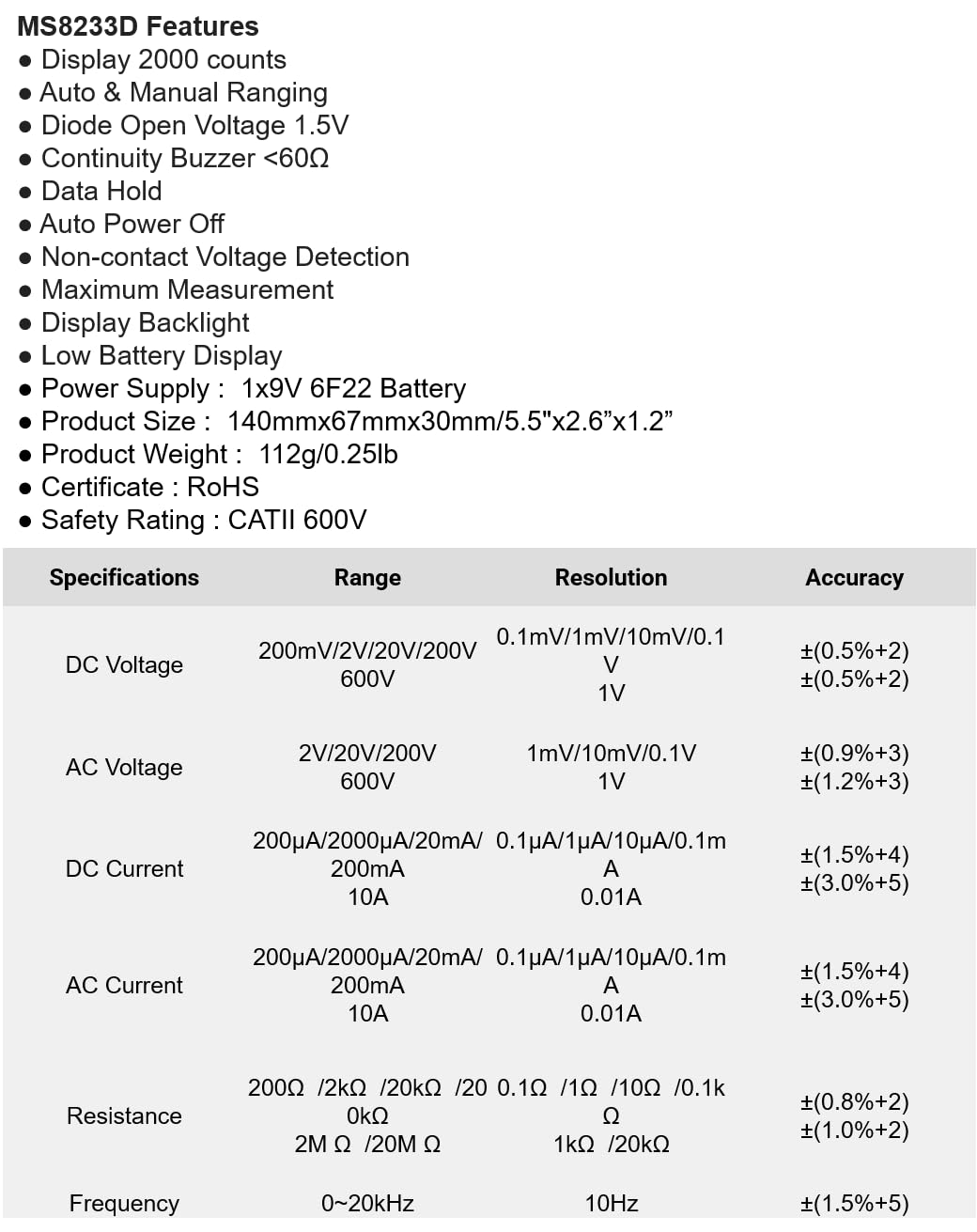
The following table details the measurement ranges, resolutions, and accuracies for the Mastech MS8233D Digital Multimeter:

Figure 3: Comprehensive specifications for the MS8233D, outlining measurement capabilities and precision.
| ባህሪ | ዝርዝር መግለጫ |
|---|---|
| ማሳያ | 2000 ቆጠራዎች |
| ዲሲ ጥራዝtage | 200mV / 2V / 20V / 200V / 600V |
| ኤሲ ጥራዝtage | 2V/20V/200V/600V |
| DC Current | 200µA / 2000µA / 20mA / 200mA / 10A |
| ኤሲ የአሁኑ | 200µA / 2000µA / 20mA / 200mA / 10A |
| መቋቋም | 200Ω / 2kΩ / 20kΩ / 200kΩ / 2MΩ / 20MΩ |
| ድግግሞሽ | 0-20 ኪኸ |
| Diode ክፍት ጥራዝtage | 1.5 ቪ |
| ቀጣይ Buzzer። | <60Ω |
| የኃይል አቅርቦት | 1 x 9V 6F22 ባትሪ |
| የምርት ልኬቶች | 140ሚሜ x 67ሚሜ x 30ሚሜ (5.5" x 2.6" x 1.2") |
| የምርት ክብደት | 112 ግ (0.25 ፓውንድ) |
| የደህንነት ደረጃ | CATII 600V |
| የምስክር ወረቀቶች | CE፣ RoHS |
ዋስትና እና ድጋፍ
For warranty information and technical support, please refer to the documentation provided with your purchase or contact the seller/manufacturer directly. Keep your purchase receipt as proof of purchase for any warranty claims.


