Baseus USB C Hub User Manual
Model: USB-C Hub with 30W PD Charger
1. መግቢያ
Thank you for choosing the Baseus USB C Hub. This manual provides detailed instructions for setting up, operating, maintaining, and troubleshooting your device to ensure optimal performance and longevity. Please read this manual thoroughly before using the product.
2. ምርት አብቅቷልview
2.1 የጥቅል ይዘቶች
- Baseus USB C Hub
- 30W Dual Port USB C PD Charger Block
- የተጠቃሚ መመሪያ
2.2 የምርት ንድፍ
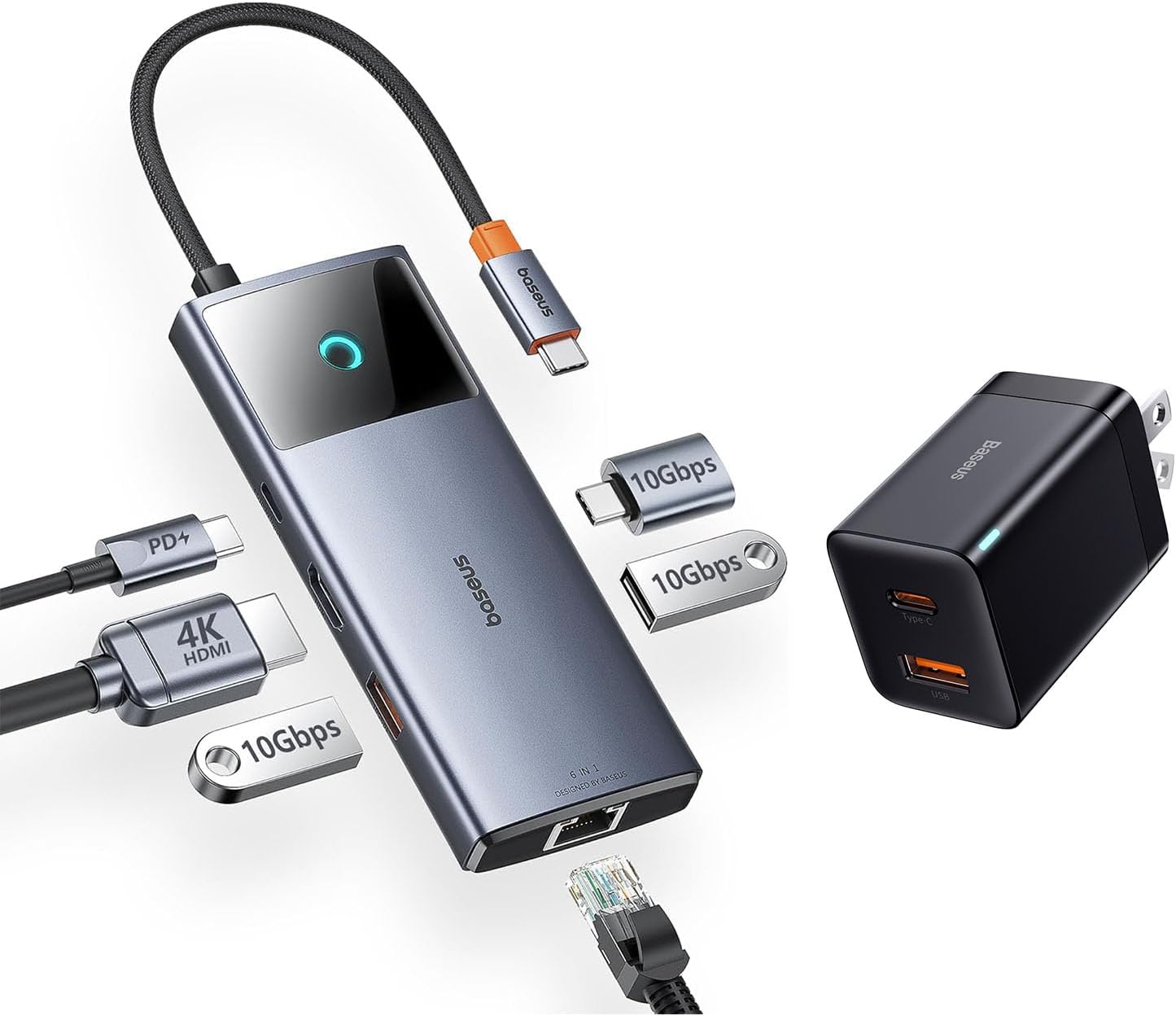
Image: The Baseus USB C Hub with its integrated cable, various ports, and the accompanying 30W dual-port charger.
The Baseus USB C Hub features multiple ports for expanded connectivity, including USB-A, USB-C data ports, an HDMI port, and an Ethernet port. The included 30W charger provides fast power delivery.
2.3 ቁልፍ ባህሪያት
- 4ኬ@60Hz የኤችዲኤምአይ ውፅዓት፡ Supports ultra-clear video mirroring or extension to an external display.
- 10Gbps የውሂብ ዝውውር፡ Equipped with USB-C and USB-A data ports for high-speed file ያስተላልፋል.
- ጊጋቢት ኢተርኔት ወደብ፡ Provides a stable and fast wired internet connection.
- 30W Dual-Port PD Charging: Fast charges up to two devices simultaneously (18W USB-C, 12W USB-A).
- የታመቀ እና ተንቀሳቃሽ ንድፍ; Features a foldable plug for easy portability.
3. ማዋቀር
3.1 ማዕከሉን ማገናኘት
- Connect the integrated USB-C cable of the Baseus USB C Hub to the USB-C port on your host device (e.g., laptop, iPad, iPhone 15 series).
- Ensure the connection is secure. The hub is plug-and-play and typically does not require driver installation.
3.2 Powering the Hub and Devices
- Plug the 30W Dual Port USB C PD Charger Block into a wall outlet.
- Connect your devices (e.g., smartphone, tablet) to the USB-C (18W) or USB-A (12W) output ports on the charger block using appropriate charging cables.
- For optimal performance of the hub and connected peripherals, ensure your host device is adequately powered.
4. የአሠራር መመሪያዎች
4.1 የውሂብ ማስተላለፍ

Image: Illustration of high-speed 10Gbps data transfer through the hub's USB-C and USB-A data ports.
Connect your USB-C or USB-A storage devices (e.g., external hard drives, flash drives) to the corresponding data ports on the hub. The hub supports data transfer speeds up to 10Gbps, allowing for rapid transfer of large files.
4.2 የቪዲዮ ውፅዓት (ኤችዲኤምአይ)

Image: A laptop connected to an external monitor via the Baseus USB C Hub, displaying 4K@60Hz clarity.
Connect an HDMI cable from the hub's HDMI port to an external monitor or projector. The hub supports 4K resolution at 60Hz, providing a clear and smooth visual experience for presentations, video editing, or extended desktop use. Ensure your host device and display support 4K@60Hz for optimal performance.
4.3 Network Connection (Ethernet)

Image: A laptop connected to a network cable via the Baseus USB C Hub's Gigabit Ethernet port.
For a stable and high-speed internet connection, connect an Ethernet cable from your router or modem to the Gigabit Ethernet port on the hub. This provides a reliable wired connection, ideal for online gaming, video conferencing, or large downloads.
4.4 የኃይል መሙያ መሳሪያዎች

Image: An iPhone 14 Pro Max charging rapidly with the 30W PPS charger, showing significant charge in 30 minutes.

Image: A smartphone and a tablet simultaneously charging from the USB-C (18W) and USB-A (12W) ports of the Baseus charger.
The included 30W dual-port charger allows you to fast charge two devices concurrently. Use the USB-C port for up to 18W Power Delivery (PD) and the USB-A port for up to 12W charging. This is suitable for smartphones, tablets, and other compatible USB-powered devices.
5. ጥገና
To ensure the longevity and proper functioning of your Baseus USB C Hub and charger, follow these maintenance guidelines:
- ማጽዳት፡ Use a soft, dry cloth to wipe the surfaces of the hub and charger. Do not use liquid cleaners or abrasive materials.
- ማከማቻ፡ መሳሪያውን በቀጥታ ከፀሀይ ብርሀን እና ከከፍተኛ ሙቀት ርቆ በቀዝቃዛና ደረቅ ቦታ ያከማቹ።
- አያያዝ፡ መሳሪያውን ከመጣል ወይም ለጠንካራ ተጽእኖ ከማጋለጥ ይቆጠቡ። የተቀናጀውን የዩኤስቢ-ሲ ገመድ ከመጠን በላይ አያጠፍሩት።
- የአየር ማናፈሻ; ከመጠን በላይ ሙቀትን ለመከላከል ማዕከሉ በሚጠቀሙበት ጊዜ በቂ የአየር ዝውውር እንዳለው ያረጋግጡ።
6. መላ መፈለግ
If you encounter issues with your Baseus USB C Hub, please refer to the following common solutions:
- ምንም የማሳያ ውጤት የለም፡
- የኤችዲኤምአይ ገመድ ከሁለቱም ሃብል እና ከሞኒተሩ ጋር ደህንነቱ በተጠበቀ ሁኔታ መገናኘቱን ያረጋግጡ።
- የአስተናጋጅ መሣሪያዎ ዩኤስቢ-ሲ ወደብ የቪዲዮ ውፅዓት (DisplayPort Alternate Mode) የሚደግፍ መሆኑን ያረጋግጡ።
- የተለየ የኤችዲኤምአይ ገመድ ወይም ማሳያ ይሞክሩ።
- የአስተናጋጅ መሣሪያዎን እንደገና ያስጀምሩ።
- ቀርፋፋ የውሂብ ዝውውር ፍጥነት፡
- Ensure your connected storage device supports 10Gbps (USB 3.1 Gen 2) speeds.
- Check if other high-bandwidth devices are connected to the hub simultaneously.
- Ensure your host device's USB-C port supports USB 3.1 Gen 2 speeds.
- ምንም የአውታረ መረብ ግንኙነት የለም፡
- Verify the Ethernet cable is properly connected to the hub and your router/modem.
- በአስተናጋጅ መሣሪያዎ ላይ የአውታረ መረብ ቅንብሮችዎን ያረጋግጡ።
- የእርስዎ ራውተር/ሞደም በትክክል እየሰራ መሆኑን ያረጋግጡ።
- የማይሞሉ መሳሪያዎች፡-
- Ensure the 30W charger is securely plugged into a live wall outlet.
- የተለየ የኃይል መሙያ ገመድ ይሞክሩ።
- Verify that your device is compatible with the charging specifications (18W USB-C PD, 12W USB-A).
7. ዝርዝሮች
| ባህሪ | ዝርዝር መግለጫ |
|---|---|
| ሞዴል | Baseus USB C Hub (ASIN: B0CZP5S4JS) |
| የሃርድዌር በይነገጽ | ዩኤስቢ 3.0 ዓይነት C |
| የኤችዲኤምአይ ውፅዓት | 4ኬ@60Hz |
| የዩኤስቢ የውሂብ ወደቦች | 1x ዩኤስቢ-ሲ (10Gbps)፣ 2x ዩኤስቢ-ኤ (10Gbps) |
| የኤተርኔት ወደብ | ጊጋቢት ኢተርኔት (10/100/1000 ሜባበሰ) |
| የኃይል መሙያ ውፅዓት (ዩኤስቢ-ሲ) | 18 ዋ የኃይል አቅርቦት (PD) |
| Charger Output (USB-A) | 12 ዋ |
| Total USB Ports (Hub) | 4 (1 x ዩኤስቢ-ሲ፣ 3 x ዩኤስቢ-ኤ) |
| ተስማሚ መሣሪያዎች | iPad Pro, iPad Air, iPad Mini, iPhone 15, iPhone 15 Pro, iPhone 15 Pro Max, Laptops with USB-C |
| ልዩ ባህሪ | ፈጣን ባትሪ መሙላት |
8. ዋስትና እና ድጋፍ
Baseus products are designed and manufactured to the highest quality standards. This product is covered by a limited warranty from the date of purchase. Please refer to the warranty card included in your package for specific terms and conditions.
For technical support, troubleshooting assistance, or warranty claims, please contact Baseus customer service through the official Baseus website or your point of purchase. When contacting support, please have your product model and purchase information ready.


