1. መግቢያ
Thank you for choosing the Reobiux 2K Outdoor WiFi Surveillance Camera. This camera is designed to provide comprehensive and reliable outdoor monitoring with advanced features such as dual lenses, 360° PTZ control, 2K resolution, color night vision, motion detection, two-way audio, and IP66 waterproofing. This manual will guide you through the installation, operation, and maintenance of your new security camera.
2. የጥቅል ይዘቶች
እባክዎ የጥቅሉን ይዘት በጥንቃቄ ያረጋግጡ። ማንኛውም እቃ ከጎደለ ወይም ከተበላሸ፣ እባክዎ የደንበኞች ድጋፍን ያነጋግሩ።
- 1 x Reobiux 2K Outdoor WiFi Surveillance Camera
- 1 x 3m Power Adapter
- 1 x የተጠቃሚ መመሪያ
- 1 x የመጫኛ ጠመዝማዛዎች ስብስብ
3. የምርት ባህሪዎች
3.1 Dual Lens 2-in-1 & 360° View
The camera features two lenses for a comprehensive 360° panoramic view. The fixed lens provides a wide overview, while the rotating lens offers flexible pan (355° horizontal) and tilt (90° vertical) capabilities to cover every corner of your surveillance area without delay.

Image: Illustration of the camera's dual lens system and PTZ (Pan-Tilt-Zoom) functionality.
3.2 2K Resolution & Color Night Vision
Experience remarkably clear images with 2K resolution, capturing every detail with impressive clarity. The camera offers three night vision modes: infrared mode for black and white clarity in total darkness, full-color mode for vivid night images, and an alarm siren mode for deterrence.

Image: Demonstrates the difference between infrared and full-color night vision modes.

Image: Visual comparison highlighting the enhanced detail provided by the 2.5K QHD resolution over standard 1080P.
3.3 Motion Detection & 24/7 Recording
The camera features intelligent motion detection. Upon detecting a moving object, it sends real-time notifications to your device. Continuous video recording to an SD card (up to 128GB) ensures you can review footage anytime without missing important details.
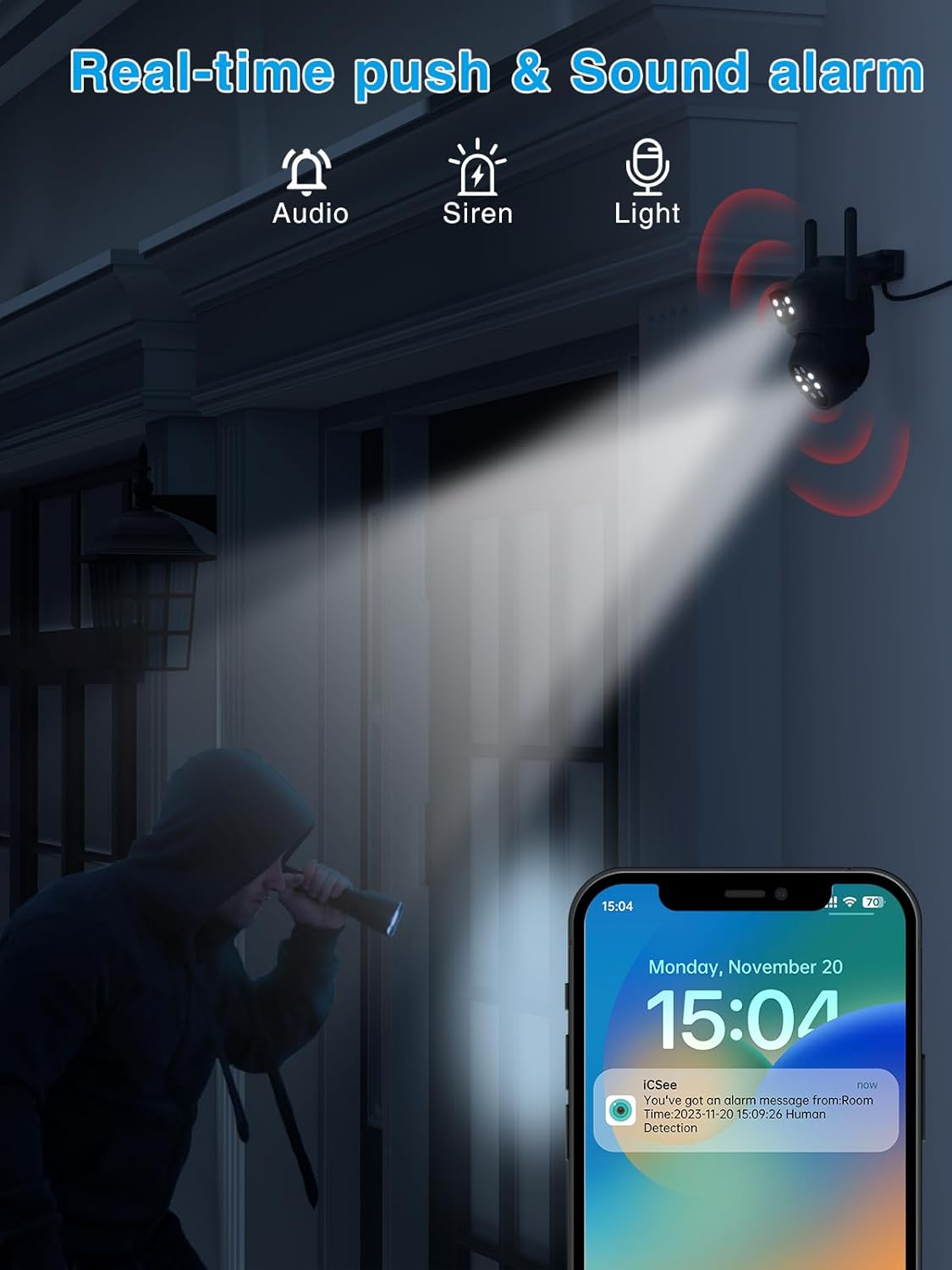
Image: Depicts the camera's motion detection and real-time alarm notification feature.
3.4 Two-Way Audio & Alarm Siren
Communicate with visitors or deter intruders using the built-in two-way audio function. The integrated alarm siren can be remotely activated upon detection of suspicious activity, alerting neighbors and enhancing home security.

Image: Illustrates the two-way audio communication capability of the camera.
3.5 IP66 Waterproof & Multi-User Access
With an IP66 waterproof rating, the camera is designed to withstand various weather conditions, including rain and snow. It also supports multi-user access, allowing multiple family members or colleagues to monitor the outdoor space simultaneously.

Image: Shows the camera's durability and IP66 waterproof design in outdoor conditions.
4. የማዋቀር መመሪያ
4.1 መጫን
- ካሜራውን ለመጫን ተስማሚ የሆነ የውጪ ቦታ ይምረጡ፣ ይህም ግልጽ መሆኑን ያረጋግጣል view መከታተል የሚፈልጉትን አካባቢ.
- Use the included mounting screws to securely attach the camera to a wall or desired surface.
- Connect the 3m power adapter to the camera and plug it into a power outlet.
4.2 App Connection (iCSee App)
- Download the 'iCSee' app from your smartphone's app store (iOS or Android).
- አዲስ መለያ ይመዝገቡ ወይም አስቀድመው ካለዎት ይግቡ።
- አዲስ መሣሪያ ለማከል የ'+' አዶን ይንኩ።
- Follow the on-screen instructions to connect the camera to your Wi-Fi network. This typically involves scanning a QR code on the camera or using an AP hotspot connection.
- አንዴ ከተገናኘ በኋላ፣ ካሜራዎን መሰየም እና በቀጥታ ስርጭት መጀመር ይችላሉ viewing
5. የአሠራር መመሪያዎች
5.1 ቀጥታ ስርጭት View እና PTZ መቆጣጠሪያ
- Open the iCSee app and select your camera from the device list.
- የካሜራውን ፓን (አግድም) እና ዘንበል (አቀባዊ) እንቅስቃሴዎችን ለመቆጣጠር በማያ ገጹ ላይ ያለውን ጆይስቲክ ወይም የእጅ ምልክቶችን ይጠቀሙ።
- Tap the screen to zoom in or out (digital zoom).
5.2 መቅዳት እና መልሶ ማጫወት
- Insert a Micro SD card (up to 128GB, not included) into the camera's SD card slot for local storage.
- In the app settings, configure recording modes (e.g., continuous, motion-triggered).
- ለ view ተመዝግቧል footage, go to the 'Playback' section in the app and select the desired date and time.
5.3 ባለ ሁለት መንገድ ኦዲዮ
- በቀጥታ ውስጥ እያለ view፣ በካሜራው ድምጽ ማጉያ በኩል ለመናገር የማይክሮፎኑን አዶ መታ ያድርጉ።
- Ensure the speaker icon is enabled to hear audio from the camera's microphone.
5.4 Alarm and Notifications
- Enable motion detection and push notifications in the app settings to receive alerts on your phone.
- You can also manually activate the alarm siren from the app when suspicious activity is detected.
6. ጥገና
- ማጽዳት፡ የካሜራውን ሌንስ ለስላሳና ደረቅ ጨርቅ በመጠቀም የምስል ጥራት ግልጽ እንዲሆን አዘውትረው ይጥረጉ። ጠጣር ኬሚካሎችን አይጠቀሙ።
- የጽኑዌር ዝማኔዎች ፦ Check the iCSee app periodically for firmware updates. Keeping your camera's firmware up-to-date ensures optimal performance and security.
- የኃይል አቅርቦት; የኃይል አስማሚው እና ገመዱ እንዳልተበላሹ እና ደህንነቱ በተጠበቀ ሁኔታ የተገናኙ መሆናቸውን ያረጋግጡ።
7. መላ መፈለግ
| ችግር | ሊሆን የሚችል ምክንያት | መፍትሄ |
|---|---|---|
| ካሜራ ከመስመር ውጭ | ኃይል የለም፤ የዋይፋይ ግንኙነት ተቋርጧል፤ የራውተር ችግር | Check power connection; Restart camera and router; Reconnect camera to Wi-Fi via app. |
| ወደ ኤስዲ ካርድ ምንም ቀረጻ የለም። | SD card full/faulty; Recording settings incorrect | Format or replace SD card; Check recording schedule in app. |
| ደካማ የምስል ጥራት | Dirty lens; Low light; Network bandwidth | Clean the lens; Ensure adequate lighting for color night vision; Check Wi-Fi signal strength. |
| ከWi-Fi ጋር መገናኘት አልተቻለም | Incorrect password; Weak signal; Router compatibility | Double-check Wi-Fi password; Move camera closer to router; Try 2.4GHz Wi-Fi band. |
8. ዝርዝሮች
| ባህሪ | ዝርዝር |
|---|---|
| የሞዴል ቁጥር | REO-A9HQ-6MP |
| የቪዲዮ ጥራት | 2K (2.5K QHD) |
| የምሽት ራዕይ ክልል | 15 ሜትር |
| የፓን/የማጋደል ክልል | ፓን 355°፣ 90° ዘንበል |
| ግንኙነት | ገመድ አልባ (ዋይ ፋይ) |
| የውሃ መቋቋም | IP66 የውሃ መከላከያ |
| ማከማቻ | የማይክሮ ኤስዲ ካርድ (እስከ 128GB፣ አልተካተተም) |
| ባለሁለት መንገድ ኦዲዮ | አዎ |
| እንቅስቃሴ ማወቂያ | አዎ |
| የኃይል ምንጭ | የኤሌክትሪክ ገመድ (12 ቮልት፣ 5 ዋት) |
| ቁሳቁስ | ፕላስቲክ |
| ልኬቶች (L x W x H) | 12 x 12 x 10 ሴ.ሜ |
| ክብደት | 630 ግራም |
| የመጫኛ ዓይነት | Wall Mount (Screw-in) |
| የመቆጣጠሪያ አይነት | iCSee መተግበሪያ |
9. ዋስትና እና ድጋፍ
Reobiux products come with a standard manufacturer's warranty. For specific warranty details, please refer to the warranty card included in your package or visit the official Reobiux website. If you encounter any issues or have questions regarding your camera, please contact Reobiux customer support through the contact information provided on our website or within the iCSee app.
ለዋስትና ጥያቄዎች እባክዎ የግዢ ማረጋገጫዎን ያቆዩ።


