1. መግቢያ
Thank you for choosing the ELECTROPRIME LANGTU LT700 Wired Silent Punk Keyboard. This keyboard features a unique punk keycap design, silent operation, and strong compatibility, making it suitable for various computing tasks. Its ergonomic design ensures a comfortable typing experience, even during extended use. This manual provides essential information for setting up, operating, maintaining, and troubleshooting your keyboard.
2. የደህንነት መረጃ
- የቁልፍ ሰሌዳውን ለፈሳሾች ወይም ከመጠን በላይ እርጥበት አያጋልጡ።
- ከፍተኛ የሙቀት መጠንን ያስወግዱ.
- Do not attempt to disassemble or repair the keyboard yourself. Contact qualified service personnel if needed.
- ልጆች በማይደርሱበት ቦታ ያስቀምጡ.
- የቁልፍ ሰሌዳውን ለስላሳና ደረቅ ጨርቅ ያጽዱ። ጠንከር ያሉ ኬሚካሎችን ያስወግዱ።
3. የጥቅል ይዘቶች
ሁሉም እቃዎች በጥቅልዎ ውስጥ መኖራቸውን ያረጋግጡ፡-
- ELECTROPRIME LANGTU LT700 Wired Silent Punk Keyboard
- የተጠቃሚ መመሪያ (ይህ ሰነድ)
4. ማዋቀር
The LANGTU LT700 keyboard is designed for simple plug-and-play operation.
- የቁልፍ ሰሌዳውን ከማሸጊያው ያላቅቁት።
- በኮምፒተርዎ ላይ የሚገኝ የዩኤስቢ ወደብ ያግኙ።
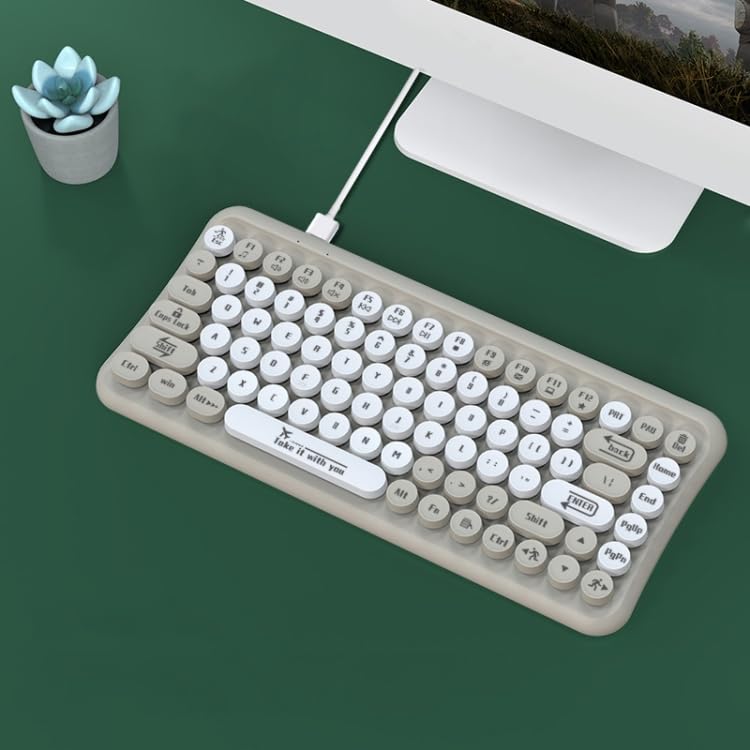
- Plug the USB connector of the keyboard into the USB port on your computer.
- Your operating system should automatically detect and install the necessary drivers. No additional software installation is typically required.
- የቁልፍ ሰሌዳው አሁን ለአገልግሎት ዝግጁ ነው።
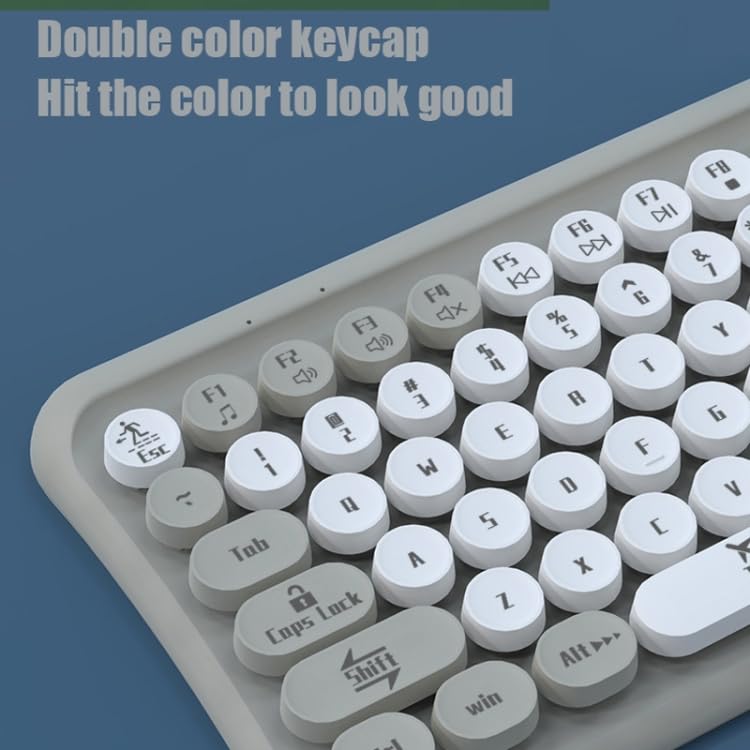
Image: The ELECTROPRIME LANGTU LT700 keyboard connected via its USB cable to a desktop computer, ready for use.
5. የአሠራር መመሪያዎች
5.1 መሰረታዊ ትየባ
The keyboard functions as a standard 85-key layout. Simply press the desired keys to input text or commands into your computer.
5.2 ጸጥ ያለ አሠራር
The keycaps utilize noise reduction technology, significantly reducing the sound of keystrokes for a quieter typing experience.
5.3 የተግባር ቁልፎች
The top row of keys (F1-F12) includes standard function keys and may have secondary multimedia functions accessible by pressing the 'Fn' key in combination with the respective function key. Refer to the icons printed on the keycaps for specific functions such as volume control, media playback, or screen brightness.
ምስል፡ መቀራረብ view of the keyboard's double-color keycaps, highlighting the ergonomic design and the icons on the function keys (F1-F12) for multimedia control.
6. ጥገና
6.1 ጽዳት
- ከማጽዳትዎ በፊት የቁልፍ ሰሌዳውን ከኮምፒዩተርዎ ያላቅቁት.
- የቁልፍ ሰሌዳውን ገጽ ለማጽዳት ለስላሳ፣ ከንጣፍ ነፃ የሆነ ጨርቅ ይጠቀሙ።
- በቁልፍ መካከል አቧራ እና ፍርስራሾች, የታመቀ አየር ወይም ትንሽ ብሩሽ ይጠቀሙ.
- Do not use abrasive cleaners, solvents, or spray cleaners directly on the keyboard.
6.2 ማከማቻ
ረዘም ላለ ጊዜ ጥቅም ላይ በማይውልበት ጊዜ የቁልፍ ሰሌዳውን በቀጥታ ከፀሐይ ብርሃን እና ከከፍተኛ ሙቀት ርቆ በቀዝቃዛና ደረቅ ቦታ ያከማቹ።
7. መላ መፈለግ
7.1 የቁልፍ ሰሌዳ ምላሽ አይሰጥም
- የዩኤስቢ ገመድ በሁለቱም በቁልፍ ሰሌዳ እና በኮምፒዩተር ላይ ደህንነቱ በተጠበቀ ሁኔታ መሰካቱን ያረጋግጡ።
- የቁልፍ ሰሌዳውን በኮምፒተርዎ ላይ ወደተለየ የዩኤስቢ ወደብ ለመሰካት ይሞክሩ።
- ኮምፒተርዎን እንደገና ያስጀምሩ.
- ችግሩ ከኪቦርድ ወይም ከኮምፒዩተር ጋር መሆኑን ለማወቅ በሌላ ኮምፒውተር ላይ የቁልፍ ሰሌዳውን ይሞክሩ።
7.2 የማይሰሩ ልዩ ቁልፎች
- Check for any debris or obstructions under the non-functional key. Gently clean around the key.
- If cleaning does not resolve the issue, the key mechanism may be damaged.
If you continue to experience problems, refer to the Warranty and Support section.
8. ዝርዝሮች
| ባህሪ | ዝርዝር መግለጫ |
|---|---|
| ሞዴል | LANGTU LT700 |
| በይነገጽ | የዩኤስቢ ገመድ |
| የቁልፎች ብዛት | 85 ቁልፎች |
| የቁልፍ ዓይነት | Punk Keycap, Chocolate Keycaps |
| የህይወት ቁልፍ | Approximately 10 million times |
| የኬብል ርዝመት | 1.5 ሜትር |
| ልኬቶች (L x W) | በግምት 315ሚሜ x 150ሚሜ |
| ክብደት | በግምት 0.60 ኪ.ግ (1.33 ፓውንድ) |
| ተኳኋኝነት | Plug and Play with most operating systems |
9. ዋስትና እና ድጋፍ
የዋስትና መረጃ ወይም የቴክኒክ ድጋፍ ለማግኘት፣ እባክዎን በግዢው ጊዜ የቀረቡትን ሰነዶች ይመልከቱ ወይም ቸርቻሪዎን ያነጋግሩ። ለማንኛውም የዋስትና ጥያቄ የግዢ ማረጋገጫዎን ያስቀምጡ።


