1. መግቢያ
The Mastech MS8250D is a high-performance digital multimeter designed for accurate measurement of AC/DC voltage, AC/DC current, resistance, capacitance, frequency, and temperature. It features a 6600-count display, auto/manual ranging, True RMS, Non-Contact Voltage (NCV) detection, diode and continuity testing, and a USB interface for PC connectivity. This manual provides detailed instructions for safe and effective use of the device.
ቁልፍ ባህሪዎች
- 6600-count digital display
- Automatic and Manual Ranging
- እውነተኛ RMS መለካት
- እውቂያ ያልሆነ ጥራዝtagሠ (NCV) ማግኘት
- Diode and Continuity Tester (buzzer < 50Ω)
- MAX/MIN value recording
- የውሂብ መያዣ ተግባር
- የጀርባ ብርሃን አሳይ
- ራስ-ሰር ኃይል ጠፍቷል
- አንጻራዊ የመለኪያ ሁነታ
- ዝቅተኛ የባትሪ ምልክት
- USB Interface for Windows OS
2. የደህንነት መረጃ
ማስጠንቀቂያ፡- To avoid electric shock or personal injury, and to avoid damage to the meter or to the equipment under test, read all safety information carefully before using the meter. This device complies with CE, RoHS, and UL safety standards.
- የሙከራ ሊዶቹ በጥሩ ሁኔታ ላይ መሆናቸውን እና በአግባቡ መገናኘታቸውን ሁልጊዜ ያረጋግጡ።
- ከተገመተው ጥራዝ በላይ አይተገበሩtagሠ, በሜትር ላይ እንደተገለጸው, በተርሚናሎች መካከል ወይም በማንኛውም ተርሚናል እና በምድር መሬት መካከል.
- ከቮል ጋር ሲሰሩ ጥንቃቄ ያድርጉtagከ30V AC RMS በላይ፣ 42V ጫፍ፣ ወይም 60V ዲሲ። እነዚህ ጥራዝtagአስደንጋጭ አደጋ ይፈጥራል።
- Before measuring current, ensure the circuit is de-energized and the meter is connected in series.
- ተግባራትን ወይም ክልሎችን ከመቀየርዎ በፊት ሁልጊዜ የሙከራ መሪዎችን ከወረዳው ያላቅቁ።
- ቆጣሪው ተጎድቶ ከታየ ወይም መያዣው ክፍት ከሆነ አይጠቀሙ።
- የባትሪው ዝቅተኛ መጠን ያለው አመልካች እንደታየ ወዲያውኑ ባትሪውን ይተኩት፤ ይህም ትክክለኛ ንባብ እንዲኖር ያደርጋል።
- Adhere to the specified measurement categories (CAT III 1000V / CAT IV 600V) for safe operation.
3. ምርት አብቅቷልview
Familiarize yourself with the components of your Mastech MS8250D Digital Multimeter.

ምስል 3.1፡ ፊት ለፊት view of the Mastech MS8250D Digital Multimeter, showing the display, function dial, and input jacks. The display shows "1.987 V", indicating a voltage measurement. The function dial is set to T-RMS. Input jacks are labeled for µA mA, A, VΩHz%, and COM.
ዋና ዋና አካላት
- LCD ማሳያ፡- የመለኪያ ንባቦችን፣ አሃዶችን እና የተግባር አመልካቾችን ያሳያል።
- የተግባር መደወያ፡ የሚፈለገውን የመለኪያ ተግባር ለመምረጥ ጥቅም ላይ ይውላል (ለምሳሌ፣ ጥራዝtage, Current, Resistance, Diode, Continuity, Temperature).
- የተግባር አዝራሮች፡
- ያዝ የአሁኑን የማሳያ ንባብ ያቀዘቅዛል።
- RANGE: Switches between auto and manual ranging.
- መልስ፡ አንጻራዊ የመለኪያ ሁነታን ያነቃቃል።
- MAX / ደቂቃ ከፍተኛውን እና ዝቅተኛውን እሴቶች ይመዘግባል።
- FUNC፡ Selects sub-functions within a dial position (e.g., AC/DC, Diode/Continuity).
- T-RMS: (Indicated on dial) True RMS measurement.
- ኤንሲቪ፡ እውቂያ ያልሆነ ጥራዝtagሠ መለየት።
- የጀርባ ብርሃን ቁልፍ፡- Activates display backlight.
- የግቤት ጃክሶች፡-
- COM: ለሁሉም መለኪያዎች የጋራ ተርሚናል (አሉታዊ ሊድ)።
- VΩHz%: ግቤት ለ ጥራዝtage, resistance, frequency, capacitance, and diode/continuity measurements (positive lead).
- µA mA: Input for microampኤሬ እና ሚሊampere current measurements (positive lead). Fused for protection.
- A: ግቤት ለ ampere current measurements (positive lead). Fused for protection.
የተካተቱ አካላት፡-
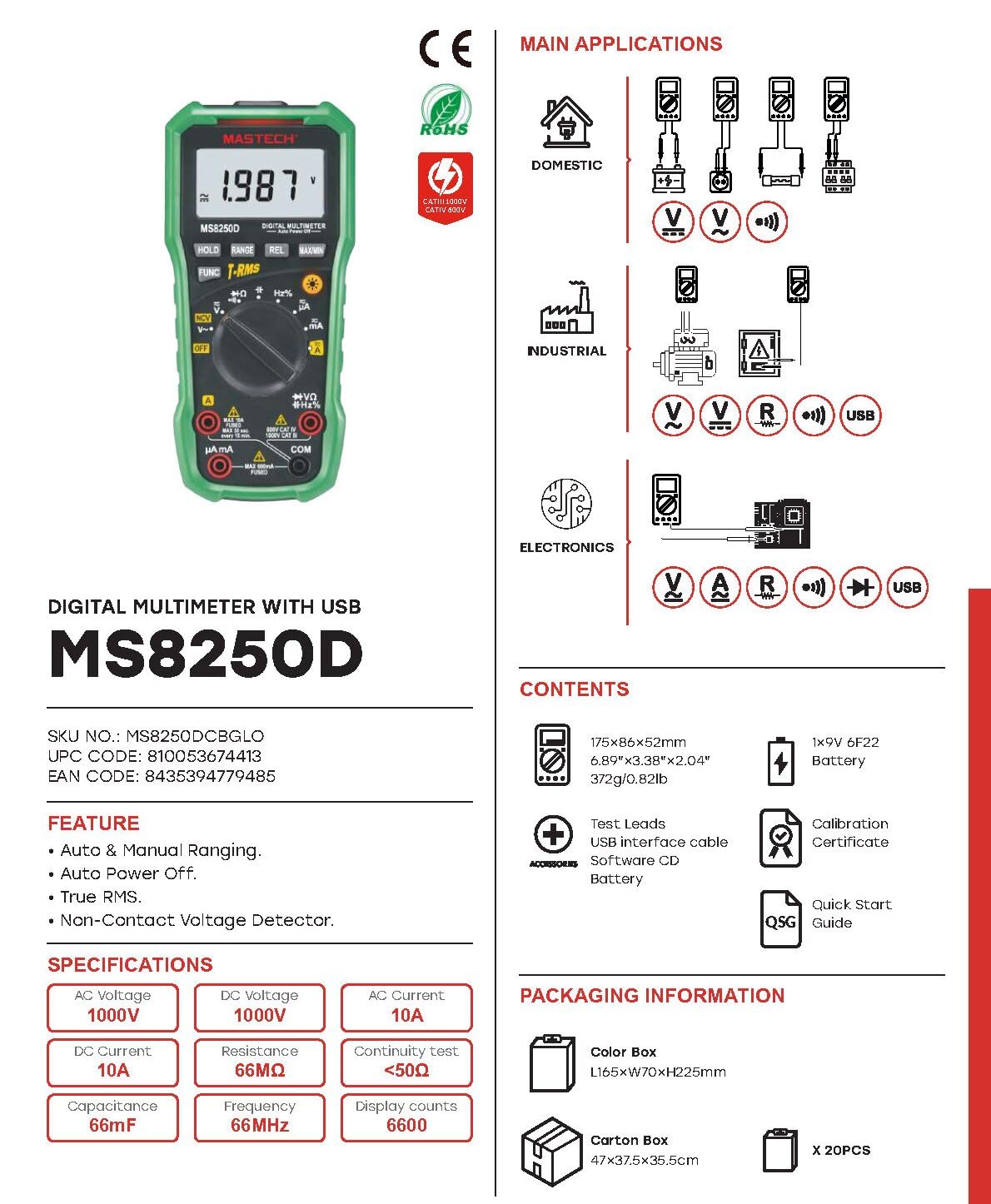
ምስል 3.2፡ Diagram showing the Mastech MS8250D Multimeter and its included accessories. The image also illustrates typical applications in domestic, industrial, and electronics settings.
- Mastech MS8250D Digital Multimeter
- የሙከራ እርሳሶች (ቀይ እና ጥቁር)
- 1 x 9V 6F22 ባትሪ (ቀድሞ የተጫነ ወይም ለብቻው የተካተተ)
- የዩኤስቢ በይነገጽ ገመድ
- Software CD (for Windows OS)
- የካሊብሬሽን የምስክር ወረቀት
- ፈጣን-ጅምር መመሪያ
4. ማዋቀር
4.1 የባትሪ ጭነት
The MS8250D requires one 9V 6F22 battery for operation. Two LR44 batteries are also mentioned in specifications, likely for a different internal component or an error in data. For the main power, use the 9V battery.
- መልቲሜትሩ መጥፋቱን ያረጋግጡ።
- የባትሪውን ክፍል ሽፋን በሜትር መለኪያው ጀርባ ላይ ያግኙት።
- ሽፋኑን የሚሸፍኑትን ዊንጮች (ዊንች) ለማላላት ዊንች ይጠቀሙበት።
- ሽፋኑን ያስወግዱ.
- Connect the 9V battery to the battery clips, observing correct polarity (+ and -).
- ባትሪውን ወደ ክፍሉ ውስጥ ያስቀምጡት.
- የባትሪውን ክፍል ሽፋን ይቀይሩት እና በዊች (ዎች) ያስጠብቁት.
ማስታወሻ፡- The meter also uses 2 LR44 batteries, which are typically included and pre-installed for specific functions like the backlight or non-contact voltage detection. Refer to the quick-start guide for specific details on these smaller batteries if replacement is needed.
4.2 የማገናኘት የሙከራ እርሳሶች
Always connect the black test lead to the COM jack. Connect the red test lead to the appropriate input jack based on the measurement type:
- ለ Voltage, Resistance, Capacitance, Frequency, Diode, and Continuity measurements: Connect the red lead to the VΩHz% ጃክ
- For Current measurements (µA or mA): Connect the red lead to the µ ኤ ኤምኤ ጃክ
- For High Current measurements (A): Connect the red lead to the A ጃክ
Ensure the test leads are fully inserted into the jacks.
5. የአሠራር መመሪያዎች
5.1 ማብራት / ማጥፋት
To turn the meter ON, rotate the function dial from the "OFF" position to any desired measurement function. To turn the meter OFF, rotate the function dial back to the "OFF" position.
The meter features an ራስ-ሰር ኃይል ጠፍቷል function to conserve battery life. It will automatically power off after a period of inactivity. To disable or re-enable this feature, refer to the quick-start guide or the full user manual provided on the software CD.
5.2 Auto Ranging and Manual Ranging
The MS8250D defaults to ራስ-ሰር ራንግ, which automatically selects the best measurement range. Press the ቀይር ለመቀየር አዝራር በእጅ ደረጃ አሰጣጥ. In manual ranging, each press of the ቀይር button cycles through available ranges. To return to auto ranging, press and hold the ቀይር አዝራር።
5.3 AC/DC ቮልtagሠ (ቪ)
- የተግባር መደወያውን ወደ V~ (የኤሲ ጥራዝ)tagሠ) ወይም V- (የዲሲ ጥራዝtagሠ) አቀማመጥ.
- የጥቁር ሙከራ መሪውን ከ ጋር ያገናኙ COM ጃክ እና ቀይ የፈተናው ውጤት ወደ VΩHz% ጃክ
- የሙከራ መመርመሪያዎችን በሚለካው ወረዳ ወይም ክፍል ላይ ያገናኙ።
- ጥራዝ ያንብቡtage value on the display. The meter will automatically detect AC or DC if the dial is set to the combined V position, or you can use the አዝናኝ button to toggle between AC and DC if available on your model.
5.4 Measuring AC/DC Current (A, mA, µA)
ማስጠንቀቂያ፡- ቆጣሪውን ከቮል ጋር በትይዩ በጭራሽ አያገናኙትtagየኤሌክትሪክ ፍሰትን በሚለካበት ጊዜ ምንጭ። ይህ ፊውዝ ሊነፍስ ወይም ቆጣሪውን ሊጎዳ ይችላል።
- ኃይሉን ወደ ወረዳው ያጥፉት.
- የተግባር መደወያውን ወደ A~ (AC Current), A- (DC Current), ማ ~, ኤምኤ-, µA~, ወይም µA- አቀማመጥ.
- የጥቁር ሙከራ መሪውን ከ ጋር ያገናኙ COM ጃክ
- ቀይ የሙከራ መሪውን ወደ A jack for high current, or µ ኤ ኤምኤ jack for low current.
- Open the circuit where the current is to be measured and connect the meter in series with the load.
- ኃይልን ወደ ወረዳው ተግብር.
- Read the current value on the display. Use the አዝናኝ አስፈላጊ ከሆነ በኤሲ እና በዲሲ መካከል ለመቀያየር የሚያስችል አዝራር።
5.5 መቋቋምን መለካት (Ω)
- የተግባር መደወያውን ወደ Ω አቀማመጥ.
- የጥቁር ሙከራ መሪውን ከ ጋር ያገናኙ COM ጃክ እና ቀይ የፈተናው ውጤት ወደ VΩHz% ጃክ
- በሙከራ ላይ ያለው ዑደት ወይም አካል ኃይል መሟጠጡን ያረጋግጡ።
- የሙከራ መመርመሪያዎችን በክፍሎቹ ላይ ያገናኙ።
- በማሳያው ላይ ያለውን የመቋቋም እሴት ያንብቡ።
5.6 የዳይኦድ ሙከራ እና የቀጣይነት ሙከራ
- የተግባር መደወያውን ወደ Diode / ቀጣይነት position (often shared with resistance or capacitance).
- የጥቁር ሙከራ መሪውን ከ ጋር ያገናኙ COM ጃክ እና ቀይ የፈተናው ውጤት ወደ VΩHz% ጃክ
- የሚለውን ተጠቀም አዝናኝ button to select between Diode Test and Continuity Test.
- ለዲዮድ ሙከራ፦ ቀዩን መመርመሪያ ከአኖድ ጋር እና ጥቁር መመርመሪያውን ከዲዮድ ካቶድ ጋር ያገናኙ። ማሳያው ወደፊት ያለውን ቮልት ያሳያል።tage drop (typically 0.5V to 0.8V for silicon diodes). Reversing the probes should show "OL" (Open Loop).
- ለቀጣይነት ፈተና፡- Connect the probes across the circuit or component. If resistance is less than approximately 50Ω, the buzzer will sound, indicating continuity.
5.7 የመለኪያ አቅም (F)
- የተግባር መደወያውን ወደ አቅም position (often shared with resistance or diode).
- የጥቁር ሙከራ መሪውን ከ ጋር ያገናኙ COM ጃክ እና ቀይ የፈተናው ውጤት ወደ VΩHz% ጃክ
- በሜትሩ ላይ ጉዳት እንዳይደርስ ለመከላከል ከመሞከርዎ በፊት መያዣው ሙሉ በሙሉ መውጣቱን ያረጋግጡ።
- የሙከራ መመርመሪያዎችን በካፓሲተር ተርሚናሎች ላይ ያገናኙ።
- በማሳያው ላይ ያለውን የ capacitance እሴት ያንብቡ።
5.8 የመለኪያ ድግግሞሽ (Hz) እና የግዴታ ዑደት (%)
- የተግባር መደወያውን ወደ Hz% position (often shared with voltagሠ) ፡፡
- የጥቁር ሙከራ መሪውን ከ ጋር ያገናኙ COM ጃክ እና ቀይ የፈተናው ውጤት ወደ VΩHz% ጃክ
- የሙከራ መመርመሪያዎችን በምልክት ምንጭ በኩል ያገናኙ።
- The display will show the frequency. Press the አዝናኝ button to toggle to Duty Cycle measurement if available.
5.9 የእውቂያ ያልሆነ ጥራዝtagሠ (NCV) ማወቂያ
- የተግባር መደወያውን ወደ ኤን.ሲ.ቪ አቀማመጥ.
- Hold the meter with the NCV sensor (usually at the top of the meter) near a live AC voltagኢ ምንጭ.
- ቆጣሪው የ AC vol መኖሩን ያሳያልtage through an audible beep and/or visual indicator (e.g., LED).
5.10 USB Interface (Windows OS)
The MS8250D includes a USB interface for connecting to a computer running Windows OS. This allows for data logging and real-time monitoring of measurements. Install the provided software from the CD and follow the on-screen instructions for driver installation and software usage.
6. ጥገና
6.1 ጽዳት
የቆጣሪውን መያዣ በማስታወቂያ ይጥረጉamp ጨርቅ እና መለስተኛ ሳሙና። ማጽጃዎችን ወይም ማሟሟቶችን አይጠቀሙ። ከመጠቀምዎ በፊት ቆጣሪው ሙሉ በሙሉ ደረቅ መሆኑን ያረጋግጡ።
6.2 የባትሪ መተካት
When the low battery indicator appears on the display, replace the 9V battery immediately to ensure accurate readings. Follow the steps in Section 4.1 Battery Installation.
6.3 ፊውዝ መተካት
If the meter fails to measure current, the fuse may be blown. Fuses are located inside the meter. To replace a fuse:
- ቆጣሪው መጥፋቱን እና ሁሉም የሙከራ ገመዶች መገናኘታቸውን ያረጋግጡ።
- Open the battery compartment cover (and potentially the main case, depending on design).
- የድሮውን ፊውዝ በጥንቃቄ ያስወግዱ።
- Replace with a fuse of the exact same type and rating (e.g., F600mA/250V for mA/µA range, F10A/250V for A range). Refer to the meter's internal markings or the full manual for specific fuse ratings.
- Reassemble the meter, ensuring all screws are tightened.
ማስጠንቀቂያ፡- Never use a fuse with a different rating or bypass the fuse. This can damage the meter and pose a serious safety hazard.
7. መላ መፈለግ
| ችግር | ሊሆን የሚችል ምክንያት | መፍትሄ |
|---|---|---|
| ቆጣሪው አይበራም። | የሞተ ባትሪ. | 9 ቮ ባትሪውን ይተኩ ፡፡ |
| "OL" (ከመጠን በላይ ጭነት) ይታያል። | መለኪያው የተመረጠውን ክልል ወይም የቆጣሪውን ከፍተኛ አቅም ያልፋል። | Switch to a higher range (if in manual ranging) or ensure the measurement is within the meter's limits. |
| የአሁኑ ንባብ የለም። | Blown fuse; incorrect lead connection; open circuit. | Check and replace fuse if necessary. Ensure leads are connected correctly (in series). Verify circuit continuity. |
| ትክክል ያልሆኑ ንባቦች። | Low battery; poor lead contact; external interference. | Replace battery. Ensure leads are firmly connected. Move away from strong electromagnetic fields. |
| Display shows "USB" but no PC connection. | Drivers not installed; incorrect software settings. | Install drivers from the provided CD. Refer to software manual for connection instructions. |
8. ዝርዝሮች
The following table details the technical specifications of the Mastech MS8250D Digital Multimeter.

ምስል 8.1፡ Detailed specifications table for the Mastech MS8250D, outlining ranges, resolutions, and accuracies for various measurement functions.
| ተግባር | ክልል | ጥራት | ትክክለኛነት |
|---|---|---|---|
| ዲሲ ጥራዝtage | |||
| 660mV | 0.1mV | ± (0.8%+3) | |
| 6.6V/66V/660V/1000V | 1mV/10mV/0.1V/1V | ± (0.5%+5) | |
| ኤሲ ጥራዝtagሠ (እውነተኛ አርኤምኤስ) | |||
| 660mV | 0.1mV | ± (1.5%+5) | |
| 6.6V/66V | 1mV/10mV | ± (1.2%+5) | |
| 660V/1000V | 0.1V/1V | ± (1.0%+3) | |
| DC Current | |||
| 660µA/6600µA/66mA/660mA | 0.1µA/1µA/10µA/0.1mA | ± (1.0%+5) | |
| 10 ኤ | 10mA | ± (2.0%+5) | |
| AC Current (እውነተኛ RMS) | |||
| 660µA/6600µA/66mA/660mA | 0.1µA/1µA/0.01mA/0.1mA | ± (1.5%+5) | |
| 10 ኤ | 10mA | ± (3.0%+5) | |
| መቋቋም | |||
| 660Ω / 6.6kΩ / 66kΩ / 660kΩ / 6.6MΩ | 0.1Ω / 1Ω / 10Ω / 100Ω / 1kΩ | ± (0.8%+5) | |
| 66MΩ | 10 ኪ | ± (1.5%+5) | |
| አቅም | |||
| 6.6nF/66nF/660nF/6.6µF/66µF | 1pF/10pF/0.1nF/1nF/10nF | ± (4.0%+5) | |
| 600µ ኤፍ | 1µ ኤፍ | ± (3.0%+5) | |
| 6.6mF/66mF | 1µF/10µF | ± (4.0%+5) | |
| ድግግሞሽ | |||
| 66Hz/660Hz/6.6kHz/66kHz | 0.01Hz / 0.1Hz / 1Hz / 10Hz | ± (1.5%+5) | |
| 660 ኪኸ / 6.6 ሜኸ / 66 ሜኸ | 0.1kHz/1kHz/10kHz | ± (1.5%+5) | |
| የግዴታ ዑደት | |||
| 0.1% ~ 99.9% | 0.1% | ± (2.0%+5) | |
አጠቃላይ ዝርዝሮች፡
- ማሳያ፡- 6600 ቆጠራዎች
- የኃይል ምንጭ፡- 1x 9V 6F22 Battery (main power), 2x LR44 batteries (auxiliary, e.g., backlight)
- ራስ-ሰር ኃይል ጠፍቷል; አዎ
- እውነተኛ አርኤምኤስ አዎ
- እውቂያ ያልሆነ ጥራዝtage (NCV) Detector: አዎ
- Diode ክፍት ጥራዝtage: 3.2 ቪ
- ቀጣይነት Buzzer፡ < 50Ω
- MAX / ደቂቃ አዎ
- የውሂብ መያዣ፡ አዎ
- ዝቅተኛ የባትሪ ማሳያ; አዎ
- የጀርባ ብርሃን አሳይ፡ አዎ
- የዩኤስቢ በይነገጽ፡ Yes (Windows OS)
- የደህንነት ደረጃ CAT III 1000V / CAT IV 600V
- የመለኪያ ትክክለኛነት; 0.4% (general, specific accuracies per function in table)
- ኦፕሬቲንግ ቁtagሠ (ደቂቃ) 3.2 ቮልት
- ከፍተኛ የሙቀት ደረጃ; 50 ዲግሪዎች ሴልሲየስ
- ልኬቶች (L x W x H)፦ 20 x 15 x 25 ሴ.ሜ
- የእቃው ክብደት፡ 1 ኪ.ግ
- ቁሳቁስ፡ አሲሪሎኒትሪል ቡታዲየን ስቲሪን (ኤቢኤስ)
- ቀለም፡ ሰማያዊ
- አምራች፡ ማሳቴክ
- የትውልድ ሀገር፡- ታይዋን
- ማረጋገጫዎች፡- CE፣ RoHS፣ UL
9. ዋስትና እና ድጋፍ
Mastech products are designed for reliability and durability. For specific warranty information, please refer to the warranty card included with your product or contact Mastech customer support directly. Typically, Mastech offers a limited warranty against defects in materials and workmanship.
For technical support, troubleshooting assistance, or warranty claims, please contact your authorized Mastech dealer or visit the official Mastech webየእውቂያ መረጃ ለማግኘት ጣቢያ.
የአውሮፓ ህብረት መለዋወጫ ተገኝነት የሚፈጀው ጊዜ፡- 1 አመት