1. መግቢያ
This manual provides essential information for the safe and effective operation of your Mastech MS8301A Digital Multimeter. Please read this manual thoroughly before using the device to ensure proper functionality and to prevent potential hazards. Keep this manual for future reference.
2. የደህንነት መረጃ
Always adhere to the following safety precautions to avoid electric shock or personal injury, and to prevent damage to the multimeter or the equipment under test.
- መመሪያዎችን ያንብቡ፡- Understand all instructions and safety information before use.
- ደረጃ የተሰጠው ጥራዝtage: ከተገመተው ጥራዝ በላይ አይተገበሩtage, as marked on the multimeter, between the terminals or between any terminal and ground.
- የሙከራ ደረጃዎች የተበላሸ መከላከያ ወይም የተጋለጠ ብረት መኖሩን የሙከራ እርሳሶችን ይመርምሩ። ከተበላሸ ይተኩ።
- የወረዳ ግንኙነት መቋረጥ፡ የወረዳውን ኃይል ያላቅቁ እና ከፍተኛ-ቮልት ያለውን ኃይል በሙሉ ይልቀቁtagየመቋቋም፣ ቀጣይነት፣ ዳዮዶች ወይም አቅምን ከመሞከርዎ በፊት e capacitors።
- የተግባር ምርጫ፡- የተግባር መቀየሪያው ለሚሰራው መለኪያ በትክክለኛው ቦታ ላይ መሆኑን ያረጋግጡ።
- የቀጥታ ሰርኮች፡ Do not measure current on a live circuit with the test leads connected in parallel.
- የአሠራር አካባቢ; Do not operate the multimeter in explosive gas, vapor, or damp አከባቢዎች.
- የግል መከላከያ መሳሪያዎች; Always wear appropriate personal protective equipment, such as safety glasses, when working with electrical circuits.
- የደህንነት ደረጃ This device is rated for CAT III 600V. Do not exceed this rating.
3. ምርት አብቅቷልview
3.1 ባህሪያት
The Mastech MS8301A Digital Multimeter offers a range of features for various electrical measurements:
- ማሳያ፡- 2000 ቆጠራዎች
- የውሂብ መያዣ፡ ለተመቻቸ ቀረጻ የሚታየውን ንባብ ያቆማል።
- Battery Tester: For 1.5V and 9V batteries.
- የታመቀ ንድፍ Product Size: 150mm x 74mm x 48mm (5.9" x 2.9" x 1.7")
- ቀላል ክብደት፡ Product Weight: 220g (0.48lb)

Image: Detailed features and specifications of the Mastech MS8301A multimeter, including display count, data hold, battery test function, and physical dimensions.
3.2 ክፍሎች
The Mastech MS8301A package typically includes the following components:
- Mastech MS8301A Digital Multimeter Unit
- የሙከራ እርሳሶች (ቀይ እና ጥቁር)
- AAA Batteries (2x1.5V)
- የመለኪያ ሰርተፊኬት (ተገቢ ከሆነ)
- ፈጣን ጅምር መመሪያ
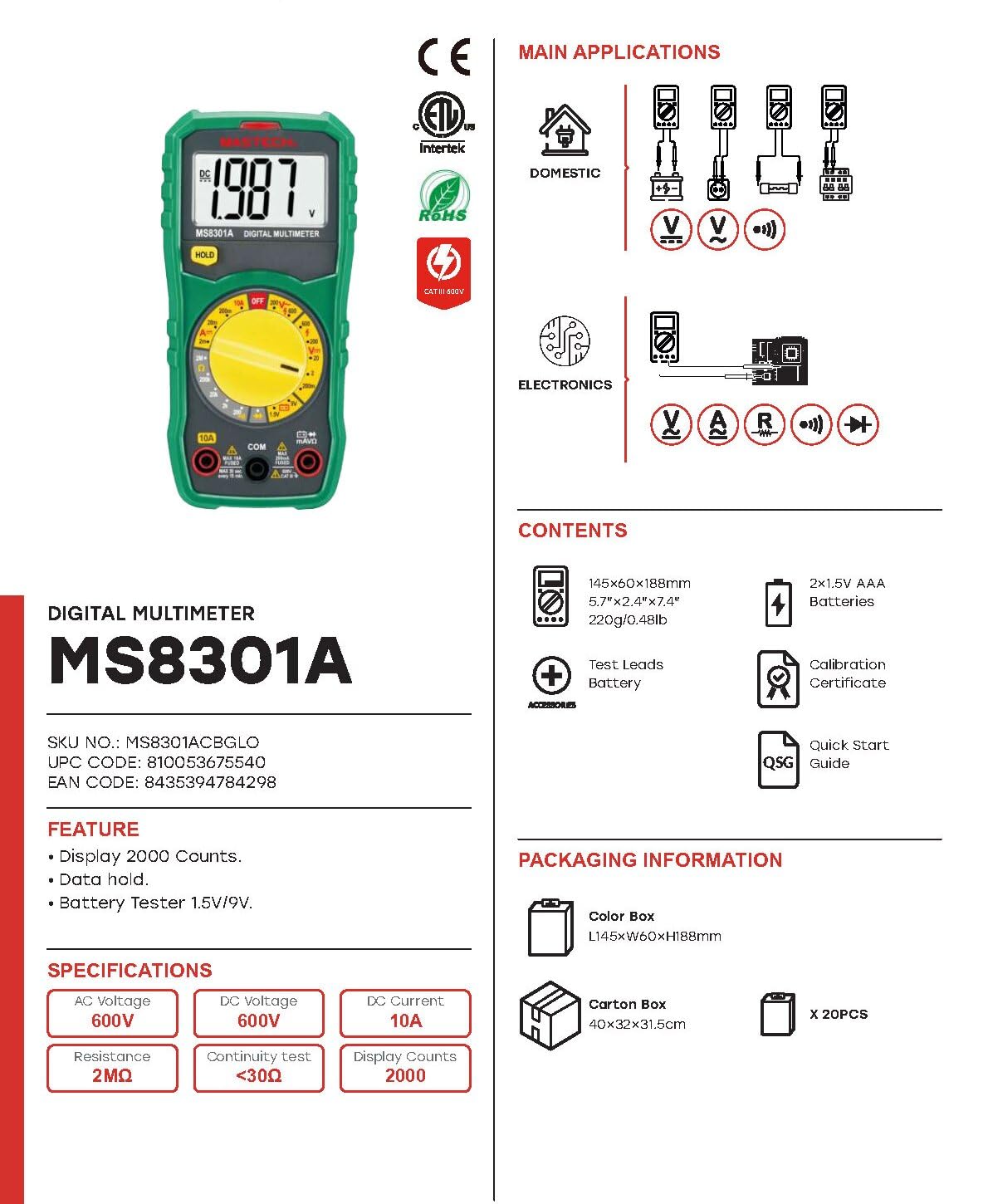
Image: The Mastech MS8301A Digital Multimeter showing its front panel, rotary switch, display, input jacks, and a list of included accessories such as test leads and batteries.
4. ማዋቀር
4.1 የባትሪ ጭነት
- Ensure the multimeter is turned off and disconnect any test leads.
- በመልቲሜትሩ ጀርባ ላይ የባትሪውን ክፍል ሽፋን ያግኙ።
- የማቆያውን ሾጣጣ (ዎች) ይክፈቱ እና ሽፋኑን ያስወግዱ.
- ሁለት 1.5V AAA ባትሪዎችን ያስገቡ፣ በክፍሉ ውስጥ እንደተገለጸው ትክክለኛውን ፖላሪቲ (+ እና -) ይመልከቱ።
- የባትሪውን ክፍል ሽፋን ይቀይሩት እና በዊች (ዎች) ያስጠብቁት.
4.2 የማገናኘት የሙከራ እርሳሶች
የሙከራ ገመዶቹን በመልቲሜትር ላይ ወደሚገኙት ተገቢ የግቤት መሰኪያዎች ያገናኙ፡
- አስገባ ጥቁር የሙከራ መሪ ወደ COM (የተለመደ) ጃክ።
- ለአብዛኛዎቹ መለኪያዎች (ጥራዝtage, Resistance, Diode, Continuity, Temperature, Battery Test), insert the ቀይ የሙከራ መሪ ወደ ቪኤምኤ ጃክ
- For high current measurements (up to 10A), insert the ቀይ የሙከራ መሪ ወደ 10 ኤ ጃክ
5. የአሠራር መመሪያዎች
ማንኛውንም መለኪያ ከመውሰድዎ በፊት፣ የሙከራ ሊዶቹ በትክክል መገናኘታቸውን እና የማዞሪያ ማብሪያ / ማጥፊያው ወደሚፈለገው ተግባር መዋቀሩን ያረጋግጡ።
5.1 መለካት DC Voltagኢ (ቪ=)
- የማዞሪያ መቀየሪያውን ወደሚፈለገው ያቀናብሩ V= range (e.g., 20V for measuring up to 20V DC).
- የቀይ ሙከራ መሪውን ከወረዳው አወንታዊ (+) ጎን እና ጥቁር ፈተናውን ወደ አሉታዊ (-) ጎን ያገናኙ።
- ጥራዝ ያንብቡtagሠ እሴት በማሳያው ላይ።
5.2 AC ቮልtagሠ (V~)
- የማዞሪያ መቀየሪያውን ወደሚፈለገው ያቀናብሩ V~ range (e.g., 200V for measuring up to 200V AC).
- የፍተሻ መሪዎቹን በ AC voltagኢ ምንጭ.
- ጥራዝ ያንብቡtagሠ እሴት በማሳያው ላይ።
5.3 የዲሲ ጅረት መለካት (A=)
- ጠቃሚ፡- በተከታታይ መልቲሜትር ከማገናኘትዎ በፊት ኃይሉን ከወረዳው ጋር ያላቅቁ።
- የማዞሪያ መቀየሪያውን ወደሚፈለገው ያቀናብሩ A= range (e.g., 200mA or 10A). Remember to move the red lead to the 10A jack for high current.
- የአሁኑን መጠን የሚለካበትን ዑደት ይክፈቱ።
- Connect the multimeter in series with the circuit, ensuring the current flows through the multimeter.
- ኃይልን ወደ ወረዳው ይተግብሩ እና በማሳያው ላይ ያለውን የአሁኑን እሴት ያንብቡ።
5.4 መቋቋምን መለካት (Ω)
- ጠቃሚ፡- ተቃውሞውን ከመለካትዎ በፊት ወረዳው ኃይል መሟጠጡን እና ሁሉም መያዣዎች መውጣታቸውን ያረጋግጡ።
- የማዞሪያ መቀየሪያውን ወደሚፈለገው ያቀናብሩ Ω ክልል.
- በሚለካው አካል ላይ የፍተሻ መሪዎችን ያገናኙ.
- በማሳያው ላይ ያለውን የመቋቋም እሴት ያንብቡ።
5.5 የዳይኦድ ሙከራ (→|)
- ጠቃሚ፡- ዳዮዱ ከወረዳው ጋር መገናኘቱን ያረጋግጡ።
- የማዞሪያ መቀየሪያውን ወደ የዳዮ ሙከራ አቀማመጥ.
- ቀዩን የሙከራ እርሳስ ከአኖድ ጋር እና ጥቁር የፈተና እርሳስን ከዲዮድ ካቶድ ጋር ያገናኙ። ማሳያው ወደፊት ያለውን ቮልት ያሳያልtagሠ ጠብታ።
- መሪዎቹን ይቀይሩ. ማሳያው ለጥሩ ዳዮድ "OL" (Open Loop) ማሳየት አለበት።
5.6 የተከታታይነት ፈተና ())))
- ጠቃሚ፡- ወረዳው ከኃይል መሟጠጡን ያረጋግጡ።
- የማዞሪያ መቀየሪያውን ወደ ቀጣይነት ፈተና አቀማመጥ.
- Connect the test leads across the component or wire to be tested.
- ተቃውሞው ከ30Ω አካባቢ በታች ከሆነ፣ ብልጭታው ድምፅ ይሰማል፣ ይህም ቀጣይነትን ያሳያል። ማሳያው የመቋቋም እሴቱንም ያሳያል።
5.7 Battery Test (1.5V/9V)
- የማዞሪያ መቀየሪያውን ወደ 1.5 ቪ or 9V battery test position, corresponding to the battery type.
- ቀዩን የሙከራ ሊድ ከባትሪው ፖዘቲቭ (+) ተርሚናል ጋር እና ጥቁር የሙከራ ሊድ ከኔጌቲቭ (-) ተርሚናል ጋር ያገናኙ።
- የባትሪውን ጥራዝ ያንብቡtagሠ በማሳያው ላይ።
5.8 የውሂብ መያዣ
Press the "HOLD" button to freeze the current reading on the display. Press it again to release the hold function and resume live readings.
6. ዝርዝሮች
| መለኪያ | ክልል | ጥራት |
|---|---|---|
| ዲሲ ጥራዝtage | 200mV / 2V / 20V / 200V / 600V | 100µV / 1mV / 10mV / 100mV / 1V |
| ኤሲ ጥራዝtage | 200V / 600V | 100mV / 1V |
| DC Current | 2mA / 20mA / 200mA / 10A | 1µA / 10µA / 100µA / 10mA |
| መቋቋም | 200Ω / 2kΩ / 20kΩ / 200kΩ / 2MΩ | 0.1Ω / 1Ω / 10Ω / 100Ω / 1kΩ |
| ቀጣይነት ፈተና | Buzzer sounds at <30Ω | - |
| የዳዮ ሙከራ | ወደ ፊት ጥራዝtagሠ ጠብታ | - |
| የባትሪ ሙከራ | 1.5V / 9V | - |
አጠቃላይ ዝርዝሮች
- ማሳያ፡- 2000 ቆጠራዎች
- የኃይል አቅርቦት; 2 x 1.5V AAA ባትሪዎች
- መጠኖች፡- 150ሚሜ x 74ሚሜ x 48ሚሜ (5.9" x 2.9" x 1.7")
- ክብደት፡ 220 ግ (0.48 ፓውንድ)
- የደህንነት ደረጃ ድመት III 600 ቪ
- ቁሳቁስ፡ አሲሪሎኒትሪል ቡታዲየን ስቲሪን (ኤቢኤስ)
- ቀለም፡ ሰማያዊ

Image: A table detailing manual ranging specifications for various Mastech digital multimeters, including the MS8301A, showing display counts, safety ratings, and measurement capabilities.
7. ጥገና
7.1 የባትሪ መተካት
When the battery low indicator appears on the display, replace the batteries immediately to ensure accurate readings. Follow the steps outlined in Section 4.1 for battery installation.
7.2 ጽዳት
መያዣውን በማስታወቂያ ይጥረጉamp ጨርቅ እና መለስተኛ ሳሙና። ማጽጃዎችን ወይም ማሟሟቶችን አይጠቀሙ። ከመጠቀምዎ በፊት መልቲሜትር ሙሉ በሙሉ ደረቅ መሆኑን ያረጋግጡ።
7.3 ማከማቻ
If the multimeter is not used for an extended period, remove the batteries to prevent leakage and damage to the device. Store in a cool, dry place away from direct sunlight.
8. መላ መፈለግ
| ችግር | ሊሆን የሚችል ምክንያት | መፍትሄ |
|---|---|---|
| ምንም ማሳያ ወይም ደብዛዛ ማሳያ የለም። | የሞተ ወይም ዝቅተኛ ባትሪዎች፤ የተሳሳተ የባትሪ ፖላሪቲ። | ባትሪዎችን ይተኩ; የባትሪውን አቀማመጥ ያረጋግጡ. |
| "OL" (ከመጠን በላይ ጭነት) ይታያል | Measurement exceeds selected range; open circuit. | Select a higher range; check for open circuit in the component or leads. |
| የተሳሳቱ ንባቦች | Incorrect function selected; poor test lead connection; damaged test leads. | Verify function switch position; ensure secure lead connection; inspect and replace damaged leads. |
| የተከታታይነት ድምጽ የለም | Open circuit; resistance too high. | Check for breaks in the circuit; ensure resistance is below 30Ω. |
9. ዋስትና እና ድጋፍ
Mastech products are designed for reliability and performance. For specific warranty information, please refer to the warranty card included with your product or contact Mastech customer support. Keep your purchase receipt as proof of purchase.
For technical support or service inquiries, please visit the official Mastech webጣቢያ ወይም የተፈቀደላቸው የአገልግሎት ማዕከሎቻቸውን ያግኙ።


