1. መግቢያ
ስለገዙ እናመሰግናለንasing the Edifier R990BT Bluetooth Computer Speakers. These 2.0 active bookshelf speakers are designed to provide high-quality audio for your PC, smartphone, tablet, and other compatible devices. Featuring Bluetooth V5.4 connectivity and dual RCA inputs, the R990BT offers versatile audio options in a classic MDF enclosure. Please read this manual thoroughly to ensure proper setup and optimal performance of your speakers.
2. የጥቅል ይዘቶች
እባክዎ ሁሉም እቃዎች በጥቅሉ ውስጥ መኖራቸውን ያረጋግጡ፡-
- Edifier R990BT Active Bookshelf Speakers (1 Pair)
- የድምጽ ማጉያ ማገናኛ ገመድ
- RCA ወደ RCA ኦዲዮ ገመድ
- ከ 3.5 ሚሜ እስከ RCA ኦዲዮ ገመድ
- የኃይል ገመድ
- ፈጣን ጅምር መመሪያ
3. ማዋቀር
3.1 የድምጽ ማጉያ አቀማመጥ
Place the speakers on a stable, flat surface such as a desk or shelf. For optimal stereo imaging, position the speakers equidistant from your listening position, forming an equilateral triangle. Ensure there is adequate space behind the speakers for cable connections and ventilation.

Image: Edifier R990BT speakers positioned on a desk, demonstrating typical placement for computer use.
3.2 ድምጽ ማጉያዎቹን ማገናኘት
- ተገብሮ ድምጽ ማጉያውን ያገናኙ፡ Use the included speaker connection cable to link the active speaker (with controls) to the passive speaker. Ensure the correct polarity (+ to + and - to -) for proper sound reproduction.
- ከኃይል ጋር ይገናኙ፡ Plug the power cable into the active speaker's power input and then into a wall outlet.
3.3 የድምጽ ምንጮችን ማገናኘት
The R990BT speakers support both wired (RCA) and wireless (Bluetooth) connections.
ባለገመድ ግንኙነት (RCA)
The speakers feature two sets of RCA input ports (Line In 1 and Line In 2) for connecting two different wired audio devices simultaneously.
- Use the RCA to RCA cable to connect devices with RCA outputs (e.g., CD player, turntable with pre-amp).
- Use the 3.5mm to RCA cable to connect devices with a 3.5mm audio jack (e.g., computer, smartphone, tablet).

Image: Close-up of the rear panel of the active speaker, highlighting the dual RCA input ports (Line In 1 and Line In 2) and the power input.
የብሉቱዝ ግንኙነት
The R990BT features Bluetooth V5.4 for wireless audio streaming.
- Turn on the speakers.
- Press the volume/input knob on the rear panel to select the Bluetooth input. The indicator light will flash blue.
- በድምጽ መሳሪያዎ (ስማርትፎን፣ ታብሌት፣ ኮምፒውተር) ላይ ብሉቱዝን ያንቁ እና የሚገኙ መሳሪያዎችን ይፈልጉ።
- Select "EDIFIER R990BT" from the list to pair. The indicator light will turn solid blue once connected.

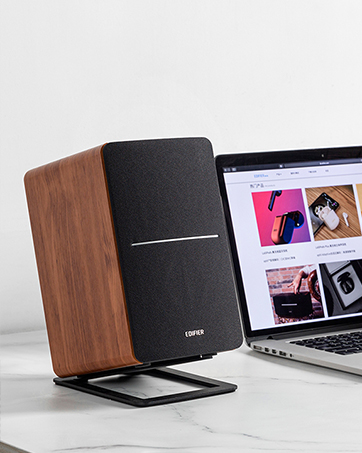
Image: A single Edifier R990BT speaker on a desk next to a laptop, symbolizing the ease of Bluetooth connectivity.
4. የአሠራር መመሪያዎች
4.1 ማብራት / ማጥፋት
The power switch is located on the rear panel of the active speaker. Flip the switch to the 'ON' position to power on the speakers. Flip to 'OFF' to power off.
4.2 የድምጽ መቆጣጠሪያ
The large knob on the rear panel of the active speaker controls the master volume. Rotate clockwise to increase volume and counter-clockwise to decrease volume.
ምስል፡ ዝርዝር view of the multi-function control knob on the rear of the speaker, used for volume adjustment and input selection.
4.3 የግቤት ምርጫ
Press the volume/input knob on the rear panel to cycle through the available audio inputs: Line In 1, Line In 2, and Bluetooth. The indicator light will change color or flash to indicate the selected input mode.
- Line In 1 / Line In 2: Solid green or red indicator (depending on model/firmware).
- ብሉቱዝ፡ Flashing blue (pairing mode) or solid blue (connected).
4.4 Using the Edifier ConneX App
For enhanced control and customization, download the Edifier ConneX mobile application. The app allows you to adjust equalization settings and access additional features for your R990BT speakers.
- Download the Edifier ConneX app from your device's app store.
- Ensure your speakers are powered on and connected via Bluetooth to your mobile device.
- Open the app and follow the on-screen instructions to connect to your R990BT speakers.

Image: The official logo for the Edifier ConneX mobile application.
5. ጥገና
5.1 ጽዳት
የድምጽ ማጉያዎችዎን ገጽታ እና አፈፃፀም ለመጠበቅ፡
- Wipe the speaker cabinets with a soft, dry cloth.
- ፈሳሽ ማጽጃዎችን፣ ኤሮሶሎችን ወይም ገላጭ ኬሚካሎችን አይጠቀሙ ምክንያቱም እነዚህ መጨረሻውን ወይም የውስጥ ክፍሎችን ሊጎዱ ይችላሉ።
- Gently brush dust from the speaker grilles using a soft brush or vacuum cleaner with a brush attachment.
5.2 ማከማቻ
If storing the speakers for an extended period, ensure they are powered off and disconnected from the power source. Store them in a cool, dry place away from direct sunlight and extreme temperatures.
6. መላ መፈለግ
If you encounter any issues with your Edifier R990BT speakers, please refer to the following common problems and solutions:
| ችግር | ሊሆን የሚችል ምክንያት | መፍትሄ |
|---|---|---|
| ድምጽ የለም። |
|
|
| የተዛባ ድምጽ |
|
|
| Bluetooth not connecting/disconnecting |
|
|
| Difficulty switching inputs |
|
|
7. ዝርዝሮች
Detailed technical specifications for the Edifier R990BT speakers:
- የሞዴል ስም፡- R990BT
- የድምጽ ማጉያ አይነት፡ የመጽሐፍ መደርደሪያ
- የመጫኛ አይነት፡ Shelf Mount/Tabletop Mount
- ቁሳቁስ፡ ኤምዲኤፍ (መካከለኛ-Density Fiberboard)
- የግንኙነት ቴክኖሎጂ; Bluetooth V5.4, Wired (Dual RCA)
- የኦዲዮ ውፅዓት ሁነታ ፦ ስቴሪዮ (2.0)
- የድምጽ ማጉያ ከፍተኛ የውጤት ኃይል፡- 24 ዋት (አርኤምኤስ)
- Woofer ዲያሜትር፡ 4 ኢንች
- የTweeter ዲያሜትር፡ 1 ኢንች
- የድግግሞሽ ምላሽ፡ 18 KHz (Upper limit, typical for compact speakers)
- የምልክት-ወደ-ጫጫታ ሬሾ- 85 ዲቢቢ
- የመቆጣጠሪያ ዘዴ፡- Touch (via rear knob)
- የኃይል ምንጭ፡- Corded Electric (100-240V ~ 50/60Hz)
- የምርት መጠኖች: 11.5"D x 7.5"W x 17"H (per speaker, approximate)
- የእቃው ክብደት፡ 7.94 Pounds (per speaker, approximate)
- ቀለም፡ ጥቁር
- ተስማሚ መሣሪያዎች Devices with Bluetooth technology, devices with RCA or 3.5mm audio output.
8. ዋስትና እና ድጋፍ
8.1 የዋስትና መረጃ
The Edifier R990BT speakers come with a Limited Warranty. Please refer to the warranty card included in your package or visit the official Edifier webስለ ምርትዎ የዋስትና ሽፋን ዝርዝር ውሎችን እና ሁኔታዎችን ለማግኘት ድህረ ገጽ።
8.2 የደንበኛ ድጋፍ
For technical assistance, troubleshooting, or general inquiries, please contact Edifier customer support. Contact details can typically be found on the official Edifier website or in your product's Quick Start Guide.
የመስመር ላይ ድጋፍ ጎብኝ www.edifier.com ለተደጋጋሚ ጥያቄዎች፣ የድጋፍ ግብዓቶች እና የእውቂያ መረጃ።


