1. መግቢያ
Thank you for choosing the Honeywell H9 Sunturalux™ Eye-Caring LED Desk Lamp. This advanced desk lamp is designed to provide optimal lighting for various tasks, prioritizing eye comfort and energy efficiency. Featuring 1000 lumens of dimmable light, adjustable color temperatures, smart auto-sensing capabilities, and a flexible multi-axis design, the H9 is suitable for reading, studying, working, and other activities. This manual will guide you through the setup, operation, and maintenance of your new desk lamp.

Image 1.1: Honeywell H9 Sunturalux LED Desk Lamp in a modern office setting.
2. የጥቅል ይዘቶች
እባክህ ከዚህ በታች የተዘረዘሩት ሁሉም እቃዎች በጥቅልህ ውስጥ መካተታቸውን አረጋግጥ፡
- 1x ዴስክ ኤልamp
- 1x አስማሚ
- 1 x የተጠቃሚ መመሪያ
- 1 x የማሸጊያ ሳጥን

Image 2.1: Contents of the Honeywell H9 Desk Lamp ጥቅል.
3. ማዋቀር
Follow these steps to assemble and prepare your Honeywell H9 Desk Lamp ለመጠቀም፡-
- ክፍሎቹን ያራግፉ፡ Carefully remove all items from the packaging. Ensure all protective wrapping is removed from the lamp አካላት.
- ኤልን አያይዝamp Arm to Base: Lamp arm connects to the sturdy circular base. Align the bottom of the lamp arm with the opening on the base.
- የመሠረቱን ደህንነት ይጠብቁ; Turn the base upside down. Use the provided Allen key and screws to firmly attach the lamp arm to the base. Ensure the screws are tightened to prevent wobbling.
- የኃይል አስማሚን ያገናኙ፡ Plug the power adapter cable into the designated port on the lamp base. Then, plug the adapter into a standard electrical outlet.
- የኤልamp: የተሰበሰበውን lamp on a stable, flat surface. Adjust the multi-axis arm and lamp ወደሚፈልጉት ቦታ ይሂዱ ።
Video 3.1: Unboxing and assembly demonstration of the Honeywell H9 Desk Lamp.
4. የአሠራር መመሪያዎች
The Honeywell H9 Desk Lamp features an intuitive touch control panel located on the lamp head. Below are the functions of each control:

ምስል 4.1፡ አልቋልview በ l ላይ ያለው የንክኪ መቆጣጠሪያ ፓነልamp ጭንቅላት ።
4.1 ማብራት / ማጥፋት
- የሚለውን ይንኩ። የኃይል አዝራር (circle with vertical line) on the control panel to turn the lamp በርቷል ወይም ጠፍቷል.
4.2 የብሩህነት ማስተካከያ
- የሚለውን ይንኩ። ብሩህነት - (sun with minus sign) button to decrease brightness.
- የሚለውን ይንኩ። ብሩህነት + (sun with plus sign) button to increase brightness.
- Lamp offers five brightness levels, ranging from 10% to 100%.
4.3 የቀለም ሙቀት ሁነታዎች
Lamp provides three distinct color temperature options:
- ሙቅ ብርሃን (2700ሺህ) Ideal for relaxing or evening use.
- የተፈጥሮ ብርሃን (4000 ኪ.ሜ): Best for reading and general tasks.
- አሪፍ ነጭ ብርሃን (5000ሺህ) Suitable for focused work, studying, or computer use.

Image 4.2: Visual representation of available color temperatures and brightness levels.
4.4 Smart Sensing & Auto-Dimming
- Sensing Mode (Person icon): Activates motion detection. The lamp automatically turns on when you approach (within approx. 0.6 meters) and turns off after 15 minutes of no activity.
- Automatic Dimming (Eye icon): The built-in ambient light sensor automatically adjusts the lamp's brightness based on surrounding light conditions to optimize eye comfort.

Image 4.3: Intelligent Constant Illumination for eye protection.

Image 4.4: Automatic sensor light switch and 45-minute timer.
4.5 የሰዓት ቆጣሪ ተግባር
- 45-Minute Timer (Clock icon): Activates a 45-minute countdown, after which the lamp በራስ-ሰር ይጠፋል.
- Delayed Light-off (Clock with arrow icon): Provides a 30-second delayed turn-off, allowing you to leave the area before the light extinguishes.
4.6 የማስታወስ ተግባር
- Lamp remembers your last used color temperature and brightness settings when turned off, restoring them upon the next power-on.
Video 4.5: Demonstration of the Honeywell H9 Desk Lamp's touch controls and features.
5. ባህሪያት
- High Color Rendering Index (CRI≥91) for Eye Care: Equipped with 240 Sunturalux full-spectrum LED beads, providing professional-grade eye protection (RG0 level, free of blue light hazard) and a double anti-glare design. Ensures accurate and vivid color representation.
- Multi-Axis Adjustable Design: Features a four-axis flexible head and arm, allowing seamless angle adjustments. The lamp head can tilt up/down by 225° and rotate left/right by 180°.
- Durable Materials & Long Lifespan: Constructed with high-quality aluminum, zinc alloy, and other premium materials for durability. LED lifespan exceeds 30,000 hours.
- Smart Sensing Technology: Automatically turns on when you approach and adjusts brightness based on ambient light conditions.
- የተቀናጀ የሰዓት ቆጣሪ ተግባር Includes a convenient 45-minute timer and a 30-second delayed switch-off function.

Image 5.1: Multi-axis adjustable design for flexible positioning.

Image 5.2: Professional eye care technology with flicker-free and no blue light hazard.
ቪዲዮ 5.3፡ አልቋልview of Honeywell H9 Desk Lamp features including smart sensing and adjustability.
6. ዝርዝሮች
| ባህሪ | ዋጋ |
|---|---|
| የሞዴል ስም | HWT-H9 |
| የምርት ስም | ሃኒዌል |
| የብርሃን ምንጭ ዓይነት | LED |
| ብሩህነት | 1000 Lumens |
| ዋትtage | 18 ዋት |
| የቀለም ሙቀት | Warm Light (2700K), Natural Light (4000K), Cool White Light (5000K) |
| የመቆጣጠሪያ ዘዴ | ንካ |
| ቁሳቁስ | ብረት፣ አልሙኒየም፣ ፕላስቲክ |
| የእቃው ክብደት | 9.92 ፓውንድ £ |
| የምርት ልኬቶች | 25.98" ዲ x 6.69" ዋ x 9.64" ኤች |
| ልዩ ባህሪያት | 4-Axis Adjustable Arm Design, No Blue Light & Flicker-Free Eye Protection Technology, Precise Touch Control Panel, Smart Light Sensing, Stepless Dimming |
| ስብሰባ ያስፈልጋል | አዎ |
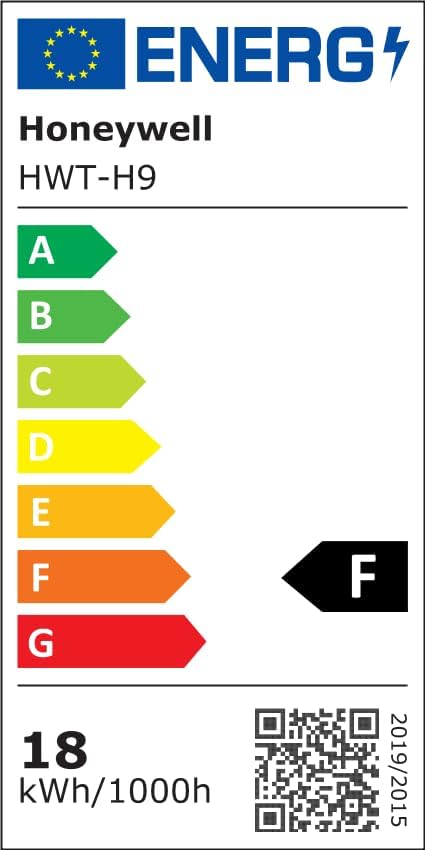
Image 6.1: Lighting Facts for Honeywell H9 Desk Lamp.

Image 6.2: Certifications for Honeywell H9 Desk Lamp.
For more details on energy efficiency, visit: https://eprel.ec.europa.eu/qr/2001097
7. ጥገና
To ensure the longevity and optimal performance of your Honeywell H9 Desk Lampእነዚህን የጥገና መመሪያዎች ይከተሉ፡-
- ማጽዳት፡ ከማጽዳትዎ በፊት ኃይሉን ያላቅቁ. ኤልን ለማጽዳት ለስላሳ እና ደረቅ ጨርቅ ይጠቀሙamp. Avoid abrasive cleaners, solvents, or harsh chemicals that may damage the finish or electronic components.
- አቧራ ማስወገድ; በመደበኛነት lamp head and arm to prevent accumulation that could affect light output or sensor performance.
- ፈሳሽ ግንኙነትን ያስወግዱ፡ ኤልን አታጋልጡamp ወደ ውሃ ወይም ሌሎች ፈሳሾች.
- በጥንቃቄ ይያዙ; ኤልamp is durable, avoid excessive force when adjusting its position to prevent damage to the joints.
8. መላ መፈለግ
If you encounter any issues with your Honeywell H9 Desk Lamp፣ እባክዎን የሚከተሉትን የተለመዱ የመላ ፍለጋ ደረጃዎች ይመልከቱ፡
- Lamp አይበራም፦
- የኃይል አስማሚው ደህንነቱ በተጠበቀ ሁኔታ በሁለቱም l ውስጥ መገናኘቱን ያረጋግጡamp እና የሚሰራ የኤሌክትሪክ ሶኬት.
- ሌላ መሳሪያ በመጫን የኃይል ማከፋፈያው የሚሰራ መሆኑን ያረጋግጡ።
- Brightness/Color Temperature Not Changing:
- Ensure you are pressing the correct touch buttons for brightness or color temperature adjustment.
- If in auto-dimming mode, the lamp may be adjusting automatically. Try disabling auto-dimming to manually control.
- Smart Sensing Not Working:
- Ensure the sensing mode (person icon) is activated on the control panel.
- Check for any obstructions blocking the sensor on the lamp ጭንቅላት ።
- Lamp is Unstable:
- ያረጋግጡ lamp arm is securely fastened to the base with the provided screws.
- ኤልን ያረጋግጡamp ጠፍጣፋ, የተረጋጋ መሬት ላይ ተቀምጧል.
If the issue persists after trying these steps, please contact Honeywell customer support.