መግቢያ
Welcome to the user manual for your new boAt Stone 352 Pro Bluetooth Speaker. This guide provides detailed instructions on how to set up, operate, and maintain your speaker, ensuring you get the best audio experience. Please read this manual thoroughly before using the product.
በሣጥኑ ውስጥ ያለው
Upon unboxing your boAt Stone 352 Pro, you should find the following items:
- 1 x boAt Stone 352 Pro Bluetooth Speaker
- 1 x የኃይል መሙያ ገመድ (አይነት-ሲ)
- 1 x የተጠቃሚ መመሪያ (ይህ ሰነድ)
- 1 x የዋስትና ካርድ
- 1 x ካታሎግ

Image: The boAt Stone 352 Pro speaker, a USB Type-C charging cable, and the warranty card/user manual are shown, representing the contents of the product box.
Video: An unboxing demonstration of the boAt Stone 352 Pro Bluetooth Speaker, showing the speaker, charging cable, and documentation included in the package.
ምርት አልቋልview
The boAt Stone 352 Pro is a portable Bluetooth speaker designed to deliver powerful audio with enhanced features. Key highlights include:
- 14 ዋት ቦአት ሲግናል ድምፅ፡ Experience clear and powerful audio output.
- Dynamic RGB LEDs: Enhance your listening experience with vibrant lighting effects.
- እስከ 12 ሰዓታት የሚደርስ መልሶ ማጫወት፦ በአንድ ክፍያ በተራዘመ የሙዚቃ መልሶ ማጫወት ይደሰቱ።
- የTWS ባህሪ፡ Connect two Stone 352 Pro speakers for a stereo sound experience.
- አብሮ የተሰራ ማይክሮፎን; Facilitates hands-free calling.
- ብሉቱዝ v5.3: የተረጋጋ እና ቀልጣፋ የገመድ አልባ ግንኙነትን ያረጋግጣል።
- IPX5 የውሃ መቋቋም; ከብልጭታ እና ላብ መከላከያ ይሰጣል።
- በርካታ የግንኙነት ሁነታዎች፡ Supports Bluetooth, AUX, and TF Card playback.
- ዓይነት-C መሙላት፡- ዘመናዊ እና ምቹ የኃይል መሙያ በይነገጽ።

Image: A black boAt Stone 352 Pro speaker, showcasing its cylindrical design and the illuminated RGB LED strip on the front.
መቆጣጠሪያዎች እና ጠቋሚዎች
Familiarize yourself with the speaker's controls and indicators for optimal use.

Image: The side panel of the boAt Stone 352 Pro speaker, highlighting the power button, volume up/down buttons, and mode selection button.
- የኃይል ቁልፍ፡- ለማብራት/ለማጥፋት ተጭነው ይያዙ። ሙዚቃን ለማጫወት/ለማቆም አጭር ይጫኑ።
- የድምጽ መጠን መጨመር (+): ድምጽን ለመጨመር አጭር ተጫን። ለቀጣይ ትራክ በረጅሙ ተጫን።
- ድምጽ መቀነስ (-): ድምጽን ለመቀነስ አጭር ተጫን። ለቀደመው ትራክ በረጅሙ ይጫኑ።
- ሁነታ (ኤም) አዝራር፡- በብሉቱዝ፣ AUX እና TF ካርድ ሁነታዎች መካከል ለመቀያየር አጭር ጫን።
- RGB LED Strip: Indicates power status, charging, and provides dynamic lighting effects.
እንደ መጀመር
ተናጋሪውን መሙላት
Before first use, fully charge your speaker. The boAt Stone 352 Pro features a Type-C charging port.
- የኃይል መሙያ ገመዱን የአይነት-ሲ ጫፍ ከድምጽ ማጉያው የኃይል መሙያ ወደብ ጋር ያገናኙ።
- Connect the USB-A end of the cable to a compatible USB power adapter (5V/1A recommended).
- The RGB LED strip will indicate charging status. It typically takes approximately 2 hours for a full charge.
- አንዴ ሙሉ ኃይል ከሞላ በኋላ የኃይል መሙያ ገመዱን ያላቅቁ።

ምስል: ዝርዝር view of the boAt Stone 352 Pro's side panel, illustrating the Type-C charging interface and the various connectivity ports (Bluetooth, AUX, TF Card).
በማብራት / በማጥፋት ላይ
- To power on, press and hold the Power button until you hear an audible prompt and the RGB LEDs illuminate.
- To power off, press and hold the Power button again until you hear an audible prompt and the RGB LEDs turn off.
የአሠራር መመሪያዎች
የብሉቱዝ ግንኙነት
- Ensure the speaker is powered on and in Bluetooth mode (indicated by a specific LED pattern or audible prompt).
- በስማርትፎንዎ ወይም በድምጽ መሳሪያዎ ላይ ብሉቱዝን ያንቁ እና የሚገኙ መሳሪያዎችን ይፈልጉ።
- Select "boAt Stone 352 Pro" from the list of devices.
- Once paired, you will hear a confirmation tone, and the speaker's LED will indicate a successful connection.
- መሳሪያው በክልል ውስጥ ከሆነ ድምጽ ማጉያው ሲበራ ከመጨረሻው የተጣመረ መሣሪያ ጋር በራስ-ሰር ይገናኛል።
AUX ሁነታ
For wired connections, use the AUX port.
- Connect one end of a 3.5mm AUX cable (not included) to the speaker's AUX port.
- Connect the other end to your audio device's 3.5mm audio output.
- Press the 'M' (Mode) button on the speaker to switch to AUX mode.
- ኦዲዮ አሁን ከተገናኘው መሣሪያዎ በድምጽ ማጉያው በኩል ይጫወታል።
TF ካርድ መልሶ ማጫወት
ሙዚቃን በቀጥታ ከTF (ማይክሮ ኤስዲ) ካርድ ያጫውቱ።
- የ TF ካርድ ከMP3 ድምጽ ጋር አስገባ files into the speaker's TF card slot.
- Press the 'M' (Mode) button to switch to TF Card mode.
- ድምጽ ማጉያው ሙዚቃውን ከካርዱ በራስ-ሰር ማጫወት ይጀምራል።
TWS (እውነተኛ ገመድ አልባ ስቴሪዮ) ተግባር
Connect two boAt Stone 352 Pro speakers wirelessly for a true stereo sound experience.
- ሁለቱም ድምጽ ማጉያዎች መብራታቸውን እና ከሌላ የብሉቱዝ መሳሪያ ጋር አለመገናኘታቸውን ያረጋግጡ።
- On one speaker (this will be the primary speaker), long press the 'M' (Mode) button until you hear a TWS pairing prompt.
- The two speakers will automatically search and pair with each other. A confirmation tone will indicate successful TWS pairing.
- Now, connect your audio device to the primary speaker via Bluetooth as described above.
- Both speakers will play audio in stereo.

Image: Two boAt Stone 352 Pro speakers, one black and one blue, operating in TWS mode, demonstrating synchronized audio playback from a connected smartphone.
ከእጅ ነፃ ጥሪ
The built-in microphone allows for convenient hands-free calls when connected via Bluetooth.
- When an incoming call is received, press the Power button once to answer.
- To end a call, press the Power button once again.
- To reject an incoming call, long press the Power button.
RGB LED Functionality
The boAt Stone 352 Pro features dynamic RGB LEDs that add a visual element to your audio experience.

ምስል፡ መቀራረብ view of the boAt Stone 352 Pro's RGB LED strip, displaying a gradient of colors from blue to green to orange, highlighting its dynamic lighting feature.
- The RGB LEDs automatically cycle through various colors, synchronizing with the music or providing ambient lighting.
- Specific button presses may allow for changing LED modes or turning them off (refer to product-specific quick start guide for advanced controls if available).
ጥገና እና እንክብካቤ
- ማጽዳት፡ ድምጽ ማጉያውን ለማጽዳት ለስላሳ እና ደረቅ ጨርቅ ይጠቀሙ. ገላጭ ማጽጃዎችን ወይም ፈሳሾችን አይጠቀሙ.
- የውሃ መቋቋም (IPX5) The speaker is IPX5 rated, meaning it is protected against low-pressure water jets from any direction. It is not designed for submersion in water. Ensure the charging port cover is securely closed to maintain water resistance.
- ማከማቻ፡ ድምጽ ማጉያውን በቀጥታ ከፀሀይ ብርሀን እና ከከፍተኛ ሙቀት ርቆ በቀዝቃዛና ደረቅ ቦታ ያከማቹ።
- የባትሪ እንክብካቤ የባትሪ ዕድሜን ለማራዘም የድምጽ ማጉያውን በተደጋጋሚ ከመሙላት ይቆጠቡ። ምንም እንኳን ለረጅም ጊዜ ጥቅም ላይ ባይውልም, በመደበኛነት ያስከፍሉት.

Image: The boAt Stone 352 Pro speaker with water droplets on its surface, emphasizing its IPX5 splash and sweat resistance feature.
መላ መፈለግ
| ችግር | ሊሆን የሚችል መፍትሄ |
|---|---|
| ተናጋሪው አይበራም። | የድምጽ ማጉያው መሙላቱን ያረጋግጡ። ከኃይል ምንጭ ጋር ያገናኙት እና እንደገና ይሞክሩ። |
| በብሉቱዝ በኩል ማጣመር አይቻልም። |
|
| ምንም ድምጽ ወይም ዝቅተኛ ድምጽ የለም. |
|
| TWS ማጣመር አልተሳካም። |
|
| የጥሪ ጥራት ደካማ ነው። |
|
ዝርዝሮች
| ባህሪ | ዝርዝር |
|---|---|
| የሞዴል ስም | ድንጋይ 352 ፕሮ |
| የድምጽ ማጉያ አይነት | ተንቀሳቃሽ ድምጽ ማጉያ |
| የድምጽ ማጉያ ውፅዓት ኃይል | 14 ዋት |
| የብሉቱዝ ስሪት | v5.3 |
| የብሉቱዝ ክልል | 10 ሜትር |
| የባትሪ አማካይ ሕይወት | 12 ሰዓታት |
| የኃይል መሙያ ጊዜ | 2 ሰዓታት |
| የባትሪ አቅም | 3600 ሚሊamp ሰዓታት |
| የውሃ መቋቋም | IPX5 |
| የግንኙነት ቴክኖሎጂ | Bluetooth, USB, Wi-Fi (Note: While Wi-Fi is listed, primary connectivity is Bluetooth, AUX, and TF Card as per product features.) |
| የመቆጣጠሪያ ዘዴ | የግፊት ቁልፍ |
| የምርት ልኬቶች | 15.8D x 9.4W x 9.4H ሴንቲሜትር |
| የእቃው ክብደት | 20 ግራም |
| የተካተቱ አካላት | Speaker, Cable, User Manual, Warranty Card, Catalogue |
ዋስትና እና ድጋፍ
Your boAt Stone 352 Pro Bluetooth Speaker comes with a standard brand warranty. Please refer to the included Warranty Card for specific terms and conditions.
- የዋስትና ጊዜ፡- በተለምዶ ከተገዛበት ቀን ጀምሮ 1 ዓመት።
- የይገባኛል ጥያቄ ሂደት፡ For warranty claims or technical support, please contact boAt customer service or visit their official website. Keep your purchase receipt and warranty card handy.
- የተራዘመ ዋስትና፡ An optional 1 Year Extended Warranty by OneAssist is available for purchase.
ለበለጠ እርዳታ፣ እርስዎም ሊመለከቱት ይችላሉ። የቦአት ሄርባብልስ መተግበሪያ for additional user help guides and support resources.
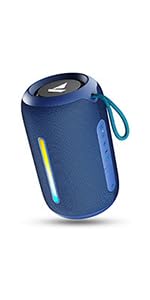
Image: A QR code for the boAt Hearables App, which provides additional support and features for the speaker.


