1. መግቢያ
This manual provides detailed instructions for the MESWAO 15.6 Inch Android 14 Tablet, model MES-B3. It covers essential information regarding product features, setup, operation, maintenance, and troubleshooting to ensure optimal performance and user experience. Please read this manual thoroughly before using your device.
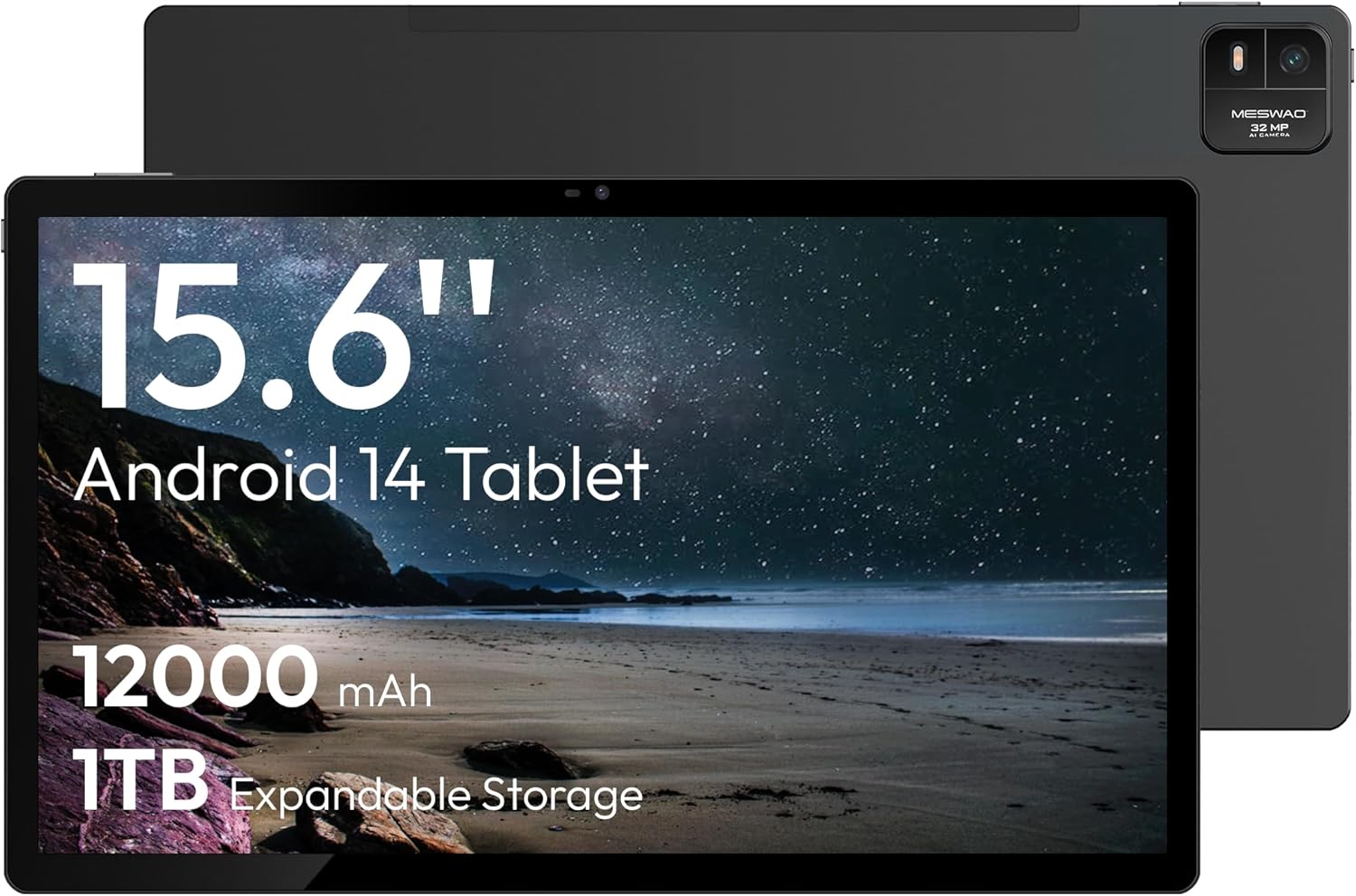
Figure 1.1: MESWAO 15.6 Inch Android 14 Tablet. This image displays the front and back view of the tablet, highlighting its large screen and rear camera module.
2. የደህንነት መረጃ
To prevent damage to your device or injury to yourself or others, please observe the following precautions:
- ጡባዊውን ለከፍተኛ ሙቀት፣ ለቀጥታ የፀሐይ ብርሃን ወይም ለከፍተኛ እርጥበት አያጋልጡት።
- ታብሌቱን ከመጣል ወይም ለከባድ ጉዳት ከማጋለጥ ይቆጠቡ።
- የጸደቁ ባትሪ መሙያዎችን እና መለዋወጫዎችን ብቻ ይጠቀሙ።
- Do not attempt to disassemble or repair the tablet yourself.
- ጡባዊውን ከውሃ እና ከሌሎች ፈሳሾች ያርቁ.
- Observe all local regulations regarding the use of electronic devices.
3. የጥቅል ይዘቶች
ሁሉም እቃዎች በጥቅሉ ውስጥ መኖራቸውን ያረጋግጡ፡-
- 15.6-inch Tablet x1
- 15 ዋ ቻርጀር x1
- Type-C to 3.5mm Adapter x1
- USB-A to Type-C Adapter x1
- Stuck Pin x1 (for SIM/TF card tray)
4. መሣሪያ አብቅቷልview
Familiarize yourself with the physical components of your MESWAO tablet.
4.1. አካላዊ ባህሪያት
- የፊት ካሜራ፡ Located at the top center of the screen when held horizontally.
- የኋላ ካሜራ ከፍላሽ ጋር; Located on the back, typically in a corner.
- የኃይል ቁልፍ፡- Usually on the side, used to power on/off or wake/sleep the device.
- የድምጽ አዝራሮች፡- የድምጽ ደረጃዎችን ያስተካክሉ።
- ዩኤስቢ-ሲ ወደብ ለክፍያ እና የውሂብ ማስተላለፍ.
- የ TF ካርድ ማስገቢያ ሊሰፋ የሚችል ማከማቻ።
- ተናጋሪዎች፡- Quad speakers with 8 sound chambers for audio output.

ምስል 4.1 - ተጠናቀቀview of MESWAO Tablet's physical features. This image illustrates the location of stereo speakers, power and volume buttons, front camera, rear camera with flashlight, Type-C port, and TF card slot.
5. ማዋቀር
5.1. የመነሻ ኃይል መሙላት
Before first use, fully charge the tablet using the provided 15W charger and USB-C cable. Connect the charger to the USB-C port on the tablet and plug it into a power outlet. The battery indicator on the screen will show charging progress.

Figure 5.1: Tablet charging illustration. This image shows the tablet connected to a charger, displaying a charging icon and indicating 100% charge in 3.5 hours.
5.2. ማብራት / ማጥፋት
- ለማብራት፡- Press and hold the Power button until the MESWAO logo appears.
- ለማጥፋት፡- የኃይል አማራጮች ምናሌ እስኪታይ ድረስ የኃይል አዝራሩን ተጭነው ይቆዩ እና ከዚያ "ኃይል አጥፋ" ን ይምረጡ።
- ለመተኛት/መነቃቃት፡- የኃይል ቁልፉን በአጭሩ ይጫኑ።
5.3. የመጀመሪያ ውቅር
መጀመሪያ ሲበራ፣ ጡባዊዎን ለማዘጋጀት የማያ ገጽ ላይ ጥያቄዎችን ይከተሉ፡
- የሚመርጡትን ቋንቋ ይምረጡ።
- ከWi-Fi አውታረ መረብ ጋር ይገናኙ።
- በጉግል መለያዎ ይግቡ ወይም አዲስ ይፍጠሩ።
- Review እና ውሎችን እና ሁኔታዎችን ይቀበሉ።
- የማያ ገጽ መቆለፊያ (ፒን፣ ስርዓተ-ጥለት ወይም የይለፍ ቃል) ያዘጋጁ።
5.4. የቲኤፍ ካርድ ማስገባት
To expand storage, insert a TF (microSD) card:
- የቲኤፍ ካርድ ማስገቢያውን በጡባዊው ጎን ላይ ያግኙት።
- Use the provided stuck pin to gently eject the card tray.
- Place the TF card into the tray with the gold contacts facing down.
- ትሪውን በጥንቃቄ ወደ ጡባዊው ውስጥ ያስገቡ።

Figure 5.2: Tablet storage capabilities. This image highlights the 128GB ROM and support for up to 1TB expandable storage via TF card.
6. የአሠራር መመሪያዎች
6.1. መሰረታዊ ዳሰሳ
The MESWAO tablet uses Android 14, offering intuitive touch-based navigation:
- መታ ያድርጉ፡ አንድ ንጥል ይምረጡ ወይም መተግበሪያ ይክፈቱ።
- ያንሸራትቱ በስክሪኖች ወይም ዝርዝሮች ውስጥ ይሸብልሉ.
- መቆንጠጥ-ለማጉላት፡ በማያ ገጹ ላይ ያለውን ይዘት ያሳድጉ ወይም ይቀንሱ።
- ሎንግ ፕሬስ የአውድ ምናሌዎችን ይድረሱ ወይም አዶዎችን ያንቀሳቅሱ።

Figure 6.1: Android 14 operating system interface. This image displays various application icons and highlights features like smooth multitasking, parental control, and enhanced privacy.
6.2. ከ Wi-Fi ጋር በመገናኘት ላይ
- ወደ ሂድ ቅንብሮች > አውታረ መረብ እና በይነመረብ > ዋይ ፋይ.
- Wi-Fi ቀይር On.
- ከዝርዝሩ ውስጥ የሚፈልጉትን አውታረ መረብ ይምረጡ።
- ከተጠየቁ የይለፍ ቃሉን ያስገቡ እና ከዚያ ይንኩ። ተገናኝ.
6.3. አፕሊኬሽኖችን ማስተዳደር
- መተግበሪያዎችን ጫን Download from the Google Play Store.
- መተግበሪያዎችን አራግፍ፡ Long-press an app icon, then drag it to "Uninstall" or go to ቅንብሮች > መተግበሪያዎች.
- መተግበሪያዎችን ዝጋ፡ Swipe up from the bottom of the screen and swipe away the app card.
6.4. የካሜራ አጠቃቀም
The tablet features a 32MP rear camera with flash and a 5MP front camera.
- ክፈት ካሜራ ማመልከቻ.
- ፎቶ ለማንሳት የመዝጊያ አዝራሩን መታ ያድርጉ።
- የካሜራ መቀየሪያ አዶን በመጠቀም ከፊት እና ከኋላ ካሜራዎች መካከል ይቀያይሩ።
- Access settings for flash, modes, and other options.
6.5. የባትሪ አስተዳደር
የ 12000mAh ባትሪ የተራዘመ አጠቃቀምን ያቀርባል. የባትሪ ዕድሜን ለማመቻቸት፡-
- የማያ ብሩህነት ያስተካክሉ።
- ጥቅም ላይ ያልዋሉ መተግበሪያዎችን ዝጋ።
- የባትሪ ቆጣቢ ሁነታን በ ውስጥ ያንቁ ቅንብሮች > ባትሪ.
6.6. ግንኙነት
- ብሉቱዝ፡ Pair with wireless headphones, speakers, or other devices via ቅንብሮች > የተገናኙ መሣሪያዎች > ብሉቱዝ.
- ዩኤስቢ-ሲ ከኮምፒዩተር ጋር ይገናኙ ለ file transfer or use with compatible USB-C accessories.
- Wireless Screen Casting: Share your tablet's screen to a compatible smart TV or monitor. Access this feature from the Quick Settings panel or ቅንብሮች > የተገናኙ መሣሪያዎች > ውሰድ.
6.7. የድምፅ ቅንብሮች
Adjust volume and audio output options:
- Use the physical volume buttons on the side of the tablet.
- Access detailed settings in ቅንብሮች > ድምጽ እና ንዝረት.
- The tablet supports multiple audio options, including USB-C audio and 3.5mm via the provided adapter.
7. ጥገና
7.1. ጡባዊዎን ማጽዳት
ታብሌቱን ለማጽዳት፣ ለስላሳ፣ ከላጣ ነፃ የሆነ ጨርቅ ይጠቀሙ። ለጠንካራ ቆሻሻዎች፣ ትንሽ ጠጣ።ampጨርቁን በውሃ ወይም ለኤሌክትሮኒክስ የተነደፈ ስክሪን ማጽጃ። ኃይለኛ ኬሚካሎችን ወይም ገላጭ ቁሳቁሶችን ያስወግዱ.
7.2. የሶፍትዌር ዝመናዎች
ጥሩ አፈጻጸምን፣ ደህንነትን እና የአዳዲስ ባህሪያትን ተደራሽነት ለማረጋገጥ የሶፍትዌር ማሻሻያዎችን በመደበኛነት ያረጋግጡ እና ይጫኑ። ወደ ሂድ ቅንብሮች > ስርዓት > የስርዓት ዝመና.
7.3. የማከማቻ አስተዳደር
To maintain performance, periodically manage your tablet's storage:
- አላስፈላጊ መተግበሪያዎችን እና መተግበሪያዎችን ይሰርዙ files.
- ትልቅ ተንቀሳቀስ files to the TF card or cloud storage.
- በ ውስጥ ላሉ መተግበሪያዎች የመሸጎጫ ውሂብን ያጽዱ ቅንብሮች > መተግበሪያዎች > [የመተግበሪያ ስም] > ማከማቻ እና መሸጎጫ.
8. መላ መፈለግ
የሚከተሉትን የተለመዱ ችግሮች እና መፍትሄዎች ይመልከቱ፡
| ችግር | መፍትሄ |
|---|---|
| ጡባዊው አይበራም። | ባትሪው መሙላቱን ያረጋግጡ። ባትሪ መሙያውን ያገናኙ እና እንደገና ለማብራት ከመሞከርዎ በፊት ጥቂት ደቂቃዎችን ይጠብቁ። |
| ከWi-Fi ጋር መገናኘት አልተቻለም። | Check if Wi-Fi is enabled. Verify the Wi-Fi password. Restart your router and the tablet. |
| መተግበሪያዎች እየተበላሹ ወይም እየቀዘቀዙ ናቸው። | Close background apps. Clear the app's cache. Restart the tablet. Ensure the app is updated. |
| ዘገምተኛ አፈጻጸም. | Free up storage space. Close unused apps. Restart the tablet. |
| ባትሪ በፍጥነት ይጠፋል. | Reduce screen brightness. Disable unused features like Bluetooth or GPS. Close background apps. Check battery usage in settings. |
9. ዝርዝሮች
Key technical specifications for the MESWAO 15.6 Inch Android 14 Tablet (MES-B3):
| ባህሪ | ዝርዝር |
|---|---|
| የምርት ስም | MESWAO |
| የሞዴል ስም | MES-B3 |
| ስርዓተ ክወና | አንድሮይድ 14 |
| የስክሪን መጠን | 15.6 ኢንች |
| የማያ ጥራት | 1920 x 1080 ፒክስል (አይፒኤስ ኤችዲ) |
| ፕሮሰሰር | Octa-Core (MediaTek Helio G99, up to 2.2 GHz) |
| ግራፊክስ ኮፕሮሰሰር | ማሊ-ጂ57 |
| RAM (Memory Storage Capacity) | 6GB (DDR3 SDRAM) |
| Internal Storage (Flash Memory Size) | 128 ጊባ |
| ሊሰፋ የሚችል ማከማቻ | እስከ 1 ቴባ በቲኤፍ ካርድ በኩል |
| የኋላ ካሜራ ጥራት | 32 ሜፒ |
| የፊት ካሜራ ጥራት | 5 ሜፒ |
| የባትሪ አቅም | 12000mAh |
| አማካይ የባትሪ ህይወት | 12 ሰዓታት |
| የገመድ አልባ አይነት | 802.11a/b/g/n/ac (ዋይፋይ 5) |
| ቀለም | ግራጫ |
| የእቃው ክብደት | 2.35 ፓውንድ |
| የምርት ልኬቶች (LxWxH) | 14.53 x 8.78 x 0.43 ኢንች |

Figure 9.1: Processor and performance details. This image highlights the Helio G99 Octa-Core chipset, 6nm process, 950MHz GPU, and smooth gaming/streaming capabilities.
10. ዋስትና እና ድጋፍ
10.1. የዋስትና መረጃ
The MESWAO 15.6 Inch Android 14 Tablet comes with a የ 12-ወር ዋስትና የማምረቻ ጉድለቶችን ይሸፍናል። የዋስትና ጥያቄዎችን ለማግኘት የግዢ ማረጋገጫዎን ያስቀምጡ።
10.2. የደንበኛ ድጋፍ
For technical assistance, troubleshooting, or warranty inquiries, please contact MESWAO customer support. They offer 24-ሰዓት የደንበኛ ድጋፍ እና አላቸው local service centers in the US, EU, and Japan.
- የመገኛ ዘዴ፡ Refer to the contact information provided with your product packaging or visit the official MESWAO webጣቢያ.
- የችግር መፍቻ፡- Issues reported are typically responded to within 24 hours, with problems resolved or replaced according to policy.

Figure 10.1: MESWAO customer support and warranty details. This image highlights the 12-month warranty, 24-hour customer support, local after-sales centers, and quick response flow.


