X9 Full-Size Bluetooth Keyboard with Phone Holder
Model: X9RBBLKBDOCKS | Brand: X9 Performance
መግቢያ
The X9 Full-Size Bluetooth Keyboard with Phone Holder is a versatile input device designed for enhanced productivity across multiple platforms. It features a full 110-key layout, integrated phone/tablet holder, and multi-device connectivity via 2.4G wireless and Bluetooth. This manual provides detailed instructions for setting up, operating, maintaining, and troubleshooting your keyboard.
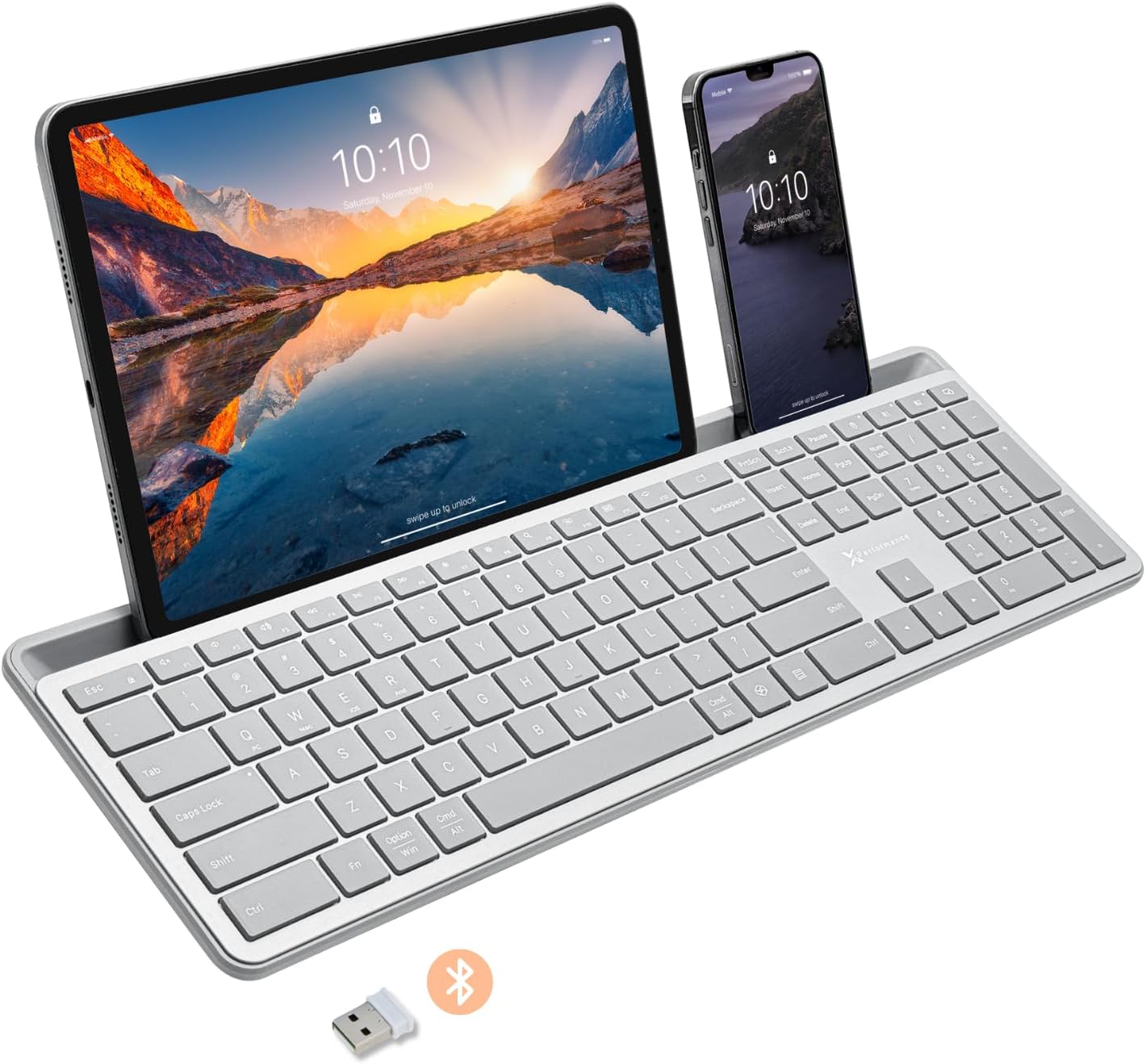
Image: The X9 Full-Size Bluetooth Keyboard in silver, featuring an integrated dock holding a tablet and a smartphone. A USB dongle and Bluetooth symbol are visible below the keyboard.
ቁልፍ ባህሪያት
- የሶስትዮሽ ሁነታ ግንኙነት፡ Seamlessly connect up to three devices using 2.4G wireless (via included USB dongle) and two independent Bluetooth channels.
- Integrated Device Dock: An extra-long dock (16.75" long x 0.45" wide) securely holds your smartphone and tablet simultaneously, allowing for easy transitions between devices. Note: May not fit devices with thick cases.
- የኋላ ብርሃን ቁልፎች Crisp white LED backlighting with 3 adjustable brightness levels for comfortable typing in various lighting conditions.
- ዳግም ሊሞላ የሚችል ባትሪ፡ Equipped with a 1000 mAh rechargeable battery for extended use, with a USB-C charging cable included.
- ባለሙሉ መጠን አቀማመጥ፡- A complete 110-key layout including a numeric keypad for efficient data entry and productivity.
- የብዝሃ-ስርዓተ ክወና ተኳኋኝነት Designed for Windows and Mac users, with seamless compatibility across macOS, iOS, and Android operating systems.
- ጸጥ ያሉ ቁልፎች፡- Keys are designed for a quiet typing experience.

Image: Diagram illustrating the keyboard's ability to pair with up to three devices: a smartphone via Bluetooth (channel 1), a desktop monitor via 2.4GHz wireless (channel 2), and a laptop via Bluetooth (channel 3).

ምስል፡ መቀራረብ view of the keyboard's integrated dock, highlighting its extra-long design and a note indicating its dimensions (0.45" width) and potential incompatibility with thick device cases.

Image: A close-up of the keyboard's side, showing a USB-C cable plugged into the charging port, with text indicating a 1000mAh rechargeable battery.
የጥቅል ይዘቶች
እባክዎ ሁሉም እቃዎች በጥቅሉ ውስጥ መኖራቸውን ያረጋግጡ፡-
- X9 Full-Size Bluetooth Keyboard
- የዩኤስቢ-ሲ ኃይል መሙያ ገመድ
- 2.4ጂ ዩኤስቢ ገመድ አልባ ዶንግሌ
የማዋቀር መመሪያ
1. የቁልፍ ሰሌዳውን መሙላት
Before first use, fully charge the keyboard. Connect the included USB-C charging cable to the keyboard's charging port and the other end to a USB power source (e.g., computer USB port, USB wall adapter). The charging indicator light will show charging status and turn off when fully charged.
2. ከመሳሪያዎች ጋር በመገናኘት ላይ
The X9 keyboard supports three connection channels: one 2.4G wireless channel and two Bluetooth channels (B1 and B2).
2.1. 2.4G ገመድ አልባ ግንኙነት
- Locate the 2.4G USB wireless dongle, typically stored in a compartment on the keyboard.
- የዩኤስቢ ዶንግልን በኮምፒውተርዎ ላይ ወዳለው የዩኤስቢ ወደብ ይሰኩት።
- Turn on the keyboard. The keyboard should automatically connect to your computer via the 2.4G dongle.
2.2. Bluetooth Connection (B1 / B2)
- የቁልፍ ሰሌዳውን ያብሩ.
- ተጭነው ይያዙት። B1 or B2 key for 3-5 seconds until the corresponding indicator light (B1 or B2) starts blinking rapidly. This indicates the keyboard is in pairing mode.
- በመሳሪያዎ (ስማርትፎን፣ ታብሌት፣ ኮምፒውተር) ላይ ወደ ብሉቱዝ ቅንብሮች ይሂዱ እና ብሉቱዝን አንቃ።
- ፈልግ new devices. The keyboard should appear as "X9 Keyboard" or similar.
- Select the keyboard from the list to pair. Follow any on-screen prompts to complete the pairing process. The indicator light will stop blinking and remain solid for a few seconds, then turn off, indicating successful connection.
- Repeat these steps for the second Bluetooth channel (B2) if you wish to connect another device.
የአሠራር መመሪያዎች
1. በተገናኙ መሣሪያዎች መካከል መቀያየር
To switch between your connected devices, simply press the corresponding connection key:
- ተጫን 2.4ጂ key to switch to the device connected via the USB dongle.
- ተጫን B1 በብሉቱዝ ቻናል 1 በኩል ወደተገናኘው መሣሪያ ለመቀየር የሚያስችል ቁልፍ።
- ተጫን B2 በብሉቱዝ ቻናል 2 በኩል ወደተገናኘው መሣሪያ ለመቀየር የሚያስችል ቁልፍ።
2. Adjusting Backlight Brightness
The keyboard features three levels of backlight brightness. To adjust:
- የሚለውን ይጫኑ Fn ቁልፍ + አምፖል key (usually located near the F12 key) repeatedly to cycle through the brightness levels (Low, Medium, High, Off).

Image: A close-up of the keyboard in a dark setting, showcasing its clear backlit keys. Indicators for Low, Medium, and High brightness levels are shown below the keyboard.
3. Using the Copilot AI Key
The keyboard includes a dedicated Copilot AI key for quick access to AI functionalities on compatible systems. Press this key to activate Copilot or similar AI features.
4. Operating System Specific Functions
The keyboard is optimized for various operating systems. Some function keys may behave differently or require the Fn key to access secondary functions depending on your OS (Windows, macOS, iOS, Android).
- For optimal compatibility, ensure your device's operating system is updated.
- Some systems may require specific key combinations (e.g., Fn + Option + R for Android, as mentioned in customer reviews for specific app compatibility). Refer to your device's documentation for advanced keyboard settings.
ጥገና
To ensure the longevity and optimal performance of your X9 keyboard, follow these maintenance guidelines:
- ማጽዳት፡ ለስላሳ፣ ከቆሸሸ ነፃ የሆነ ጨርቅ በትንሹ ተጠቀምampened with water or a mild cleaning solution to wipe the surface of the keyboard. Avoid excessive moisture. For cleaning between keys, use compressed air.
- ማከማቻ፡ የቁልፍ ሰሌዳውን በቀጥታ ከፀሀይ ብርሀን እና ከከፍተኛ ሙቀት ርቆ በቀዝቃዛና ደረቅ ቦታ ያከማቹ።
- የባትሪ እንክብካቤ Avoid fully discharging the battery frequently. For long-term storage, charge the battery to about 50% to preserve its lifespan.
- መፍሰስን ያስወግዱ፡ በውስጣዊ አካላት ላይ ጉዳት እንዳይደርስ ፈሳሾችን ከቁልፍ ሰሌዳው ያርቁ።
መላ መፈለግ
If you encounter issues with your X9 keyboard, refer to the following common problems and solutions:
| ችግር | ሊሆን የሚችል ምክንያት / መፍትሄ |
|---|---|
| የቁልፍ ሰሌዳ አይበራም። | Battery is depleted. Connect the keyboard to a power source using the USB-C cable and allow it to charge. |
| የቁልፍ ሰሌዳ በብሉቱዝ አይገናኝም። |
|
| 2.4G wireless connection not working. |
|
| ቁልፎች ምላሽ እየሰጡ አይደለም ወይም በስህተት እየተየቡ አይደሉም። |
|
| የጀርባ ብርሃን እየሰራ አይደለም። |
|
ዝርዝሮች
| ባህሪ | ዝርዝር |
|---|---|
| የሞዴል ቁጥር | X9RBBLKBDOCKS |
| የግንኙነት ቴክኖሎጂ | 2.4ጂ ገመድ አልባ ፣ ብሉቱዝ |
| ተስማሚ መሣሪያዎች | Laptop, PC, Mac, iOS, Android (Smartphone, Tablet) |
| የቁልፍ ሰሌዳ አቀማመጥ | Full-Size, 110-key |
| የኋላ መብራት | Single Color (White), 3 Brightness Levels |
| የባትሪ አቅም | 1000 ሚአሰ (እንደገና ሊሞላ የሚችል) |
| የምርት ልኬቶች (L x W x H) | 17.33" x 5.56" x 0.89" (44.02 ሴሜ x 14.12 ሴሜ x 2.26 ሴሜ) |
| የእቃው ክብደት | 2.25 ፓውንድ (1.02 ኪ.ግ) |
| Device Dock Dimensions (L x W) | 16.75" x 0.45" |
| አምራች | X9 አፈጻጸም |

ምስል: አንድ በላይ view of the X9 keyboard with measurements indicating its length (17.3"), width (5.55"), and height (0.89").
የዋስትና መረጃ
X9 Performance products are designed for reliability and performance. For specific warranty terms and conditions, please refer to the warranty card included with your product or visit the official X9 Performance website. Typically, products are covered against defects in materials and workmanship for a specified period from the date of purchase.
ድጋፍ
For further assistance, technical support, or to inquire about replacement parts, please contact X9 Performance customer support:
- Webጣቢያ፡ Visit the official X9 Performance webለተደጋጋሚ ጥያቄዎች፣ ሾፌሮች እና የድጋፍ መርጃዎች ጣቢያ።
- ያነጋግሩ፡ በምርት ማሸጊያው ወይም በባለስልጣኑ ላይ የተጠቀሰውን የእውቂያ መረጃ ይመልከቱ webለስልክ ወይም ለኢሜል ድጋፍ ጣቢያ.
Please have your product model number (X9RBBLKBDOCKS) and purchase details ready when contacting support.


