መግቢያ
The ZGCINE NPF-02 is a versatile NP-F battery charger and power adapter designed for photographers and videographers. It supports USB-C Power Delivery (PD) for both input and output, offering 25W fast charging capabilities. Additionally, it features two DC output ports, allowing it to supply power to various devices such as cameras and monitors.
This device is compatible with NP-F series batteries, including F550, F750, and F970 models, providing efficient charging and reliable power distribution for your equipment.
የጥቅል ይዘቶች፡-
- 1x ZGCINE NPF-02 Charger/Adapter
- 1x Clean Cloth
ምርት አልቋልview
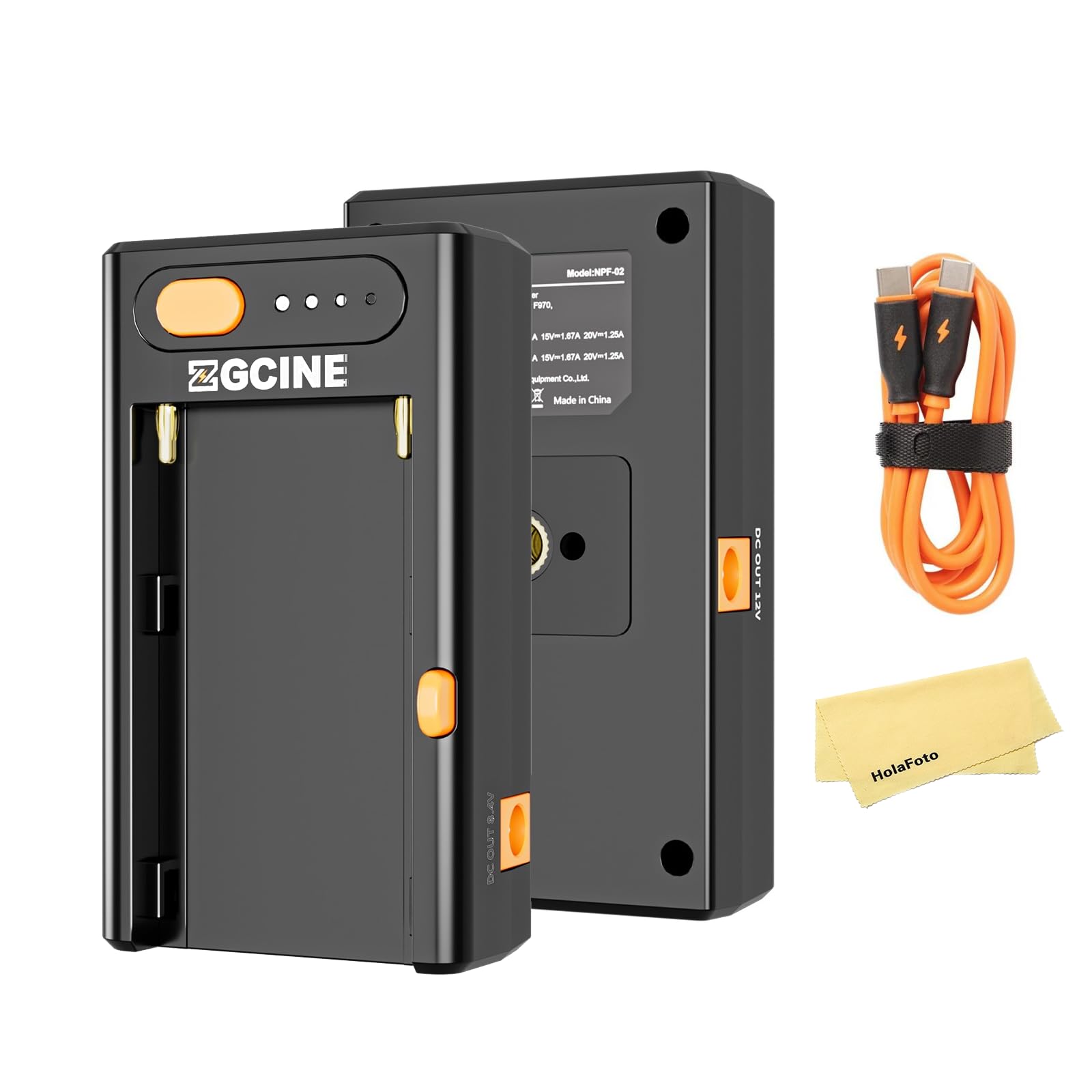
ከፊት እና ከኋላ view of the ZGCINE NPF-02, showcasing የታመቀ ዲዛይን እና የተለያዩ ወደቦች።

The ZGCINE NPF-02 with an NP-F battery inserted, ready for use.
The NPF-02 features a dedicated slot for NP-F batteries, a USB-C PD input/output port, and two DC output ports (8.4V and 12V). It also includes LED indicators to show battery status.
ማዋቀር
- Insert NP-F Battery: Align your NP-F series battery (F550, F750, or F970) with the battery slot on the NPF-02. Gently slide the battery into place until it clicks securely.
- Connect Power Source (for charging): To charge an NP-F battery, connect a USB-C PD compatible power adapter (not included) to the USB-C PD IN/OUT port on the NPF-02 using a USB-C cable. The LED indicators will illuminate to show charging status.
- Connect External Devices (for power output):
- For cameras or monitors requiring 8.4V, connect them to the DC OUT 8.4V port.
- For cameras or monitors requiring 12V, connect them to the DC OUT 12V port.
- For mobile phones or other USB-C powered devices, connect them to the USB-C PD IN/OUT port.

Connecting the USB-C cable to the NPF-02 for charging or power output.
የአሠራር መመሪያዎች
Charging NP-F Batteries
When an NP-F battery is inserted and a USB-C PD power source is connected, the NPF-02 will begin charging the battery. The LED indicators will show the current charge level. Charging times vary by battery model:
- F550 Battery: Approximately 78 minutes for a full charge.
- F750 Battery: Approximately 120 minutes for a full charge.
- F970 Battery: Approximately 200 minutes for a full charge.

Illustration of fast charging capabilities and approximate charging times for different NP-F battery models.
እንደ የኃይል ምንጭ መጠቀም
With an NP-F battery inserted, the NPF-02 can act as a power source for other devices:
- የዲሲ ውፅዓት Connect your camera, monitor, or LED light to the appropriate DC OUT port (8.4V/3A or 12V/3A). Ensure the voltage matches your device's requirements.
- የዩኤስቢ-ሲ ፒዲ ውፅዓት፡- Connect mobile phones, laptops, or other USB-C powered devices to the USB-C PD IN/OUT port. The NPF-02 supports various PD output profiles: 5V/3A, 9V/2.8A, 12V/2.1A, 15V/1.67A, 20V/1.25A.

The NPF-02 connected to a camera and a laptop, demonstrating its multi-functional power output capabilities.
የባትሪ ደረጃ አመልካቾች
The four LED dots on the NPF-02 indicate the approximate battery charge level of the inserted NP-F battery. Press the orange button next to the LEDs to check the current level.
ጥገና
- ማጽዳት፡ Use the provided clean cloth or a soft, dry cloth to wipe the device. Avoid using harsh chemicals or abrasive materials.
- ማከማቻ፡ Store the NPF-02 in a cool, dry place away from direct sunlight and extreme temperatures. Remove the NP-F battery if storing for extended periods.
- አያያዝ፡ መሳሪያውን በጥንቃቄ ይያዙት. እሱን ከመጣል ወይም ለጠንካራ ተጽእኖዎች ከማድረግ ተቆጠብ።
መላ መፈለግ
| ችግር | ሊሆን የሚችል ምክንያት | መፍትሄ |
|---|---|---|
| Device not charging / not powering external devices. |
|
|
| External device (e.g., camera) not entering PD charging mode or not receiving sufficient power. |
|
|
| NP-F battery drains quickly or device stops working after a short period. |
|
|
ዝርዝሮች
| ባህሪ | ዝርዝር |
|---|---|
| ሞዴል | NPF-02 |
| የዩኤስቢ-ሲ ፒዲ ግብዓት/ውጤት | 5V/3A፣ 9V/2.8A፣ 12V/2.1A፣ 15V/1.67A፣ 20V/1.25A (ከፍተኛ 25 ዋ) |
| የዲሲ ውጤት 1 | 8.4V/3A |
| የዲሲ ውጤት 2 | 12V/3A |
| ተኳሃኝ ባትሪዎች | NP-F series (F550, F750, F970) |
| F550 Charging Time | በግምት. 78 ደቂቃዎች |
| F750 Charging Time | በግምት. 120 ደቂቃዎች |
| F970 Charging Time | በግምት. 200 ደቂቃዎች |
| መጠኖች | 3.74 x 3.74 x 0.98 ኢንች |
| ክብደት | 5.3 አውንስ |
| አምራች | ZGCINE |
ይፋዊ የምርት ቪዲዮ
Watch this official video for a visual guide to the ZGCINE NPF-02's features and functionality, including its various ports and how it interacts with NP-F batteries.
ዋስትና እና ድጋፍ
For any questions, technical assistance, or warranty inquiries regarding your ZGCINE NPF-02, please contact the seller directly. If you made your purchase through Amazon, navigate to your Amazon Order Page and click on "problem with this order." The seller, HolaFoto, aims to respond to inquiries within 24 hours during working days.
እባክዎ ለማንኛውም የዋስትና ጥያቄዎች የግዢ ማረጋገጫዎን ያቆዩ።


