1. መግቢያ
ስለገዙ እናመሰግናለንasing the AceGamer RGB Charging Dock for PlayStation Portal. This portable charging station is designed to provide a stable and efficient charging solution for your PlayStation Portal console, featuring customizable RGB lighting and essential protection features. Please read this manual carefully before use to ensure proper operation and maintenance.
2. የጥቅል ይዘቶች
- AceGamer RGB Charging Dock (1 unit)
- የአይነት-ሲ የኃይል መሙያ ገመድ (1 አሃድ)
- የተጠቃሚ መመሪያ (ይህ ሰነድ)
3. የምርት ባህሪዎች
- Dedicated Charging: Specifically designed for the PlayStation Portal console.
- RGB መብራት፡ Features 7 distinct lighting modes for personalized aesthetics.
- ፈጣን ኃይል መሙላት; Efficient power delivery for fast charging.
- የደህንነት ጥበቃ አብሮ የተሰራ ከመጠን በላይ-የአሁኑ፣ ከመጠን በላይ ጥራዝtagሠ, እና ስር-ቮልtage ጥበቃ።
- Ergonomic ንድፍ; 30-degree comfortable viewing angle for the PlayStation Portal.
- የተረጋጋ መሠረት; Equipped with anti-slip mats for secure placement.
- ግንኙነት፡ USB Type-C input for power.
4. የማዋቀር መመሪያዎች
- የግንኙነት ኃይል; Insert the provided Type-C charging cable into the charging dock's input port and connect the other end to a suitable USB power adapter (not included).

Figure 4.1: Connecting the Type-C power cable to the charging dock.
- Place PlayStation Portal: Carefully align your PlayStation Portal console with the charging connector on the dock and gently place it into position. Ensure a secure connection for charging. The dock is designed to hold the Portal at a 30-degree angle for optimal viewing

Figure 4.2: PlayStation Portal placed on the charging dock at a 30-degree angle.
- Anti-slip Stability: The base of the charging dock is equipped with anti-slip mats to prevent accidental movement. Ensure the dock is placed on a flat, stable surface.
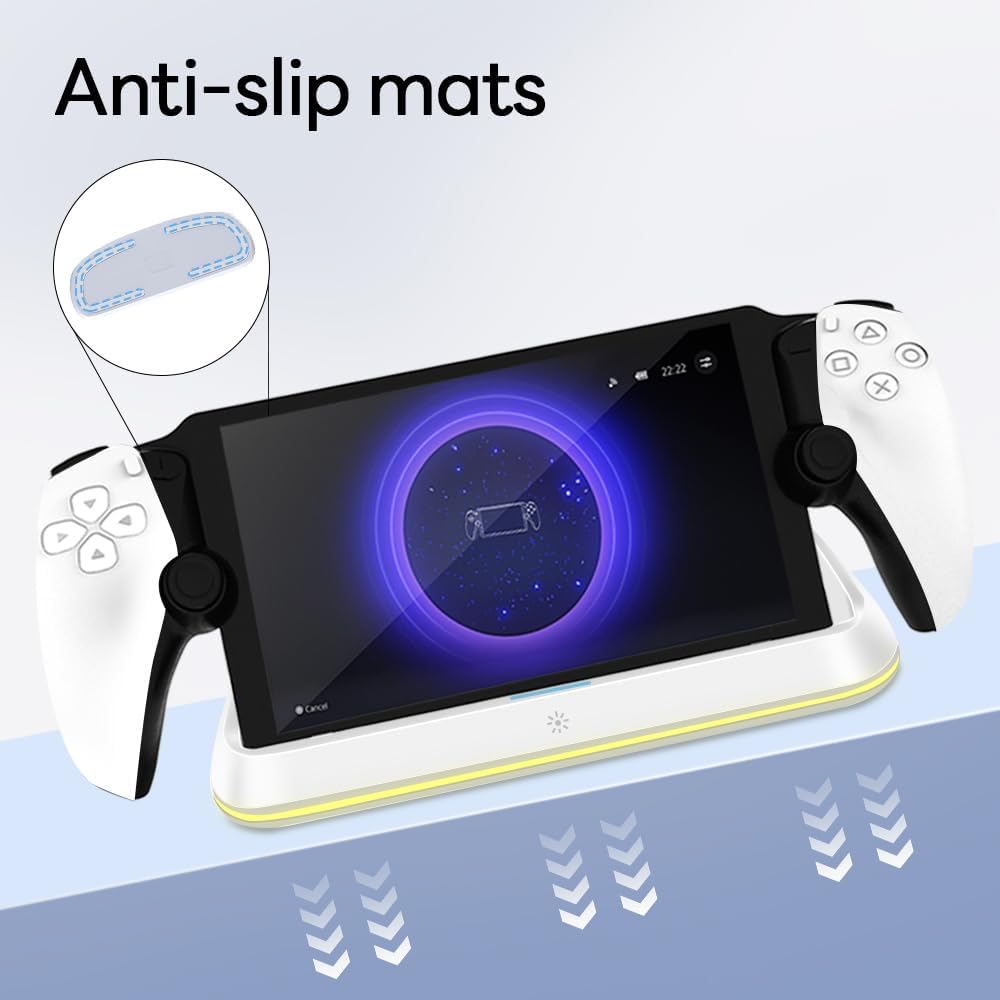
Figure 4.3: Anti-slip mats on the charging dock for enhanced stability.
- የእይታ መመሪያ፡ For a visual demonstration of the setup process, please refer to the video below.
Video 4.1: Demonstration of connecting the power supply and placing the PlayStation Portal onto the charging dock.
5. የአሠራር መመሪያዎች
- Charging the PlayStation Portal: Once the PlayStation Portal is correctly seated on the dock and the dock is powered, charging will begin automatically. A full charge typically takes approximately 3.5 hours. The dock includes protection against over-current, over-voltagሠ, እና ስር-ቮልtage to safeguard your device.

Figure 5.1: Charging indicators and safety protection features.
- RGB የመብራት ቁጥጥር፡- The charging dock features a touch-sensitive button to control the RGB lighting. Press the button to cycle through 7 different lighting modes or to turn the lights off.

Figure 5.2: RGB lighting modes and touch control button.
6. ጥገና
- Keep the charging dock clean and free from dust. Use a soft, dry cloth for cleaning.
- መሳሪያውን ለከፍተኛ ሙቀት፣ እርጥበት ወይም ቀጥተኛ የፀሐይ ብርሃን ከማጋለጥ ይቆጠቡ።
- እነዚህ ጠርዞች መሬቱን ሊጎዱ ስለሚችሉ የማጽጃ ማጽጃዎችን ወይም መሟሟቶችን አይጠቀሙ።
- Ensure the charging port and connector are free of debris before placing the PlayStation Portal.
7. መላ መፈለግ
- መሣሪያ እየሞላ አይደለም፡-
- Ensure the Type-C cable is securely connected to both the dock and the power adapter.
- የኃይል አስማሚው በትክክል እየሰራ መሆኑን እና በቀጥታ መውጫ ላይ መሰካቱን ያረጋግጡ።
- Check if the PlayStation Portal is properly seated on the charging connector.
- የተለየ የType-C ገመድ ወይም የኃይል አስማሚ ለመጠቀም ይሞክሩ።
- የ RGB መብራቶች አይሰሩም:
- Ensure the charging dock is powered on.
- Press the touch light button to cycle through modes or turn the lights on.
- Unstable placement:
- Ensure the dock is placed on a flat, level surface.
- Check if the anti-slip mats are clean and intact.
8. ዝርዝሮች
| የምርት ስም | AceGamer |
| የሞዴል ቁጥር | PS-P-White |
| ተስማሚ መሣሪያዎች | PlayStation ፖርታል |
| ግብዓት Voltage | 5 ቮልት |
| ዋትtage | 7 ዋት |
| የማገናኛ አይነት | ዩኤስቢ ዓይነት-ሲ (ለኃይል ግብዓት) |
| ልዩ ባህሪያት | RGB Lighting, Fast Charging, Over-current Protection, Over-voltage Protection, Under-voltagሠ ጥበቃ |
| መጠኖች | በግምት 22.5 x 8.9 x 8.4 ሴ.ሜ |
| ክብደት | በግምት 290 ግ |
9. ዋስትና እና ድጋፍ
AceGamer products are designed and manufactured to the highest quality standards. For warranty information or technical support, please contact the retailer where you purchased the product or visit the official AceGamer website for customer service contact details. Please retain your proof of purchase for warranty claims.


