1. መግቢያ
This manual provides detailed instructions for the installation, operation, and maintenance of your Reobiux D20-1P 2K Outdoor Surveillance Camera. Please read this manual thoroughly before using the product to ensure proper functionality and safety.
2. የጥቅል ይዘቶች
ከዚህ በታች የተዘረዘሩት ሁሉም እቃዎች በጥቅልዎ ውስጥ መያዛቸውን ያረጋግጡ። ማንኛቸውም እቃዎች ከጠፉ ወይም ከተበላሹ፣ እባክዎ የደንበኛ ድጋፍን ያግኙ።
- 1x Reobiux D20-1P Solar PTZ Camera
- 1x Solar Collector
- 1 x የተጠቃሚ መመሪያ
- 1 x የመጫኛ መሠረት
- 1x Power Supply (for initial charging)
- 1 x የዊንች ቦርሳ (ለመጫኛ)
- 1x Type-C Charging Line
3. ምርት አብቅቷልview
The Reobiux D20-1P is a 2K outdoor surveillance camera designed for comprehensive home security. It features dual lenses, 360° Pan-Tilt-Zoom (PTZ) capabilities, and operates wirelessly via Wi-Fi. Key features include PIR motion detection, color night vision, two-way audio, and an IP66 weatherproof rating, powered by a solar panel and rechargeable battery.
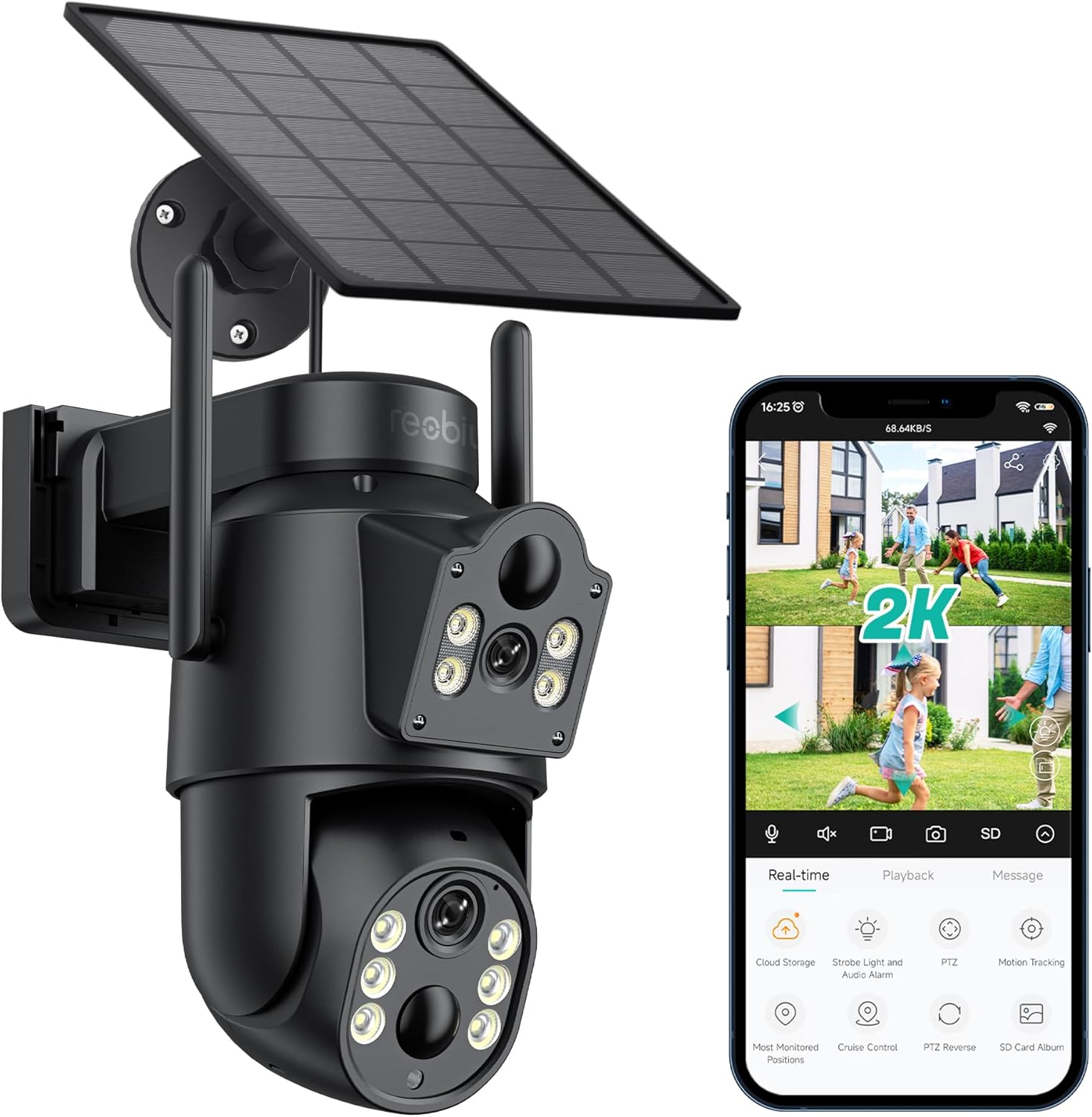
ምስል 3.1፡ Reobiux D20-1P Solar PTZ Camera and its mobile application interface showing real-time monitoring, playback, and various control options.
ቁልፍ ባህሪዎች
- 2K QHD High Resolution: ግልጽ እና ዝርዝር የቪዲዮ foo ያቀርባልtage.
- ባለሁለት ሌንስ ዲዛይን፡ Combines a fixed lens with a rotating lens for comprehensive coverage.
- 360° PTZ Functionality: Allows remote control of pan, tilt, and zoom for flexible viewing ማዕዘኖች.
- በፀሐይ ኃይል የሚሞላ ባትሪ ያለው፤ Ensures continuous operation with minimal manual charging.
- የ PIR እንቅስቃሴ ማወቂያ Intelligently detects human movement to reduce false alarms.
- የቀለም የምሽት እይታ; Offers full-color video even in low-light conditions, alongside infrared night vision.
- ባለሁለት መንገድ ኦዲዮ፡- Enables communication with visitors or deterrence of intruders.
- IP66 የአየር ሁኔታ መከላከያ; የተለያዩ የውጪ የአየር ሁኔታዎችን ለመቋቋም የተነደፈ።
- Wireless Wi-Fi Connectivity: Easy setup and remote access via smartphone.
4. የማዋቀር መመሪያ
4.1 የመጀመሪያ ደረጃ መሙላት
Before first use, fully charge the camera's internal battery using the provided Type-C charging line and power supply. This ensures the camera has sufficient power for initial setup and operation, especially if solar charging conditions are not optimal immediately after installation.
4.2 የመተግበሪያ ጭነት እና የመለያ ፈጠራ
- አውርድ አይ ሲ ይመልከቱ ከስማርትፎንዎ የመተግበሪያ መደብር (iOS App Store ወይም Google Play Store) የመጣ መተግበሪያ።
- መተግበሪያውን ይጫኑ እና ይክፈቱት።
- አዲስ መለያ ለመፍጠር የማያ ገጽ ላይ መመሪያዎችን ይከተሉ ወይም አስቀድመው ካለዎት ይግቡ።
4.3 Camera Connection to Wi-Fi
- Ensure your camera is powered on.
- In the iCSee app, tap the "+" icon to add a new device.
- Select the option for "Wi-Fi Camera" or "Add Device by AP Hotspot" (refer to app for exact wording).
- Follow the app's instructions to connect the camera to your 2.4GHz Wi-Fi network. You may need to scan a QR code displayed on your phone with the camera, or listen for a sound prompt.
- አንዴ ከተገናኘ በኋላ፣ ካሜራዎን ስም መስጠት እና ክትትል መጀመር ይችላሉ።
4.4 ካሜራውን መጫን
Choose a location that provides optimal surveillance coverage and receives direct sunlight for the solar panel. Ensure the camera is within range of your Wi-Fi network.
- ቦታ ይምረጡ፡- Identify a suitable wall or surface for mounting. Consider the camera's viewing angle (355° pan, 90° tilt) and the solar panel's exposure to sunlight.
- የመሰርሰሪያ ነጥቦችን ምልክት ያድርጉ፡ Use the mounting base as a template to mark the screw holes on the wall.
- ጉድጓዶች ቁፋሮ; ምልክት በተደረገባቸው ቦታዎች ላይ የሙከራ ቀዳዳዎችን ይቆፍሩ። አስፈላጊ ከሆነ የግድግዳ መልሕቆችን ያስገቡ።
- Attach Mounting Base: Secure the mounting base to the wall using the provided screws.
- ካሜራ አያይዝ፡ ካሜራውን በተጠበቀው መሠረት ላይ ይጫኑት።
- የፀሐይ ፓነልን ማስተካከል; Position the solar panel to maximize sunlight exposure throughout the day.

ምስል 4.1፡ Illustration of the camera mounted with its solar panel, highlighting the fixed and rotating lenses and the benefit of continuous solar power.
5. የአሠራር መመሪያዎች
5.1 ቀጥታ ስርጭት View እና መልሶ ማጫወት
Open the iCSee app and select your camera to access the live viewከዚህ፣ የሚከተሉትን ማድረግ ይችላሉ፦
- የእውነተኛ ጊዜ ክትትል; View የቀጥታ ቪዲዮ ምግብ.
- PTZ ቁጥጥር Use the on-screen joystick to pan (355°) and tilt (90°) the camera.
- ዲጂታል ማጉላት፡ Pinch to zoom on the live feed.
- መልሶ ማጫወት፡ መዳረሻ ተመዝግቧል footage stored on the SD card or cloud storage.

ምስል 5.1፡ Demonstrates the superior clarity of 2K QHD resolution compared to 1080P, providing more details for monitoring.
5.2 የእንቅስቃሴ ማወቂያ እና ማንቂያዎች
The camera utilizes PIR (Passive Infrared) intelligent detection to identify human movement, minimizing false alarms from pets or swaying branches.
- አንቃ/አሰናክል፡ በመተግበሪያው ቅንብሮች ውስጥ የእንቅስቃሴ ማወቅን ያግብሩ ወይም ያቦዝኑ።
- የስሜታዊነት ማስተካከያ; Adjust the PIR sensor's sensitivity to suit your environment.
- የማንቂያ ማሳወቂያዎች፡- እንቅስቃሴ ሲገኝ በስማርትፎንዎ ላይ ፈጣን የግፊት ማሳወቂያዎችን ይቀበሉ።
- የድምፅ እና የብርሃን ማንቂያ; Configure the camera to trigger a strobe light and audible alarm upon detection.

ምስል 5.2፡ The camera's PIR intelligent detection distinguishes human movement from other objects, reducing unnecessary alerts.

ምስል 5.3፡ When motion is detected, the camera can send real-time push notifications and activate a sound and light alarm to deter intruders.
5.3 የምሽት እይታ ሁነታዎች
The camera offers two night vision modes for clear visibility in the dark:
- Spotlight Full Color Night Vision: Utilizes built-in spotlights to provide full-color video in low-light conditions.
- Spotlight Infrared Night Vision: Uses infrared LEDs for black-and-white video in complete darkness, with a range of up to 30 meters.
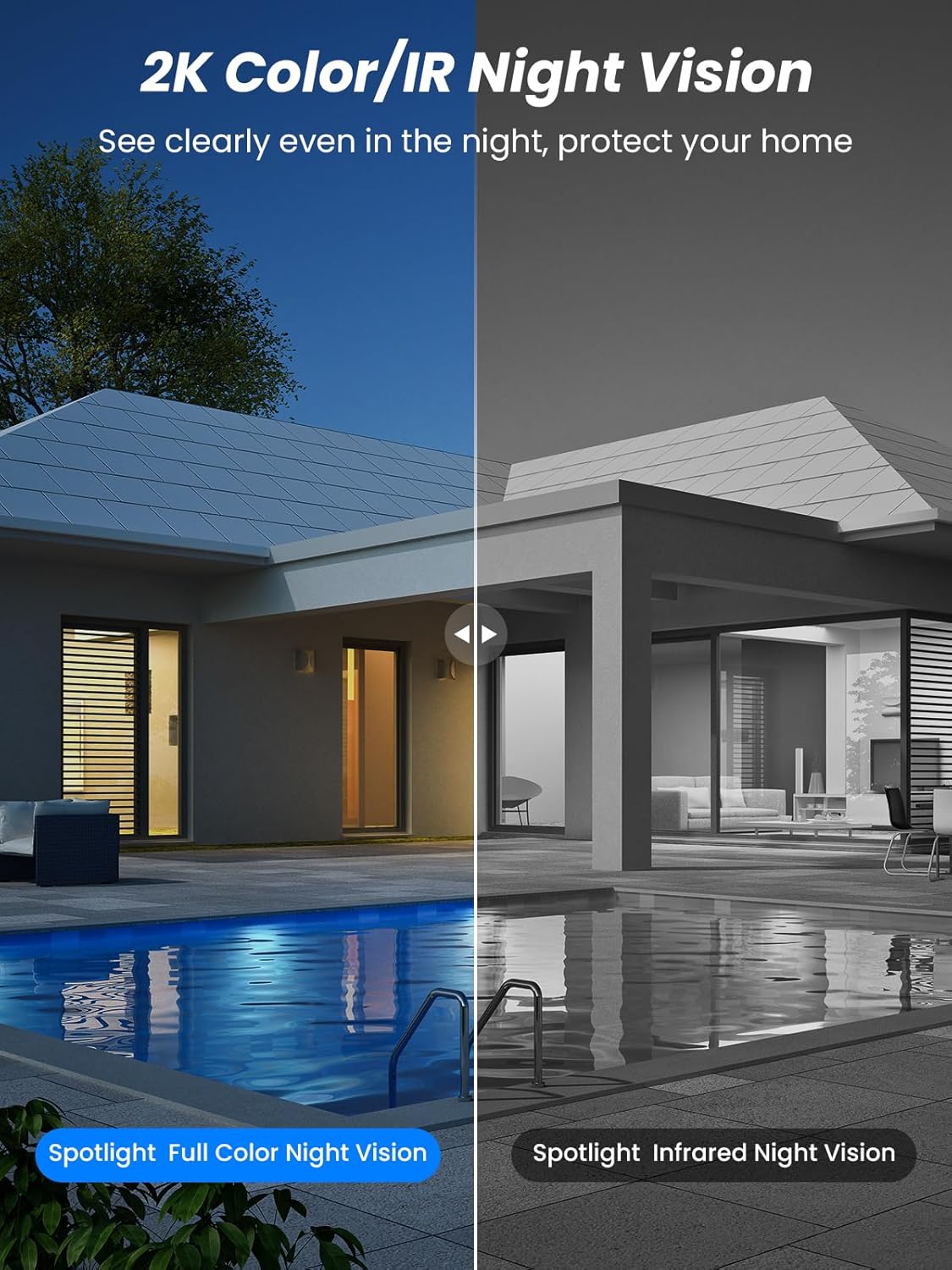
ምስል 5.4፡ Illustrates the difference between full-color night vision, enabled by spotlights, and traditional infrared night vision.
5.4 ባለ ሁለት መንገድ ኦዲዮ
The integrated microphone and speaker allow for two-way communication.
- ተናገር፡ በካሜራው ድምጽ ማጉያ በኩል ለመናገር በመተግበሪያው ውስጥ ያለውን የማይክሮፎን አዶ መታ ያድርጉ።
- ያዳምጡ፡ የካሜራው ማይክሮፎን ከአካባቢው ድምጽን ይይዛል።

ምስል 5.5፡ The two-way audio function allows for direct communication through the camera, useful for interacting with visitors or delivery personnel.
6. ጥገና
- ማጽዳት፡ በየጊዜው የካሜራውን ሌንስ እና የፀሐይ ፓነልን በሶላር ያፅዱ፣ መamp ጥሩ አፈጻጸም እና የምስል ጥራትን ለማረጋገጥ ጨርቅ። የማጽጃ ማጽጃዎችን ያስወግዱ።
- የባትሪ ጤና፡ While solar-powered, extreme weather or prolonged periods of low sunlight may require manual charging. Monitor battery levels via the app.
- የጽኑዌር ዝማኔዎች ፦ Check the iCSee app regularly for available firmware updates to ensure your camera has the latest features and security enhancements.
- የአየር ሁኔታ ጥበቃ; The camera is IP66 weatherproof, designed to withstand rain, snow, and sun. However, ensure all connections are secure to maintain water resistance.

ምስል 6.1፡ The IP66 rating ensures the camera's durability and functionality in various outdoor weather conditions, including snow, rain, and direct sunlight.
7. መላ መፈለግ
- ካሜራ ከWi-Fi ጋር አልተገናኘም፡-
- Ensure the camera is within range of your 2.4GHz Wi-Fi network. 5GHz networks are not supported.
- የWi-Fi ይለፍ ቃልዎ ትክክል መሆኑን ያረጋግጡ።
- ራውተርዎን እና ካሜራውን እንደገና ያስጀምሩ።
- If issues persist, try resetting the camera (refer to app or product for reset button location).
- Battery not charging or draining quickly:
- Ensure the solar panel is clean and receives direct sunlight for several hours daily.
- በፀሐይ ፓነል እና በካሜራ መካከል ያለውን ግንኙነት ያረጋግጡ።
- If in a low-light environment, manually charge the camera using the Type-C cable.
- ተደጋጋሚ የእንቅስቃሴ ማወቂያ ክስተቶች ወይም በቀጥታ ስርጭት view streaming can consume battery faster. Adjust settings if needed.
- የሐሰት እንቅስቃሴ ማወቂያ ማንቂያዎች፡
- Adjust the PIR motion detection sensitivity in the iCSee app.
- Ensure the camera is not pointed at areas with constant movement (e.g., busy roads, swaying trees) if not intended for monitoring.
- ደካማ የምስል ጥራት;
- የካሜራውን ሌንስ ያጽዱ.
- በተለይም በሌሊት ጥሩ የምስል ቀረጻ ለማድረግ በቂ ብርሃን ያረጋግጡ።
- የWi-Fi ምልክትዎን ጥንካሬ ያረጋግጡ፤ ደካማ ምልክት የቪዲዮ ዥረት ጥራትን ሊጎዳ ይችላል።
8. ዝርዝሮች
| ባህሪ | ዝርዝር |
|---|---|
| የሞዴል ስም | D20-1 ፒ |
| የቪዲዮ ቀረጻ ጥራት | 2.5 ኪ |
| ውጤታማ የቪዲዮ ጥራት | 2ኬ QHD |
| ገመድ አልባ የመገናኛ ቴክኖሎጂ | ዋይ ፋይ (2.4GHz) |
| የቅጽ ምክንያት | ጉልላት |
| Viewማእዘን | 355 ዲግሪ (ፓን)፣ 90 ዲግሪ (ማጋደል) |
| የመጫኛ ዓይነት | ግድግዳ ላይ የተገጠመ |
| የምሽት ራዕይ ክልል | 30 ሜትር |
| የፍሬም መጠን | 25 fps |
| ቁሳቁስ | ፕላስቲክ |
| ጥራዝtage | 12 ቮልት (ዲሲ) |
| ዋትtage | 5 ዋት |
| የኃይል ምንጭ | በባትሪ የተጎላበተ፣ በፀሐይ የሚሠራ |
| ባትሪዎች | 3 ሊቲየም አዮን ባትሪዎች (ተጨምሯል) |
| የግንኙነት ፕሮቶኮል | ዋይ ፋይ |
| የመቆጣጠሪያ አይነት | iCSee መተግበሪያ |
| ልዩ ባህሪያት | Night Vision (Color/IR), PIR Motion Detection, Two-Way Audio, IP66 Weatherproof |
| የእቃው ክብደት | 1.06 ኪ.ግ |
| የፓርሴል ልኬቶች | 21.7 x 19.5 x 13.8 ሴ.ሜ |
9. ዋስትና እና ድጋፍ
Reobiux offers a የ 1 ዓመት ዋስትና for this product. For any issues or inquiries, please do not hesitate to reach out to our customer service. We provide 20 hours of online service to assist you.
For support, please refer to the contact information provided with your purchase or within the iCSee application.


