1. መግቢያ
The BUSICOM PC-SeaV15c is a 15-inch Windows IoT touch panel PC designed for commercial and industrial applications. This manual provides essential information for the safe and efficient setup, operation, and maintenance of your device. Please read this manual thoroughly before using the product and retain it for future reference.
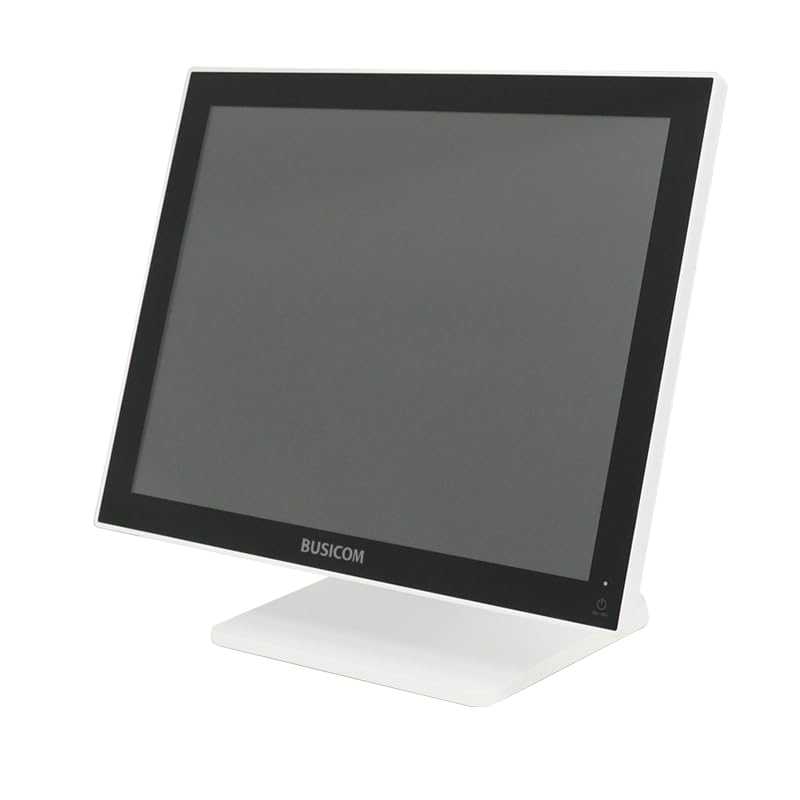
ምስል 1: የፊት view of the BUSICOM PC-SeaV15c Touch Panel PC.
2. ምርት አብቅቷልview
2.1 ቁልፍ ባህሪያት
- የላቀ ንድፍ፡ Features an ultra-thin bezel and a highly durable 7H reinforced display for enhanced aesthetics and protection.
- የላቀ አፈጻጸም፡ Equipped with Microsoft Windows 10 IoT Enterprise, ensuring long-term support and reliable operation.
- የሚታወቅ የመዳሰሻ ፓነል Utilizes a capacitive touch method, offering a familiar and responsive touch experience similar to smartphones and tablets.
- ቀላል ጥገና; Designed for simple RAM and SSD replacement, facilitating upgrades and servicing.
- ሁለገብ በይነገጾች፡ Provides a wide range of connectivity options to integrate with various peripherals.
- ውጤታማ ማከማቻ; SSD storage ensures fast processing speeds, quiet operation, and excellent shock resistance.
2.2 ክፍሎች
The package typically includes the BUSICOM PC-SeaV15c unit and a power adapter. Additional accessories may vary.

Figure 2: Front and side profile of the PC-SeaV15c unit.

ምስል 3: የኋላ view showing access panels for RAM and SSD components.
3. የማዋቀር መመሪያዎች
3.1 ማሸግ
- Carefully remove the PC-SeaV15c from its packaging.
- Check for any visible damage. If damaged, contact your vendor immediately.
- ሁሉም የተዘረዘሩ ክፍሎች መኖራቸውን ያረጋግጡ።
3.2 ማገናኛ ፔሪፈራል
Refer to the interface diagram below for port locations and types.

Figure 4: Detailed diagram of the PC-SeaV15c's rear and bottom interfaces.
- የኃይል ግንኙነት; Connect the provided power adapter to the DC In port and then to a power outlet.
- የዩኤስቢ መሣሪያዎች፡- Use the USB 2.0 (4 ports) and USB 3.0 (2 ports) for connecting keyboards, mice, printers, and other USB peripherals.
- የአውታረ መረብ ግንኙነት፡- Connect an Ethernet cable to the LAN port for wired network access.
- የድምጽ ውፅዓት፡- Connect external speakers or headphones to the Audio Out port.
- Serial Ports (RJ45): Utilize COM1, COM2, COM3, and COM6 for connecting specialized POS peripherals such as barcode scanners or receipt printers.
- Cash Drawer (RJ11): Connect a compatible cash drawer to the RJ11 port.
- ውጫዊ ማሳያ If an external monitor is required, connect it to the Mini DisplayPort.
- የዩኤስቢ ዓይነት-C፡ ለተኳሃኝ መሳሪያዎች።
3.3 ማብራት / ማጥፋት
- አብራ፡ Press the power button located on the upper right side of the display bezel or the power mark on the rear panel.
- ኃይል ዝጋ: To safely shut down the system, use the standard Windows shutdown procedure. Avoid direct power disconnection during operation to prevent data loss.
4. የአሠራር መመሪያዎች
4.1 Windows 10 IoT Enterprise
The PC-SeaV15c operates on Windows 10 IoT Enterprise 2021. Familiarize yourself with the Windows operating system for basic navigation, application management, and system settings.
4.2 Touch Panel Usage
The capacitive touch screen supports multi-touch gestures.
- መታ ያድርጉ፡ ከመዳፊት ጠቅታ ጋር እኩል ነው።
- ሁለቴ መታ ከድርብ-ጠቅታ ጋር እኩል ነው።
- ተጭነው ይያዙ፡ ከቀኝ-ጠቅታ ጋር እኩል ነው።
- ያንሸራትቱ ለማሸብለል ወይም ለማሰስ።
- መቆንጠጥ-ለማጉላት፡ ለማጉላት ወይም ለማውጣት ሁለት ጣቶችን ይጠቀሙ።
5. ጥገና
5.1 መሳሪያውን ማጽዳት
- ከማጽዳትዎ በፊት ሁልጊዜ መሳሪያውን ያጥፉ እና ከኤሌክትሪክ ጋር ያላቅቁ።
- ለስላሳ፣ ከቆሸሸ ነፃ የሆነ ጨርቅ በትንሹ ተጠቀምampበውሃ የታሸገ ወይም የማይበላሽ የስክሪን ማጽጃ።
- Do not spray liquids directly onto the screen or device.
- ኃይለኛ ኬሚካሎችን፣ መፈልፈያዎችን ወይም ሻካራ ቁሶችን ከመጠቀም ይቆጠቡ።
5.2 RAM and SSD Replacement
The PC-SeaV15c is designed for easy replacement of RAM and SSD components. Refer to Figure 3 for the access panel location. For detailed instructions on component replacement, consult a qualified technician or the BUSICOM support webጣቢያ.
6. መላ መፈለግ
ይህ ክፍል ሊያጋጥሙህ ለሚችሉ የተለመዱ ጉዳዮች መፍትሄዎችን ይሰጣል።
- መሣሪያው አይበራም፦
- የኃይል አስማሚው ከመሣሪያው እና ከሚሠራው የኃይል ምንጭ ጋር ደህንነቱ በተጠበቀ ሁኔታ መገናኘቱን ያረጋግጡ።
- ሌላ መሳሪያ በመጫን የኃይል ማከፋፈያው የሚሰራ መሆኑን ያረጋግጡ።
- የንክኪ ማያ ገጽ ምላሽ አይሰጥም፦
- መሣሪያውን እንደገና ያስጀምሩ.
- ስክሪኑ ንፁህ እና ከጉዳቶች የጸዳ መሆኑን ያረጋግጡ።
- ማሳያ የለም፡
- መሣሪያው በርቶ ከሆነ ያረጋግጡ።
- If an external display is connected, ensure the correct input source is selected on the external display.
- Peripheral not detected:
- Ensure the peripheral is correctly connected to the appropriate port (USB, LAN, COM).
- ተጓዳኝ ክፍሉን ከተለየ ወደብ ጋር ለማገናኘት ይሞክሩ።
- Check the peripheral's own power supply, if applicable.
For further assistance, please contact BUSICOM customer support.
7. ዝርዝሮች
| ባህሪ | ዝርዝር |
|---|---|
| የምርት ስም | BUSICOM |
| የሞዴል ስም | PC-SeaV15c |
| ቀለም | ነጭ |
| የስክሪን መጠን | 15 ኢንች |
| ጥራት | 1024x768 |
| ስርዓተ ክወና | ዊንዶውስ 10 አይኦ ኢንተርፕራይዝ 2021 |
| ሲፒዩ ብራንድ | ኢንቴል |
| ፕሮሰሰር ሶኬት | Intel® N97 |
| የሲፒዩ ፍጥነት | 3.6 ጊኸ |
| የማህደረ ትውስታ አይነት | DDR4 |
| ራም ተጭኗል | 4 ጊባ |
| የሃርድ ዲስክ አይነት | ኤስኤስዲ |
| የኤስኤስዲ አቅም | 128 ጊባ (እንደ የምርት ርዕስ) |
| ግራፊክስ ካርድ ዓይነት | የተዋሃደ |
| VRAM Type | DDR4 SDRAM |
| VRAM Capacity | 4 ጊባ |
| ዩኤስቢ 2.0 ወደቦች | 4 |
| ዩኤስቢ 3.0 ወደቦች | 2 |
| ኦፕቲካል ድራይቭ | ምንም |
| የምርት ክብደት | 6 ኪ |
| ቁመት (በግምት) | 307.5 mm (as per dimension diagram) |

ምስል 5: የኋላ view of the PC-SeaV15c with approximate height dimension.
8. ዋስትና እና ድጋፍ
For warranty information and technical support, please refer to the warranty card included with your product or visit the official BUSICOM webጣቢያ. ለዋስትና ጥያቄዎች የግዢ ደረሰኝዎን እንደ ግዢ ማረጋገጫ ያቆዩት።
BUSICOM Official Webጣቢያ፡ BUSICOM Store on Amazon.co.jp


