መግቢያ
Thank you for choosing the Oraimo Traveler Link 20 Power Bank. This device is designed to provide reliable portable power for your electronic devices. With a high capacity of 20000mAh and multiple built-in charging cables, it offers convenient and efficient charging on the go. Please read this manual carefully to ensure proper use and optimal performance.
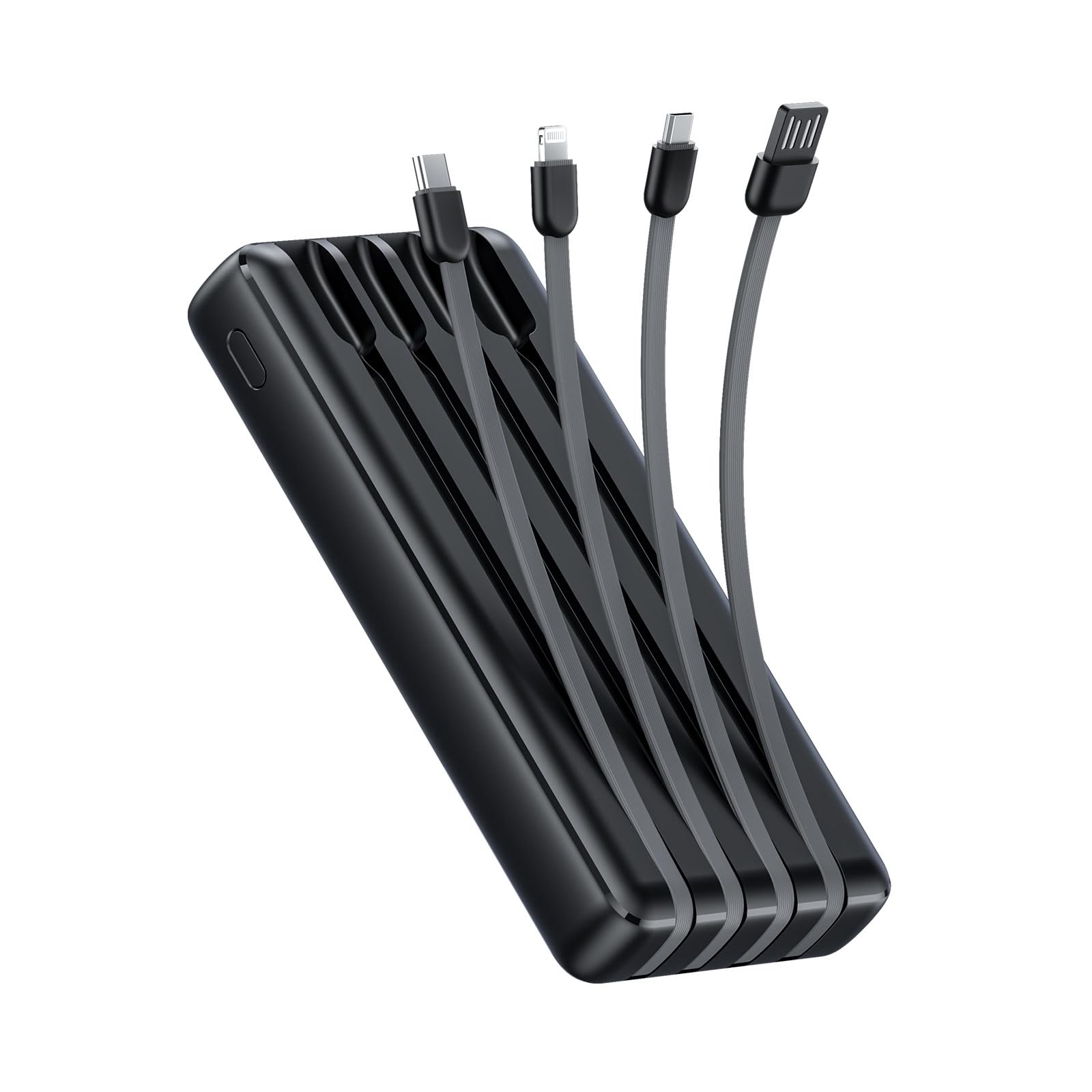
Image: The Oraimo Traveler Link 20 Power Bank, showcasing its compact design and integrated cables.
ማዋቀር
የመነሻ ኃይል መሙላት
Before first use, fully charge your Oraimo Traveler Link 20 Power Bank. This ensures the battery is calibrated and ready for optimal performance.
- Connect the power bank to a power source using one of the built-in recharging cables (USB-A, Type-C, or Micro-USB) or an external USB-A to Type-C/Micro-USB cable.
- የኃይል መሙያውን ሁኔታ ለማሳየት በኃይል ባንክ ላይ ያሉት የ LED አመልካቾች ያበራሉ።
- Once all LED indicators are solid, the power bank is fully charged. Disconnect it from the power source.
አካላትን መለየት
Familiarize yourself with the power bank's features:
- አብሮገነብ የኃይል መሙያ ኬብሎች፡ Includes Type-C, Micro-USB, and Lightning cables for charging various devices.
- Built-in Recharging Cable: A USB-A cable is integrated for convenient recharging of the power bank itself.
- USB-A የውጤት ወደብ፡- An additional USB-A port for charging devices using your own cable.
- የ LED አመልካቾች የቀረውን የባትሪ ደረጃ እና የኃይል መሙያ ሁኔታን ያሳዩ።
- የኃይል ቁልፍ፡- Activates the power bank and controls the LED flashlight.
- የ LED የእጅ ባትሪ; Integrated light for emergency use.
የአሠራር መመሪያዎች
መሣሪያዎችዎን በመሙላት ላይ
The Traveler Link 20 allows you to charge up to four devices simultaneously using its built-in cables and USB-A output port.
- Select the appropriate built-in cable (Type-C, Micro-USB, or Lightning) for your device.
- ገመዱን ከመሳሪያዎ የኃይል መሙያ ወደብ ጋር ያገናኙ።
- Alternatively, use your own USB charging cable with the dedicated USB-A output port.
- The power bank will automatically begin charging your device(s). The LED indicators will show the power bank's remaining charge.

ምስል፡ መቀራረብ view of the Oraimo Traveler Link 20 showing its integrated Type-C, Micro-USB, and Lightning charging cables.

Image: The power bank simultaneously charging a smartphone, a smartwatch, and a portable toothbrush, demonstrating its multi-output capability.

Image: The Oraimo Traveler Link 20 demonstrating wide compatibility with various devices including iOS smartphones, Android smartphones, and accessories like earbuds.

Image: An illustration highlighting the 20000mAh capacity of the Oraimo Traveler Link 20, capable of fully charging a phone multiple times.
የኃይል ባንክን እንደገና መሙላት
The power bank can be recharged using its built-in USB-A cable or via its Type-C or Micro-USB input ports.
- Using Built-in USB-A Cable: Plug the integrated USB-A cable into a USB wall adapter, computer USB port, or other USB power source.
- Using Type-C or Micro-USB Input: Connect a compatible cable (not included for these inputs) to the respective port on the power bank and then to a power source.
- የ LED አመልካቾች ባትሪ በሚሞላበት ጊዜ ብልጭ ድርግም ይላሉ እና ሙሉ በሙሉ ሲሞሉ ጠንካራ ሆነው ይቆያሉ።

Image: The power bank being recharged via its built-in USB-A cable connected to a power strip, and also showing an alternative recharge method using a Type-C cable and wall adapter.
የ LED የእጅ ባትሪ ተግባር
The power bank includes a built-in LED flashlight with an SOS light alarm function for emergencies.
- የእጅ ባትሪውን ለማብራት/ለማጥፋት፦ Long press the power button for approximately 3 seconds.
- የኤስኦኤስ ሁነታን ለማንቃት፡- While the flashlight is on, short press the power button to cycle through modes (steady light, SOS flashing).

Image: The Oraimo Traveler Link 20 with its LED flashlight illuminated, demonstrating its emergency lighting capability.
ዝቅተኛ የአሁኑ የኃይል መሙያ ሁነታ
The power bank automatically detects and switches to low current charging mode for small devices like wireless earbuds or smartwatches, preventing damage from overcurrent.
- Simply connect your low-current device. The power bank will intelligently adjust the output.
ጥገና
To ensure the longevity and safe operation of your Oraimo Traveler Link 20 Power Bank, follow these maintenance guidelines:
- ማከማቻ፡ የኃይል ባንኩን በቀጥታ ከፀሀይ ብርሀን እና ከከፍተኛ ሙቀት ርቆ በቀዝቃዛና ደረቅ ቦታ ያከማቹ።
- ማጽዳት፡ የኃይል ባንኩን ውጫዊ ክፍል ለማጽዳት ለስላሳ እና ደረቅ ጨርቅ ይጠቀሙ። ፈሳሽ ማጽጃዎችን ወይም የማጽጃ ቁሳቁሶችን አይጠቀሙ።
- አካላዊ ጉዳትን ያስወግዱ; የኃይል ባንኩን አይጣሉት፣ አይወጉት ወይም አያሰራጩት። ለውሃ ወይም ለከፍተኛ እርጥበት እንዳያጋልጡት።
- መደበኛ መሙላት፡ ለረጅም ጊዜ ጥቅም ላይ የማይውል ከሆነ የባትሪውን ጤና ለመጠበቅ ቢያንስ በየሶስት ወሩ አንድ ጊዜ የኃይል ባንኩን ይሙሉ።
መላ መፈለግ
ከኃይል ባንክዎ ጋር ችግሮች ካጋጠሙዎት የሚከተሉትን የተለመዱ ችግሮች እና መፍትሄዎች ይመልከቱ፡
| ችግር | ሊሆን የሚችል ምክንያት | መፍትሄ |
|---|---|---|
| የኃይል ባንክ መሣሪያዎችን እየሞላ አይደለም። | Low battery; incorrect cable connection; device incompatibility. | Ensure power bank is charged. Check cable connections. Verify device compatibility. |
| የኃይል ባንክ እየሞላ አይደለም. | Faulty charging cable/adapter; power source issue. | Try a different charging cable and wall adapter. Ensure the power source is active. |
| ቀስ ብሎ መሙላት። | Using a non-fast charging adapter; multiple devices connected; cable quality. | Use a compatible fast-charging adapter. Disconnect other devices. Use high-quality cables. |
| የ LED የእጅ ባትሪ አይሰራም። | የተሳሳተ አሠራር፤ ባትሪው ዝቅተኛ ነው። | Long press the power button for 3 seconds. Recharge the power bank. |
The Oraimo Traveler Link 20 features a multi-protection system (over-current, short-circuit, over-discharge, high/low-temperature charging/discharge, overcharge, output overvoltage) to protect itself and your devices. If the power bank stops functioning, it might be due to one of these protection mechanisms activating. Disconnect all devices and cables, then try again after a few minutes.

Image: Diagram illustrating the multi-protection system of the Oraimo Traveler Link 20, highlighting various safety features.
የምርት ዝርዝሮች
| ባህሪ | ዝርዝር |
|---|---|
| የሞዴል ስም | Traveler Link 20 |
| የሞዴል ቁጥር | OPB-P5201 |
| የምርት ስም | ኦራኢሞ |
| የባትሪ አቅም | 20000mAh (ሊቲየም አዮን) |
| የውጤት ኃይል | Up to 12W (5V/2.4A Max) |
| ግብዓት Voltage | 5V |
| የማገናኛ አይነት | USB Type-C, USB Type-A, Micro USB (built-in cables: Type-C, Micro-USB, Lightning; built-in recharging cable: USB-A) |
| ልዩ ባህሪያት | 4 Built-in Charging & Recharging Cables, Charge up to 4 devices simultaneously, Multi-protection System, LED Flashlight with SOS, Low Current Protection |
| መጠኖች | 20.5 x 3 x 11 ሴ.ሜ |
| ክብደት | 200 ግራም |
| ቀለም | ጥቁር |
ዋስትና እና ድጋፍ
Oraimo products are manufactured to the highest quality standards. This product is covered by a limited warranty from the date of purchase. Please refer to the warranty card included in your product packaging for specific terms and conditions.
For technical support, troubleshooting assistance, or warranty claims, please contact Oraimo customer service through their official webጣቢያ ወይም በምርት ሰነድዎ ውስጥ የተካተተውን የእውቂያ መረጃ። የግዢ ማረጋገጫዎን ለዋስትና ማረጋገጫ ያስቀምጡ።


