መግቢያ
This manual provides detailed instructions for the installation, operation, and maintenance of your darkFlash DB330M Micro-ATX PC Case. Please read this manual thoroughly before beginning assembly to ensure proper setup and safe usage. The DB330M case features a 270° panoramic tempered glass panel, pre-installed PWM ARGB fans, and a high-speed I/O panel.
የደህንነት መረጃ
- በፒሲ መያዣ ውስጥ ያሉትን ማንኛውንም ክፍሎች ከመጫንዎ ወይም ከማገልገልዎ በፊት ሁልጊዜ የኃይል አቅርቦቱን ከግድግዳ ሶኬት ያላቅቁ።
- Handle tempered glass panels with care to prevent breakage. Avoid impacts or sharp objects.
- ኤሌክትሮስታቲክ ፈሳሽ (ESD) በስሱ ክፍሎች ላይ ጉዳት እንዳይደርስ ለመከላከል ፀረ-ስታቲክ ጓንቶችን ያድርጉ ወይም ፀረ-ስታቲክ የእጅ አንጓ ማሰሪያ ይጠቀሙ።
- ትናንሽ ክፍሎችን እና ዊንጮችን ከልጆች ያርቁ።
- ከመጠን በላይ ሙቀትን ለመከላከል በፒሲው መያዣ ዙሪያ በቂ የአየር ዝውውርን ያረጋግጡ።
የጥቅል ይዘቶች
ሁሉም እቃዎች በጥቅሉ ውስጥ መኖራቸውን ያረጋግጡ፡-
- darkFlash DB330M Micro-ATX PC Case
- 3 x Pre-installed PWM ARGB Fans
- የመለዋወጫ ሣጥን (ዊንጮች፣ የኬብል ማያያዣዎች፣ ወዘተ)
- የተጠቃሚ መመሪያ (ይህ ሰነድ)
ባህሪዎች አብቅተዋልview
- 270° Panoramic Tempered Glass: ሰፋ ያለ ያቀርባል view የውስጥ አካላት እና የ RGB መብራቶች።
- High-Speed I/O Panel: Includes USB 3.0 and Type-C ports for fast data transfer.
- Vertical Airflow Cooling: Optimized design with pre-installed fans for efficient heat dissipation.
- ማግኔቲክ አቧራ ማጣሪያዎች፡ Located on top and bottom to keep components clean.
- ቀላል መጫኛ; User-friendly design for hassle-free assembly and maintenance.
ዝርዝሮች
| ባህሪ | ዝርዝር መግለጫ |
|---|---|
| የሞዴል ስም | DB330M PC CASE |
| ልኬቶች (LxWxH) | 8.58" ዲ x 13.11" ዋ x 15.75" ሸ (218ሚሜ x 333ሚሜ x 400ሚሜ) |
| የማዘርቦርድ ተኳኋኝነት | ማይክሮ ATX፣ ITX |
| የጉዳይ ዓይነት | ሚዲ ታወር |
| ቁሳቁስ | ፕላስቲክ፣ የተለጠፈ ብርጭቆ |
| ቀድሞ የተጫኑ አድናቂዎች | 3 x 120mm PWM ARGB Fans |
| ከፍተኛው የሲፒዩ ማቀዝቀዣ ቁመት | 180 ሚሜ |
| ከፍተኛ የጂፒዩ ማጽዳት | 305 ሚሜ |
| የራዲያተር ድጋፍ (ከፍተኛ) | እስከ 240 ሚ.ሜ |
| የኃይል አቅርቦት መጫኛ ዓይነት | Bottom Mount (Max 140mm PSU length) |
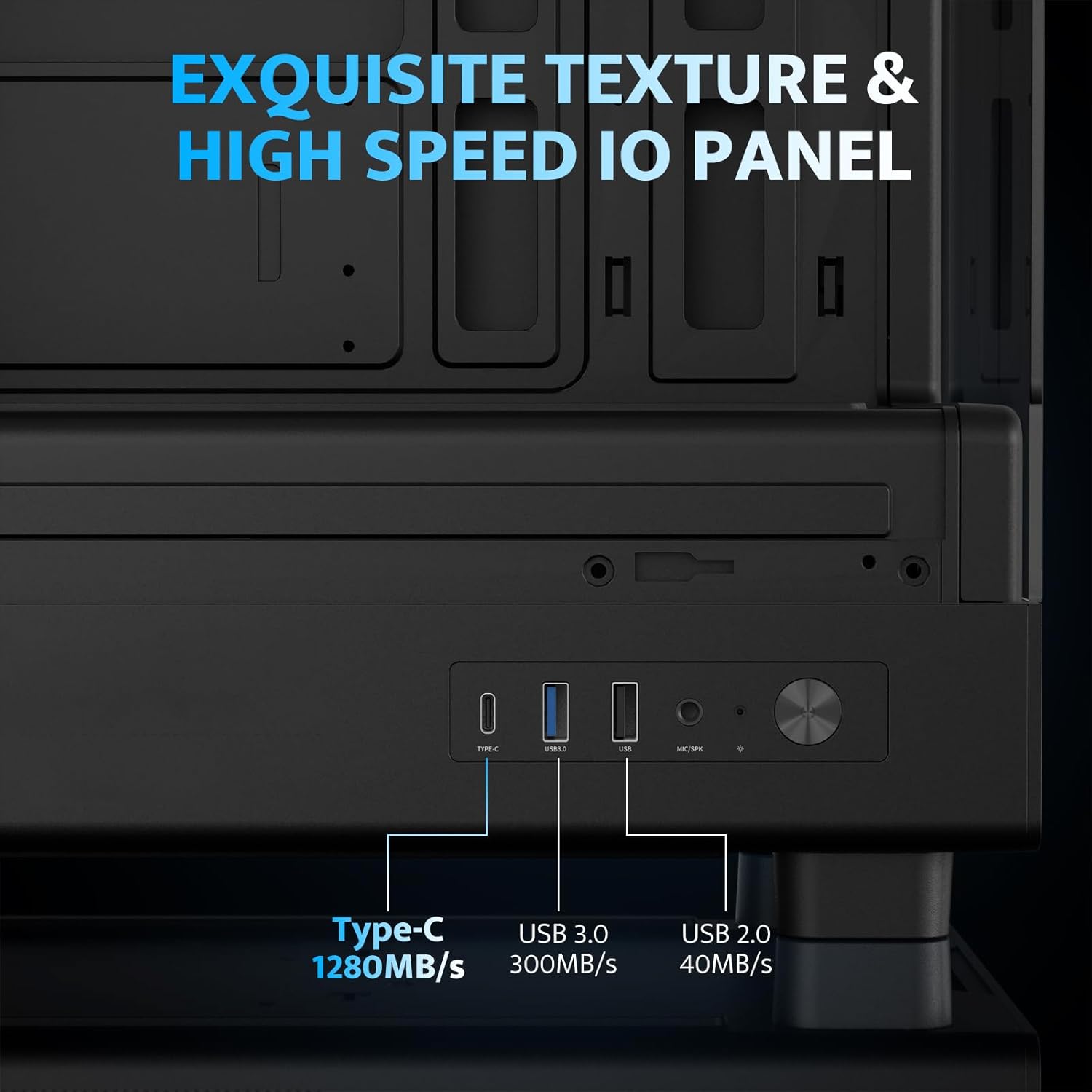
| አይ/ኦ ወደቦች | 1 x USB 3.0, 1 x Type-C, Audio In/Out |
ማዋቀር እና መጫን
1. Accessing the Interior (Quick Release Design)
The darkFlash DB330M features a quick-release design for easy access to internal components. The tempered glass panels can be removed by gently pulling them away from the chassis. The top panel also detaches for fan/radiator installation.

2. Motherboard መጫን
Install your Micro-ATX or ITX motherboard into the designated area. Ensure standoffs are correctly aligned and secured. The case supports CPU coolers up to 180mm in height and GPUs up to 305mm in length.

3. Fan and Cooling System Installation
The case comes with three pre-installed 120mm PWM ARGB fans. Two fans are located at the top, and one at the rear. Additional fan mounts are available at the bottom (up to 2 x 120mm) for enhanced airflow. The case supports a 240mm AIO radiator on the top panel.
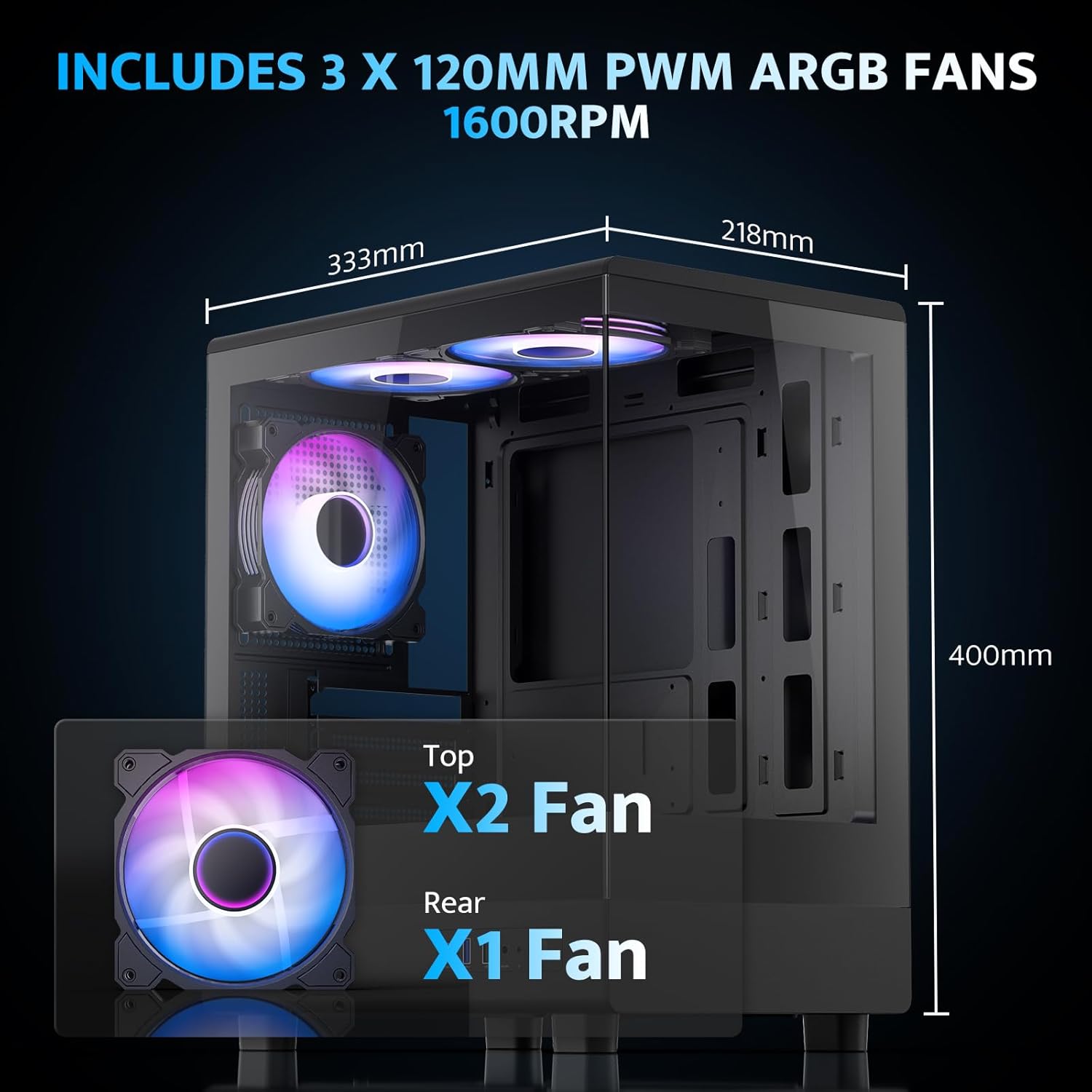
The pre-installed fans are PWM ARGB type, offering speed adjustment and rich lighting modes with motherboard synchronization. Note: An RGB hub controller is not included.

4. Power Supply and Storage Installation
Install your power supply unit (PSU) in the bottom mount. The case supports PSUs up to 140mm in length. Utilize the standard hard drive cage for storage devices.
5. Connecting Front I/O Panel
Connect the front I/O panel cables to your motherboard. The panel includes a Type-C port, USB 3.0 port, and USB 2.0 port for various connectivity needs.
6. የኬብል አስተዳደር
Utilize the cable routing options and tie-downs behind the motherboard tray to ensure clean cable management. This improves airflow and aesthetics.
የአሠራር መመሪያዎች
1. ማብራት
After all components are securely installed and connected, plug in the power cable to your PSU and press the power button on the front I/O panel to start your system.
2. የARGB ማራገቢያ መቆጣጠሪያ
The pre-installed ARGB fans can be controlled via compatible motherboard software (if connected to an ARGB header) to customize lighting effects and fan speeds. Refer to your motherboard manual for specific software instructions.
3. የአየር ፍሰት ውቅር
The DB330M is designed with optimized airflow channels. The pre-installed fans facilitate vertical airflow, with the fan above the PSU directing air towards the graphics card. Ensure no obstructions block the airflow paths.


ጥገና
1. የአቧራ ማጣሪያ ማጽዳት
Regularly clean the magnetic dust filters located on the top and bottom of the case. Gently remove the filters and clean them with compressed air or a soft brush. Reattach them securely after cleaning.
2. አጠቃላይ ጽዳት
Use a soft, dry cloth to wipe down the exterior of the case. For tempered glass panels, use a glass cleaner and a microfiber cloth. Avoid abrasive cleaners or solvents.
መላ መፈለግ
- ፒሲው አያበራም:
- Ensure the power supply is properly connected to the wall and the PSU switch is in the 'ON' position.
- ከ PSU የሚመጡት ሁሉም የኃይል ገመዶች ከእናትቦርዱ እና ከክፍሎቹ ጋር ደህንነቱ በተጠበቀ ሁኔታ የተገናኙ መሆናቸውን ያረጋግጡ።
- የፊት ፓነል የኃይል መቀየሪያ ግንኙነትን ከእናትቦርዱ ጋር ያረጋግጡ።
- አድናቂዎች አይሽከረከሩም/አርጂቢ አይሰራም፡
- Confirm fan power cables are connected to the motherboard or fan controller.
- Ensure ARGB cables are connected to a compatible ARGB header on the motherboard or an ARGB controller.
- Check motherboard software settings for fan speed and RGB control.
- የዩኤስቢ ወደቦች የማይሰሩ
- Verify the front panel USB 3.0 and Type-C cables are correctly plugged into the corresponding headers on your motherboard.
- የማዘርቦርድ ነጂዎች ወቅታዊ መሆናቸውን ያረጋግጡ።
ዋስትና እና ድጋፍ
darkFlash provides a የ1-ዓመት ዋስትና for this computer case. For technical support, warranty claims, or further assistance, please contact darkFlash customer service through their official webምርቱ የተገዛበት ቦታ ወይም ቸርቻሪ። እባክዎን የግዢ ማረጋገጫዎን ለዋስትና ማረጋገጫ ያስቀምጡ።
Official darkFlash Webጣቢያ፡ www.darkflash.com


