1. መግቢያ
The Auronic Electric Air Dehumidifier AU3270 is designed to effectively remove excess moisture from indoor environments, helping to prevent mold growth and maintain a healthy humidity level. This appliance is suitable for spaces up to 15 square meters and can extract up to 10 liters of moisture per day. This manual provides essential information for the safe and efficient use of your dehumidifier.

Image: The Auronic Electric Air Dehumidifier AU3270 positioned in a living room, illustrating its compact design and 10-liter daily capacity for optimal dehumidification.
2. የደህንነት መመሪያዎች
እባክዎን ጉዳት ወይም ጉዳትን ለመከላከል መሳሪያውን ከመጠቀምዎ በፊት ሁሉንም የደህንነት መመሪያዎች በጥንቃቄ ያንብቡ።
- የኃይል አቅርቦቱን ጥራዝ ያረጋግጡtagሠ በእርጥበት ማስወገጃው ላይ ካለው የደረጃ መለያ ጋር ይዛመዳል።
- የእርጥበት ማስወገጃውን በተበላሸ የኤሌክትሪክ ገመድ ወይም መሰኪያ አይጠቀሙ።
- መሳሪያውን ከሙቀት ምንጮች፣ ቀጥታ የፀሐይ ብርሃን እና ተቀጣጣይ ቁሶች ያርቁ።
- የአየር ማስገቢያውን ወይም መውጫውን አያግዱ. በክፍሉ ዙሪያ ቢያንስ 20 ሴ.ሜ ርቀትን ይጠብቁ ።
- Always place the dehumidifier on a stable, level surface to prevent water spillage.
- ከማጽዳትዎ፣ ከጥገናዎ ወይም ለረጅም ጊዜ አገልግሎት ላይ በማይውልበት ጊዜ መሳሪያውን ከኤሌክትሪክ ያላቅቁት።
- ክፍሉን፣ የኤሌክትሪክ ገመድ፣ ወይም ውሃ ወይም ሌላ ፈሳሾችን አታስጠምቁ።
- ይህ መሳሪያ ለደህንነታቸው ኃላፊነት ባለው ሰው ቁጥጥር ወይም መመሪያ ካልተሰጣቸው በስተቀር የአካል፣ የስሜት ወይም የአዕምሮ ችሎታዎች ወይም የልምድ እና የእውቀት እጥረት ላላቸው ሰዎች (ልጆችን ጨምሮ) ለመጠቀም የታሰበ አይደለም።
- ልጆች ከመሳሪያው ጋር እንደማይጫወቱ ለማረጋገጥ ክትትል ሊደረግባቸው ይገባል.
3. ማዋቀር
3.1 የማሸግ እና የማሸጊያ ይዘቶች
Carefully remove the dehumidifier from its packaging. Check that all components are present and undamaged. The package typically includes the dehumidifier unit, a drainage hose, and this user manual.

Image: Contents of the Auronic Dehumidifier package, displaying the main unit, continuous drainage hose, and user manual, along with key product dimensions.
3.2 አቀማመጥ
Place the dehumidifier on a firm, level surface in the desired location. Ensure there is at least 20 cm of free space around the air inlet and outlet for optimal airflow. The unit is effective for rooms up to 15 square meters. Avoid placing it in direct sunlight or near heat-emitting appliances.
3.3 የኃይል ግንኙነት
Plug the power cord into a grounded electrical outlet. Ensure the outlet meets the power requirements specified on the appliance's rating label.
3.4 የፍሳሽ አማራጮች
እርጥበት ማድረቂያው ሁለት የፍሳሽ ማስወገጃ ዘዴዎችን ይሰጣል-
- የውሃ ማጠራቀሚያ; The unit collects condensed water in its internal 2-liter water tank. The appliance will automatically stop operating when the tank is full, and an indicator will illuminate.
- ቀጣይነት ያለው የፍሳሽ ማስወገጃ; For uninterrupted operation, attach the included drainage hose to the continuous drainage port on the back of the unit. Route the hose to a suitable drain or larger container, ensuring it is sloped downwards to allow water to flow freely by gravity.
4. የአሠራር መመሪያዎች
4.1 የቁጥጥር ፓነል በላይview
The dehumidifier features an intuitive digital LED display and control buttons for easy operation.
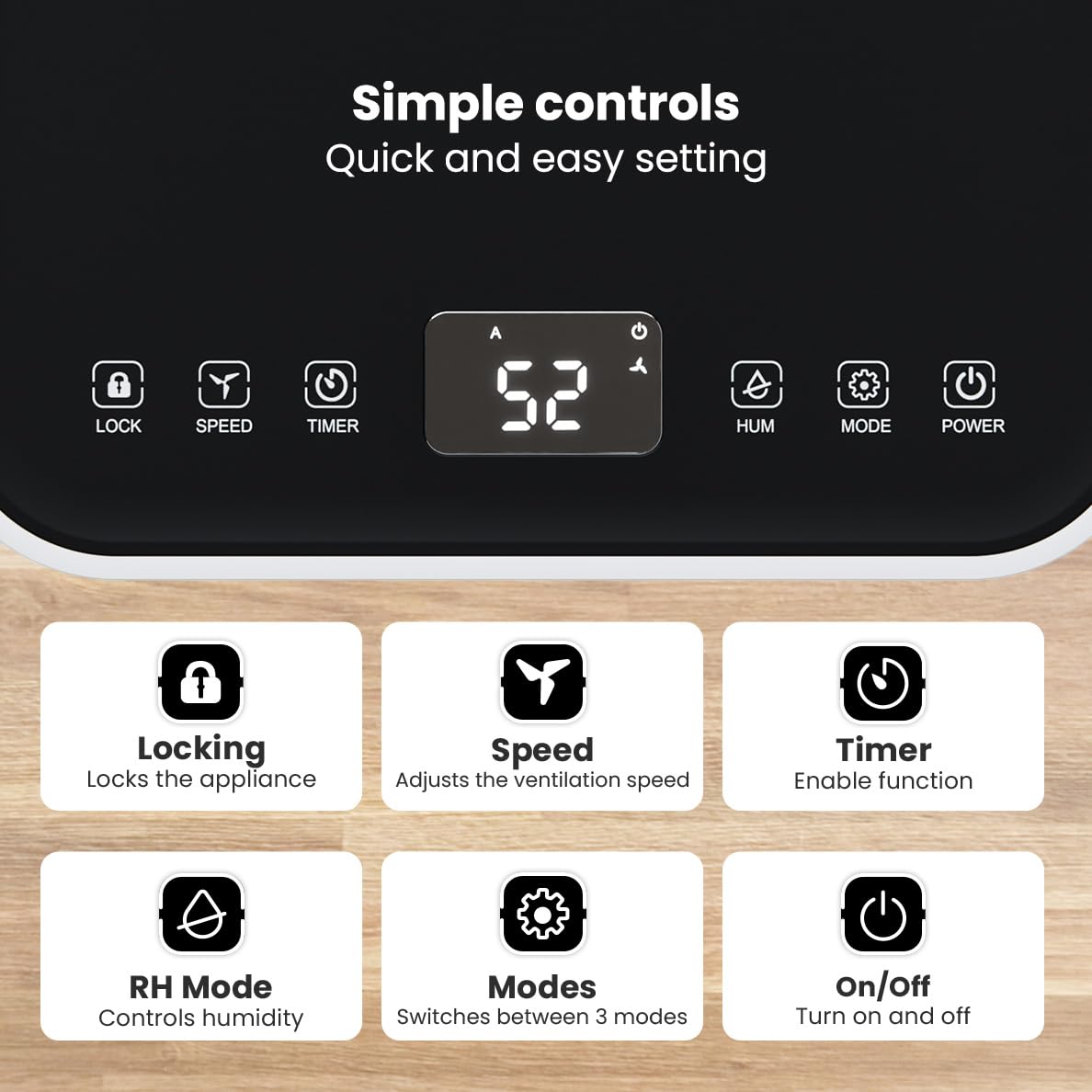
ምስል፡ ዝርዝር view of the dehumidifier's control panel, highlighting each button's function for easy setting adjustments.
- ማብሪያ ማጥፊያ (⏻): መሣሪያውን ያበራል ወይም ያጠፋል።
- ሁነታ አዝራር (⚙): Switches between the three operating modes: Automatic, Continuous, and Quiet.
- RH Mode Button (💧): Controls the desired relative humidity level. Press to set the target humidity.
- የሰዓት ቆጣሪ ቁልፍ (⏱): Enables the timer function for scheduled operation.
- የፍጥነት ቁልፍ (⇋): Adjusts the ventilation speed (fan speed).
- የመቆለፊያ ቁልፍ (🔒): ድንገተኛ ለውጦችን ለመከላከል የቁጥጥር ፓነሉን ይቆልፋል.
4.2 የአሠራር ሁነታዎች
ያሉትን የክወና ሁነታዎች ለማሽከርከር የሞድ አዝራሩን ይጫኑ፡-
- ራስ-ሰር ሁነታ: The device automatically adjusts its operation based on the current room humidity to maintain a comfortable level.
- ቀጣይነት ያለው ሁነታ ፦ Ideal for very damp environments like wet basements. The dehumidifier operates continuously regardless of the humidity level until the water tank is full or continuous drainage is active.
- ጸጥታ ሁነታ: Designed for night-time use or in areas where low noise is preferred. The dehumidifier operates at a reduced fan speed, ensuring a peaceful environment with a noise level below 36dB.

Image: A chart comparing the noise level of the Auronic Dehumidifier (42dB) to common sounds like breathing, whispering, and loud conversation, highlighting its quiet operation.
4.3 Humidity Sensor and Display
The integrated humidity sensor monitors the room's humidity level, which is displayed on the digital screen. The color of the display indicates the current humidity status:
- ሰማያዊ፥ Humidity level is below 45%.
- አረንጓዴ፥ Humidity level is between 45% and 64%.
- ቀይ፥ Humidity level is above 65%.
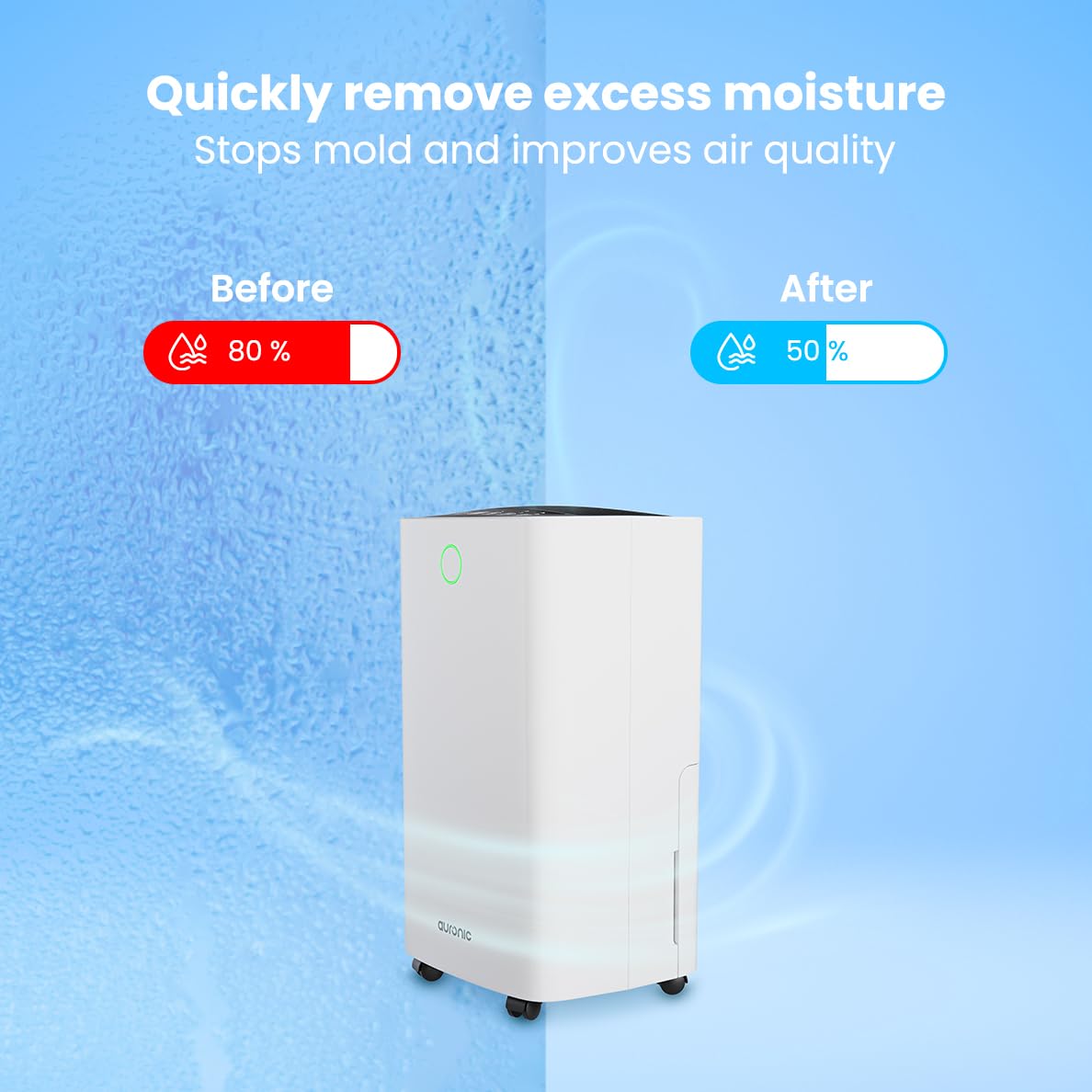
Image: A visual representation demonstrating the dehumidifier's effectiveness, showing a reduction in humidity from 80% to 50% in a room.
4.4 የልብስ ማጠቢያ ማድረቂያ ተግባር
The Auronic dehumidifier includes a laundry drying function to assist in reducing the drying time of clothes, sheets, and towels. Place the appliance in your laundry room or near drying clothes to utilize this feature, which helps to remove moisture from the air and accelerate the drying process.

Image: The dehumidifier in a bathroom setting, demonstrating its ability to extract up to 10 liters of moisture and its suitability for rooms up to 15 square meters, alongside its intelligent humidity meter, wash-dry function, and silent operation.
5. ጥገና
መደበኛ ጥገና የእርጥበት ማስወገጃዎን ረጅም ዕድሜ እና ቀልጣፋ አሠራር ያረጋግጣል።
5.1 የውሃ ማጠራቀሚያውን ባዶ ማድረግ
When the water tank is full, the dehumidifier will stop operating, and an indicator light will turn on. Carefully pull out the water tank from the unit, empty the collected water, and then reinsert the tank firmly until it clicks into place. Ensure the tank is properly seated to resume operation.
5.2 የአየር ማጣሪያን ማጽዳት
The air filter should be cleaned regularly (e.g., every two weeks or as needed) to maintain optimal performance. A dirty filter can reduce efficiency and increase energy consumption.
- የእርጥበት ማስወገጃውን ከኃይል ማሰራጫው ያላቅቁት.
- የአየር ማጣሪያውን ይፈልጉ እና ያስወግዱት (በተለምዶ ከጀርባው ወይም ከክፍሉ ጎን)።
- Clean the filter using a vacuum cleaner to remove dust and debris. For heavily soiled filters, wash gently with lukewarm water and a mild detergent.
- Allow the filter to air dry completely before reinserting it into the dehumidifier.
5.3 አጠቃላይ ጽዳት እና ማከማቻ
የእርጥበት ማስወገጃውን ውጫዊ ክፍል ለስላሳ, መamp cloth. Do not use abrasive cleaners or solvents. For long-term storage, ensure the water tank is empty and clean, the filter is clean and dry, and the unit is unplugged. Store the dehumidifier in a cool, dry place, preferably in its original packaging.
6. መላ መፈለግ
ከእርጥበት ማስወገጃዎ ጋር ችግሮች ካጋጠሙዎት የሚከተሉትን የተለመዱ ችግሮች እና መፍትሄዎች ይመልከቱ፡
| ችግር | ሊሆን የሚችል ምክንያት | መፍትሄ |
|---|---|---|
| እርጥበት ማድረቂያ አይበራም። | የኃይል አቅርቦት የለም፤ የኃይል ገመድ አልተሰካም፤ የኃይል ቁልፉ አልተጫነም። | Check power connection; Ensure outlet is functional; Press the Power button. |
| ምንም ውሃ አልተሰበሰበም ወይም ዝቅተኛ የእርጥበት ማስወገጃ. | Room temperature too low; Humidity level already low; Air filter clogged; Air inlet/outlet blocked; Water tank not properly inserted. | Ensure room temperature is above 5°C; Check current humidity; Clean the air filter; Clear any obstructions; Reinsert water tank correctly. |
| ክፍል ጫጫታ ነው። | ዩኒት በደረጃ ወለል ላይ አይደለም; የአየር ማጣሪያ ተዘግቷል; የውስጥ አካላት መንቀጥቀጥ. | Place on a stable, level surface; Clean the air filter; If noise persists, contact customer support. |
| የውሃ ማጠራቀሚያው ሙሉ አመልካች በርቷል፣ ነገር ግን ታንክ ሙሉ አይደለም። | Float switch malfunction; Water tank not properly seated. | Remove and reinsert the water tank; Check float switch for obstructions. |
| ማሳያ የስህተት ኮድ ያሳያል። | የውስጥ ዳሳሽ ስህተት ወይም ብልሽት። | ለ5 ደቂቃዎች መሳሪያውን ያላቅቁትና ከዚያ መልሰው ይሰኩት። ስህተቱ ከቀጠለ የደንበኛ ድጋፍን ያነጋግሩ። |
7. ዝርዝሮች
Technical specifications for the Auronic Electric Air Dehumidifier AU3270:
| ባህሪ | ዝርዝር |
|---|---|
| የምርት ስም | አውሮኒክ |
| የሞዴል ስም | AU3270 |
| አቅም | በቀን 10 ሊትር |
| የውሃ ማጠራቀሚያ አቅም | 2 ሊትር |
| የወለል አካባቢ ሽፋን | Up to 15 m² (150000 Square Centimeters) |
| ዋትtage | 185 ዋት |
| የምርት ልኬቶች (D x W x H) | 50D x 30.5W x 26.5H ሴንቲሜትር |
| የእቃው ክብደት | 10 ኪ |
| ቀለም | ነጭ |
| የድምጽ ደረጃ | Below 36dB (in Quiet Mode) |
8. ዋስትና እና ድጋፍ
8.1 የዋስትና መረጃ
Your Auronic Electric Air Dehumidifier AU3270 comes with a standard manufacturer's warranty. Please refer to the warranty card included in your package for specific terms, conditions, and duration. Keep your proof of purchase for warranty claims.
8.2 የደንበኛ ድጋፍ
For any questions, technical assistance, or warranty claims, please contact Auronic customer support. Contact details can typically be found on the product packaging, the official Auronic webጣቢያ, ወይም የዋስትና ካርድ.