1. መግቢያ
The MAXHUB UC P30 SC802A 12X VHD Camera is a high-definition video capture device designed for professional use. Featuring 12x optical zoom and 1080p video resolution, it is ideal for various applications including video conferencing, live streaming, and educational environments. This manual provides detailed instructions to help you set up, operate, and maintain your camera for optimal performance.
2. በሳጥኑ ውስጥ ያለው
እባክዎ ሁሉም ክፍሎች በጥቅሉ ውስጥ መኖራቸውን ያረጋግጡ፡-
- 1 x MAXHUB UC P30 SC802A 12X VHD Camera
- (Additional accessories such as power adapter, USB cable, remote control, etc., would typically be listed here if provided in the product data. Based on "Included Components: 1 product", only the camera is explicitly mentioned.)
3. ምርት አብቅቷልview
Familiarize yourself with the key components and features of your MAXHUB UC P30 SC802A camera.
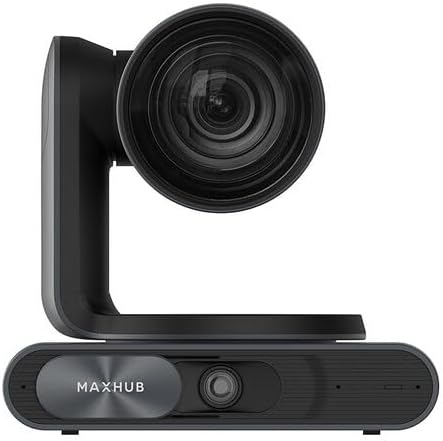
ምስል 3.1፡ ፊት ለፊት view of the MAXHUB UC P30 SC802A camera, showing the main lens and the MAXHUB branding on the base.

ምስል 3.2፡ አንግል view of the MAXHUB UC P30 SC802A camera, highlighting its compact design and the rotating camera head.
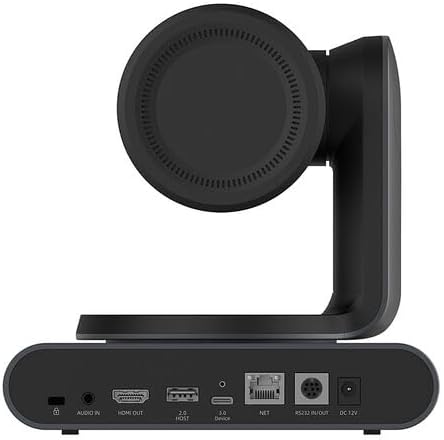
ምስል 3.3፡ የኋላ view of the MAXHUB UC P30 SC802A camera, displaying various connectivity ports including Audio In, HDMI Out, USB 2.0 Host, USB 3.0 Device, NET (Ethernet), RS232 In/Out, and DC 12V power input.
4. ማዋቀር
Follow these steps to set up your MAXHUB UC P30 SC802A camera:
- አቀማመጥ፡- Place the camera on a stable, flat surface or mount it securely using compatible mounting hardware (not included, unless specified). Ensure it has a clear line of sight to the area you wish to capture.
- የኃይል ግንኙነት; Connect the provided power adapter to the DC 12V input port on the rear of the camera (refer to Figure 3.3) and plug the adapter into a power outlet.
- የዩኤስቢ ግንኙነት፡- Connect the camera to your computer using a USB cable (USB 3.0 Device port, refer to Figure 3.3). The camera is designed for plug-and-play operation with most operating systems.
- የቪዲዮ ውፅዓት (ከተፈለገ) For direct video monitoring, connect an HDMI cable from the HDMI Out port on the camera to an HDMI input on a display device (refer to Figure 3.3).
- የድምጽ ግብዓት (አማራጭ)፡ If using an external microphone, connect it to the Audio In port on the camera (refer to Figure 3.3).
- የአውታረ መረብ ግንኙነት (አማራጭ) For network control or streaming, connect an Ethernet cable to the NET port (refer to Figure 3.3).
- የአሽከርካሪ ጭነት; In most cases, the camera will be recognized automatically by your operating system. If prompted, allow the system to install necessary drivers. For advanced features or specific software, refer to the manufacturer's webለአሽከርካሪ ውርዶች ጣቢያ.
5. የአሠራር መመሪያዎች
Once the camera is set up, you can begin operation:
- አብራ፡ The camera will power on automatically once connected to power. An indicator light (if present) will illuminate.
- የሶፍትዌር እውቅና; Open your preferred video conferencing, streaming, or recording software on your computer. Select the MAXHUB UC P30 camera as your video input device.
- Pan, Tilt, Zoom (PTZ) Control:
- በእጅ ቁጥጥር The camera head can be manually adjusted for initial positioning.
- የሶፍትዌር ቁጥጥር Utilize the PTZ controls within your video software or a dedicated MAXHUB control application (if available) to remotely adjust pan, tilt, and zoom.
- የርቀት መቆጣጠሪያ (የሚመለከተው ከሆነ) If a remote control was included, use it to precisely adjust the camera's position and zoom level.
- የትኩረት ማስተካከያ፡- The camera typically features auto-focus. If manual focus is required, it can usually be adjusted via software controls.
- የቪዲዮ ቅንጅቶች Adjust video settings such as resolution (up to 1080p), frame rate, brightness, contrast, and white balance through your software's camera settings.
- ኃይል ዝጋ: Disconnect the power adapter from the camera or the power outlet to turn off the device.
6. ጥገና
ትክክለኛው ጥገና የካሜራዎን ረጅም ዕድሜ እና ጥሩ አፈጻጸም ያረጋግጣል፡-
- ሌንስን ማጽዳት; Use a soft, lint-free cloth specifically designed for optical lenses to gently wipe the camera lens. Avoid abrasive materials or harsh chemicals.
- ሰውነትን ማጽዳት; የካሜራውን አካል ለስላሳና ደረቅ ጨርቅ ይጥረጉ። ለጠንካራ ቆሻሻ፣ ትንሽ ቆንጥጦamp ጨርቅ መጠቀም ይቻላል፣ ነገር ግን እርጥበት ወደቦች ወይም ወደ ውስጥ ክፍሎች እንዳይገባ ያረጋግጡ።
- ማከማቻ፡ When not in use for extended periods, store the camera in a cool, dry place, away from direct sunlight and extreme temperatures. Use the original packaging or a protective case if available.
- እንቅፋቶችን ያስወግዱ፡ Ensure the camera's ventilation openings (if any) are not blocked to prevent overheating.
7. መላ መፈለግ
ለጋራ ጉዳዮች እና መፍትሄዎቻቸው ይህንን ክፍል ይመልከቱ፡-
| ችግር | ሊሆን የሚችል ምክንያት | መፍትሄ |
|---|---|---|
| ምንም የምስል/የቪዲዮ ውፅዓት የለም። |
|
|
| ደካማ የምስል ጥራት |
|
|
| ካሜራ በኮምፒውተር አልታወቀም። |
|
|
8. ዝርዝሮች
Key technical specifications for the MAXHUB UC P30 SC802A 12X VHD Camera:
| ባህሪ | ዝርዝር |
|---|---|
| የሞዴል ስም | UCP30 |
| የምርት ስም | MAXHUB |
| የካሜራ መቅረጫ አይነት | Action Camera (Note: This might be a misclassification in the source data, as it's a PTZ camera. Describing it as a "Professional Video Conferencing Camera" would be more accurate based on its features.) |
| የጨረር ማጉላት | 12 x |
| የቪዲዮ ቀረጻ ጥራት | 1080 ፒ |
| የቪዲዮ ቀረጻ ቅርጸት | MP4 |
| የግንኙነት ቴክኖሎጂ | ዩኤስቢ |
| ቀለም | ጥቁር |
| የእቃው ክብደት | 2.2 ፓውንድ |
| የጥቅል ልኬቶች | 3.94 x 0.79 x 0.39 ኢንች |
| ASIN | B0DF5RFM3J |
| የመጀመሪያ ቀን ይገኛል። | ኦገስት 25፣ 2024 |
9. የዋስትና መረጃ
MAXHUB products are typically covered by a manufacturer's warranty. For specific warranty terms, conditions, and duration, please refer to the warranty card included with your product or visit the official MAXHUB webጣቢያ. ለዋስትና ጥያቄዎች የግዢ ማረጋገጫዎን ያስቀምጡ።
10. ድጋፍ
If you encounter any issues not covered in this manual or require further assistance, please contact MAXHUB customer support. You can usually find contact information on the official MAXHUB webጣቢያ ወይም ምርቱን በገዙበት ቸርቻሪ በኩል።
For online resources, visit the ማክስሁብ በአማዞን ላይ መደብር.


